🛻 物流订单处理 AI 代理(GPT-4o
中级
这是一个Sales, IT Ops领域的自动化工作流,包含 11 个节点。主要使用 If, Code, GmailTrigger, GoogleSheets, Agent 等节点。 🛻 物流订单处理 AI 代理(GPT-4o、Gmail 和 Google Sheet)
前置要求
- •Google 账号和 Gmail API 凭证
- •Google Sheets API 凭证
- •OpenAI API Key
工作流预览
可视化展示节点连接关系,支持缩放和平移
导出工作流
复制以下 JSON 配置到 n8n 导入,即可使用此工作流
{
"meta": {
"instanceId": "6a5e68bcca67c4cdb3e0b698d01739aea084e1ec06e551db64aeff43d174cb23",
"templateCredsSetupCompleted": true
},
"nodes": [
{
"id": "bc49829b-45f2-4910-9c37-907271982f14",
"name": "Sticky Note3",
"type": "n8n-nodes-base.stickyNote",
"position": [
-140,
320
],
"parameters": {
"width": 780,
"height": 540,
"content": "### 4. Do you need more details?\nFind a step-by-step guide in this tutorial\n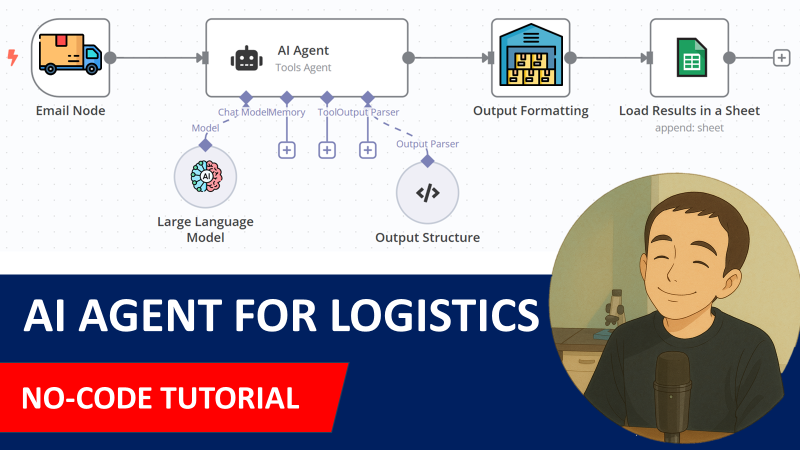\n[🎥 Watch My Tutorial](https://www.youtube.com/watch?v=kQ8dO_30SB0)"
},
"typeVersion": 1
},
{
"id": "40c6e16a-3b4f-4e28-b0a1-7066e0efab5d",
"name": "AI Agent",
"type": "@n8n/n8n-nodes-langchain.agent",
"position": [
-460,
-80
],
"parameters": {
"text": "=Email Subject: {{ $json.subject }}\nEmail Body: \n{{ $json.text }}",
"options": {
"systemMessage": "=You are an assistant that processes emails related to inbound orders from Hermas.\n\nEach email has the subject line containing a purchase order reference (e.g., \"PO45231\").\nIn the email body, you will find:\n\nAn expected delivery date, typically in formats like 27/03/2025 or 2025-03-27.\n\nOne or more order lines, where each line contains:\n\nAn SKU (e.g., HERM-SHOE-001)\n\nA quantity (e.g., 120)\n\nYour goal is to extract the following fields:\n\npurchase_order: The PO number from the subject line (e.g., PO45231)\n\nexpected_delivery_date: In ISO format (e.g., 2025-03-27)\n\nlines: A list of objects with sku and quantity for each order line\n\nReturn your output strictly as a valid JSON object using the format below."
},
"promptType": "define",
"hasOutputParser": true
},
"typeVersion": 1.8
},
{
"id": "e9cb7bb1-40e7-463e-8b3f-417602338e5c",
"name": "OpenAI Chat Model",
"type": "@n8n/n8n-nodes-langchain.lmChatOpenAi",
"position": [
-520,
120
],
"parameters": {
"model": {
"__rl": true,
"mode": "list",
"value": "gpt-4o-mini"
},
"options": {}
},
"typeVersion": 1.2
},
{
"id": "468bdb39-223f-4bae-8bdb-a72272ab57c3",
"name": "Structured Output Parser",
"type": "@n8n/n8n-nodes-langchain.outputParserStructured",
"position": [
-180,
120
],
"parameters": {
"jsonSchemaExample": "{\n \"purchase_order\": \"PO45231\",\n \"expected_delivery_date\": \"2025-03-27\",\n \"lines\": [\n { \"sku\": \"HERM-SHOE-001\", \"quantity\": 120 },\n { \"sku\": \"HERM-BAG-032\", \"quantity\": 45 },\n { \"sku\": \"HERM-WATCH-105\", \"quantity\": 30 },\n { \"sku\": \"HERM-SCARF-018\", \"quantity\": 80 }\n ]\n}\n"
},
"typeVersion": 1.2
},
{
"id": "667a8d43-1ce5-4ec8-871a-26007356a89e",
"name": "Sticky Note1",
"type": "n8n-nodes-base.stickyNote",
"position": [
-1000,
-460
],
"parameters": {
"color": 7,
"width": 380,
"height": 720,
"content": "### 1. Workflow Trigger with Gmail Trigger\nThe workflow is triggered by a new email received in your Gmail mailbox. \nIf the subject includes the string \"Inbound Order\" we proceed, if not we do nothing.\n\n#### How to setup?\n- **Gmail Trigger Node:** set up your Gmail API credentials\n[Learn more about the Gmail Trigger Node](https://docs.n8n.io/integrations/builtin/trigger-nodes/n8n-nodes-base.gmailtrigger)\n"
},
"typeVersion": 1
},
{
"id": "e1e2d95a-9bbd-4bd5-92ec-7a4835db21a2",
"name": "Sticky Note2",
"type": "n8n-nodes-base.stickyNote",
"position": [
-600,
-460
],
"parameters": {
"color": 7,
"width": 660,
"height": 720,
"content": "### 2. AI Agent equipped with the query tool\nThe email body and subject are sent to the AI agent for parsing. The results include the **PO Number**, **expected delivery date** and all the order lines with **SKU ID** and **order quantity**. Outputs are formatted by the code node to fit in a Google Sheet.\n\n#### How to setup?\n- **AI Agent with the Chat Model**:\n 1. Add a **chat model** with the required credentials *(Example: Open AI 4o-mini)*\n 2. Adapt the system prompt to the format of your emails\n [Learn more about the AI Agent Node](https://docs.n8n.io/integrations/builtin/cluster-nodes/root-nodes/n8n-nodes-langchain.agent)"
},
"typeVersion": 1
},
{
"id": "53375c17-a36c-431e-9ba6-07a9a84fc4c9",
"name": "Sticky Note4",
"type": "n8n-nodes-base.stickyNote",
"position": [
80,
-460
],
"parameters": {
"color": 7,
"width": 460,
"height": 540,
"content": "### 3. Store the orderlines in a Google Sheet\nThe table generated by the **code node** includes all the order lines with the **PO Number** and the **expected delivery date**. This **Google Sheet Node** loads the content in a Google Sheet.\n\n#### How to setup?\n- **Add Results in Google Sheets**:\n 1. Add your Google Sheet API credentials to access the Google Sheet file\n 2. Select the file using the list, an URL or an ID\n 3. Select the sheet in which the vocabulary list is stored\n 4. Create the columns: **PO_NUMBER, EXPECTED_DELIVERY DATE, SKU_ID, QUANTITY**\n [Learn more about the Google Sheet Node](https://docs.n8n.io/integrations/builtin/app-nodes/n8n-nodes-base.googlesheets)"
},
"typeVersion": 1
},
{
"id": "776cfc0e-264b-44cc-b534-dc387b0c9fce",
"name": "Store Purchase Order Lines",
"type": "n8n-nodes-base.googleSheets",
"position": [
180,
-80
],
"parameters": {
"columns": {
"value": {
"SKU_ID": "={{ $json.sku }}",
"QUANTITY": "={{ $json.quantity }}",
"PO_NUMBER": "={{ $json.purchase_order }}",
"EXPECTED_DELIVERY DATE": "={{ $json.expected_delivery_date }}"
},
"schema": [
{
"id": "PO_NUMBER",
"type": "string",
"display": true,
"required": false,
"displayName": "PO_NUMBER",
"defaultMatch": false,
"canBeUsedToMatch": true
},
{
"id": "EXPECTED_DELIVERY DATE",
"type": "string",
"display": true,
"required": false,
"displayName": "EXPECTED_DELIVERY DATE",
"defaultMatch": false,
"canBeUsedToMatch": true
},
{
"id": "SKU_ID",
"type": "string",
"display": true,
"required": false,
"displayName": "SKU_ID",
"defaultMatch": false,
"canBeUsedToMatch": true
},
{
"id": "QUANTITY",
"type": "string",
"display": true,
"required": false,
"displayName": "QUANTITY",
"defaultMatch": false,
"canBeUsedToMatch": true
}
],
"mappingMode": "defineBelow",
"matchingColumns": [],
"attemptToConvertTypes": false,
"convertFieldsToString": false
},
"options": {},
"operation": "append",
"sheetName": {
"__rl": true,
"mode": "list",
"value": "gid=0",
"cachedResultUrl": "=",
"cachedResultName": "="
},
"documentId": {
"__rl": true,
"mode": "list",
"value": "1HnaJJ-DqzqgWJo2YwQDcgB6BgWiU6eMlnGvv4kapubg",
"cachedResultUrl": "=",
"cachedResultName": "="
}
},
"notesInFlow": true,
"typeVersion": 4.5
},
{
"id": "d5c52625-fef2-47a9-b2a4-bf005d8b9e05",
"name": "Email Received",
"type": "n8n-nodes-base.gmailTrigger",
"position": [
-980,
-80
],
"parameters": {
"simple": false,
"filters": {},
"options": {},
"pollTimes": {
"item": [
{
"mode": "everyMinute"
}
]
}
},
"typeVersion": 1.2
},
{
"id": "6dc9e5cc-9ab3-469c-ad93-e0e7817ccbf7",
"name": "Is PO?",
"type": "n8n-nodes-base.if",
"position": [
-760,
-80
],
"parameters": {
"options": {},
"conditions": {
"options": {
"version": 2,
"leftValue": "",
"caseSensitive": true,
"typeValidation": "strict"
},
"combinator": "and",
"conditions": [
{
"id": "f300ae2b-5de4-4efc-88ae-130a957588cb",
"operator": {
"type": "string",
"operation": "contains"
},
"leftValue": "={{ $json.subject }}",
"rightValue": "Inbound Order"
}
]
}
},
"typeVersion": 2.2
},
{
"id": "385db736-0867-46b9-9274-380e7c255fc4",
"name": "Format Purchase Order Lines",
"type": "n8n-nodes-base.code",
"position": [
-120,
-80
],
"parameters": {
"jsCode": "const {purchase_order, expected_delivery_date, lines} = $input.first().json.output;\n\nreturn lines.map( line => ({\n json: {\n purchase_order,\n expected_delivery_date,\n sku: line.sku,\n quantity: line.quantity\n }\n}))\n"
},
"typeVersion": 2
},
{
"id": "b2e39591-70be-4d7f-a5d4-1505741d6310",
"name": "Sticky Note",
"type": "n8n-nodes-base.stickyNote",
"position": [
-1000,
320
],
"parameters": {
"width": 780,
"height": 720,
"content": "### Test the workflow with this email!\n\n#### How?\n1. Send this email to the Gmail box you set up in your credentials.\n2. Click on Test workflow\n\n### Email\n**Email Subject:** Inbound Order PO45231 – Expected Delivery on 2025-03-27\n\n**Email Body:** \nDear LogiGreen Team,\n\nPlease find below the details of the upcoming inbound order.\n\nPurchase Order: PO45231\nExpected Delivery Date: 27/03/2025\n\nOrder Lines:\n\nSKU: HERM-SHOE-001 — Qty: 120\n\nSKU: HERM-BAG-032 — Qty: 45\n\nSKU: HERM-WATCH-105 — Qty: 30\n\nSKU: HERM-SCARF-018 — Qty: 80\n\nLet us know if you need any additional details.\n\nBest regards,\nSophie Lambert\nAdmin Assistant – Hermas Logistics\n📞 +33 1 23 45 67 89 78 84\n✉️ sophie.lambert@hermas.com\n"
},
"typeVersion": 1
}
],
"pinData": {},
"connections": {
"6dc9e5cc-9ab3-469c-ad93-e0e7817ccbf7": {
"main": [
[
{
"node": "40c6e16a-3b4f-4e28-b0a1-7066e0efab5d",
"type": "main",
"index": 0
}
]
]
},
"40c6e16a-3b4f-4e28-b0a1-7066e0efab5d": {
"main": [
[
{
"node": "385db736-0867-46b9-9274-380e7c255fc4",
"type": "main",
"index": 0
}
]
]
},
"d5c52625-fef2-47a9-b2a4-bf005d8b9e05": {
"main": [
[
{
"node": "6dc9e5cc-9ab3-469c-ad93-e0e7817ccbf7",
"type": "main",
"index": 0
}
]
]
},
"e9cb7bb1-40e7-463e-8b3f-417602338e5c": {
"ai_languageModel": [
[
{
"node": "40c6e16a-3b4f-4e28-b0a1-7066e0efab5d",
"type": "ai_languageModel",
"index": 0
}
]
]
},
"468bdb39-223f-4bae-8bdb-a72272ab57c3": {
"ai_outputParser": [
[
{
"node": "40c6e16a-3b4f-4e28-b0a1-7066e0efab5d",
"type": "ai_outputParser",
"index": 0
}
]
]
},
"385db736-0867-46b9-9274-380e7c255fc4": {
"main": [
[
{
"node": "776cfc0e-264b-44cc-b534-dc387b0c9fce",
"type": "main",
"index": 0
}
]
]
}
}
}常见问题
如何使用这个工作流?
复制上方的 JSON 配置代码,在您的 n8n 实例中创建新工作流并选择「从 JSON 导入」,粘贴配置后根据需要修改凭证设置即可。
这个工作流适合什么场景?
中级 - 销售, IT 运维
需要付费吗?
本工作流完全免费,您可以直接导入使用。但请注意,工作流中使用的第三方服务(如 OpenAI API)可能需要您自行付费。
相关工作流推荐
✈️ 使用CarbonInterface API和GPT-4o计算商务旅行二氧化碳排放量
✈️ 通过Carbon Interface API和GPT-4o计算商务旅行二氧化碳排放
Split Out
Http Request
Gmail Trigger
+
Split Out
Http Request
Gmail Trigger
12 节点Samir Saci
其他
🚚 使用 Carbon Interface API 和 GPT-4o 计算货运的 CO2
🚚 使用 Carbon Interface API 和 GPT-4o 计算货运的 CO2 排放量
Http Request
Gmail Trigger
Google Sheets
+
Http Request
Gmail Trigger
Google Sheets
10 节点Samir Saci
人工智能
🤖🚚 基于GPT-4o和Open Route API的运输订单管理AI代理
🤖🚚 基于GPT-4o和Open Route API的运输订单管理AI代理
Set
Wait
Gmail
+
Set
Wait
Gmail
26 节点Samir Saci
人工智能
🌲 使用Gmail和GPT-40进行可持续发展报告审计的AI代理
🌲 使用Gmail和GPT-40进行可持续发展报告审计的AI代理
If
Code
Gmail
+
If
Code
Gmail
14 节点Samir Saci
其他
🗞️ AI驱动的可持续性营销简报(使用Gmail、GPT-4o)
🗞️ AI驱动的可持续性营销简报(使用Gmail、GPT-4o)
If
Set
Code
+
If
Set
Code
21 节点Samir Saci
人工智能
📦 使用Gmail和Google表格解析EDI消息
📦 使用Gmail和Google表格解析电子数据交换(EDI)消息
If
Set
Code
+
If
Set
Code
17 节点Samir Saci
其他
工作流信息
难度等级
中级
节点数量11
分类2
节点类型8
作者

Samir Saci
@samirsaciAutomation, AI and Analytics for Supply Chain & Business Optimization Helping businesses streamline operations using n8n, AI agents, and data science to enhance efficiency and sustainability. Linkedin: www.linkedin.com/in/samir-saci
外部链接
在 n8n.io 查看 →
分享此工作流