AWS 自动化 SSL/TLS 证书过期报告
高级
这是一个AI Summarization, Multimodal AI领域的自动化工作流,包含 23 个节点。主要使用 Set, Code, Slack, SendGrid, GoogleDrive 等节点。 使用 AWS ACM 和 AI 为 Slack 和邮件生成 SSL/TLS 证书过期报告
前置要求
- •Slack Bot Token 或 Webhook URL
- •Google Drive API 凭证
- •可能需要目标 API 的认证凭证
- •AWS Access Key 和 Secret
- •OpenAI API Key
使用的节点 (23)
工作流预览
可视化展示节点连接关系,支持缩放和平移
导出工作流
复制以下 JSON 配置到 n8n 导入,即可使用此工作流
{
"id": "TK91m9bEjdq5Nlgu",
"meta": {
"instanceId": "4a2e6764ba7a6bc9890d9225f4b21d570ce88fc9bd57549c89057fcee58fed0f",
"templateCredsSetupCompleted": true
},
"name": "Automated SSL/TLS Certificate Expiry Report for AWS",
"tags": [
{
"id": "ZWDTpzMgM2j0ZGMO",
"name": "acm",
"createdAt": "2025-08-20T04:24:13.252Z",
"updatedAt": "2025-08-20T04:24:13.252Z"
},
{
"id": "hvp6nueQ4hpIJWbY",
"name": "aws",
"createdAt": "2025-08-17T05:47:27.209Z",
"updatedAt": "2025-08-17T05:47:27.209Z"
}
],
"nodes": [
{
"id": "72c7e0a7-e1bf-40da-b946-f7bc2261bbae",
"name": "Get many certificates",
"type": "n8n-nodes-base.awsCertificateManager",
"position": [
224,
48
],
"parameters": {
"options": {},
"operation": "getMany"
},
"credentials": {
"aws": {
"id": "IZYsJuHhfVJ3PIrC",
"name": "ap-southeast-1"
}
},
"typeVersion": 1
},
{
"id": "8de106a8-5abb-4194-9179-b3310cd99ede",
"name": "Sticky Note",
"type": "n8n-nodes-base.stickyNote",
"position": [
-1136,
-800
],
"parameters": {
"color": 4,
"width": 928,
"height": 2080,
"content": "# Automated SSL/TLS Certificate Expiry Report for AWS\n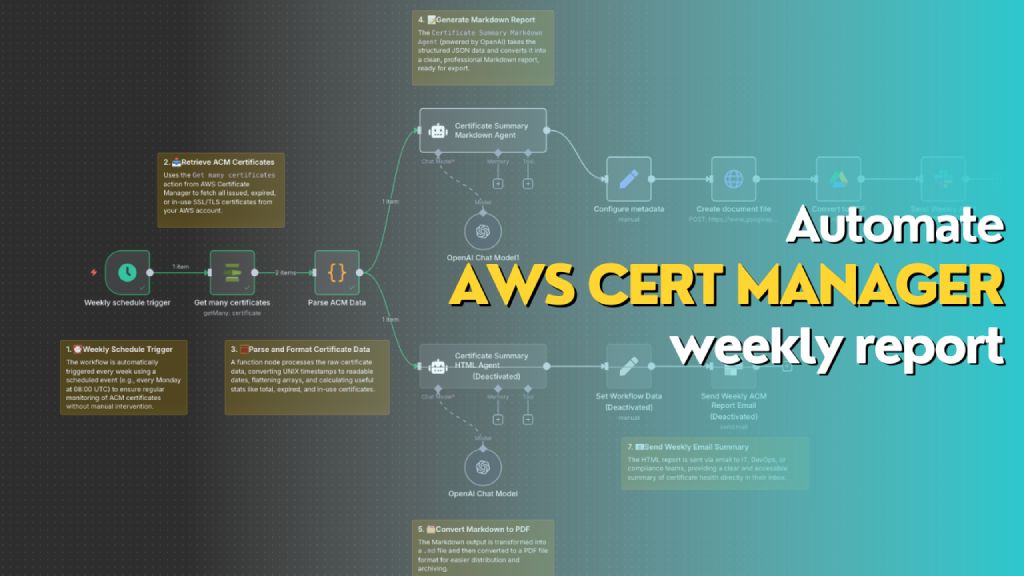\n> Automatically generates a weekly report of all AWS ACM certificates, including status, expiry dates, and renewal eligibility. The workflow formats the data into both Markdown (for PDF export to Slack) and HTML (for email summary), helping teams stay on top of certificate compliance and expiration risks.\n\n## **Who’s it for**\nThis workflow is designed for **DevOps engineers**, **cloud administrators**, and **compliance teams** who manage AWS infrastructure and need **automated weekly visibility** into the status of their SSL/TLS certificates in **AWS Certificate Manager (ACM)**. It's ideal for teams that want to reduce the risk of expired certs, track renewal eligibility, and maintain reporting for audit or operational purposes.\n\n## **How it works / What it does**\nThis n8n workflow performs the following actions on a weekly schedule:\n\n1. **Trigger**: Automatically runs once a week using the `Weekly schedule trigger`.\n2. **Fetch Certificates**: Uses `Get many certificates` action from AWS Certificate Manager to retrieve all certificate records.\n3. **Parse Data**: Processes and reformats certificate data (dates, booleans, SANs, etc.) into a clean JSON object.\n4. **Generate Reports**:\n - 📄 **Markdown Report**: Uses the `Certificate Summary Markdown Agent` (OpenAI) to generate a Markdown report for PDF export.\n - 🌐 **HTML Report**: Uses the `Certificate Summary HTML Agent` to generate a styled HTML report for email.\n5. **Deliver Reports**:\n - Converts Markdown to PDF and sends it to Slack as a file.\n - Sends HTML content as a formatted email.\n\n## **How to set up**\n\n1. **Configure AWS Credentials** in n8n to allow access to AWS ACM.\n2. Create a new workflow and use the following nodes in sequence:\n - `Schedule Trigger`: Weekly (e.g., every Monday at 08:00 UTC)\n - `AWS ACM → Get many certificates`\n - `Function Node → Parse ACM Data`: Converts and summarizes certificate metadata\n - `OpenAI Chat Node (Markdown Agent)` with a system/user prompt to generate Markdown\n - `Configure Metadata` → Define file name and MIME type (`.md`)\n - `Create document file` → Converts Markdown to document stream\n - `Convert to PDF`\n - `Slack Node` → Upload the PDF to a channel\n - *(Optional)* Add a second `OpenAI Chat Node` for generating HTML and sending it via email\n\n3. **Connect Output**:\n - Markdown report → Slack file upload\n - HTML report → Email node with embedded HTML\n\n## **Requirements**\n\n- 🟩 **n8n instance** (self-hosted or cloud)\n- 🟦 **AWS account** with access to ACM\n- 🟨 **OpenAI API key** (for ChatGPT Agent)\n- 🟥 **Slack webhook or OAuth credentials** (for file upload)\n- 📧 **Email integration** (e.g., SMTP or SendGrid)\n- 📝 Permissions to write documents (Google Drive / file node)\n\n## **How to customize the workflow**\n\n- **Change report frequency**: Adjust the `Weekly schedule trigger` to daily or monthly as needed.\n- **Filter certificates**:\n - Modify the function node to only include `EXPIRED`, `IN_USE`, or `INELIGIBLE` certs.\n - Add tags or domains to include/exclude.\n- **Add visuals**: Enhance the HTML version with colored rows, icons, or company branding.\n- **Change delivery channels**:\n - Replace Slack with Microsoft Teams, Discord, or Telegram.\n - Send Markdown as email attachment instead of PDF.\n- **Integrate ticketing**:\n - Create a JIRA/GitHub issue for each certificate that is `EXPIRED` or `INELIGIBLE`."
},
"typeVersion": 1
},
{
"id": "cdd46941-248b-4f54-8bb1-6be5e6147d95",
"name": "Sticky Note1",
"type": "n8n-nodes-base.stickyNote",
"position": [
-96,
240
],
"parameters": {
"width": 272,
"content": "### 1. ⏰ Weekly Schedule Trigger\nThe workflow is automatically triggered every week using a scheduled event (e.g., every Monday at 08:00 UTC) to ensure regular monitoring of ACM certificates without manual intervention."
},
"typeVersion": 1
},
{
"id": "2ccee042-087a-44e2-8682-c005948885d4",
"name": "Sticky Note2",
"type": "n8n-nodes-base.stickyNote",
"position": [
112,
-160
],
"parameters": {
"width": 272,
"content": "### 2. 📥 Retrieve ACM Certificates\nUses the `Get many certificates` action from AWS Certificate Manager to fetch all issued, expired, or in-use SSL/TLS certificates from your AWS account."
},
"typeVersion": 1
},
{
"id": "2307a17b-c03d-494a-91ce-e16122cd6886",
"name": "Sticky Note3",
"type": "n8n-nodes-base.stickyNote",
"position": [
256,
240
],
"parameters": {
"width": 352,
"content": "### 3. 🧮 Parse and Format Certificate Data\nA function node processes the raw certificate data, converting UNIX timestamps to readable dates, flattening arrays, and calculating useful stats like total, expired, and in-use certificates."
},
"typeVersion": 1
},
{
"id": "ccc49d5b-c69a-4b4e-918a-bd758a9adf8c",
"name": "Sticky Note4",
"type": "n8n-nodes-base.stickyNote",
"position": [
656,
-464
],
"parameters": {
"width": 304,
"content": "### 4. 📝 Generate Markdown Report\nThe `Certificate Summary Markdown Agent` (powered by OpenAI) takes the structured JSON data and converts it into a clean, professional Markdown report, ready for export.\n"
},
"typeVersion": 1
},
{
"id": "929c84a2-d3d0-4acf-9034-b7754d8e1fea",
"name": "Sticky Note5",
"type": "n8n-nodes-base.stickyNote",
"position": [
656,
624
],
"parameters": {
"width": 304,
"height": 144,
"content": "### 5. 🗂️ Convert Markdown to PDF\nThe Markdown output is transformed into a `.md` file and then converted to a PDF file format for easier distribution and archiving.\n"
},
"typeVersion": 1
},
{
"id": "c4e22b44-9389-4886-a76c-ea38726ad617",
"name": "Sticky Note6",
"type": "n8n-nodes-base.stickyNote",
"position": [
1552,
192
],
"parameters": {
"width": 912,
"height": 240,
"content": "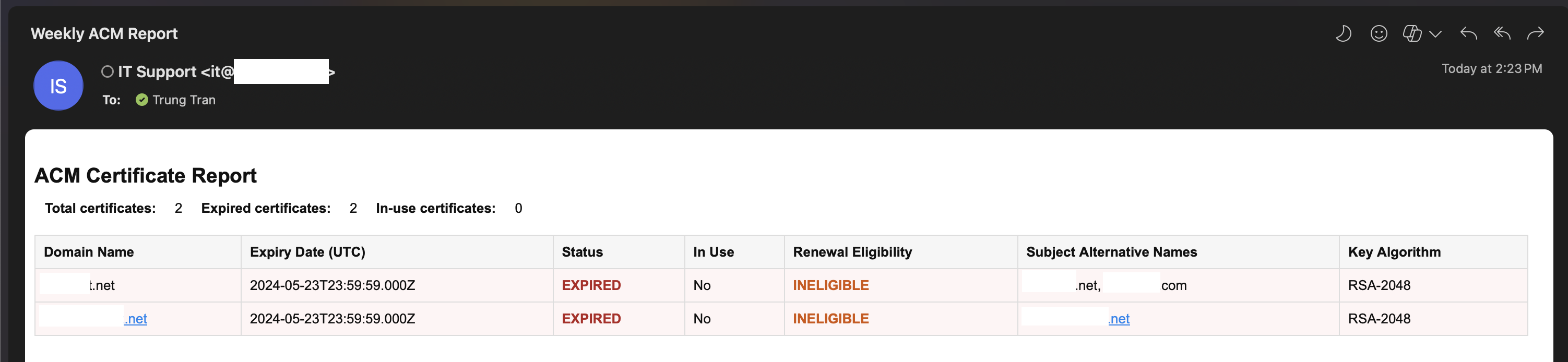"
},
"typeVersion": 1
},
{
"id": "dbfbb8b8-e683-4f8e-9566-e1a45e5442e1",
"name": "Sticky Note7",
"type": "n8n-nodes-base.stickyNote",
"position": [
1120,
528
],
"parameters": {
"width": 400,
"height": 112,
"content": "### 7. 📧 Send Weekly Email Summary\nThe HTML report is sent via email to IT, DevOps, or compliance teams, providing a clear and accessible summary of certificate health directly in their inbox.\n"
},
"typeVersion": 1
},
{
"id": "f4bdc2d2-bc98-4eca-9886-1dd303091150",
"name": "Weekly schedule trigger",
"type": "n8n-nodes-base.scheduleTrigger",
"position": [
0,
48
],
"parameters": {
"rule": {
"interval": [
{
"field": "weeks",
"triggerAtDay": [
1
]
}
]
}
},
"typeVersion": 1.2
},
{
"id": "a736e395-58bb-4263-b42d-aded26afc6b2",
"name": "OpenAI Chat Model",
"type": "@n8n/n8n-nodes-langchain.lmChatOpenAi",
"position": [
768,
472
],
"parameters": {
"model": {
"__rl": true,
"mode": "list",
"value": "gpt-5-mini",
"cachedResultName": "gpt-5-mini"
},
"options": {}
},
"credentials": {
"openAiApi": {
"id": "PPSwAKeLQYgAPobT",
"name": "OpenAi account"
}
},
"typeVersion": 1.2
},
{
"id": "bca5adc0-9afe-4a4f-ac72-30501fd2b0d8",
"name": "Parse ACM Data",
"type": "n8n-nodes-base.code",
"position": [
448,
48
],
"parameters": {
"jsCode": "const items = await $input.all();\nconst certificates = [];\n\nfor (const item of items) {\n const certs = Array.isArray(item.json) ? item.json : [item.json];\n\n for (const cert of certs) {\n certificates.push({\n CertificateArn: cert.CertificateArn,\n DomainName: cert.DomainName,\n Status: cert.Status,\n InUse: cert.InUse ? 'Yes' : 'No',\n CreatedAt: new Date(cert.CreatedAt * 1000).toISOString(),\n IssuedAt: new Date(cert.IssuedAt * 1000).toISOString(),\n NotBefore: new Date(cert.NotBefore * 1000).toISOString(),\n NotAfter: new Date(cert.NotAfter * 1000).toISOString(),\n RenewalEligibility: cert.RenewalEligibility,\n SubjectAlternativeNames: (cert.SubjectAlternativeNameSummaries || []).join(', '),\n KeyAlgorithm: cert.KeyAlgorithm,\n KeyUsages: (cert.KeyUsages || []).join(', '),\n ExtendedKeyUsages: (cert.ExtendedKeyUsages || []).join(', '),\n Type: cert.Type,\n Exported: cert.Exported ? 'Yes' : 'No',\n });\n }\n}\n\nreturn [\n {\n json: {\n certificates,\n total: certificates.length,\n expiredCount: certificates.filter(c => c.Status === 'EXPIRED').length,\n inUseCount: certificates.filter(c => c.InUse === 'Yes').length,\n }\n }\n];"
},
"typeVersion": 2
},
{
"id": "7d2d2fa6-2737-4577-bb13-5d776a9a0a5b",
"name": "OpenAI Chat Model1",
"type": "@n8n/n8n-nodes-langchain.lmChatOpenAi",
"position": [
768,
-32
],
"parameters": {
"model": {
"__rl": true,
"mode": "list",
"value": "gpt-4.1-mini"
},
"options": {}
},
"credentials": {
"openAiApi": {
"id": "PPSwAKeLQYgAPobT",
"name": "OpenAi account"
}
},
"typeVersion": 1.2
},
{
"id": "4f123f70-a491-4201-a2f7-6069cbd735c2",
"name": "Create document file",
"type": "n8n-nodes-base.httpRequest",
"position": [
1296,
-152
],
"parameters": {
"url": "https://www.googleapis.com/upload/drive/v3/files?uploadType=multipart&supportsAllDrives=true",
"body": "=--foo_bar_baz\nContent-Type: application/json; charset=UTF-8\n\n{\n \"name\": \"ACM Certificate Weekly Report {{ $today.format('yyyy-MM-dd-hhmm') }}\",\n \"mimeType\": \"application/vnd.google-apps.document\",\n \"parents\": [\"{{ $json['Drive Folder ID'] }}\"]\n}\n\n--foo_bar_baz\nContent-Type: text/markdown; charset=UTF-8\n\n{{ $json['Document Content'] }}\n--foo_bar_baz--",
"method": "POST",
"options": {},
"sendBody": true,
"sendQuery": true,
"contentType": "raw",
"sendHeaders": true,
"authentication": "predefinedCredentialType",
"rawContentType": "multipart/related; boundary=foo_bar_baz",
"queryParameters": {
"parameters": [
{
"name": "uploadType",
"value": "multipart"
},
{
"name": "supportsAllDrives",
"value": "true"
}
]
},
"headerParameters": {
"parameters": [
{
"name": "boundary",
"value": "foo_bar_baz"
}
]
},
"nodeCredentialType": "googleDriveOAuth2Api"
},
"credentials": {
"googleDriveOAuth2Api": {
"id": "fC471es5gk5Mm900",
"name": "Google Drive account"
}
},
"typeVersion": 4.2
},
{
"id": "1ee4f8f4-1e4b-4977-a090-b350e69e6fd8",
"name": "Configure metadata ",
"type": "n8n-nodes-base.set",
"position": [
1072,
-152
],
"parameters": {
"options": {},
"assignments": {
"assignments": [
{
"id": "1ff0b9a4-7d60-44ec-b047-e49252f1ace9",
"name": "Drive Folder ID",
"type": "string",
"value": "1IPcko8bzogO3W4mxhrW2Q017QA0Lc5MI"
},
{
"id": "75ab39ab-44d0-4272-bceb-fe63bd72a5ba",
"name": "Document Content",
"type": "string",
"value": "={{ $json.output }}"
}
]
}
},
"typeVersion": 3.4
},
{
"id": "44bc4988-b569-4eeb-bee6-af4897743939",
"name": "Convert to PDF",
"type": "n8n-nodes-base.googleDrive",
"position": [
1520,
-152
],
"parameters": {
"fileId": {
"__rl": true,
"mode": "id",
"value": "={{ $json.id }}"
},
"options": {
"googleFileConversion": {
"conversion": {
"docsToFormat": "application/pdf"
}
}
},
"operation": "download"
},
"credentials": {
"googleDriveOAuth2Api": {
"id": "fC471es5gk5Mm900",
"name": "Google Drive account"
}
},
"typeVersion": 3
},
{
"id": "cf420f55-0b0e-44a7-84c9-d4ec1b5220d0",
"name": "Send Weekly ACM Report PDF",
"type": "n8n-nodes-base.slack",
"position": [
1744,
-152
],
"webhookId": "b4d5b0ca-b166-4000-abf8-df943fe711ae",
"parameters": {
"options": {
"channelId": "C097VAKKPUP",
"initialComment": "📄 The ACM Certificate Weekly Report is ready! Please find the generated PDF file attached for review and next steps. "
},
"resource": "file",
"authentication": "oAuth2"
},
"credentials": {
"slackOAuth2Api": {
"id": "4JSKt9sIRV1KGswQ",
"name": "Slack account"
}
},
"typeVersion": 2.3
},
{
"id": "00e56531-89a5-447b-b99f-e1946c63eba5",
"name": "Send Weekly ACM Report Email",
"type": "n8n-nodes-base.sendGrid",
"disabled": true,
"position": [
1296,
248
],
"parameters": {
"subject": "Weekly ACM Report",
"toEmail": "={{ $json.RecepientEmail }}",
"fromName": "={{ $json.SenderName }}",
"resource": "mail",
"fromEmail": "={{ $json.SenderEmail }}",
"contentType": "text/html",
"contentValue": "={{ $('Certificate Summary HTML Agent').item.json.output }}",
"additionalFields": {}
},
"credentials": {
"sendGridApi": {
"id": "O1IzegT4JdKjrzrj",
"name": "SendGrid account"
}
},
"typeVersion": 1
},
{
"id": "cc91cae2-3dd0-4a16-ba4d-30034521582d",
"name": "Certificate Summary Markdown Agent",
"type": "@n8n/n8n-nodes-langchain.agent",
"position": [
672,
-256
],
"parameters": {
"text": "=Here is the list of AWS ACM certificate metadata in JSON format. Please generate a Markdown report including:\n\n- A summary of:\n - Total number of certificates\n - Number of expired certificates\n - Number currently in use\n\n- A table with the following columns:\n - Domain Name\n - Expiry Date (NotAfter)\n - Status (add ⚠️ if expired)\n - In Use\n - Renewal Eligibility\n - Subject Alternative Names\n - Key Algorithm\n\nEnsure the Markdown is readable and ready to be saved as a `.md` file for Slack.\n\nHere is the input data: {{ $json.certificates.toJsonString() }}",
"options": {
"systemMessage": "You are a reporting assistant that converts AWS Certificate Manager (ACM) metadata into a clean, readable, and professional Markdown report.\n\nYour job is to:\n- Generate a summary at the top: total certificates, number expired, number in use\n- Present certificate data as a Markdown table\n- Include key fields: Domain Name, Expiry Date, Status, In Use, Renewal Eligibility, Subject Alternative Names, Key Algorithm\n- Highlight expired certificates with ⚠️ in the Status column\n- Sort the table by expiration date descending (nearest expiry at the top)\n- Output only Markdown content (no explanations or extra comments)"
},
"promptType": "define"
},
"typeVersion": 2.1
},
{
"id": "bb2cdcf1-8e34-4b01-9f79-ad2d8efaafae",
"name": "Certificate Summary HTML Agent",
"type": "@n8n/n8n-nodes-langchain.agent",
"disabled": true,
"position": [
672,
248
],
"parameters": {
"text": "=Here is a list of AWS ACM certificates in JSON format. Please generate a summary HTML report with the following fields for each certificate:\n\n- Domain Name \n- Expiry Date \n- Status (highlight if EXPIRED or FAILED) \n- In Use (Yes/No) \n- Renewal Eligibility \n- Subject Alternative Names \n- Key Algorithm \n\nAlso include a summary at the top showing:\n- Total certificates\n- Number of expired certificates\n- Number of in-use certificates\n\nOutput only HTML with a simple table layout.\n\nHere is the data: {{ $json.certificates.toJsonString() }}",
"options": {
"systemMessage": "You are an expert assistant specialized in generating concise, clear, and visually structured HTML reports based on AWS Certificate Manager (ACM) metadata. \n\nYour goal is to help DevOps teams quickly understand the status of their certificates by extracting key information from the given certificate JSON array.\n\nAlways format the output as a valid HTML table, include appropriate headings and summary, and sort certificates by expiration date descending (most urgent first). Use red or orange for expired or ineligible certificates to improve visibility. You do not need to explain the data—just output the HTML for embedding in Slack or email messages."
},
"promptType": "define"
},
"typeVersion": 2.1
},
{
"id": "cf045865-814e-4301-9c73-de39bd3c6585",
"name": "Sticky Note8",
"type": "n8n-nodes-base.stickyNote",
"position": [
1296,
-624
],
"parameters": {
"width": 912,
"height": 416,
"content": "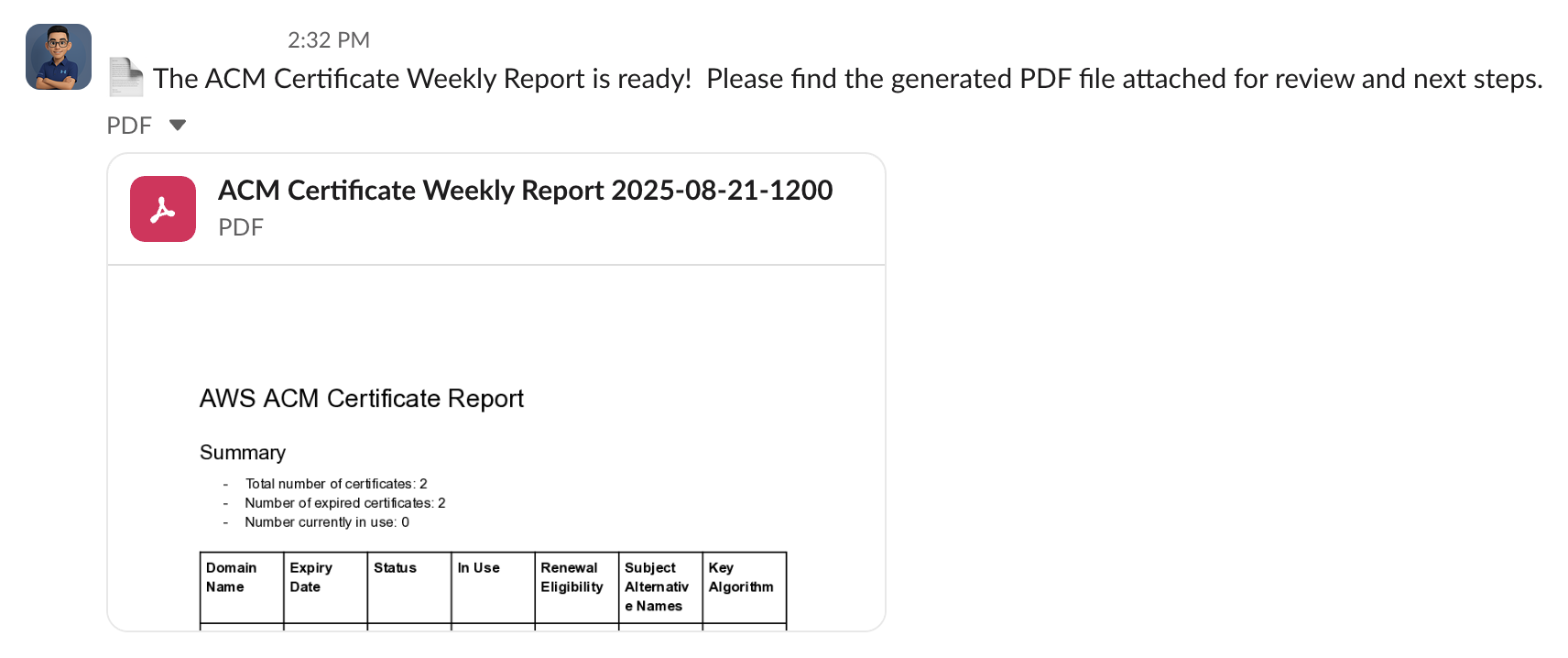"
},
"typeVersion": 1
},
{
"id": "e35484f2-223c-449a-9609-433a04a96109",
"name": "Sticky Note9",
"type": "n8n-nodes-base.stickyNote",
"position": [
1984,
-160
],
"parameters": {
"width": 336,
"height": 144,
"content": "### 6. 💬 Send PDF Report to Slack\nThe finalized PDF report is uploaded to a specific Slack channel (e.g., `#it-security` or `#cloud-ops`) so stakeholders are instantly notified of certificate status.\n"
},
"typeVersion": 1
},
{
"id": "5a303f6d-00f4-4668-9b7e-c6bce6187f99",
"name": "Set Workflow Data",
"type": "n8n-nodes-base.set",
"disabled": true,
"position": [
1072,
248
],
"parameters": {
"options": {},
"assignments": {
"assignments": [
{
"id": "0869e141-3255-4268-ad3b-cb88173b6079",
"name": "SenderEmail",
"type": "string",
"value": "it@emesoft.net"
},
{
"id": "6c2047bb-ff37-45c2-a30c-6b00b6aed409",
"name": "SenderName",
"type": "string",
"value": "IT Support"
},
{
"id": "8b5c7afb-3ac0-4be9-ada8-4488d5acf402",
"name": "RecepientEmail",
"type": "string",
"value": "trung.tran@emesoft.net"
}
]
}
},
"typeVersion": 3.4
}
],
"active": false,
"pinData": {},
"settings": {
"executionOrder": "v1"
},
"versionId": "6985d393-0373-4095-b053-76348faa6904",
"connections": {
"44bc4988-b569-4eeb-bee6-af4897743939": {
"main": [
[
{
"node": "cf420f55-0b0e-44a7-84c9-d4ec1b5220d0",
"type": "main",
"index": 0
}
]
]
},
"bca5adc0-9afe-4a4f-ac72-30501fd2b0d8": {
"main": [
[
{
"node": "bb2cdcf1-8e34-4b01-9f79-ad2d8efaafae",
"type": "main",
"index": 0
},
{
"node": "cc91cae2-3dd0-4a16-ba4d-30034521582d",
"type": "main",
"index": 0
}
]
]
},
"a736e395-58bb-4263-b42d-aded26afc6b2": {
"ai_languageModel": [
[
{
"node": "bb2cdcf1-8e34-4b01-9f79-ad2d8efaafae",
"type": "ai_languageModel",
"index": 0
}
]
]
},
"5a303f6d-00f4-4668-9b7e-c6bce6187f99": {
"main": [
[
{
"node": "00e56531-89a5-447b-b99f-e1946c63eba5",
"type": "main",
"index": 0
}
]
]
},
"7d2d2fa6-2737-4577-bb13-5d776a9a0a5b": {
"ai_languageModel": [
[
{
"node": "cc91cae2-3dd0-4a16-ba4d-30034521582d",
"type": "ai_languageModel",
"index": 0
}
]
]
},
"1ee4f8f4-1e4b-4977-a090-b350e69e6fd8": {
"main": [
[
{
"node": "4f123f70-a491-4201-a2f7-6069cbd735c2",
"type": "main",
"index": 0
}
]
]
},
"4f123f70-a491-4201-a2f7-6069cbd735c2": {
"main": [
[
{
"node": "44bc4988-b569-4eeb-bee6-af4897743939",
"type": "main",
"index": 0
}
]
]
},
"72c7e0a7-e1bf-40da-b946-f7bc2261bbae": {
"main": [
[
{
"node": "bca5adc0-9afe-4a4f-ac72-30501fd2b0d8",
"type": "main",
"index": 0
}
]
]
},
"f4bdc2d2-bc98-4eca-9886-1dd303091150": {
"main": [
[
{
"node": "72c7e0a7-e1bf-40da-b946-f7bc2261bbae",
"type": "main",
"index": 0
}
]
]
},
"bb2cdcf1-8e34-4b01-9f79-ad2d8efaafae": {
"main": [
[
{
"node": "5a303f6d-00f4-4668-9b7e-c6bce6187f99",
"type": "main",
"index": 0
}
]
]
},
"cc91cae2-3dd0-4a16-ba4d-30034521582d": {
"main": [
[
{
"node": "1ee4f8f4-1e4b-4977-a090-b350e69e6fd8",
"type": "main",
"index": 0
}
]
]
}
}
}常见问题
如何使用这个工作流?
复制上方的 JSON 配置代码,在您的 n8n 实例中创建新工作流并选择「从 JSON 导入」,粘贴配置后根据需要修改凭证设置即可。
这个工作流适合什么场景?
高级 - AI 摘要总结, 多模态 AI
需要付费吗?
本工作流完全免费,您可以直接导入使用。但请注意,工作流中使用的第三方服务(如 OpenAI API)可能需要您自行付费。
相关工作流推荐
Decodo爬虫API工作流模板(n8n自动化亚马逊图书购买报告)
使用Decodo爬虫和GPT 4.1 mini提取亚马逊图书数据并生成购买报告
Set
Code
Slack
+
Set
Code
Slack
22 节点Trung Tran
AI 摘要总结
用于更智能BRD(业务需求文档)编写的多Agent RAG系统
使用多Agent GPT和Google Workspace生成业务需求文档
Set
Code
Merge
+
Set
Code
Merge
37 节点Trung Tran
AI RAG 检索增强
AI驱动的YouTube自动标签工作流(SEO自动化)
使用GPT和Slack通知自动化YouTube视频SEO标签
Set
Slack
You Tube
+
Set
Slack
You Tube
19 节点Trung Tran
AI 摘要总结
构建用于Slack候选人评估的AI驱动聊天机器人
AI简历分析与候选人评估:Slack和Google表格集成
If
Code
Slack
+
If
Code
Slack
29 节点Trung Tran
AI 聊天机器人
HireMind – AI驱动的简历智能处理流程
HR AI简历筛选与评估:GPT-4和Google Workspace
If
Code
Slack
+
If
Code
Slack
26 节点Trung Tran
人力资源
🎧 IT语音支持自动化机器人 – Telegram语音消息转JIRA工单(使用OpenAI Whisper)
通过Whisper和GPT-4.1 Mini将Telegram语音消息自动转换为JIRA工单
If
Set
Code
+
If
Set
Code
25 节点Trung Tran
工单管理
工作流信息
难度等级
高级
节点数量23
分类2
节点类型11
作者

Trung Tran
@trungtranEmpowering small and medium businesses with smart automation and practical AI, no big tech team required.
外部链接
在 n8n.io 查看 →
分享此工作流