基于聊天的AWS Lambda管理器与自动化审计日志记录(GPT-4.1 mini + Google表格)
中级
这是一个DevOps, AI Chatbot领域的自动化工作流,包含 15 个节点。主要使用 AwsLambdaTool, Agent, HttpRequestTool, GoogleSheetsTool, ChatTrigger 等节点。 通过聊天使用GPT-4.1和Google表格审计日志记录的AWS Lambda管理器
前置要求
- •AWS Access Key 和 Secret
- •可能需要目标 API 的认证凭证
- •Google Sheets API 凭证
- •OpenAI API Key
使用的节点 (15)
工作流预览
可视化展示节点连接关系,支持缩放和平移
导出工作流
复制以下 JSON 配置到 n8n 导入,即可使用此工作流
{
"id": "8Hr1UiypOyXzJuXf",
"meta": {
"instanceId": "e145bfb15cacc90e0d1ae6ee743e6744f8fc7108de50458700cb2ae620dc5ca5",
"templateCredsSetupCompleted": true
},
"name": "Chat-Based AWS Lambda Manager with Automated Audit Logging (GPT-4.1 mini + Google Sheet)",
"tags": [
{
"id": "zVkByIt5M465W2a8",
"name": "aws",
"createdAt": "2025-09-12T06:14:33.823Z",
"updatedAt": "2025-09-12T06:14:33.823Z"
}
],
"nodes": [
{
"id": "616e9751-00a6-4313-a1ae-aa0ffb44430e",
"name": "OpenAI Chat Model",
"type": "@n8n/n8n-nodes-langchain.lmChatOpenAi",
"position": [
-160,
736
],
"parameters": {
"model": {
"__rl": true,
"mode": "list",
"value": "gpt-4.1-mini"
},
"options": {}
},
"credentials": {
"openAiApi": {
"id": "tnXtbK3d66hDjxXa",
"name": "OpenAi account"
}
},
"typeVersion": 1.2
},
{
"id": "a1dca496-5a02-45d4-b230-65a12d8a51d9",
"name": "Simple Memory",
"type": "@n8n/n8n-nodes-langchain.memoryBufferWindow",
"position": [
-32,
736
],
"parameters": {
"contextWindowLength": 10
},
"typeVersion": 1.3
},
{
"id": "cffff788-b047-4553-83cc-726d5028ebfb",
"name": "When chat message received",
"type": "@n8n/n8n-nodes-langchain.chatTrigger",
"position": [
-384,
512
],
"webhookId": "c676ef51-4e8a-4d31-9b8b-7c05602edd32",
"parameters": {
"options": {}
},
"typeVersion": 1.3
},
{
"id": "73569e82-cc64-4435-a06c-c7b8eed1b453",
"name": "Sticky Note",
"type": "n8n-nodes-base.stickyNote",
"position": [
-1840,
-80
],
"parameters": {
"color": 6,
"width": 880,
"height": 1184,
"content": "# Chat-Based AWS Lambda Manager with Automated Audit Logging (GPT-4.1 mini + Google Sheet)\n> This workflow provides a chat-based AI agent to manage AWS Lambda functions. It allows users to list, invoke, get details, and delete Lambda functions, while automatically recording every action into Google Sheets for audit and compliance tracking.\n\n## **Who’s it for**\n- Cloud engineers and DevOps teams managing AWS Lambda functions. \n- Developers who want a simple chat interface to perform Lambda operations. \n- Compliance and operations teams needing automatic audit logs of AWS actions. \n\n## **How it works / What it does**\n1. A chat message triggers the **AWS Lambda Manager Agent**. \n2. The agent interprets user intent and calls one of the available tools: \n - **Invoke Lambda Function**: Runs a Lambda function with given payload. \n - **List Lambda Functions**: Shows all functions in the account. \n - **Get Lambda Function**: Retrieves details/configuration of a function. \n - **Delete a Function**: Removes a Lambda function permanently. \n3. After each action, the agent calls **Audit Logs (Google Sheets)** to record the operation type, function name, timestamp, and outcome. \n4. The agent confirms destructive actions (like delete) before execution. \n\n## **How to set up**\n1. Add a **Chat Trigger** node to start the workflow when a user sends a message. \n2. Connect it to the **AWS Lambda Manager Agent** node. \n3. Configure the agent with the provided system prompt to enforce rules and logging. \n4. Link the agent to the following tool nodes: \n - Invoke Lambda Function \n - List Lambda Functions \n - Get Lambda Function \n - Delete a Function \n - Audit Logs (Google Sheets with `appendOrUpdate` enabled) \n5. Deploy the workflow and test it with sample chat commands like “list functions” or “invoke testFunction”. \n\n## **Requirements**\n- AWS account with IAM credentials that have `lambda:ListFunctions`, `lambda:InvokeFunction`, `lambda:GetFunction`, and `lambda:DeleteFunction` permissions. \n- Google Sheets API connected for storing audit logs. \n- Proper region and function names configured when invoking or deleting. \n- n8n instance or automation platform that supports agent + tool integration. \n\n## **How to customize the workflow**\n- **Add new tools**: Extend with more AWS Lambda operations like Update Function Code or Publish Version. \n- **Enhance logging**: Include user ID, request payload, or execution results in Audit Logs. \n- **Access control**: Restrict delete actions to admins by adding role-based logic. \n- **Multi-cloud support**: Extend the agent to handle Azure/AWS/GCP serverless functions in one workflow. \n- **Custom responses**: Modify agent prompt to tailor tone (developer-friendly vs. business-friendly). "
},
"typeVersion": 1
},
{
"id": "40693ce3-331d-4164-bd28-1fbee18ec87b",
"name": "Sticky Note1",
"type": "n8n-nodes-base.stickyNote",
"position": [
-416,
368
],
"parameters": {
"color": 5,
"height": 128,
"content": "### Receive Chat Message\nThe workflow begins when a user sends a chat message. This acts as the trigger for the AWS Lambda Manager Agent."
},
"typeVersion": 1
},
{
"id": "bd9ce2c4-5637-4d1e-b5ed-5b11ed11e2ac",
"name": "Sticky Note2",
"type": "n8n-nodes-base.stickyNote",
"position": [
144,
320
],
"parameters": {
"color": 5,
"content": "### Interpret User Intent\nThe AWS Lambda Manager Agent analyzes the chat input to determine which Lambda operation is being requested (list, invoke, get details, or delete)."
},
"typeVersion": 1
},
{
"id": "bc5292ea-8e7b-4c3a-ae26-555861f7b8e7",
"name": "AWS Lambda Manager Agent",
"type": "@n8n/n8n-nodes-langchain.agent",
"position": [
152,
512
],
"parameters": {
"options": {
"systemMessage": "You are AWS Lambda Manager Agent, a chat-based assistant that helps users manage their AWS Lambda functions.\nYou are equipped with 5 tools:\n1. Invoke Lambda Function – Run a specific Lambda function with an input payload.\n2. List Lambda Functions – Retrieve all Lambda functions in the account/region.\n3. Get Lambda Function – Get configuration and details of a function.\n4. Delete a Function – Permanently delete a Lambda function.\n5. Audit Logs – Append every action performed into Google Sheets for tracking. The input must always be a simple log string (for example: \"Invoked function processOrders at 2025-09-16 10:30 UTC\").\n\nResponsibilities:\n- Parse user requests and determine intent.\n- Call the correct tool to execute the operation.\n- After any of the first 4 Lambda operations, always call Audit Logs to record action details (function name, action type, timestamp, requestor, and outcome).\n- If the request is unclear, ask clarifying questions before taking action.\n- Keep answers short and action-focused, but confirm important destructive actions like deletion.\nExamples of behavior:\n- User: “Show me all my Lambda functions.”\nAgent: Calls List Lambda Functions, then logs action with Audit Logs.\n- User: “Run my processOrders function with this JSON.”\nAgent: Calls Invoke Lambda Function with provided JSON, then logs action.\n- User: “Tell me details about paymentHandler.”\nAgent: Calls Get Lambda Function, then logs action.\n- User: “Delete the testFunction.”\nAgent: Confirms: “Are you sure you want to permanently delete testFunction?” If confirmed, calls Delete a Function, then logs action.\nRules:\n- Always log operations in Audit Logs as a single text string.\n- Never skip logging.\n- Confirm destructive actions like delete.\n- Respect the user’s natural language and support flexible phrasing such as “remove,” “run,” “show,” or “info.”"
}
},
"typeVersion": 2.2
},
{
"id": "9c1b9a0d-3152-459e-99ac-e5ef64fc5e66",
"name": "Invoke Lambda Function",
"type": "n8n-nodes-base.awsLambdaTool",
"position": [
96,
736
],
"parameters": {
"payload": "={{ /*n8n-auto-generated-fromAI-override*/ $fromAI('JSON_Input', ``, 'string') }}",
"function": "arn:aws:lambda:ap-southeast-1:984623028397:function:myFunction",
"invocationType": "Event"
},
"credentials": {
"aws": {
"id": "mx7x25MWVlUbEtd3",
"name": "ap-southeast-1"
}
},
"typeVersion": 1
},
{
"id": "ce85a47e-4828-4e7e-b3b6-ef2c0195510b",
"name": "List Lambda Functions",
"type": "n8n-nodes-base.httpRequestTool",
"position": [
224,
736
],
"parameters": {
"url": "={{ /*n8n-auto-generated-fromAI-override*/ $fromAI('URL', `Template: https://lambda.REGION.amazonaws.com/2015-03-31/functions\nREGION is parameter`, 'string') }}",
"options": {},
"sendHeaders": true,
"authentication": "predefinedCredentialType",
"toolDescription": "Description: Returns all Lambda functions in your account for the given region.",
"headerParameters": {
"parameters": [
{}
]
},
"nodeCredentialType": "aws"
},
"credentials": {
"aws": {
"id": "Q5gor70maeAQPEU4",
"name": "AWS account 2"
}
},
"typeVersion": 4.2
},
{
"id": "3e2516da-8d3f-4c82-8026-8d9fbd037906",
"name": "Get Lambda Function",
"type": "n8n-nodes-base.httpRequestTool",
"position": [
352,
736
],
"parameters": {
"url": "={{ /*n8n-auto-generated-fromAI-override*/ $fromAI('URL', `Format: https://lambda.region.amazonaws.com/2015-03-31/functions/FUNCTION_NAME\nRegion & function_name are params`, 'string') }}",
"options": {},
"sendHeaders": true,
"authentication": "predefinedCredentialType",
"nodeCredentialType": "aws"
},
"credentials": {
"aws": {
"id": "Q5gor70maeAQPEU4",
"name": "AWS account 2"
}
},
"typeVersion": 4.2
},
{
"id": "02700199-d4ab-499c-ad0f-6e2063d551a4",
"name": "Delete a Function",
"type": "n8n-nodes-base.httpRequestTool",
"position": [
480,
736
],
"parameters": {
"url": "={{ /*n8n-auto-generated-fromAI-override*/ $fromAI('URL', `Template: https://lambda.region.amazonaws.com/2015-03-31/functions/FUNCTION_NAME\nregion & FUNCTION_NAME are params`, 'string') }}",
"method": "DELETE",
"options": {},
"sendHeaders": true,
"authentication": "predefinedCredentialType",
"toolDescription": "Description: Deletes a Lambda function permanently.",
"headerParameters": {
"parameters": [
{}
]
},
"nodeCredentialType": "aws"
},
"credentials": {
"aws": {
"id": "Q5gor70maeAQPEU4",
"name": "AWS account 2"
}
},
"typeVersion": 4.2
},
{
"id": "65430de9-aadf-4af9-a755-3ed28ff84e25",
"name": "Audit Logs",
"type": "n8n-nodes-base.googleSheetsTool",
"position": [
608,
736
],
"parameters": {
"columns": {
"value": {},
"schema": [],
"mappingMode": "autoMapInputData",
"matchingColumns": [],
"attemptToConvertTypes": false,
"convertFieldsToString": false
},
"options": {},
"operation": "appendOrUpdate",
"sheetName": {
"__rl": true,
"mode": "list",
"value": "gid=0",
"cachedResultUrl": "https://docs.google.com/spreadsheets/d/1aaDJ9ZAt2LLpZDFcXjVaYW57JwyruCrl5UJWejG1ZTk/edit#gid=0",
"cachedResultName": "Sheet1"
},
"documentId": {
"__rl": true,
"mode": "list",
"value": "1aaDJ9ZAt2LLpZDFcXjVaYW57JwyruCrl5UJWejG1ZTk",
"cachedResultUrl": "https://docs.google.com/spreadsheets/d/1aaDJ9ZAt2LLpZDFcXjVaYW57JwyruCrl5UJWejG1ZTk/edit?usp=drivesdk",
"cachedResultName": "AWS S3 Audit Logs"
}
},
"credentials": {
"googleSheetsOAuth2Api": {
"id": "7zk8xcj4pNU6f1WM",
"name": "Google Sheets account"
}
},
"typeVersion": 4.7
},
{
"id": "a08f808b-1196-46dd-bac4-ae1b4682ff6d",
"name": "Sticky Note3",
"type": "n8n-nodes-base.stickyNote",
"position": [
80,
912
],
"parameters": {
"color": 5,
"width": 336,
"height": 256,
"content": "### Execute Lambda Operation\nBased on the intent, the agent calls one of the connected Lambda tools:\n- **Invoke Lambda Function** to run a function with payload. \n- **List Lambda Functions** to retrieve all available functions. \n- **Get Lambda Function** to fetch configuration details. \n- **Delete a Function** to permanently remove a Lambda function (requires confirmation)."
},
"typeVersion": 1
},
{
"id": "f445f4a6-9ff0-46c0-932a-7deee046648c",
"name": "Sticky Note4",
"type": "n8n-nodes-base.stickyNote",
"position": [
544,
912
],
"parameters": {
"color": 5,
"height": 176,
"content": "### Record Action in Audit Logs\nAfter executing any Lambda operation, the agent automatically calls the **Audit Logs** tool to append details (function name, action, timestamp, result) into Google Sheets for compliance tracking."
},
"typeVersion": 1
},
{
"id": "b84bbe70-1375-41e1-9e91-6b27cd707ed4",
"name": "Sticky Note5",
"type": "n8n-nodes-base.stickyNote",
"position": [
-928,
208
],
"parameters": {
"width": 480,
"height": 624,
"content": "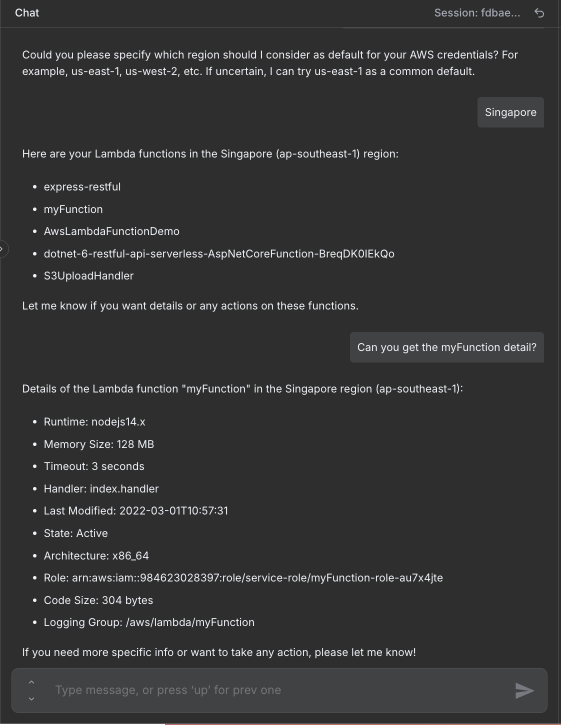"
},
"typeVersion": 1
}
],
"active": false,
"pinData": {},
"settings": {
"executionOrder": "v1"
},
"versionId": "72f00ce5-d7b4-4369-b869-48b6e73611ba",
"connections": {
"65430de9-aadf-4af9-a755-3ed28ff84e25": {
"ai_tool": [
[
{
"node": "bc5292ea-8e7b-4c3a-ae26-555861f7b8e7",
"type": "ai_tool",
"index": 0
}
]
]
},
"a1dca496-5a02-45d4-b230-65a12d8a51d9": {
"ai_memory": [
[
{
"node": "bc5292ea-8e7b-4c3a-ae26-555861f7b8e7",
"type": "ai_memory",
"index": 0
}
]
]
},
"02700199-d4ab-499c-ad0f-6e2063d551a4": {
"ai_tool": [
[
{
"node": "bc5292ea-8e7b-4c3a-ae26-555861f7b8e7",
"type": "ai_tool",
"index": 0
}
]
]
},
"616e9751-00a6-4313-a1ae-aa0ffb44430e": {
"ai_languageModel": [
[
{
"node": "bc5292ea-8e7b-4c3a-ae26-555861f7b8e7",
"type": "ai_languageModel",
"index": 0
}
]
]
},
"3e2516da-8d3f-4c82-8026-8d9fbd037906": {
"ai_tool": [
[
{
"node": "bc5292ea-8e7b-4c3a-ae26-555861f7b8e7",
"type": "ai_tool",
"index": 0
}
]
]
},
"ce85a47e-4828-4e7e-b3b6-ef2c0195510b": {
"ai_tool": [
[
{
"node": "bc5292ea-8e7b-4c3a-ae26-555861f7b8e7",
"type": "ai_tool",
"index": 0
}
]
]
},
"9c1b9a0d-3152-459e-99ac-e5ef64fc5e66": {
"ai_tool": [
[
{
"node": "bc5292ea-8e7b-4c3a-ae26-555861f7b8e7",
"type": "ai_tool",
"index": 0
}
]
]
},
"bc5292ea-8e7b-4c3a-ae26-555861f7b8e7": {
"main": [
[]
]
},
"cffff788-b047-4553-83cc-726d5028ebfb": {
"main": [
[
{
"node": "bc5292ea-8e7b-4c3a-ae26-555861f7b8e7",
"type": "main",
"index": 0
}
]
]
}
}
}常见问题
如何使用这个工作流?
复制上方的 JSON 配置代码,在您的 n8n 实例中创建新工作流并选择「从 JSON 导入」,粘贴配置后根据需要修改凭证设置即可。
这个工作流适合什么场景?
中级 - 开发运维, AI 聊天机器人
需要付费吗?
本工作流完全免费,您可以直接导入使用。但请注意,工作流中使用的第三方服务(如 OpenAI API)可能需要您自行付费。
相关工作流推荐
EC2生命周期管理器与AI聊天助手(描述、启动、停止、重启、终止)
含AI聊天代理的AWS EC2生命周期管理器(描述、启动、停止、重启)
Agent
Http Request Tool
Chat Trigger
+
Agent
Http Request Tool
Chat Trigger
16 节点Trung Tran
开发运维
n8n中带审计日志的AI驱动AWS S3管理器(Slack/ChatOps工作流)
通过Slack使用GPT-4代理和Google表格审计日志管理AWS S3
Aws S3 Tool
Agent
Google Sheets Tool
+
Aws S3 Tool
Agent
Google Sheets Tool
16 节点Trung Tran
开发运维
基于聊天的AWS IAM策略生成器与AI助手(OpenAI)
通过聊天界面使用GPT-4助手生成AWS IAM策略
Email Send
Http Request
Agent
+
Email Send
Http Request
Agent
14 节点Trung Tran
开发运维
构建用于Slack候选人评估的AI驱动聊天机器人
AI简历分析与候选人评估:Slack和Google表格集成
If
Code
Slack
+
If
Code
Slack
29 节点Trung Tran
AI 聊天机器人
使用Airtop和GPT-4自动化浏览器任务 - Reddit发帖示例
使用Airtop和GPT-4自动化浏览器任务 - Reddit发帖示例
Airtop Tool
Agent
Google Sheets Tool
+
Airtop Tool
Agent
Google Sheets Tool
18 节点Joseph
社交媒体
用于潜在客户捕获和业务问答的 AI Chatbot
基于 GPT-4o、Pinecone 和 Google Sheets 的自动化线索捕获与业务问答
Google Drive
Agent
Google Sheets Tool
+
Google Drive
Agent
Google Sheets Tool
17 节点Belgacem Dhiflaoui
客户培育
工作流信息
难度等级
中级
节点数量15
分类2
节点类型8
作者

Trung Tran
@trungtranEmpowering small and medium businesses with smart automation and practical AI, no big tech team required. Youtube channel: youtube.com/@theStackExplorer
外部链接
在 n8n.io 查看 →
分享此工作流