만료된 AWS ACM 인증서를 정리하고 Slack 승인 필요
중급
이것은DevOps, Multimodal AI분야의자동화 워크플로우로, 14개의 노드를 포함합니다.주로 Slack, Filter, ScheduleTrigger, AwsCertificateManager 등의 노드를 사용하며. Slack을 통해 만료된 AWS ACM 인증서를 정리하기 위해 승인
사전 요구사항
- •Slack Bot Token 또는 Webhook URL
- •AWS Access Key와 Secret
워크플로우 미리보기
노드 연결 관계를 시각적으로 표시하며, 확대/축소 및 이동을 지원합니다
워크플로우 내보내기
다음 JSON 구성을 복사하여 n8n에 가져오면 이 워크플로우를 사용할 수 있습니다
{
"id": "ISewUDgaQCM3Lw59",
"meta": {
"instanceId": "4a2e6764ba7a6bc9890d9225f4b21d570ce88fc9bd57549c89057fcee58fed0f",
"templateCredsSetupCompleted": true
},
"name": "Clean Expired AWS ACM Certs with Slack Approval",
"tags": [
{
"id": "ZWDTpzMgM2j0ZGMO",
"name": "acm",
"createdAt": "2025-08-20T04:24:13.252Z",
"updatedAt": "2025-08-20T04:24:13.252Z"
},
{
"id": "hvp6nueQ4hpIJWbY",
"name": "aws",
"createdAt": "2025-08-17T05:47:27.209Z",
"updatedAt": "2025-08-17T05:47:27.209Z"
}
],
"nodes": [
{
"id": "0fa56096-8872-400b-afa1-5c52090bd33c",
"name": "다수 인증서 조회",
"type": "n8n-nodes-base.awsCertificateManager",
"position": [
224,
0
],
"parameters": {
"options": {},
"operation": "getMany"
},
"credentials": {
"aws": {
"id": "IZYsJuHhfVJ3PIrC",
"name": "ap-southeast-1"
}
},
"typeVersion": 1
},
{
"id": "849ac135-f381-4a26-a9c5-79e62d20f74d",
"name": "메시지 전송 및 응답 대기",
"type": "n8n-nodes-base.slack",
"disabled": true,
"position": [
720,
0
],
"webhookId": "a2040fd8-4de2-4eb9-ad51-fa9a5b974afc",
"parameters": {
"user": {
"__rl": true,
"mode": "list",
"value": "U054RMBTVBM",
"cachedResultName": "trung.tran"
},
"message": "=:warning: *Expired SSL Certificate Detected*\nAn SSL certificate in AWS ACM has expired. Please review the details below and approve deletion to keep the environment clean.\n*📄 Certificate Summary:*\n• *Domain Name:* `{{ $json.DomainName }}`\n• *Certificate ARN:* `{{ $json.CertificateArn }}`\n• *Issueed Date:* `{{ $json.IssuedAt.toDateTime('s').toString() }}`\n• *Expiration Date:* `{{ $json.NotAfter.toDateTime('s').toString() }}`\n\n👉 *Next Step:* \nReact to this message with:\n:white_check_mark: to approve deletion \n:x: to keep the certificate\n\n_(This message will be auto-checked in 1 hour for reactions.)_",
"options": {
"limitWaitTime": {
"values": {
"resumeUnit": "minutes",
"resumeAmount": 60
}
}
},
"operation": "sendAndWait",
"authentication": "oAuth2",
"approvalOptions": {
"values": {
"approvalType": "double"
}
}
},
"credentials": {
"slackOAuth2Api": {
"id": "4JSKt9sIRV1KGswQ",
"name": "Slack account"
}
},
"typeVersion": 2.3
},
{
"id": "203fe369-3299-46e3-a076-99d0b8dd1c00",
"name": "스티키 노트",
"type": "n8n-nodes-base.stickyNote",
"position": [
-1264,
-672
],
"parameters": {
"width": 1056,
"height": 1744,
"content": "# Clean Up Expired AWS ACM Certificates with Human Approval\n> Automate the cleanup of expired AWS ACM certificates with Slack-based approval. This workflow helps maintain a secure and tidy AWS environment by detecting expired SSL certs, sending detailed Slack notifications to admins, and deleting them upon approval, ensuring full visibility and control over certificate lifecycle management.\n## 🧑💼 Who’s it for\n\nThis workflow is designed for:\n- **AWS administrators** who want to keep their environment clean and secure \n- **DevOps teams** managing SSL lifecycle in AWS ACM \n- **IT Admins** needing visibility and control over expired cert removal \n- Teams that use **Slack for collaboration and approvals**\n\n## ⚙️ How it works / What it does\n\nThis automated workflow performs the following tasks on a **daily schedule**:\n1. **Fetch all ACM certificates** in your AWS account.\n2. **Filter out the expired ones** by comparing expiration date and status.\n3. **Send a Slack approval message** with certificate details to the admin team.\n4. **Wait for approval response** directly in Slack (`✅` to approve deletion).\n5. If approved, it **deletes the expired certificate** using AWS ACM.\n6. Finally, it **notifies the IT admin** about the action taken.\n\n## 🔧 How to set up\n\n1. **Create the Workflow**\n - Add the nodes as shown:\n - `Schedule Trigger`\n - `AWS - ACM: listCertificates`\n - `AWS - ACM: describeCertificate` (loop per cert)\n - `IF Node` to filter expired certs\n - `Slack - Send & Wait for Reaction`\n - `AWS - ACM: deleteCertificate`\n - `Slack - Post Message` to notify\n\n2. **Configure Slack**\n - Create a **Slack Bot Token** with:\n - `chat:write`\n - `reactions:read`\n - `channels:read`\n - Connect it in your Slack nodes.\n\n3. **Configure AWS Credentials**\n - Use IAM User or Role with:\n - `acm:ListCertificates`\n - `acm:DescribeCertificate`\n - `acm:DeleteCertificate`\n\n4. **Set schedule**\n - Daily, Weekly, or custom cron expression.\n\n## 📋 Requirements\n\n| Component | Description |\n|------------------|--------------------------------------|\n| AWS ACM Access | IAM permissions for ACM actions |\n| Slack Bot Token | With `chat:write` & `reactions:read` |\n| n8n Environment | Self-hosted or n8n Cloud |\n| Slack Channel | Where approval messages will be sent |\n\n## 🛠️ How to customize the workflow\n\n### 🕒 Change waiting time\nAdjust the wait time before checking Slack reactions in the `sendAndWait` node (default 1 hour).\n\n### 👥 Change Slack target\nChange the Slack channel or tag specific people (`<@U123456>`).\n\n### 📓 Add logging\nAdd Google Sheets, Notion, or DynamoDB to log certificate details and approval decisions.\n\n### 🧪 Add dry-run/test mode\nUse an IF node before deletion to simulate removal when `ENV === dry-run`.\n"
},
"typeVersion": 1
},
{
"id": "4539a804-c2ca-4591-9b7c-5c018cffdf97",
"name": "스티키 노트1",
"type": "n8n-nodes-base.stickyNote",
"position": [
-176,
192
],
"parameters": {
"width": 272,
"height": 128,
"content": "### 1. Schedule Trigger\nThe workflow starts on a scheduled basis (e.g., daily at 09:00) to automatically check ACM certificates without manual intervention."
},
"typeVersion": 1
},
{
"id": "0333abeb-5624-4b50-a25e-15ea74211a5a",
"name": "스티키 노트2",
"type": "n8n-nodes-base.stickyNote",
"position": [
144,
192
],
"parameters": {
"width": 208,
"content": "### 2. Get Certificates\nFetches all ACM certificates in the configured AWS region(s), including details such as domain names, status, and expiration dates."
},
"typeVersion": 1
},
{
"id": "b09e50cd-01bd-4901-ad4c-136d30352564",
"name": "스티키 노트3",
"type": "n8n-nodes-base.stickyNote",
"position": [
400,
192
],
"parameters": {
"width": 192,
"content": "### 3. Filter Expired Certificates Only\nChecks each certificate and keeps only those that expired already.\n\n"
},
"typeVersion": 1
},
{
"id": "0084a198-5701-4af9-b009-293951900c2a",
"name": "스티키 노트4",
"type": "n8n-nodes-base.stickyNote",
"position": [
624,
192
],
"parameters": {
"height": 176,
"content": "### 4. Notify via Slack and Wait for Approval\nSends a Slack message with certificate details (domain, ARN, expiration date, status). \nThe workflow pauses here until a user clicks **Approve** or **Reject**."
},
"typeVersion": 1
},
{
"id": "0c6903b4-8ddc-4c94-bb11-9e2ef518e5a9",
"name": "스티키 노트5",
"type": "n8n-nodes-base.stickyNote",
"position": [
896,
192
],
"parameters": {
"width": 304,
"content": "### 5. Delete Expired Certificate\nIf **Approve** is selected in Slack, the workflow triggers AWS ACM to delete the certificate automatically. \nIf **Reject** is clicked, no action is taken, and the workflow ends."
},
"typeVersion": 1
},
{
"id": "079cb3e6-73cc-41ad-95a5-c0af457b25bf",
"name": "IT 관리자 알림",
"type": "n8n-nodes-base.slack",
"position": [
1296,
0
],
"webhookId": "7ea60ebd-bef7-4a22-ba58-4009b32b63b4",
"parameters": {
"text": "=:white_check_mark: *ACM Certificate Deleted Successfully*\n\n*Domain:* {{ $('Get expired certification only').item.json.DomainName }}\n*ARN:* {{ $('Get expired certification only').item.json.CertificateArn }}\n*Deleted At:* {{ $now }}\n\nApproved by: {{ $('Send message and wait for response').item.json.user?.name || $('Send message and wait for response').item.json.username || 'N/A' }}",
"user": {
"__rl": true,
"mode": "list",
"value": "U054RMBTVBM",
"cachedResultName": "trung.tran"
},
"select": "user",
"otherOptions": {},
"authentication": "oAuth2"
},
"credentials": {
"slackOAuth2Api": {
"id": "4JSKt9sIRV1KGswQ",
"name": "Slack account"
}
},
"typeVersion": 2.3
},
{
"id": "347da160-cca8-4d35-9e50-64f538dd4b46",
"name": "스티키 노트6",
"type": "n8n-nodes-base.stickyNote",
"position": [
640,
-496
],
"parameters": {
"width": 608,
"height": 416,
"content": "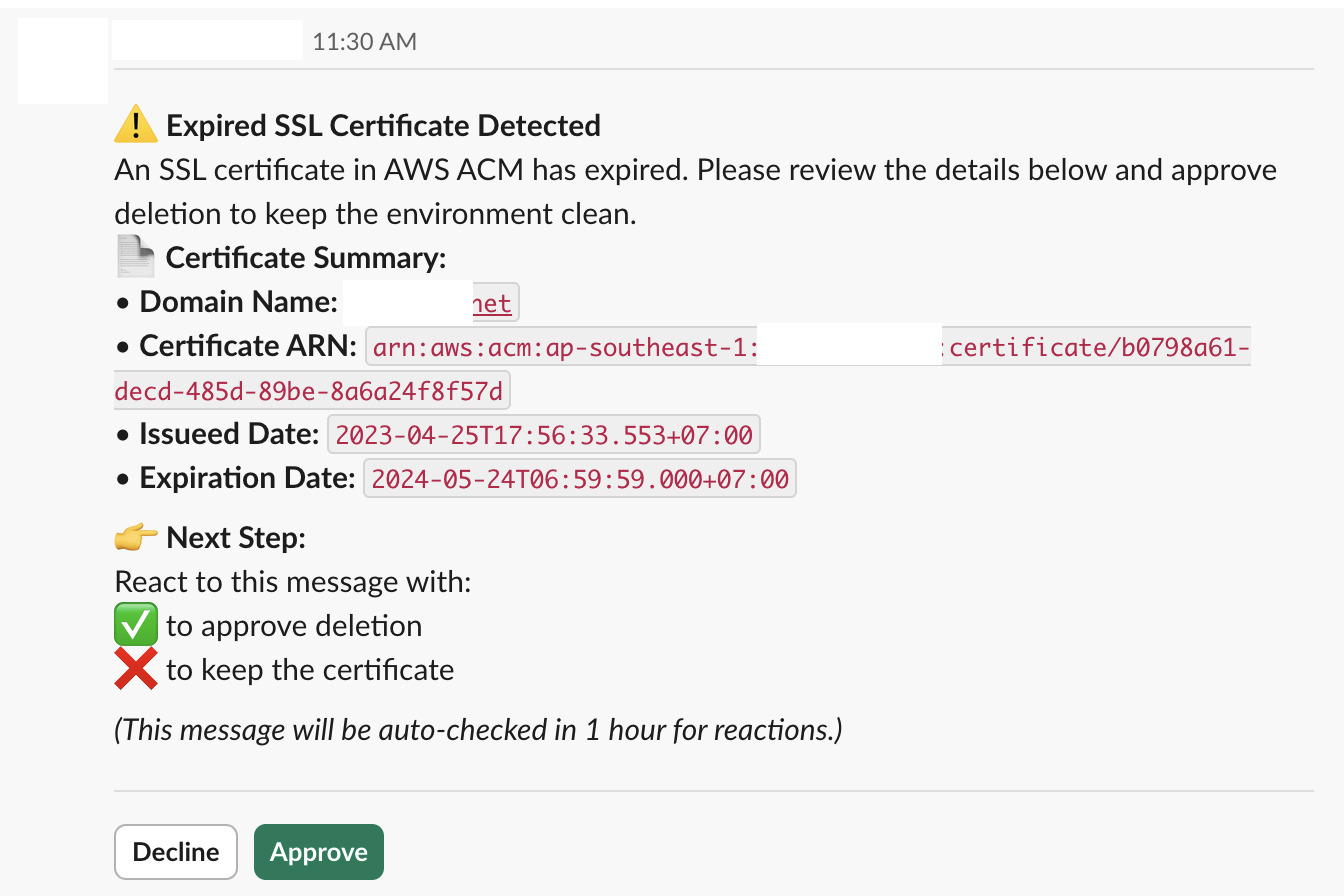"
},
"typeVersion": 1
},
{
"id": "8a2d6219-969d-4b6f-9c1b-9c818f12e9c0",
"name": "스티키 노트7",
"type": "n8n-nodes-base.stickyNote",
"position": [
1280,
192
],
"parameters": {
"content": "### 6. Notify admin via Slack"
},
"typeVersion": 1
},
{
"id": "58b1a7e2-765c-4fe7-8831-cdab2eda3932",
"name": "만료 인증서만 조회",
"type": "n8n-nodes-base.filter",
"position": [
448,
0
],
"parameters": {
"options": {},
"conditions": {
"options": {
"version": 2,
"leftValue": "",
"caseSensitive": true,
"typeValidation": "strict"
},
"combinator": "or",
"conditions": [
{
"id": "fe1b749d-3046-465e-b60a-786f5b0e2f99",
"operator": {
"type": "string",
"operation": "equals"
},
"leftValue": "={{ $json.Status }}",
"rightValue": "=EXPIRED"
}
]
}
},
"typeVersion": 2.2
},
{
"id": "c948316a-c28f-40b0-a320-927efbd8883b",
"name": "일일 스케줄 트리거",
"type": "n8n-nodes-base.scheduleTrigger",
"position": [
0,
0
],
"parameters": {
"rule": {
"interval": [
{}
]
}
},
"typeVersion": 1.2
},
{
"id": "ebb985a7-ba79-4690-8892-976b19fe2941",
"name": "인증서 삭제",
"type": "n8n-nodes-base.awsCertificateManager",
"position": [
992,
0
],
"parameters": {
"operation": "delete",
"certificateArn": "={{ $json.CertificateArn }}"
},
"credentials": {
"aws": {
"id": "d62669OP9bvnmE4n",
"name": "us-east-1"
}
},
"typeVersion": 1
}
],
"active": false,
"pinData": {},
"settings": {
"executionOrder": "v1"
},
"versionId": "bfa1e782-637f-49eb-8c58-fbd6e4540d77",
"connections": {
"ebb985a7-ba79-4690-8892-976b19fe2941": {
"main": [
[
{
"node": "079cb3e6-73cc-41ad-95a5-c0af457b25bf",
"type": "main",
"index": 0
}
]
]
},
"0fa56096-8872-400b-afa1-5c52090bd33c": {
"main": [
[
{
"node": "58b1a7e2-765c-4fe7-8831-cdab2eda3932",
"type": "main",
"index": 0
}
]
]
},
"c948316a-c28f-40b0-a320-927efbd8883b": {
"main": [
[
{
"node": "0fa56096-8872-400b-afa1-5c52090bd33c",
"type": "main",
"index": 0
}
]
]
},
"58b1a7e2-765c-4fe7-8831-cdab2eda3932": {
"main": [
[
{
"node": "849ac135-f381-4a26-a9c5-79e62d20f74d",
"type": "main",
"index": 0
}
]
]
},
"849ac135-f381-4a26-a9c5-79e62d20f74d": {
"main": [
[
{
"node": "ebb985a7-ba79-4690-8892-976b19fe2941",
"type": "main",
"index": 0
}
]
]
}
}
}자주 묻는 질문
이 워크플로우를 어떻게 사용하나요?
위의 JSON 구성 코드를 복사하여 n8n 인스턴스에서 새 워크플로우를 생성하고 "JSON에서 가져오기"를 선택한 후, 구성을 붙여넣고 필요에 따라 인증 설정을 수정하세요.
이 워크플로우는 어떤 시나리오에 적합한가요?
중급 - 데브옵스, 멀티모달 AI
유료인가요?
이 워크플로우는 완전히 무료이며 직접 가져와 사용할 수 있습니다. 다만, 워크플로우에서 사용하는 타사 서비스(예: OpenAI API)는 사용자 직접 비용을 지불해야 할 수 있습니다.
관련 워크플로우 추천
AWS ACM 인증서 자동 갱신 (Slack 승인 포함)
Slack 승인 워크플로가 포함된 AWS 인증서 자동 갱신
Slack
Filter
Schedule Trigger
+
Slack
Filter
Schedule Trigger
14 노드Trung Tran
보안 운영
챗봇 및 GPT-4.1을 포함한 자동화 Slack 채널 검토 워크플로
자동화된 Slack 채널 비활성 감사 및 보고서 생성, 작업 공간 정리용
Code
Slack
Filter
+
Code
Slack
Filter
16 노드Trung Tran
AI 요약
AWS 자동화 SSL/TLS 인증 만료 보고서
사용AWS ACM과 AI로 Slack과 이메일에서 SSL/TLS 인증 만료 보고서 생성
Set
Code
Slack
+
Set
Code
Slack
23 노드Trung Tran
AI 요약
MFA 강제 실행 및 접근 키 중지 자동화 AWS IAM 준수 작업 흐름
AWS IAM 준수 자동화: 강제 MFA 및 액세스 키 정리
Code
Slack
Aws Iam
+
Code
Slack
Aws Iam
19 노드Trung Tran
보안 운영
스마트 공급업체 계약 갱신 및 알림 워크플로우 (GPT 4.1 mini 사용)
GPT-4.1 mini, Slack 및 Gmail을 사용한 공급업체 계약 갱신 및 알림 자동화
If
Code
Slack
+
If
Code
Slack
21 노드Trung Tran
문서 추출
AI 기반 YouTube 자동 태그 워크플로우(SEO 자동화)
GPT 및 Slack 알림을 사용한 YouTube 동영상 SEO 태그 자동화
Set
Slack
You Tube
+
Set
Slack
You Tube
19 노드Trung Tran
AI 요약
워크플로우 정보
난이도
중급
노드 수14
카테고리2
노드 유형5
저자

Trung Tran
@trungtranEmpowering small and medium businesses with smart automation and practical AI, no big tech team required.
외부 링크
n8n.io에서 보기 →
이 워크플로우 공유