MFA 강제 실행 및 접근 키 중지 자동화 AWS IAM 준수 작업 흐름
고급
이것은SecOps, Multimodal AI분야의자동화 워크플로우로, 19개의 노드를 포함합니다.주로 Code, Slack, AwsIam, Filter, HttpRequest 등의 노드를 사용하며. AWS IAM 준수 자동화: 강제 MFA 및 액세스 키 정리
사전 요구사항
- •Slack Bot Token 또는 Webhook URL
- •AWS Access Key와 Secret
- •대상 API의 인증 정보가 필요할 수 있음
워크플로우 미리보기
노드 연결 관계를 시각적으로 표시하며, 확대/축소 및 이동을 지원합니다
워크플로우 내보내기
다음 JSON 구성을 복사하여 n8n에 가져오면 이 워크플로우를 사용할 수 있습니다
{
"id": "Q0EjgXk8j2ygOvy5",
"meta": {
"instanceId": "4a2e6764ba7a6bc9890d9225f4b21d570ce88fc9bd57549c89057fcee58fed0f",
"templateCredsSetupCompleted": true
},
"name": "Automated AWS IAM Compliance Workflow for MFA Enforcement and Access Key Deactivation",
"tags": [
{
"id": "hvp6nueQ4hpIJWbY",
"name": "aws",
"createdAt": "2025-08-17T05:47:27.209Z",
"updatedAt": "2025-08-17T05:47:27.209Z"
}
],
"nodes": [
{
"id": "e0c92177-d85f-45c1-b0a6-bcb7e9b424e1",
"name": "다수 사용자 가져오기",
"type": "n8n-nodes-base.awsIam",
"position": [
-224,
-48
],
"parameters": {
"returnAll": true,
"requestOptions": {},
"additionalFields": {}
},
"credentials": {
"aws": {
"id": "d62669OP9bvnmE4n",
"name": "us-east-1"
}
},
"typeVersion": 1
},
{
"id": "7b14679e-4c0d-42bc-904f-41c8f2e3d957",
"name": "메모",
"type": "n8n-nodes-base.stickyNote",
"position": [
-1536,
-592
],
"parameters": {
"width": 976,
"height": 1200,
"content": "# Automated AWS IAM Compliance Workflow for MFA Enforcement and Access Key Deactivation\n> This workflow leverages AWS IAM APIs and n8n automation to ensure strict security compliance by continuously monitoring IAM users for MFA (Multi-Factor Authentication) enforcement.\n\n[.jpg)](https://www.youtube.com/watch?v=ZggCRl8z_gQ)\n\n## **Who’s it for**\nThis workflow is designed for **DevOps, Security, or Cloud Engineers** responsible for maintaining IAM security compliance in AWS accounts. It's ideal for teams who want to **enforce MFA usage** and **automatically disable access** for non-compliant IAM users.\n\n## **How it works / What it does**\nThis automated workflow performs a **daily check** to detect IAM users without an MFA device and deactivate their access keys.\n\n### Step-by-step:\n1. **Daily scheduler**: Triggers the workflow once a day.\n2. **Get many users**: Retrieves a list of all IAM users in the account.\n3. **Get IAM User MFA Devices**: Calls AWS API to get MFA device info for each user.\n4. **Filter out IAM users with MFA**: Keeps only users **without any MFA device**.\n5. **Send warning message(s)**: Sends Slack alerts for users who do not have MFA enabled.\n6. **Get User Access Key(s)**: Fetches access keys for each non-MFA user.\n7. **Parse the list of user access key(s)**: Extracts and flattens key information like `AccessKeyId`, `Status`, and `UserName`.\n8. **Filter out inactive keys**: Keeps only **active** access keys for further action.\n9. **Deactivate Access Key(s)**: Calls AWS API to deactivate each active key for non-MFA users.\n\n## **How to set up**\n1. **Configure AWS credentials** in your environment (IAM role or AWS access key with required permissions).\n2. **Connect Slack** via the Slack node for alerting (set channel and credentials).\n3. Set the **scheduler** to your preferred frequency (e.g., daily at 9AM).\n4. Adjust any Slack message template or filtering conditions as needed.\n\n## **Requirements**\n- IAM user or role credentials with the following AWS IAM permissions:\n - `iam:ListUsers`\n - `iam:ListMFADevices`\n - `iam:ListAccessKeys`\n - `iam:UpdateAccessKey`\n- Slack credentials (Bot token with `chat:write` permission).\n- n8n environment with:\n - Slack integration\n - AWS credentials (set via environment or credentials manager)\n\n## **How to customize the workflow**\n- **Alert threshold**: Instead of immediate deactivation, you can delay action (e.g., alert first, wait 24h, then disable).\n- **Change notification channel**: Modify the Slack node to send alerts to a different channel or add email integration.\n- **Whitelist exceptions**: Add a Set or IF node to exclude specific usernames (e.g., service accounts).\n- **Add audit logging**: Use Google Sheets, Airtable, or a database to log which users were flagged or had access disabled.\n- **Extend access checks**: Include console password check (`GetLoginProfile`) if needed."
},
"typeVersion": 1
},
{
"id": "9234cd35-9728-47de-96c8-1eb5c4ffb354",
"name": "메모1",
"type": "n8n-nodes-base.stickyNote",
"position": [
-528,
-208
],
"parameters": {
"width": 256,
"height": 144,
"content": "### 1. Schedule Workflow\nTriggers the workflow automatically once per day to ensure continuous IAM compliance monitoring without manual intervention."
},
"typeVersion": 1
},
{
"id": "9d2fff11-c252-45f8-af8b-e18761fed2a6",
"name": "메모2",
"type": "n8n-nodes-base.stickyNote",
"position": [
-320,
128
],
"parameters": {
"width": 304,
"height": 128,
"content": "### 2. 👥 Get All IAM Users\nUses the `ListUsers` API to retrieve all active IAM users in the AWS account. These users will be evaluated for MFA compliance.\n"
},
"typeVersion": 1
},
{
"id": "e5535511-2750-45dd-bd7b-1daf18d41842",
"name": "메모3",
"type": "n8n-nodes-base.stickyNote",
"position": [
-96,
-240
],
"parameters": {
"width": 288,
"height": 144,
"content": "### 3. 🔐 Get IAM User MFA Devices\nCalls `ListMFADevices` for each user to check if they have at least one MFA device enabled. This is a critical step in identifying users who are not following best security practices."
},
"typeVersion": 1
},
{
"id": "9714750e-365f-40fb-a917-7dfbce8d1803",
"name": "메모4",
"type": "n8n-nodes-base.stickyNote",
"position": [
384,
224
],
"parameters": {
"width": 368,
"height": 128,
"content": "\n### 5. 🔎 Get User Access Key(s)\nFor each user without MFA, calls the `ListAccessKeys` API to retrieve all associated access keys that may allow programmatic access to AWS.\n"
},
"typeVersion": 1
},
{
"id": "bee26e8e-3f62-44e0-abf1-2a42b293ae75",
"name": "메모7",
"type": "n8n-nodes-base.stickyNote",
"position": [
1280,
-144
],
"parameters": {
"width": 608,
"content": "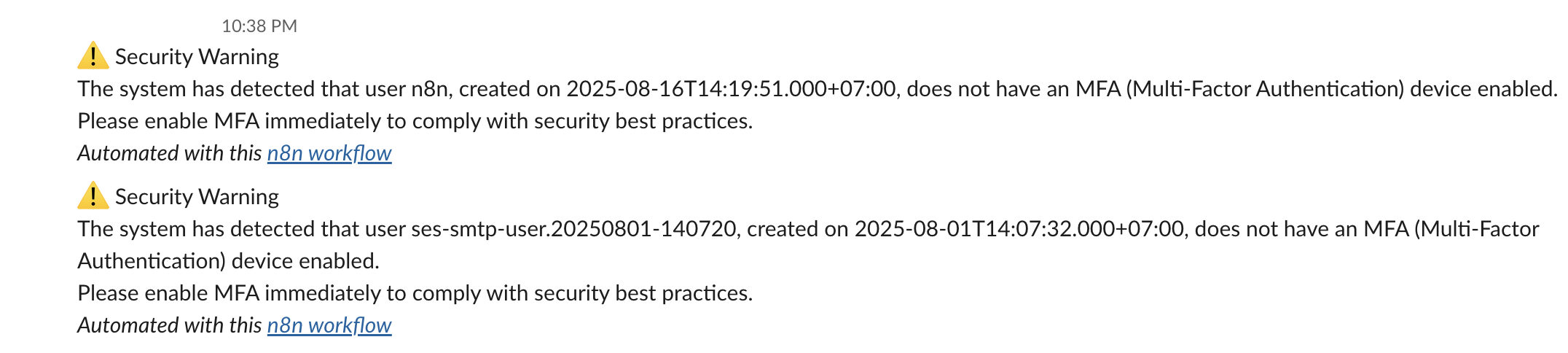"
},
"typeVersion": 1
},
{
"id": "f98f864f-2efa-4246-93ab-a45667751d7a",
"name": "메모5",
"type": "n8n-nodes-base.stickyNote",
"position": [
368,
-320
],
"parameters": {
"width": 272,
"content": "### 4. 💬 Send Warning Messages\nSends real-time Slack alerts for each non-compliant user, including their username and account creation date. This provides visibility and prompts action before access is revoked."
},
"typeVersion": 1
},
{
"id": "ccbe9813-0aa1-410c-b389-abe678fa1d25",
"name": "IAM 사용자 MFA 디바이스 가져오기",
"type": "n8n-nodes-base.httpRequest",
"position": [
0,
-48
],
"parameters": {
"url": "=https://iam.amazonaws.com/?Action=ListMFADevices&UserName={{ $json.UserName }}&Version=2010-05-08",
"options": {},
"authentication": "predefinedCredentialType",
"nodeCredentialType": "aws"
},
"credentials": {
"aws": {
"id": "d62669OP9bvnmE4n",
"name": "us-east-1"
}
},
"typeVersion": 4.2
},
{
"id": "60809479-ea5c-4446-aa70-5c6d841d09ea",
"name": "MFA 디바이스가 있는 IAM 사용자 필터링",
"type": "n8n-nodes-base.filter",
"position": [
224,
-48
],
"parameters": {
"options": {},
"conditions": {
"options": {
"version": 2,
"leftValue": "",
"caseSensitive": true,
"typeValidation": "strict"
},
"combinator": "and",
"conditions": [
{
"id": "2853872a-825b-4f59-8b4b-358cac8b197b",
"operator": {
"type": "array",
"operation": "empty",
"singleValue": true
},
"leftValue": "={{ $json.ListMFADevicesResponse.ListMFADevicesResult.MFADevices }}",
"rightValue": "Active"
}
]
}
},
"typeVersion": 2.2
},
{
"id": "5a499cf2-b352-4e15-93ee-03ce2d0df32d",
"name": "사용자 액세스 키 가져오기",
"type": "n8n-nodes-base.httpRequest",
"position": [
448,
48
],
"parameters": {
"url": "=https://iam.amazonaws.com/?Action=ListAccessKeys&UserName={{ $('Get many users').item.json.UserName }}&Version=2010-05-08",
"options": {},
"authentication": "predefinedCredentialType",
"nodeCredentialType": "aws"
},
"credentials": {
"aws": {
"id": "d62669OP9bvnmE4n",
"name": "us-east-1"
}
},
"typeVersion": 4.2
},
{
"id": "77d5914f-44dd-4267-be75-f960f477702d",
"name": "일일 스케줄러",
"type": "n8n-nodes-base.scheduleTrigger",
"position": [
-448,
-48
],
"parameters": {
"rule": {
"interval": [
{}
]
}
},
"typeVersion": 1.2
},
{
"id": "f0b5101b-e521-45d9-9d93-9bcffa3a1702",
"name": "경고 메시지 전송",
"type": "n8n-nodes-base.slack",
"position": [
448,
-144
],
"webhookId": "7c4ae1f3-4589-484f-b55e-0e74b920044a",
"parameters": {
"text": "=⚠️ Security Warning\nThe system has detected that user {{ $('Get many users').item.json.UserName }}, created on {{ $('Get many users').item.json.CreateDate.toDateTime('s') }}, does not have an MFA (Multi-Factor Authentication) device enabled.\nPlease enable MFA immediately to comply with security best practices.",
"select": "channel",
"channelId": {
"__rl": true,
"mode": "list",
"value": "C097VAKKPUP",
"cachedResultName": "it-support"
},
"otherOptions": {},
"authentication": "oAuth2"
},
"credentials": {
"slackOAuth2Api": {
"id": "4JSKt9sIRV1KGswQ",
"name": "Slack account"
}
},
"typeVersion": 2.3
},
{
"id": "33fec879-44f5-4b87-aa36-976f440a8cd4",
"name": "액세스 키 비활성화",
"type": "n8n-nodes-base.httpRequest",
"position": [
1328,
48
],
"parameters": {
"url": "=https://iam.amazonaws.com/?Action=UpdateAccessKey&UserName={{ $json.UserName }}&AccessKeyId={{ $json.AccessKeyId }}&Status=Inactive&Version=2010-05-08",
"options": {},
"authentication": "predefinedCredentialType",
"nodeCredentialType": "aws"
},
"credentials": {
"aws": {
"id": "d62669OP9bvnmE4n",
"name": "us-east-1"
}
},
"typeVersion": 4.2
},
{
"id": "5d112ea5-aff9-4a4e-aa4b-835847a70fb3",
"name": "비활성 키 필터링",
"type": "n8n-nodes-base.filter",
"position": [
896,
48
],
"parameters": {
"options": {},
"conditions": {
"options": {
"version": 2,
"leftValue": "",
"caseSensitive": true,
"typeValidation": "strict"
},
"combinator": "and",
"conditions": [
{
"id": "2853872a-825b-4f59-8b4b-358cac8b197b",
"operator": {
"type": "string",
"operation": "equals"
},
"leftValue": "={{ $json.Status }}",
"rightValue": "Active"
}
]
}
},
"typeVersion": 2.2
},
{
"id": "96034aab-7108-4dc8-a525-074ea63b5f3a",
"name": "사용자 액세스 키 목록 파싱",
"type": "n8n-nodes-base.code",
"position": [
672,
48
],
"parameters": {
"jsCode": "const items = await $input.all();\nconst results = [];\n\nfor (const item of items) {\n const accessKeys = item.json?.ListAccessKeysResponse?.ListAccessKeysResult?.AccessKeyMetadata || [];\n\n for (const key of accessKeys) {\n results.push({\n json: {\n UserName: key.UserName,\n AccessKeyId: key.AccessKeyId,\n Status: key.Status,\n CreateDate: new Date(key.CreateDate * 1000).toISOString(),\n }\n });\n }\n}\n\nreturn results.length > 0\n ? results\n : [{ json: { warning: 'No access keys found in input data' } }];"
},
"typeVersion": 2
},
{
"id": "f62c4dac-f501-49ca-962a-20dad60cca72",
"name": "메모6",
"type": "n8n-nodes-base.stickyNote",
"position": [
1520,
48
],
"parameters": {
"width": 400,
"height": 128,
"content": "### 6. 🔒 Deactivate Access Key(s)\nUses the `UpdateAccessKey` API to set the status of each active access key to `Inactive`. This immediately blocks unauthorized programmatic access for non-MFA users."
},
"typeVersion": 1
},
{
"id": "e96b7315-a7c9-4fdf-b2cd-dd7ceebd6cd4",
"name": "메시지 전송 및 응답 대기",
"type": "n8n-nodes-base.slack",
"position": [
1136,
48
],
"webhookId": "2c7c3227-a44d-4fa2-a390-00c30b11e800",
"parameters": {
"user": {
"__rl": true,
"mode": "list",
"value": "U054RMBTVBM",
"cachedResultName": "trung.tran"
},
"message": "=⚠️ *Access Key Deactivation Request*\nUser *`{{ $json.UserName }}`* does not have MFA enabled.\nThey have active access key(s) that may pose a security risk.\nDo you approve disabling the access key *`{{ $json.AccessKeyId }}`*?",
"options": {
"limitWaitTime": {
"values": {
"resumeUnit": "minutes",
"resumeAmount": 60
}
}
},
"operation": "sendAndWait",
"authentication": "oAuth2",
"approvalOptions": {
"values": {
"approvalType": "double"
}
}
},
"credentials": {
"slackOAuth2Api": {
"id": "4JSKt9sIRV1KGswQ",
"name": "Slack account"
}
},
"typeVersion": 2.3
},
{
"id": "807d2857-7a94-4a93-8943-5987497daf13",
"name": "메모8",
"type": "n8n-nodes-base.stickyNote",
"position": [
928,
224
],
"parameters": {
"width": 464,
"height": 176,
"content": "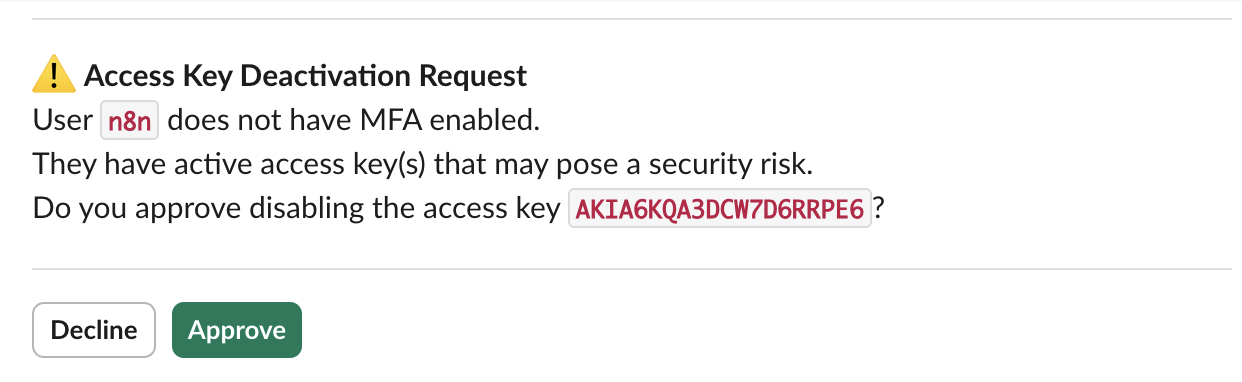"
},
"typeVersion": 1
}
],
"active": false,
"pinData": {},
"settings": {
"executionOrder": "v1"
},
"versionId": "16313843-f027-42f1-a3dd-e8e0be8ad28a",
"connections": {
"e0c92177-d85f-45c1-b0a6-bcb7e9b424e1": {
"main": [
[
{
"node": "ccbe9813-0aa1-410c-b389-abe678fa1d25",
"type": "main",
"index": 0
}
]
]
},
"77d5914f-44dd-4267-be75-f960f477702d": {
"main": [
[
{
"node": "e0c92177-d85f-45c1-b0a6-bcb7e9b424e1",
"type": "main",
"index": 0
}
]
]
},
"5a499cf2-b352-4e15-93ee-03ce2d0df32d": {
"main": [
[
{
"node": "96034aab-7108-4dc8-a525-074ea63b5f3a",
"type": "main",
"index": 0
}
]
]
},
"33fec879-44f5-4b87-aa36-976f440a8cd4": {
"main": [
[]
]
},
"5d112ea5-aff9-4a4e-aa4b-835847a70fb3": {
"main": [
[
{
"node": "e96b7315-a7c9-4fdf-b2cd-dd7ceebd6cd4",
"type": "main",
"index": 0
}
]
]
},
"ccbe9813-0aa1-410c-b389-abe678fa1d25": {
"main": [
[
{
"node": "60809479-ea5c-4446-aa70-5c6d841d09ea",
"type": "main",
"index": 0
}
]
]
},
"e96b7315-a7c9-4fdf-b2cd-dd7ceebd6cd4": {
"main": [
[
{
"node": "33fec879-44f5-4b87-aa36-976f440a8cd4",
"type": "main",
"index": 0
}
]
]
},
"60809479-ea5c-4446-aa70-5c6d841d09ea": {
"main": [
[
{
"node": "f0b5101b-e521-45d9-9d93-9bcffa3a1702",
"type": "main",
"index": 0
},
{
"node": "5a499cf2-b352-4e15-93ee-03ce2d0df32d",
"type": "main",
"index": 0
}
]
]
},
"96034aab-7108-4dc8-a525-074ea63b5f3a": {
"main": [
[
{
"node": "5d112ea5-aff9-4a4e-aa4b-835847a70fb3",
"type": "main",
"index": 0
}
]
]
}
}
}자주 묻는 질문
이 워크플로우를 어떻게 사용하나요?
위의 JSON 구성 코드를 복사하여 n8n 인스턴스에서 새 워크플로우를 생성하고 "JSON에서 가져오기"를 선택한 후, 구성을 붙여넣고 필요에 따라 인증 설정을 수정하세요.
이 워크플로우는 어떤 시나리오에 적합한가요?
고급 - 보안 운영, 멀티모달 AI
유료인가요?
이 워크플로우는 완전히 무료이며 직접 가져와 사용할 수 있습니다. 다만, 워크플로우에서 사용하는 타사 서비스(예: OpenAI API)는 사용자 직접 비용을 지불해야 할 수 있습니다.
관련 워크플로우 추천
AWS ACM 인증서 자동 갱신 (Slack 승인 포함)
Slack 승인 워크플로가 포함된 AWS 인증서 자동 갱신
Slack
Filter
Schedule Trigger
+
Slack
Filter
Schedule Trigger
14 노드Trung Tran
보안 운영
챗봇 및 GPT-4.1을 포함한 자동화 Slack 채널 검토 워크플로
자동화된 Slack 채널 비활성 감사 및 보고서 생성, 작업 공간 정리용
Code
Slack
Filter
+
Code
Slack
Filter
16 노드Trung Tran
AI 요약
AWS 자동화 SSL/TLS 인증 만료 보고서
사용AWS ACM과 AI로 Slack과 이메일에서 SSL/TLS 인증 만료 보고서 생성
Set
Code
Slack
+
Set
Code
Slack
23 노드Trung Tran
AI 요약
Slack 후보자 평가를 위한 AI 기반 챗봇 구축
AI 이력서 분석 및 후보자 평가: Slack과 Google 스프레드시트 통합
If
Code
Slack
+
If
Code
Slack
29 노드Trung Tran
AI 챗봇
스마트 공급업체 계약 갱신 및 알림 워크플로우 (GPT 4.1 mini 사용)
GPT-4.1 mini, Slack 및 Gmail을 사용한 공급업체 계약 갱신 및 알림 자동화
If
Code
Slack
+
If
Code
Slack
21 노드Trung Tran
문서 추출
만료된 AWS ACM 인증서를 정리하고 Slack 승인 필요
Slack을 통해 만료된 AWS ACM 인증서를 정리하기 위해 승인
Slack
Filter
Schedule Trigger
+
Slack
Filter
Schedule Trigger
14 노드Trung Tran
데브옵스
워크플로우 정보
난이도
고급
노드 수19
카테고리2
노드 유형7
저자

Trung Tran
@trungtranEmpowering small and medium businesses with smart automation and practical AI, no big tech team required.
외부 링크
n8n.io에서 보기 →
이 워크플로우 공유