Gmail Agent
Ceci est unAI Chatbot, Multimodal AIworkflow d'automatisation du domainecontenant 12 nœuds.Utilise principalement des nœuds comme GmailTool, Agent, GoogleSheetsTool, ChatTrigger, LmChatGoogleGemini. Automatisation des tâches Gmail avec l'assistant Gemini AI et la gestion des contacts
- •Compte Google et informations d'identification Gmail API
- •Informations d'identification Google Sheets API
- •Clé API Google Gemini
Nœuds utilisés (12)
Catégorie
{
"id": "dCoGIILwTYxSwiHV",
"meta": {
"instanceId": "061ca141d020a6e1355b8c7fe05f92a699e37e92079ad2e150a506ee8bbe9e11"
},
"name": "Gmail Agent",
"tags": [],
"nodes": [
{
"id": "bd41a12c-009b-4812-9807-a68f75a09a81",
"name": "À la réception d'un message chat",
"type": "@n8n/n8n-nodes-langchain.chatTrigger",
"position": [
752,
288
],
"webhookId": "a5718612-cc72-403e-9ee5-b5ad46da024f",
"parameters": {
"options": {}
},
"typeVersion": 1.1
},
{
"id": "a6cfb7de-5f06-437c-a509-9b45ebcfa14c",
"name": "Agent IA",
"type": "@n8n/n8n-nodes-langchain.agent",
"position": [
1008,
288
],
"parameters": {
"options": {
"systemMessage": "=You are Rakin’s smart Gmail assistant.\n\nInstructions:\n\nFor any Gmail-related task from Rakin, use the appropriate Gmail tool (Send, Reply, Label, Delete, Get Many).\n\nIf only a name is given (no email), fetch the email from Google Sheets.\n\nAuto-complete any missing details (links, answers, summaries) needed for emails or replies.\n\nApply relevant labels like:\n\nyoutube-viewers\nsales-inquiry\nmeeting-request\npotential-clients\ncollaboration-requests\n\nwhen appropriate.\n\nStay efficient, accurate, and helpful at all times."
}
},
"typeVersion": 2
},
{
"id": "2387aefe-f80c-4e94-b516-1afea31163e7",
"name": "Envoyer",
"type": "n8n-nodes-base.gmailTool",
"position": [
912,
496
],
"webhookId": "f82621ed-6e2e-464b-98c4-c81523615c43",
"parameters": {
"sendTo": "={{ /*n8n-auto-generated-fromAI-override*/ $fromAI('To', ``, 'string') }}",
"message": "={{ /*n8n-auto-generated-fromAI-override*/ $fromAI('Message', ``, 'string') }}",
"options": {
"appendAttribution": false
},
"subject": "={{ /*n8n-auto-generated-fromAI-override*/ $fromAI('Subject', ``, 'string') }}",
"emailType": "text"
},
"typeVersion": 2.1
},
{
"id": "90f756fd-d40d-4475-a02d-ddf9592d655b",
"name": "Répondre",
"type": "n8n-nodes-base.gmailTool",
"position": [
1024,
496
],
"webhookId": "f82621ed-6e2e-464b-98c4-c81523615c43",
"parameters": {
"message": "={{ /*n8n-auto-generated-fromAI-override*/ $fromAI('Message', ``, 'string') }}",
"options": {
"appendAttribution": false
},
"emailType": "text",
"messageId": "={{ /*n8n-auto-generated-fromAI-override*/ $fromAI('Message_ID', ``, 'string') }}",
"operation": "reply"
},
"typeVersion": 2.1
},
{
"id": "7eb3e8d2-cc51-403d-ae01-71078a207513",
"name": "Étiqueter",
"type": "n8n-nodes-base.gmailTool",
"position": [
1152,
496
],
"webhookId": "f82621ed-6e2e-464b-98c4-c81523615c43",
"parameters": {
"labelIds": "={{ /*n8n-auto-generated-fromAI-override*/ $fromAI('Label_Names_or_IDs', ``, 'string') }}",
"messageId": "={{ /*n8n-auto-generated-fromAI-override*/ $fromAI('Message_ID', ``, 'string') }}",
"operation": "addLabels"
},
"typeVersion": 2.1
},
{
"id": "34450898-1c3b-4755-848d-93a5c3076d83",
"name": "Supprimer",
"type": "n8n-nodes-base.gmailTool",
"position": [
1264,
496
],
"webhookId": "f82621ed-6e2e-464b-98c4-c81523615c43",
"parameters": {
"messageId": "={{ /*n8n-auto-generated-fromAI-override*/ $fromAI('Message_ID', ``, 'string') }}",
"operation": "delete"
},
"typeVersion": 2.1
},
{
"id": "862846c3-3488-4932-a93d-69287299e971",
"name": "Obtenir plusieurs",
"type": "n8n-nodes-base.gmailTool",
"position": [
1392,
496
],
"webhookId": "f82621ed-6e2e-464b-98c4-c81523615c43",
"parameters": {
"simple": "={{ /*n8n-auto-generated-fromAI-override*/ $fromAI('Simplify', ``, 'boolean') }}",
"filters": {},
"options": {},
"operation": "getAll",
"returnAll": "={{ /*n8n-auto-generated-fromAI-override*/ $fromAI('Return_All', ``, 'boolean') }}"
},
"typeVersion": 2.1
},
{
"id": "1e39bc28-629a-4902-9e92-ed3d43296ed5",
"name": "Feuille",
"type": "n8n-nodes-base.googleSheetsTool",
"position": [
1504,
496
],
"parameters": {
"options": {},
"sheetName": {
"__rl": true,
"mode": "list",
"value": "gid=0",
"cachedResultUrl": "https://docs.google.com/spreadsheets/d/1UTOyNDNeRJj6nRuladtP61ljeZg6xXK3O1Kn3Dq7t_A/edit#gid=0",
"cachedResultName": "Sheet1"
},
"documentId": {
"__rl": true,
"mode": "list",
"value": "1UTOyNDNeRJj6nRuladtP61ljeZg6xXK3O1Kn3Dq7t_A",
"cachedResultUrl": "https://docs.google.com/spreadsheets/d/1UTOyNDNeRJj6nRuladtP61ljeZg6xXK3O1Kn3Dq7t_A/edit?usp=drivesdk",
"cachedResultName": "Contact Details"
}
},
"typeVersion": 4.6
},
{
"id": "f7320f18-2a7b-4c55-99eb-1e68ad348b51",
"name": "Gemini",
"type": "@n8n/n8n-nodes-langchain.lmChatGoogleGemini",
"position": [
672,
496
],
"parameters": {
"options": {}
},
"typeVersion": 1
},
{
"id": "c8857e6d-f0da-4d54-a7b4-c57009ce65d9",
"name": "Mémoire",
"type": "@n8n/n8n-nodes-langchain.memoryBufferWindow",
"position": [
784,
496
],
"parameters": {},
"typeVersion": 1.3
},
{
"id": "133b9714-bf54-440f-8e1b-79e5be3463f6",
"name": "Note adhésive",
"type": "n8n-nodes-base.stickyNote",
"position": [
-64,
-304
],
"parameters": {
"color": 4,
"width": 660,
"height": 980,
"content": "# 🛠️ Setup Guide\n### 👤 Author: [Rakin Jakaria](https://www.youtube.com/@rakinjakaria)\n### 🔌 Steps to Connect:\n1. **Gmail OAuth2 Setup** \n - Connect your Gmail account to n8n using OAuth2 authentication.\n - Go to **Credentials** in n8n and create a new **Gmail OAuth2** credential.\n - Follow the authentication flow to authorize n8n to access your Gmail account.\n - Apply this credential to all Gmail nodes (Send, Reply, Label, Delete, Get Many).\n\n2. **Google Gemini API Key** \n - Visit [Google AI Studio](https://aistudio.google.com/) and generate your Gemini API key.\n - Create a new **Google Gemini (PaLM) API** credential in n8n.\n - Paste your API key into the **Gemini** language model node.\n\n3. **Google Sheets Integration** \n - Set up **Google Sheets OAuth2** credentials in n8n.\n - Create or connect to your existing Google Sheets document for contact management.\n - Update the **Sheet** node with your specific spreadsheet ID and sheet name.\n - Ensure your sheet has columns for names and email addresses.\n\n4. **Chat Trigger Configuration** \n - The **Chat Trigger** node creates a webhook URL for your Gmail agent.\n - Copy the webhook URL from the Chat Trigger node.\n - Use this URL to interact with your Gmail agent via chat interface.\n\n5. **AI Agent System Prompt Customization** \n - Modify the system message in the **AI Agent** node to match your specific needs.\n - Update the predefined labels (youtube-viewers, sales-inquiry, etc.) to your Gmail labels.\n - Customize the assistant's name and behavior instructions.\n\n6. **Memory Configuration** \n - The **Memory** node stores conversation context.\n - Adjust the buffer window size based on your chat length requirements.\n\n---\n💡 **Pro Tips:**\n- Test each Gmail operation individually before running the full workflow.\n- Create Gmail labels beforehand for better email organization.\n- Monitor your Google API usage to avoid rate limits.\n\nNeed help? Check out Rakin's [YouTube Tutorials](https://www.youtube.com/@rakinjakaria) for detailed setup instructions."
},
"typeVersion": 1
},
{
"id": "fc096be2-2970-4170-badd-e98cab6feb5d",
"name": "Note adhésive 3",
"type": "n8n-nodes-base.stickyNote",
"position": [
656,
-304
],
"parameters": {
"color": 4,
"width": 480,
"height": 448,
"content": "## Start here: Step-by Step Youtube Tutorial :star:\n[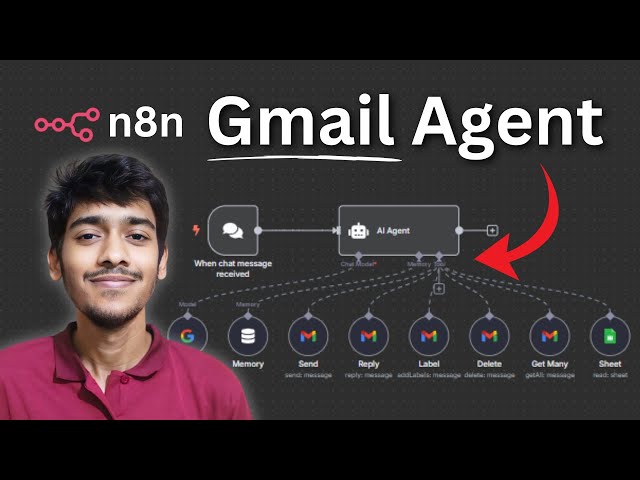](https://youtu.be/Qogyc2mPa80?si=_TcQZjBdtLHy2mdz)"
},
"typeVersion": 1
}
],
"active": false,
"pinData": {},
"settings": {
"executionOrder": "v1"
},
"versionId": "5d7c251c-1d3f-476e-9090-f101d95bdbea",
"connections": {
"2387aefe-f80c-4e94-b516-1afea31163e7": {
"ai_tool": [
[
{
"node": "a6cfb7de-5f06-437c-a509-9b45ebcfa14c",
"type": "ai_tool",
"index": 0
}
]
]
},
"7eb3e8d2-cc51-403d-ae01-71078a207513": {
"ai_tool": [
[
{
"node": "a6cfb7de-5f06-437c-a509-9b45ebcfa14c",
"type": "ai_tool",
"index": 0
}
]
]
},
"90f756fd-d40d-4475-a02d-ddf9592d655b": {
"ai_tool": [
[
{
"node": "a6cfb7de-5f06-437c-a509-9b45ebcfa14c",
"type": "ai_tool",
"index": 0
}
]
]
},
"1e39bc28-629a-4902-9e92-ed3d43296ed5": {
"ai_tool": [
[
{
"node": "a6cfb7de-5f06-437c-a509-9b45ebcfa14c",
"type": "ai_tool",
"index": 0
}
]
]
},
"34450898-1c3b-4755-848d-93a5c3076d83": {
"ai_tool": [
[
{
"node": "a6cfb7de-5f06-437c-a509-9b45ebcfa14c",
"type": "ai_tool",
"index": 0
}
]
]
},
"f7320f18-2a7b-4c55-99eb-1e68ad348b51": {
"ai_languageModel": [
[
{
"node": "a6cfb7de-5f06-437c-a509-9b45ebcfa14c",
"type": "ai_languageModel",
"index": 0
}
]
]
},
"c8857e6d-f0da-4d54-a7b4-c57009ce65d9": {
"ai_memory": [
[
{
"node": "a6cfb7de-5f06-437c-a509-9b45ebcfa14c",
"type": "ai_memory",
"index": 0
}
]
]
},
"862846c3-3488-4932-a93d-69287299e971": {
"ai_tool": [
[
{
"node": "a6cfb7de-5f06-437c-a509-9b45ebcfa14c",
"type": "ai_tool",
"index": 0
}
]
]
},
"bd41a12c-009b-4812-9807-a68f75a09a81": {
"main": [
[
{
"node": "a6cfb7de-5f06-437c-a509-9b45ebcfa14c",
"type": "main",
"index": 0
}
]
]
}
}
}Comment utiliser ce workflow ?
Copiez le code de configuration JSON ci-dessus, créez un nouveau workflow dans votre instance n8n et sélectionnez "Importer depuis le JSON", collez la configuration et modifiez les paramètres d'authentification selon vos besoins.
Dans quelles scénarios ce workflow est-il adapté ?
Intermédiaire - Chatbot IA, IA Multimodale
Est-ce payant ?
Ce workflow est entièrement gratuit et peut être utilisé directement. Veuillez noter que les services tiers utilisés dans le workflow (comme l'API OpenAI) peuvent nécessiter un paiement de votre part.
Workflows recommandés

Rakin Jakaria
@rakinjakariaPartager ce workflow