Importer des flux de chat multi-agents Flowise dans un chatbot n8n et personnaliser la marque
Ceci est unEngineering, AIworkflow d'automatisation du domainecontenant 7 nœuds.Utilise principalement des nœuds comme Set, HttpRequest, ChatTrigger, combinant la technologie d'intelligence artificielle pour une automatisation intelligente. Utiliser les flux de chat multi-agents Flowise pour créer un chatbot IA sur mesure pour un site web
- •Peut nécessiter les informations d'identification d'authentification de l'API cible
Nœuds utilisés (7)
Catégorie
{
"id": "IlTvU5j9eLTYb06I",
"meta": {
"instanceId": "a4bfc93e975ca233ac45ed7c9227d84cf5a2329310525917adaf3312e10d5462",
"templateCredsSetupCompleted": true
},
"name": "Import Flowise Multi-Agent Chatflows in n8n Chatbot and Branded it",
"tags": [],
"nodes": [
{
"id": "4eebb2dd-0879-4ee3-aa07-f5bc180f3afd",
"name": "À la réception du message",
"type": "@n8n/n8n-nodes-langchain.chatTrigger",
"position": [
-720,
0
],
"webhookId": "8465c3be-42ca-4489-8dde-815812206e61",
"parameters": {
"mode": "webhook",
"public": true,
"options": {
"allowedOrigins": "*"
}
},
"typeVersion": 1.1
},
{
"id": "cdd4781a-fb3a-492d-80a4-d75841dd458c",
"name": "Edit Fields",
"type": "n8n-nodes-base.set",
"position": [
-280,
0
],
"parameters": {
"options": {},
"assignments": {
"assignments": [
{
"id": "6a50a699-9598-452a-bc38-a87e2be9084c",
"name": "output",
"type": "string",
"value": "={{ $json.text }}"
}
]
}
},
"typeVersion": 3.4
},
{
"id": "f63fd39c-014b-428d-81a5-f7a675dbfeac",
"name": "Note adhésive",
"type": "n8n-nodes-base.stickyNote",
"position": [
20,
-960
],
"parameters": {
"color": 6,
"width": 800,
"height": 220,
"content": "### Enable n8n CDN on your website\n<link href=\"https://cdn.jsdelivr.net/npm/@n8n/chat/dist/style.css\" rel=\"stylesheet\" />\n<script type=\"module\">\n\timport { createChat } from 'https://cdn.jsdelivr.net/npm/@n8n/chat/dist/chat.bundle.es.js';\n\n\tcreateChat({\n\t\twebhookUrl: 'YOUR_PRODUCTION_WEBHOOK_URL'\n\t});\n</script>"
},
"typeVersion": 1
},
{
"id": "209a551f-cb0e-42ae-a53d-78a1e2d96640",
"name": "Note adhésive1",
"type": "n8n-nodes-base.stickyNote",
"position": [
-740,
-960
],
"parameters": {
"color": 3,
"width": 720,
"height": 780,
"content": "## Flowise\n\nFlowise is an open-source, low-code/no-code platform designed to simplify the creation of AI agents and applications powered by large language models (LLMs). It offers a visual interface that allows users to build complex AI workflows without extensive programming knowledge.\n\nFlowise supports integration with various LLM frameworks and tools, making it a versatile choice for building AI-driven applications across different domains.\n\n### Basic Flowise Multi-Agent Chatflows:\n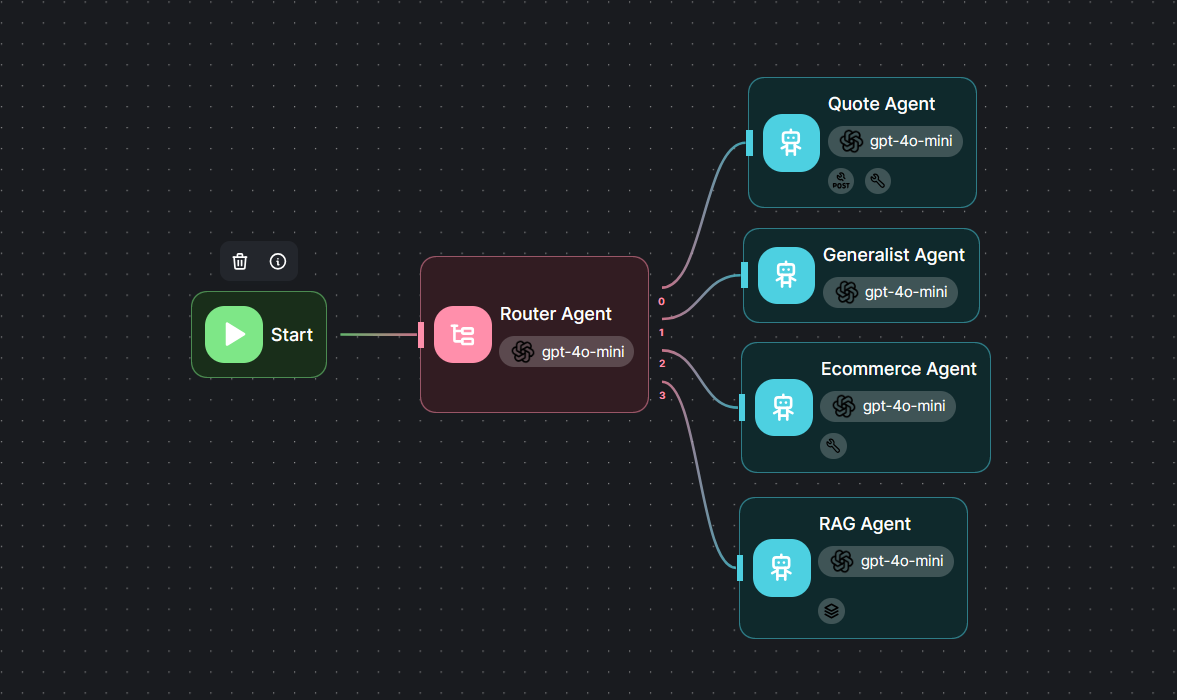\n\nSet Header-Auth Name: Authorization and Value: Bearer FLOWSIE_API"
},
"typeVersion": 1
},
{
"id": "214da305-e6d2-4a1b-9ebf-572f122ba219",
"name": "Note adhésive2",
"type": "n8n-nodes-base.stickyNote",
"position": [
20,
-720
],
"parameters": {
"color": 6,
"width": 800,
"height": 540,
"content": "### Customize n8n Chatbot\n\n```js\ncreateChat({\n\twebhookUrl: '',\n\twebhookConfig: {\n\t\tmethod: 'POST',\n\t\theaders: {}\n\t},\n\ttarget: '#n8n-chat',\n\tmode: 'window',\n\tchatInputKey: 'chatInput',\n\tchatSessionKey: 'sessionId',\n\tmetadata: {},\n\tshowWelcomeScreen: false,\n\tdefaultLanguage: 'en',\n\tinitialMessages: [\n\t\t'Hi there! 👋',\n\t\t'My name is Nathan. How can I assist you today?'\n\t],\n\ti18n: {\n\t\ten: {\n\t\t\ttitle: 'Hi there! 👋',\n\t\t\tsubtitle: \"Start a chat. We're here to help you 24/7.\",\n\t\t\tfooter: '',\n\t\t\tgetStarted: 'New Conversation',\n\t\t\tinputPlaceholder: 'Type your question..',\n\t\t},\n\t},\n});\n```"
},
"typeVersion": 1
},
{
"id": "a31c4b87-43e4-4aa4-a5c3-8b84f7aab84f",
"name": "Note adhésive3",
"type": "n8n-nodes-base.stickyNote",
"position": [
-560,
-60
],
"parameters": {
"height": 220,
"content": "Set FLOWISE_URL and FLOW_ID"
},
"typeVersion": 1
},
{
"id": "14e6f14f-c7a8-4969-bc08-152c8f2f4b63",
"name": "Flowise",
"type": "n8n-nodes-base.httpRequest",
"position": [
-500,
0
],
"parameters": {
"url": "https://FLOWISEURL/api/v1/prediction/FLOWISE_ID",
"method": "POST",
"options": {},
"jsonBody": "={\n \"question\": \"{{ $json.chatInput }}\"\n}",
"sendBody": true,
"sendHeaders": true,
"specifyBody": "json",
"authentication": "genericCredentialType",
"genericAuthType": "httpHeaderAuth",
"headerParameters": {
"parameters": [
{
"name": "Content-Type",
"value": "application/json"
}
]
}
},
"credentials": {
"httpHeaderAuth": {
"id": "OzvOPMztvvv1Duex",
"name": "FLowise API"
}
},
"typeVersion": 4.2
}
],
"active": false,
"pinData": {},
"settings": {
"executionOrder": "v1"
},
"versionId": "054d4347-07c9-4c18-87e6-83fc08adeee9",
"connections": {
"14e6f14f-c7a8-4969-bc08-152c8f2f4b63": {
"main": [
[
{
"node": "cdd4781a-fb3a-492d-80a4-d75841dd458c",
"type": "main",
"index": 0
}
]
]
},
"When chat message received": {
"main": [
[
{
"node": "14e6f14f-c7a8-4969-bc08-152c8f2f4b63",
"type": "main",
"index": 0
}
]
]
}
}
}Comment utiliser ce workflow ?
Copiez le code de configuration JSON ci-dessus, créez un nouveau workflow dans votre instance n8n et sélectionnez "Importer depuis le JSON", collez la configuration et modifiez les paramètres d'authentification selon vos besoins.
Dans quelles scénarios ce workflow est-il adapté ?
Intermédiaire - Ingénierie, Intelligence Artificielle
Est-ce payant ?
Ce workflow est entièrement gratuit et peut être utilisé directement. Veuillez noter que les services tiers utilisés dans le workflow (comme l'API OpenAI) peuvent nécessiter un paiement de votre part.
Workflows recommandés

Davide
@n3witaliaFull-stack Web Developer based in Italy specialising in Marketing & AI-powered automations. For business enquiries, send me an email at info@n3w.it or add me on Linkedin.com/in/davideboizza
Partager ce workflow