Informe automatizado de expiración de certificados SSL/TLS de AWS
Este es unAI Summarization, Multimodal AIflujo de automatización del dominio deautomatización que contiene 23 nodos.Utiliza principalmente nodos como Set, Code, Slack, SendGrid, GoogleDrive. Usar AWS ACM e IA para generar informes de caducidad de certificados SSL/TLS para Slack y correo electrónico
- •Bot Token de Slack o URL de Webhook
- •Credenciales de API de Google Drive
- •Pueden requerirse credenciales de autenticación para la API de destino
- •Access Key y Secret de AWS
- •Clave de API de OpenAI
Nodos utilizados (23)
Categoría
{
"id": "TK91m9bEjdq5Nlgu",
"meta": {
"instanceId": "4a2e6764ba7a6bc9890d9225f4b21d570ce88fc9bd57549c89057fcee58fed0f",
"templateCredsSetupCompleted": true
},
"name": "Automated SSL/TLS Certificate Expiry Report for AWS",
"tags": [
{
"id": "ZWDTpzMgM2j0ZGMO",
"name": "acm",
"createdAt": "2025-08-20T04:24:13.252Z",
"updatedAt": "2025-08-20T04:24:13.252Z"
},
{
"id": "hvp6nueQ4hpIJWbY",
"name": "aws",
"createdAt": "2025-08-17T05:47:27.209Z",
"updatedAt": "2025-08-17T05:47:27.209Z"
}
],
"nodes": [
{
"id": "72c7e0a7-e1bf-40da-b946-f7bc2261bbae",
"name": "Obtener múltiples certificados",
"type": "n8n-nodes-base.awsCertificateManager",
"position": [
224,
48
],
"parameters": {
"options": {},
"operation": "getMany"
},
"credentials": {
"aws": {
"id": "IZYsJuHhfVJ3PIrC",
"name": "ap-southeast-1"
}
},
"typeVersion": 1
},
{
"id": "8de106a8-5abb-4194-9179-b3310cd99ede",
"name": "Nota adhesiva",
"type": "n8n-nodes-base.stickyNote",
"position": [
-1136,
-800
],
"parameters": {
"color": 4,
"width": 928,
"height": 2080,
"content": "# Automated SSL/TLS Certificate Expiry Report for AWS\n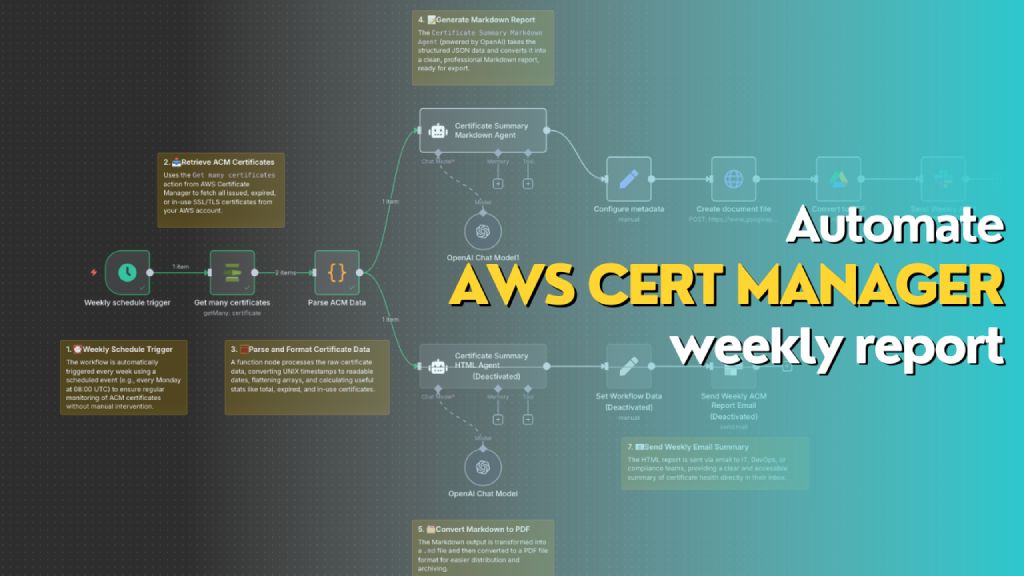\n> Automatically generates a weekly report of all AWS ACM certificates, including status, expiry dates, and renewal eligibility. The workflow formats the data into both Markdown (for PDF export to Slack) and HTML (for email summary), helping teams stay on top of certificate compliance and expiration risks.\n\n## **Who’s it for**\nThis workflow is designed for **DevOps engineers**, **cloud administrators**, and **compliance teams** who manage AWS infrastructure and need **automated weekly visibility** into the status of their SSL/TLS certificates in **AWS Certificate Manager (ACM)**. It's ideal for teams that want to reduce the risk of expired certs, track renewal eligibility, and maintain reporting for audit or operational purposes.\n\n## **How it works / What it does**\nThis n8n workflow performs the following actions on a weekly schedule:\n\n1. **Trigger**: Automatically runs once a week using the `Weekly schedule trigger`.\n2. **Fetch Certificates**: Uses `Get many certificates` action from AWS Certificate Manager to retrieve all certificate records.\n3. **Parse Data**: Processes and reformats certificate data (dates, booleans, SANs, etc.) into a clean JSON object.\n4. **Generate Reports**:\n - 📄 **Markdown Report**: Uses the `Certificate Summary Markdown Agent` (OpenAI) to generate a Markdown report for PDF export.\n - 🌐 **HTML Report**: Uses the `Certificate Summary HTML Agent` to generate a styled HTML report for email.\n5. **Deliver Reports**:\n - Converts Markdown to PDF and sends it to Slack as a file.\n - Sends HTML content as a formatted email.\n\n## **How to set up**\n\n1. **Configure AWS Credentials** in n8n to allow access to AWS ACM.\n2. Create a new workflow and use the following nodes in sequence:\n - `Schedule Trigger`: Weekly (e.g., every Monday at 08:00 UTC)\n - `AWS ACM → Get many certificates`\n - `Function Node → Parse ACM Data`: Converts and summarizes certificate metadata\n - `OpenAI Chat Node (Markdown Agent)` with a system/user prompt to generate Markdown\n - `Configure Metadata` → Define file name and MIME type (`.md`)\n - `Create document file` → Converts Markdown to document stream\n - `Convert to PDF`\n - `Slack Node` → Upload the PDF to a channel\n - *(Optional)* Add a second `OpenAI Chat Node` for generating HTML and sending it via email\n\n3. **Connect Output**:\n - Markdown report → Slack file upload\n - HTML report → Email node with embedded HTML\n\n## **Requirements**\n\n- 🟩 **n8n instance** (self-hosted or cloud)\n- 🟦 **AWS account** with access to ACM\n- 🟨 **OpenAI API key** (for ChatGPT Agent)\n- 🟥 **Slack webhook or OAuth credentials** (for file upload)\n- 📧 **Email integration** (e.g., SMTP or SendGrid)\n- 📝 Permissions to write documents (Google Drive / file node)\n\n## **How to customize the workflow**\n\n- **Change report frequency**: Adjust the `Weekly schedule trigger` to daily or monthly as needed.\n- **Filter certificates**:\n - Modify the function node to only include `EXPIRED`, `IN_USE`, or `INELIGIBLE` certs.\n - Add tags or domains to include/exclude.\n- **Add visuals**: Enhance the HTML version with colored rows, icons, or company branding.\n- **Change delivery channels**:\n - Replace Slack with Microsoft Teams, Discord, or Telegram.\n - Send Markdown as email attachment instead of PDF.\n- **Integrate ticketing**:\n - Create a JIRA/GitHub issue for each certificate that is `EXPIRED` or `INELIGIBLE`."
},
"typeVersion": 1
},
{
"id": "cdd46941-248b-4f54-8bb1-6be5e6147d95",
"name": "Nota adhesiva1",
"type": "n8n-nodes-base.stickyNote",
"position": [
-96,
240
],
"parameters": {
"width": 272,
"content": "### 1. ⏰ Weekly Schedule Trigger\nThe workflow is automatically triggered every week using a scheduled event (e.g., every Monday at 08:00 UTC) to ensure regular monitoring of ACM certificates without manual intervention."
},
"typeVersion": 1
},
{
"id": "2ccee042-087a-44e2-8682-c005948885d4",
"name": "Nota adhesiva2",
"type": "n8n-nodes-base.stickyNote",
"position": [
112,
-160
],
"parameters": {
"width": 272,
"content": "### 2. 📥 Retrieve ACM Certificates\nUses the `Get many certificates` action from AWS Certificate Manager to fetch all issued, expired, or in-use SSL/TLS certificates from your AWS account."
},
"typeVersion": 1
},
{
"id": "2307a17b-c03d-494a-91ce-e16122cd6886",
"name": "Nota adhesiva3",
"type": "n8n-nodes-base.stickyNote",
"position": [
256,
240
],
"parameters": {
"width": 352,
"content": "### 3. 🧮 Parse and Format Certificate Data\nA function node processes the raw certificate data, converting UNIX timestamps to readable dates, flattening arrays, and calculating useful stats like total, expired, and in-use certificates."
},
"typeVersion": 1
},
{
"id": "ccc49d5b-c69a-4b4e-918a-bd758a9adf8c",
"name": "Nota adhesiva4",
"type": "n8n-nodes-base.stickyNote",
"position": [
656,
-464
],
"parameters": {
"width": 304,
"content": "### 4. 📝 Generate Markdown Report\nThe `Certificate Summary Markdown Agent` (powered by OpenAI) takes the structured JSON data and converts it into a clean, professional Markdown report, ready for export.\n"
},
"typeVersion": 1
},
{
"id": "929c84a2-d3d0-4acf-9034-b7754d8e1fea",
"name": "Nota adhesiva5",
"type": "n8n-nodes-base.stickyNote",
"position": [
656,
624
],
"parameters": {
"width": 304,
"height": 144,
"content": "### 5. 🗂️ Convert Markdown to PDF\nThe Markdown output is transformed into a `.md` file and then converted to a PDF file format for easier distribution and archiving.\n"
},
"typeVersion": 1
},
{
"id": "c4e22b44-9389-4886-a76c-ea38726ad617",
"name": "Nota adhesiva6",
"type": "n8n-nodes-base.stickyNote",
"position": [
1552,
192
],
"parameters": {
"width": 912,
"height": 240,
"content": "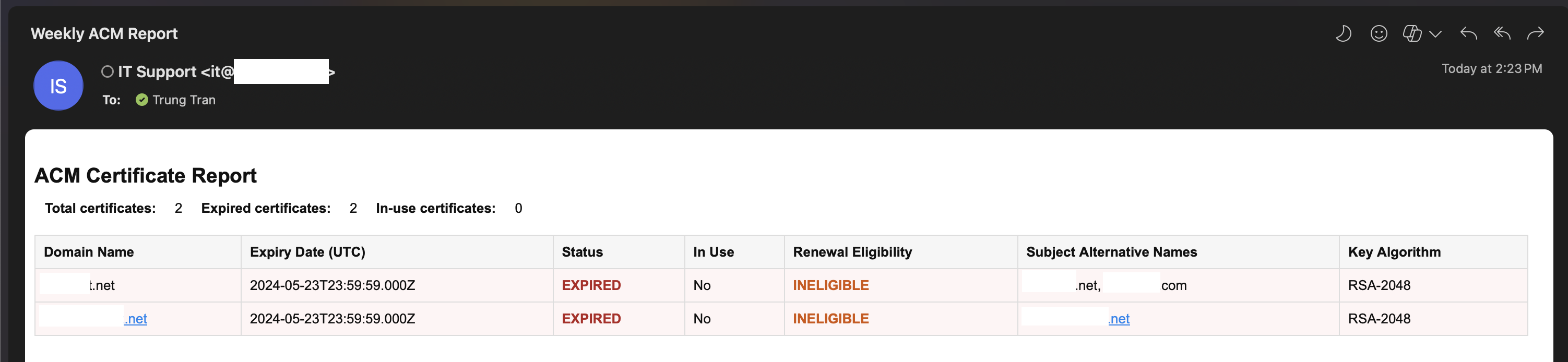"
},
"typeVersion": 1
},
{
"id": "dbfbb8b8-e683-4f8e-9566-e1a45e5442e1",
"name": "Nota adhesiva7",
"type": "n8n-nodes-base.stickyNote",
"position": [
1120,
528
],
"parameters": {
"width": 400,
"height": 112,
"content": "### 7. 📧 Send Weekly Email Summary\nThe HTML report is sent via email to IT, DevOps, or compliance teams, providing a clear and accessible summary of certificate health directly in their inbox.\n"
},
"typeVersion": 1
},
{
"id": "f4bdc2d2-bc98-4eca-9886-1dd303091150",
"name": "Activador de programación semanal",
"type": "n8n-nodes-base.scheduleTrigger",
"position": [
0,
48
],
"parameters": {
"rule": {
"interval": [
{
"field": "weeks",
"triggerAtDay": [
1
]
}
]
}
},
"typeVersion": 1.2
},
{
"id": "a736e395-58bb-4263-b42d-aded26afc6b2",
"name": "OpenAI Modelo de Chat",
"type": "@n8n/n8n-nodes-langchain.lmChatOpenAi",
"position": [
768,
472
],
"parameters": {
"model": {
"__rl": true,
"mode": "list",
"value": "gpt-5-mini",
"cachedResultName": "gpt-5-mini"
},
"options": {}
},
"credentials": {
"openAiApi": {
"id": "PPSwAKeLQYgAPobT",
"name": "OpenAi account"
}
},
"typeVersion": 1.2
},
{
"id": "bca5adc0-9afe-4a4f-ac72-30501fd2b0d8",
"name": "Analizar datos de ACM",
"type": "n8n-nodes-base.code",
"position": [
448,
48
],
"parameters": {
"jsCode": "const items = await $input.all();\nconst certificates = [];\n\nfor (const item of items) {\n const certs = Array.isArray(item.json) ? item.json : [item.json];\n\n for (const cert of certs) {\n certificates.push({\n CertificateArn: cert.CertificateArn,\n DomainName: cert.DomainName,\n Status: cert.Status,\n InUse: cert.InUse ? 'Yes' : 'No',\n CreatedAt: new Date(cert.CreatedAt * 1000).toISOString(),\n IssuedAt: new Date(cert.IssuedAt * 1000).toISOString(),\n NotBefore: new Date(cert.NotBefore * 1000).toISOString(),\n NotAfter: new Date(cert.NotAfter * 1000).toISOString(),\n RenewalEligibility: cert.RenewalEligibility,\n SubjectAlternativeNames: (cert.SubjectAlternativeNameSummaries || []).join(', '),\n KeyAlgorithm: cert.KeyAlgorithm,\n KeyUsages: (cert.KeyUsages || []).join(', '),\n ExtendedKeyUsages: (cert.ExtendedKeyUsages || []).join(', '),\n Type: cert.Type,\n Exported: cert.Exported ? 'Yes' : 'No',\n });\n }\n}\n\nreturn [\n {\n json: {\n certificates,\n total: certificates.length,\n expiredCount: certificates.filter(c => c.Status === 'EXPIRED').length,\n inUseCount: certificates.filter(c => c.InUse === 'Yes').length,\n }\n }\n];"
},
"typeVersion": 2
},
{
"id": "7d2d2fa6-2737-4577-bb13-5d776a9a0a5b",
"name": "OpenAI Modelo de Chat1",
"type": "@n8n/n8n-nodes-langchain.lmChatOpenAi",
"position": [
768,
-32
],
"parameters": {
"model": {
"__rl": true,
"mode": "list",
"value": "gpt-4.1-mini"
},
"options": {}
},
"credentials": {
"openAiApi": {
"id": "PPSwAKeLQYgAPobT",
"name": "OpenAi account"
}
},
"typeVersion": 1.2
},
{
"id": "4f123f70-a491-4201-a2f7-6069cbd735c2",
"name": "Crear archivo de documento",
"type": "n8n-nodes-base.httpRequest",
"position": [
1296,
-152
],
"parameters": {
"url": "https://www.googleapis.com/upload/drive/v3/files?uploadType=multipart&supportsAllDrives=true",
"body": "=--foo_bar_baz\nContent-Type: application/json; charset=UTF-8\n\n{\n \"name\": \"ACM Certificate Weekly Report {{ $today.format('yyyy-MM-dd-hhmm') }}\",\n \"mimeType\": \"application/vnd.google-apps.document\",\n \"parents\": [\"{{ $json['Drive Folder ID'] }}\"]\n}\n\n--foo_bar_baz\nContent-Type: text/markdown; charset=UTF-8\n\n{{ $json['Document Content'] }}\n--foo_bar_baz--",
"method": "POST",
"options": {},
"sendBody": true,
"sendQuery": true,
"contentType": "raw",
"sendHeaders": true,
"authentication": "predefinedCredentialType",
"rawContentType": "multipart/related; boundary=foo_bar_baz",
"queryParameters": {
"parameters": [
{
"name": "uploadType",
"value": "multipart"
},
{
"name": "supportsAllDrives",
"value": "true"
}
]
},
"headerParameters": {
"parameters": [
{
"name": "boundary",
"value": "foo_bar_baz"
}
]
},
"nodeCredentialType": "googleDriveOAuth2Api"
},
"credentials": {
"googleDriveOAuth2Api": {
"id": "fC471es5gk5Mm900",
"name": "Google Drive account"
}
},
"typeVersion": 4.2
},
{
"id": "1ee4f8f4-1e4b-4977-a090-b350e69e6fd8",
"name": "Configurar metadatos",
"type": "n8n-nodes-base.set",
"position": [
1072,
-152
],
"parameters": {
"options": {},
"assignments": {
"assignments": [
{
"id": "1ff0b9a4-7d60-44ec-b047-e49252f1ace9",
"name": "Drive Folder ID",
"type": "string",
"value": "1IPcko8bzogO3W4mxhrW2Q017QA0Lc5MI"
},
{
"id": "75ab39ab-44d0-4272-bceb-fe63bd72a5ba",
"name": "Document Content",
"type": "string",
"value": "={{ $json.output }}"
}
]
}
},
"typeVersion": 3.4
},
{
"id": "44bc4988-b569-4eeb-bee6-af4897743939",
"name": "Convertir a PDF",
"type": "n8n-nodes-base.googleDrive",
"position": [
1520,
-152
],
"parameters": {
"fileId": {
"__rl": true,
"mode": "id",
"value": "={{ $json.id }}"
},
"options": {
"googleFileConversion": {
"conversion": {
"docsToFormat": "application/pdf"
}
}
},
"operation": "download"
},
"credentials": {
"googleDriveOAuth2Api": {
"id": "fC471es5gk5Mm900",
"name": "Google Drive account"
}
},
"typeVersion": 3
},
{
"id": "cf420f55-0b0e-44a7-84c9-d4ec1b5220d0",
"name": "Enviar PDF de informe semanal de ACM",
"type": "n8n-nodes-base.slack",
"position": [
1744,
-152
],
"webhookId": "b4d5b0ca-b166-4000-abf8-df943fe711ae",
"parameters": {
"options": {
"channelId": "C097VAKKPUP",
"initialComment": "📄 The ACM Certificate Weekly Report is ready! Please find the generated PDF file attached for review and next steps. "
},
"resource": "file",
"authentication": "oAuth2"
},
"credentials": {
"slackOAuth2Api": {
"id": "4JSKt9sIRV1KGswQ",
"name": "Slack account"
}
},
"typeVersion": 2.3
},
{
"id": "00e56531-89a5-447b-b99f-e1946c63eba5",
"name": "Enviar correo de informe semanal de ACM",
"type": "n8n-nodes-base.sendGrid",
"disabled": true,
"position": [
1296,
248
],
"parameters": {
"subject": "Weekly ACM Report",
"toEmail": "={{ $json.RecepientEmail }}",
"fromName": "={{ $json.SenderName }}",
"resource": "mail",
"fromEmail": "={{ $json.SenderEmail }}",
"contentType": "text/html",
"contentValue": "={{ $('Certificate Summary HTML Agent').item.json.output }}",
"additionalFields": {}
},
"credentials": {
"sendGridApi": {
"id": "O1IzegT4JdKjrzrj",
"name": "SendGrid account"
}
},
"typeVersion": 1
},
{
"id": "cc91cae2-3dd0-4a16-ba4d-30034521582d",
"name": "Agente de resumen de certificados en Markdown",
"type": "@n8n/n8n-nodes-langchain.agent",
"position": [
672,
-256
],
"parameters": {
"text": "=Here is the list of AWS ACM certificate metadata in JSON format. Please generate a Markdown report including:\n\n- A summary of:\n - Total number of certificates\n - Number of expired certificates\n - Number currently in use\n\n- A table with the following columns:\n - Domain Name\n - Expiry Date (NotAfter)\n - Status (add ⚠️ if expired)\n - In Use\n - Renewal Eligibility\n - Subject Alternative Names\n - Key Algorithm\n\nEnsure the Markdown is readable and ready to be saved as a `.md` file for Slack.\n\nHere is the input data: {{ $json.certificates.toJsonString() }}",
"options": {
"systemMessage": "You are a reporting assistant that converts AWS Certificate Manager (ACM) metadata into a clean, readable, and professional Markdown report.\n\nYour job is to:\n- Generate a summary at the top: total certificates, number expired, number in use\n- Present certificate data as a Markdown table\n- Include key fields: Domain Name, Expiry Date, Status, In Use, Renewal Eligibility, Subject Alternative Names, Key Algorithm\n- Highlight expired certificates with ⚠️ in the Status column\n- Sort the table by expiration date descending (nearest expiry at the top)\n- Output only Markdown content (no explanations or extra comments)"
},
"promptType": "define"
},
"typeVersion": 2.1
},
{
"id": "bb2cdcf1-8e34-4b01-9f79-ad2d8efaafae",
"name": "Agente de resumen de certificados en HTML",
"type": "@n8n/n8n-nodes-langchain.agent",
"disabled": true,
"position": [
672,
248
],
"parameters": {
"text": "=Here is a list of AWS ACM certificates in JSON format. Please generate a summary HTML report with the following fields for each certificate:\n\n- Domain Name \n- Expiry Date \n- Status (highlight if EXPIRED or FAILED) \n- In Use (Yes/No) \n- Renewal Eligibility \n- Subject Alternative Names \n- Key Algorithm \n\nAlso include a summary at the top showing:\n- Total certificates\n- Number of expired certificates\n- Number of in-use certificates\n\nOutput only HTML with a simple table layout.\n\nHere is the data: {{ $json.certificates.toJsonString() }}",
"options": {
"systemMessage": "You are an expert assistant specialized in generating concise, clear, and visually structured HTML reports based on AWS Certificate Manager (ACM) metadata. \n\nYour goal is to help DevOps teams quickly understand the status of their certificates by extracting key information from the given certificate JSON array.\n\nAlways format the output as a valid HTML table, include appropriate headings and summary, and sort certificates by expiration date descending (most urgent first). Use red or orange for expired or ineligible certificates to improve visibility. You do not need to explain the data—just output the HTML for embedding in Slack or email messages."
},
"promptType": "define"
},
"typeVersion": 2.1
},
{
"id": "cf045865-814e-4301-9c73-de39bd3c6585",
"name": "Nota adhesiva8",
"type": "n8n-nodes-base.stickyNote",
"position": [
1296,
-624
],
"parameters": {
"width": 912,
"height": 416,
"content": "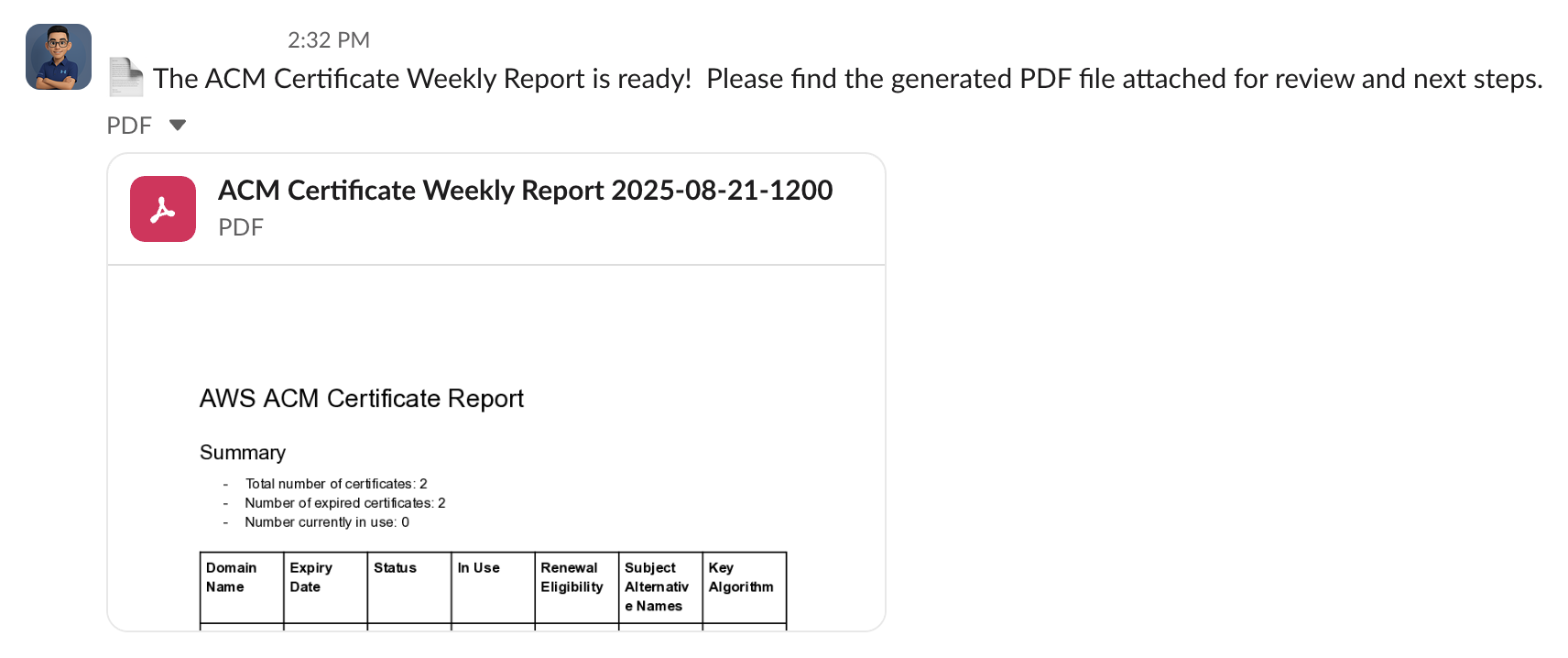"
},
"typeVersion": 1
},
{
"id": "e35484f2-223c-449a-9609-433a04a96109",
"name": "Nota adhesiva9",
"type": "n8n-nodes-base.stickyNote",
"position": [
1984,
-160
],
"parameters": {
"width": 336,
"height": 144,
"content": "### 6. 💬 Send PDF Report to Slack\nThe finalized PDF report is uploaded to a specific Slack channel (e.g., `#it-security` or `#cloud-ops`) so stakeholders are instantly notified of certificate status.\n"
},
"typeVersion": 1
},
{
"id": "5a303f6d-00f4-4668-9b7e-c6bce6187f99",
"name": "Establecer datos del flujo de trabajo",
"type": "n8n-nodes-base.set",
"disabled": true,
"position": [
1072,
248
],
"parameters": {
"options": {},
"assignments": {
"assignments": [
{
"id": "0869e141-3255-4268-ad3b-cb88173b6079",
"name": "SenderEmail",
"type": "string",
"value": "it@emesoft.net"
},
{
"id": "6c2047bb-ff37-45c2-a30c-6b00b6aed409",
"name": "SenderName",
"type": "string",
"value": "IT Support"
},
{
"id": "8b5c7afb-3ac0-4be9-ada8-4488d5acf402",
"name": "RecepientEmail",
"type": "string",
"value": "trung.tran@emesoft.net"
}
]
}
},
"typeVersion": 3.4
}
],
"active": false,
"pinData": {},
"settings": {
"executionOrder": "v1"
},
"versionId": "6985d393-0373-4095-b053-76348faa6904",
"connections": {
"44bc4988-b569-4eeb-bee6-af4897743939": {
"main": [
[
{
"node": "cf420f55-0b0e-44a7-84c9-d4ec1b5220d0",
"type": "main",
"index": 0
}
]
]
},
"bca5adc0-9afe-4a4f-ac72-30501fd2b0d8": {
"main": [
[
{
"node": "bb2cdcf1-8e34-4b01-9f79-ad2d8efaafae",
"type": "main",
"index": 0
},
{
"node": "cc91cae2-3dd0-4a16-ba4d-30034521582d",
"type": "main",
"index": 0
}
]
]
},
"a736e395-58bb-4263-b42d-aded26afc6b2": {
"ai_languageModel": [
[
{
"node": "bb2cdcf1-8e34-4b01-9f79-ad2d8efaafae",
"type": "ai_languageModel",
"index": 0
}
]
]
},
"5a303f6d-00f4-4668-9b7e-c6bce6187f99": {
"main": [
[
{
"node": "00e56531-89a5-447b-b99f-e1946c63eba5",
"type": "main",
"index": 0
}
]
]
},
"7d2d2fa6-2737-4577-bb13-5d776a9a0a5b": {
"ai_languageModel": [
[
{
"node": "cc91cae2-3dd0-4a16-ba4d-30034521582d",
"type": "ai_languageModel",
"index": 0
}
]
]
},
"1ee4f8f4-1e4b-4977-a090-b350e69e6fd8": {
"main": [
[
{
"node": "4f123f70-a491-4201-a2f7-6069cbd735c2",
"type": "main",
"index": 0
}
]
]
},
"4f123f70-a491-4201-a2f7-6069cbd735c2": {
"main": [
[
{
"node": "44bc4988-b569-4eeb-bee6-af4897743939",
"type": "main",
"index": 0
}
]
]
},
"72c7e0a7-e1bf-40da-b946-f7bc2261bbae": {
"main": [
[
{
"node": "bca5adc0-9afe-4a4f-ac72-30501fd2b0d8",
"type": "main",
"index": 0
}
]
]
},
"f4bdc2d2-bc98-4eca-9886-1dd303091150": {
"main": [
[
{
"node": "72c7e0a7-e1bf-40da-b946-f7bc2261bbae",
"type": "main",
"index": 0
}
]
]
},
"bb2cdcf1-8e34-4b01-9f79-ad2d8efaafae": {
"main": [
[
{
"node": "5a303f6d-00f4-4668-9b7e-c6bce6187f99",
"type": "main",
"index": 0
}
]
]
},
"cc91cae2-3dd0-4a16-ba4d-30034521582d": {
"main": [
[
{
"node": "1ee4f8f4-1e4b-4977-a090-b350e69e6fd8",
"type": "main",
"index": 0
}
]
]
}
}
}¿Cómo usar este flujo de trabajo?
Copie el código de configuración JSON de arriba, cree un nuevo flujo de trabajo en su instancia de n8n y seleccione "Importar desde JSON", pegue la configuración y luego modifique la configuración de credenciales según sea necesario.
¿En qué escenarios es adecuado este flujo de trabajo?
Avanzado - Resumen de IA, IA Multimodal
¿Es de pago?
Este flujo de trabajo es completamente gratuito, puede importarlo y usarlo directamente. Sin embargo, tenga en cuenta que los servicios de terceros utilizados en el flujo de trabajo (como la API de OpenAI) pueden requerir un pago por su cuenta.
Flujos de trabajo relacionados recomendados

Trung Tran
@trungtranEmpowering small and medium businesses with smart automation and practical AI, no big tech team required.
Compartir este flujo de trabajo