Automatische AWS ACM-Zertifikatserneuerung (mit Slack-Approval)
Dies ist ein SecOps, Multimodal AI-Bereich Automatisierungsworkflow mit 14 Nodes. Hauptsächlich werden Slack, Filter, ScheduleTrigger, AwsCertificateManager und andere Nodes verwendet. Automatische Verlängerung von AWS-Zertifikaten mit Slack-Genehmigungsworkflow
- •Slack Bot Token oder Webhook URL
- •AWS Access Key und Secret
Verwendete Nodes (14)
Kategorie
{
"id": "Rptc1H55PaNYDVZa",
"meta": {
"instanceId": "4a2e6764ba7a6bc9890d9225f4b21d570ce88fc9bd57549c89057fcee58fed0f",
"templateCredsSetupCompleted": true
},
"name": "AWS ACM Certificate Auto-Renew with Slack approval",
"tags": [],
"nodes": [
{
"id": "19f3e8a0-5957-4c10-8d09-75d88a55402e",
"name": "Zeitplan-Trigger",
"type": "n8n-nodes-base.scheduleTrigger",
"position": [
0,
0
],
"parameters": {
"rule": {
"interval": [
{}
]
}
},
"typeVersion": 1.2
},
{
"id": "76302994-4f45-4353-8b5e-f253fbf28b5a",
"name": "Zertifikat erneuern",
"type": "n8n-nodes-base.awsCertificateManager",
"position": [
1184,
0
],
"parameters": {
"certificateArn": "={{ $('Cert expire in next 7 days?').item.json.CertificateArn }}"
},
"credentials": {
"aws": {
"id": "IZYsJuHhfVJ3PIrC",
"name": "AWS account"
}
},
"typeVersion": 1
},
{
"id": "0620ba39-d94d-4876-a802-b6cc1100e9a9",
"name": "Mehrere Zertifikate abrufen",
"type": "n8n-nodes-base.awsCertificateManager",
"position": [
240,
0
],
"parameters": {
"options": {},
"operation": "getMany"
},
"credentials": {
"aws": {
"id": "IZYsJuHhfVJ3PIrC",
"name": "AWS account"
}
},
"typeVersion": 1
},
{
"id": "6d3e2484-43da-4a0e-8e92-175b4d1ec3fe",
"name": "Nachricht senden und auf Antwort warten",
"type": "n8n-nodes-base.slack",
"position": [
880,
0
],
"webhookId": "768d9aee-c2e3-4b84-8afc-d0fdf1e5964b",
"parameters": {
"user": {
"__rl": true,
"mode": "list",
"value": "U054RMBTVBM",
"cachedResultName": "trung.tran"
},
"message": "=:warning: *AWS ACM Certificate Expiry Alert* :warning:\n\nThe following ACM certificate will expire soon and requires renewal:\n\n*Domain Name:* {{ $json.DomainName }}\n*Alternate Names:* {{ $json.SubjectAlternativeNameSummaries }}\n*Certificate ARN:* {{ $json.CertificateArn }}\n*Key Algorithm:* {{ $json.KeyAlgorithm }}\n*Status:* {{ $json.Status }}\n*Issued At:* {{ $json.IssuedAt.toDateTime('s')}}\n*Expires At:* {{ $json.NotAfter.toDateTime('s')}}\n\nPlease confirm renewal action to proceed.",
"options": {},
"operation": "sendAndWait",
"authentication": "oAuth2"
},
"credentials": {
"slackOAuth2Api": {
"id": "4JSKt9sIRV1KGswQ",
"name": "Slack account"
}
},
"typeVersion": 2.3
},
{
"id": "6e47976b-6eb8-4a42-a777-b23e857f9651",
"name": "Zertifikat läuft in 7 Tagen ab?",
"type": "n8n-nodes-base.filter",
"position": [
528,
0
],
"parameters": {
"options": {},
"conditions": {
"options": {
"version": 2,
"leftValue": "",
"caseSensitive": true,
"typeValidation": "strict"
},
"combinator": "or",
"conditions": [
{
"id": "fe1b749d-3046-465e-b60a-786f5b0e2f99",
"operator": {
"type": "dateTime",
"operation": "before"
},
"leftValue": "={{ $json.NotAfter.toDateTime('s') }}",
"rightValue": "={{ $today.plus(7,'days') }}"
},
{
"id": "8db3e990-dca3-4c23-9d62-e4d25a807588",
"operator": {
"type": "dateTime",
"operation": "before"
},
"leftValue": "={{ $json.NotBefore.toDateTime('s') }}",
"rightValue": "={{ $today }}"
}
]
}
},
"typeVersion": 2.2
},
{
"id": "5a336509-7d02-4c62-8198-04ad2750682f",
"name": "Notiz",
"type": "n8n-nodes-base.stickyNote",
"position": [
-1136,
-576
],
"parameters": {
"width": 928,
"height": 1616,
"content": "# AWS ACM Certificate Auto-Renew with Slack approval\n\n## **Who’s it for**\n- SRE/DevOps teams managing many ACM certs.\n- Cloud ops who want **hands-off renewals** with an **approval step in Slack**.\n- MSPs that need auditable reminders and renewals on schedule.\n\n## **How it works / What it does**\n1. **Schedule Trigger** – runs daily (or your cadence).\n2. **Get many certificates** – fetches ACM certs (paginate if needed).\n3. **Filter: expiring in next 7 days** – keeps items where:\n - `NotAfter` **before** `today + 7d`\n - `NotBefore` **before** `today` (already valid)\n4. **Send message and wait for response (Slack)** – posts a certificate summary and **pauses** until Approve/Reject.\n5. **Renew a certificate** – on **Approve**, calls the renew action for the item.\n\n## **How to set up**\n1. **Credentials**\n - **AWS** in n8n with permissions to list/read/renew certs.\n - **Slack** OAuth (bot in the target channel). \n2. **Schedule Trigger**\n - Set to run once per day (e.g., `09:00` local).\n3. **Get many certificates**\n - Region: your ACM region(s). \n - If you have several regions, loop regions or run multiple branches.\n4. **Filter (IF / Filter node)**\n - Add these two conditions (AND):\n - `{{ $json.NotAfter.toDateTime('s') }}` **is before** `{{ $today.plus(7,'days') }}`\n - `{{ $json.NotBefore.toDateTime('s') }}` **is before** `{{ $today }}`\n5. **Slack → Send & Wait**\n - Message (text input):\n ```\n :warning: *ACM Certificate Expiry Alert* :warning:\n\n *Domain:* {{ $json.DomainName }}\n *SANs:* {{ $json.SubjectAlternativeNameSummaries }}\n *ARN:* {{ $json.CertificateArn }}\n *Algo:* {{ $json.KeyAlgorithm }}\n *Status:* {{ $json.Status }}\n *Issued:* {{ $json.IssuedAt | toDate | formatDate(\"YYYY-MM-DD HH:mm\") }}\n *Expires:* {{ $json.NotAfter | toDate | formatDate(\"YYYY-MM-DD HH:mm\") }}\n\n Approve to start renewal.\n ```\n - Add two buttons: **Approve** / **Reject** (the node will output which was clicked).\n6. **Renew a certificate**\n - Map the **CertificateArn** from the Slack Approved branch.\n\n## **Requirements**\n- n8n (current version with Slack *Send & Wait*).\n- AWS IAM permissions (read + renew ACM), e.g.:\n - `acm:ListCertificates`, `acm:DescribeCertificate`, `acm:RenewCertificate` (plus region access).\n- Slack bot with permission to post & use interactivity in the target channel.\n\n## **How to customize the workflow**\n- **Window size:** change `7` to `14` or `30` days in the filter.\n- **Catch expired**: add an OR path `{{ $json.NotAfter.toDateTime('s') }} is before {{ $today }}` → send a **red** Slack alert.\n- **Auto-renew w/o approval:** bypass Slack and renew directly for low-risk domains.\n- **Multiple regions/accounts:** iterate over a list of regions or assume roles per account.\n- **Logging:** add a Google Sheet/DB append after Slack click with `user`, `time`, `result`.\n- **Escalation:** if no Slack response after N hours, ping `@oncall` or open a ticket.\n\n## **Notes**\n- The Slack node **pauses** execution until a button is clicked—perfect for change control.\n- Time conversions above assume `NotAfter`/`IssuedAt` are Unix seconds (`'s'`). Adjust if your data differs."
},
"typeVersion": 1
},
{
"id": "158aa163-42cb-42d6-b915-c1525983e069",
"name": "Notiz 1",
"type": "n8n-nodes-base.stickyNote",
"position": [
-80,
192
],
"parameters": {
"width": 272,
"content": "### 1. Schedule Trigger\nThe workflow starts on a scheduled basis (e.g., daily at 09:00) to automatically check ACM certificates without manual intervention."
},
"typeVersion": 1
},
{
"id": "38d53502-a32b-4734-a63b-d362f0c16f7d",
"name": "Notiz 2",
"type": "n8n-nodes-base.stickyNote",
"position": [
240,
192
],
"parameters": {
"width": 256,
"content": "### 2. Get Certificates\nFetches all ACM certificates in the configured AWS region(s), including details such as domain names, status, and expiration dates."
},
"typeVersion": 1
},
{
"id": "c41f8bcd-9473-45a5-b8da-08090d024955",
"name": "Notiz 3",
"type": "n8n-nodes-base.stickyNote",
"position": [
528,
192
],
"parameters": {
"content": "### 3. Filter Certificates Expiring Soon\nChecks each certificate and keeps only those that are already valid and will expire within the next 7 days.\n\n"
},
"typeVersion": 1
},
{
"id": "8b46936f-4dfd-44ea-bdda-cd35209d7c61",
"name": "Notiz 4",
"type": "n8n-nodes-base.stickyNote",
"position": [
832,
192
],
"parameters": {
"content": "### 4. Notify via Slack and Wait for Approval\nSends a Slack message with certificate details (domain, ARN, expiration date, status). \nThe workflow pauses here until a user clicks **Approve** or **Reject**."
},
"typeVersion": 1
},
{
"id": "4de9462c-89e2-4a78-87c1-eaeaf0b418a5",
"name": "Notiz 5",
"type": "n8n-nodes-base.stickyNote",
"position": [
1120,
192
],
"parameters": {
"content": "### 5. Renew Certificate\nIf **Approve** is selected in Slack, the workflow triggers AWS ACM to renew the certificate automatically. \nIf **Reject** is clicked, no action is taken, and the workflow ends."
},
"typeVersion": 1
},
{
"id": "d72ec217-74be-481b-bb17-d640a80dfede",
"name": "IT-Administrator benachrichtigen",
"type": "n8n-nodes-base.slack",
"position": [
1456,
0
],
"webhookId": "eacf27c7-db94-47bd-89ad-6f497815398c",
"parameters": {
"text": "=:white_check_mark: *ACM Certificate Renewed Successfully*\n\n*Domain:* {{ $('Cert expire in next 7 days?').item.json.DomainName }}\n*ARN:* {{ $('Cert expire in next 7 days?').item.json.CertificateArn }}\n*Previous Expiry:* {{ $('Cert expire in next 7 days?').item.json.NotAfter.toDateTime('s') }}\n*Renewed At:* {{ $now }}\n\nApproved by: {{ $('Send message and wait for response').item.json.user?.name || $('Send message and wait for response').item.json.username || 'N/A' }}",
"user": {
"__rl": true,
"mode": "list",
"value": "U054RMBTVBM",
"cachedResultName": "trung.tran"
},
"select": "user",
"otherOptions": {},
"authentication": "oAuth2"
},
"credentials": {
"slackOAuth2Api": {
"id": "4JSKt9sIRV1KGswQ",
"name": "Slack account"
}
},
"typeVersion": 2.3
},
{
"id": "5b0e2374-fc3a-49e5-8538-65551f9d5422",
"name": "Notiz 6",
"type": "n8n-nodes-base.stickyNote",
"position": [
1680,
-32
],
"parameters": {
"width": 624,
"height": 192,
"content": "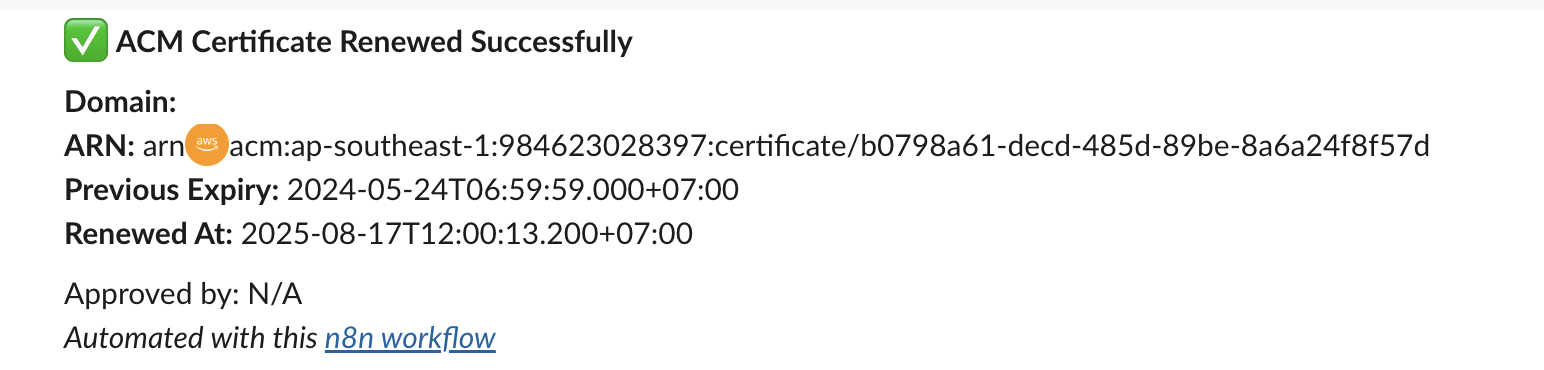"
},
"typeVersion": 1
},
{
"id": "8fd13176-f90c-4fea-bb42-c13d98488d33",
"name": "Notiz 7",
"type": "n8n-nodes-base.stickyNote",
"position": [
1424,
192
],
"parameters": {
"content": "### 6. Notify admin via Slack"
},
"typeVersion": 1
}
],
"active": false,
"pinData": {},
"settings": {
"executionOrder": "v1"
},
"versionId": "e61ccea4-43f6-410d-9036-90d750e3837b",
"connections": {
"19f3e8a0-5957-4c10-8d09-75d88a55402e": {
"main": [
[
{
"node": "0620ba39-d94d-4876-a802-b6cc1100e9a9",
"type": "main",
"index": 0
}
]
]
},
"76302994-4f45-4353-8b5e-f253fbf28b5a": {
"main": [
[
{
"node": "d72ec217-74be-481b-bb17-d640a80dfede",
"type": "main",
"index": 0
}
]
]
},
"0620ba39-d94d-4876-a802-b6cc1100e9a9": {
"main": [
[
{
"node": "6e47976b-6eb8-4a42-a777-b23e857f9651",
"type": "main",
"index": 0
}
]
]
},
"6e47976b-6eb8-4a42-a777-b23e857f9651": {
"main": [
[
{
"node": "6d3e2484-43da-4a0e-8e92-175b4d1ec3fe",
"type": "main",
"index": 0
}
]
]
},
"6d3e2484-43da-4a0e-8e92-175b4d1ec3fe": {
"main": [
[
{
"node": "76302994-4f45-4353-8b5e-f253fbf28b5a",
"type": "main",
"index": 0
}
]
]
}
}
}Wie verwende ich diesen Workflow?
Kopieren Sie den obigen JSON-Code, erstellen Sie einen neuen Workflow in Ihrer n8n-Instanz und wählen Sie "Aus JSON importieren". Fügen Sie die Konfiguration ein und passen Sie die Anmeldedaten nach Bedarf an.
Für welche Szenarien ist dieser Workflow geeignet?
Fortgeschritten - Sicherheitsbetrieb, Multimodales KI
Ist es kostenpflichtig?
Dieser Workflow ist völlig kostenlos. Beachten Sie jedoch, dass Drittanbieterdienste (wie OpenAI API), die im Workflow verwendet werden, möglicherweise kostenpflichtig sind.
Verwandte Workflows

Trung Tran
@trungtranEmpowering small and medium businesses with smart automation and practical AI, no big tech team required.
Diesen Workflow teilen