AWS-Automatisierung für SSL/TLS-Zertifikatsablaufberichte
Dies ist ein AI Summarization, Multimodal AI-Bereich Automatisierungsworkflow mit 23 Nodes. Hauptsächlich werden Set, Code, Slack, SendGrid, GoogleDrive und andere Nodes verwendet. SSL/TLS-Zertifikatsablaufberichte für Slack und E-Mails mit AWS ACM und KI generieren
- •Slack Bot Token oder Webhook URL
- •Google Drive API-Anmeldedaten
- •Möglicherweise sind Ziel-API-Anmeldedaten erforderlich
- •AWS Access Key und Secret
- •OpenAI API Key
Verwendete Nodes (23)
Kategorie
{
"id": "TK91m9bEjdq5Nlgu",
"meta": {
"instanceId": "4a2e6764ba7a6bc9890d9225f4b21d570ce88fc9bd57549c89057fcee58fed0f",
"templateCredsSetupCompleted": true
},
"name": "Automated SSL/TLS Certificate Expiry Report for AWS",
"tags": [
{
"id": "ZWDTpzMgM2j0ZGMO",
"name": "acm",
"createdAt": "2025-08-20T04:24:13.252Z",
"updatedAt": "2025-08-20T04:24:13.252Z"
},
{
"id": "hvp6nueQ4hpIJWbY",
"name": "aws",
"createdAt": "2025-08-17T05:47:27.209Z",
"updatedAt": "2025-08-17T05:47:27.209Z"
}
],
"nodes": [
{
"id": "72c7e0a7-e1bf-40da-b946-f7bc2261bbae",
"name": "Mehrere Zertifikate abrufen",
"type": "n8n-nodes-base.awsCertificateManager",
"position": [
224,
48
],
"parameters": {
"options": {},
"operation": "getMany"
},
"credentials": {
"aws": {
"id": "IZYsJuHhfVJ3PIrC",
"name": "ap-southeast-1"
}
},
"typeVersion": 1
},
{
"id": "8de106a8-5abb-4194-9179-b3310cd99ede",
"name": "Notiz",
"type": "n8n-nodes-base.stickyNote",
"position": [
-1136,
-800
],
"parameters": {
"color": 4,
"width": 928,
"height": 2080,
"content": "# Automated SSL/TLS Certificate Expiry Report for AWS\n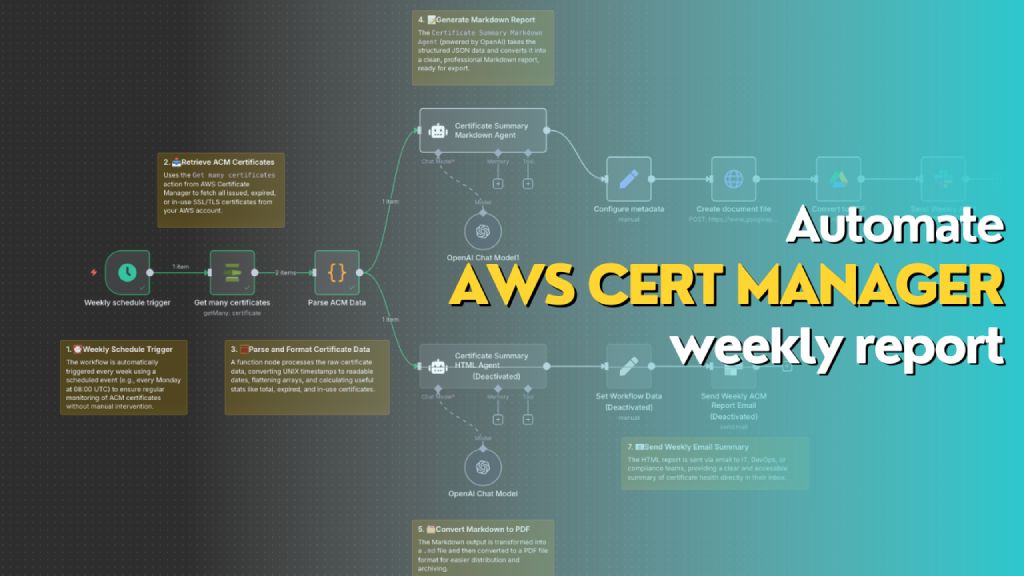\n> Automatically generates a weekly report of all AWS ACM certificates, including status, expiry dates, and renewal eligibility. The workflow formats the data into both Markdown (for PDF export to Slack) and HTML (for email summary), helping teams stay on top of certificate compliance and expiration risks.\n\n## **Who’s it for**\nThis workflow is designed for **DevOps engineers**, **cloud administrators**, and **compliance teams** who manage AWS infrastructure and need **automated weekly visibility** into the status of their SSL/TLS certificates in **AWS Certificate Manager (ACM)**. It's ideal for teams that want to reduce the risk of expired certs, track renewal eligibility, and maintain reporting for audit or operational purposes.\n\n## **How it works / What it does**\nThis n8n workflow performs the following actions on a weekly schedule:\n\n1. **Trigger**: Automatically runs once a week using the `Weekly schedule trigger`.\n2. **Fetch Certificates**: Uses `Get many certificates` action from AWS Certificate Manager to retrieve all certificate records.\n3. **Parse Data**: Processes and reformats certificate data (dates, booleans, SANs, etc.) into a clean JSON object.\n4. **Generate Reports**:\n - 📄 **Markdown Report**: Uses the `Certificate Summary Markdown Agent` (OpenAI) to generate a Markdown report for PDF export.\n - 🌐 **HTML Report**: Uses the `Certificate Summary HTML Agent` to generate a styled HTML report for email.\n5. **Deliver Reports**:\n - Converts Markdown to PDF and sends it to Slack as a file.\n - Sends HTML content as a formatted email.\n\n## **How to set up**\n\n1. **Configure AWS Credentials** in n8n to allow access to AWS ACM.\n2. Create a new workflow and use the following nodes in sequence:\n - `Schedule Trigger`: Weekly (e.g., every Monday at 08:00 UTC)\n - `AWS ACM → Get many certificates`\n - `Function Node → Parse ACM Data`: Converts and summarizes certificate metadata\n - `OpenAI Chat Node (Markdown Agent)` with a system/user prompt to generate Markdown\n - `Configure Metadata` → Define file name and MIME type (`.md`)\n - `Create document file` → Converts Markdown to document stream\n - `Convert to PDF`\n - `Slack Node` → Upload the PDF to a channel\n - *(Optional)* Add a second `OpenAI Chat Node` for generating HTML and sending it via email\n\n3. **Connect Output**:\n - Markdown report → Slack file upload\n - HTML report → Email node with embedded HTML\n\n## **Requirements**\n\n- 🟩 **n8n instance** (self-hosted or cloud)\n- 🟦 **AWS account** with access to ACM\n- 🟨 **OpenAI API key** (for ChatGPT Agent)\n- 🟥 **Slack webhook or OAuth credentials** (for file upload)\n- 📧 **Email integration** (e.g., SMTP or SendGrid)\n- 📝 Permissions to write documents (Google Drive / file node)\n\n## **How to customize the workflow**\n\n- **Change report frequency**: Adjust the `Weekly schedule trigger` to daily or monthly as needed.\n- **Filter certificates**:\n - Modify the function node to only include `EXPIRED`, `IN_USE`, or `INELIGIBLE` certs.\n - Add tags or domains to include/exclude.\n- **Add visuals**: Enhance the HTML version with colored rows, icons, or company branding.\n- **Change delivery channels**:\n - Replace Slack with Microsoft Teams, Discord, or Telegram.\n - Send Markdown as email attachment instead of PDF.\n- **Integrate ticketing**:\n - Create a JIRA/GitHub issue for each certificate that is `EXPIRED` or `INELIGIBLE`."
},
"typeVersion": 1
},
{
"id": "cdd46941-248b-4f54-8bb1-6be5e6147d95",
"name": "Notiz1",
"type": "n8n-nodes-base.stickyNote",
"position": [
-96,
240
],
"parameters": {
"width": 272,
"content": "### 1. ⏰ Weekly Schedule Trigger\nThe workflow is automatically triggered every week using a scheduled event (e.g., every Monday at 08:00 UTC) to ensure regular monitoring of ACM certificates without manual intervention."
},
"typeVersion": 1
},
{
"id": "2ccee042-087a-44e2-8682-c005948885d4",
"name": "Notiz2",
"type": "n8n-nodes-base.stickyNote",
"position": [
112,
-160
],
"parameters": {
"width": 272,
"content": "### 2. 📥 Retrieve ACM Certificates\nUses the `Get many certificates` action from AWS Certificate Manager to fetch all issued, expired, or in-use SSL/TLS certificates from your AWS account."
},
"typeVersion": 1
},
{
"id": "2307a17b-c03d-494a-91ce-e16122cd6886",
"name": "Notiz3",
"type": "n8n-nodes-base.stickyNote",
"position": [
256,
240
],
"parameters": {
"width": 352,
"content": "### 3. 🧮 Parse and Format Certificate Data\nA function node processes the raw certificate data, converting UNIX timestamps to readable dates, flattening arrays, and calculating useful stats like total, expired, and in-use certificates."
},
"typeVersion": 1
},
{
"id": "ccc49d5b-c69a-4b4e-918a-bd758a9adf8c",
"name": "Notiz4",
"type": "n8n-nodes-base.stickyNote",
"position": [
656,
-464
],
"parameters": {
"width": 304,
"content": "### 4. 📝 Generate Markdown Report\nThe `Certificate Summary Markdown Agent` (powered by OpenAI) takes the structured JSON data and converts it into a clean, professional Markdown report, ready for export.\n"
},
"typeVersion": 1
},
{
"id": "929c84a2-d3d0-4acf-9034-b7754d8e1fea",
"name": "Notiz5",
"type": "n8n-nodes-base.stickyNote",
"position": [
656,
624
],
"parameters": {
"width": 304,
"height": 144,
"content": "### 5. 🗂️ Convert Markdown to PDF\nThe Markdown output is transformed into a `.md` file and then converted to a PDF file format for easier distribution and archiving.\n"
},
"typeVersion": 1
},
{
"id": "c4e22b44-9389-4886-a76c-ea38726ad617",
"name": "Notiz6",
"type": "n8n-nodes-base.stickyNote",
"position": [
1552,
192
],
"parameters": {
"width": 912,
"height": 240,
"content": "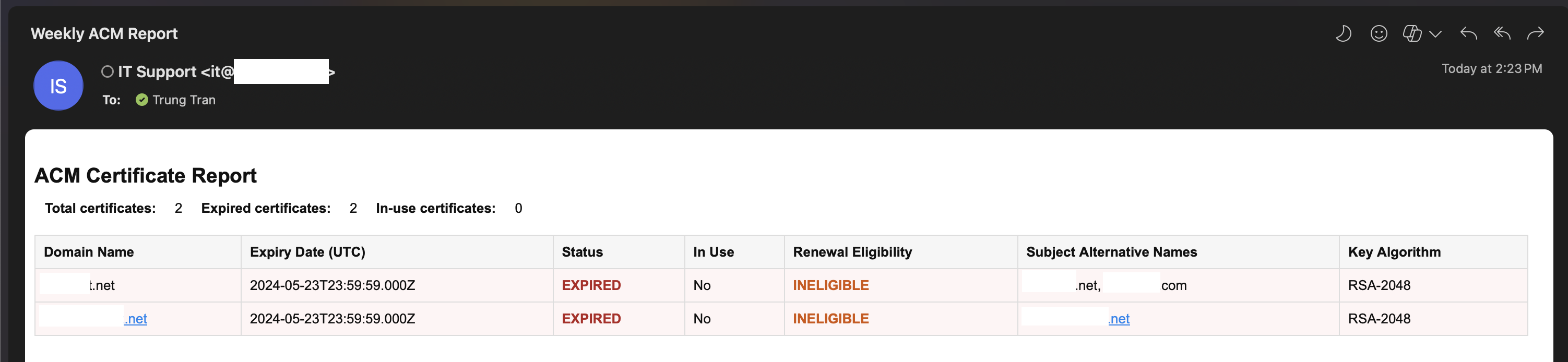"
},
"typeVersion": 1
},
{
"id": "dbfbb8b8-e683-4f8e-9566-e1a45e5442e1",
"name": "Notiz7",
"type": "n8n-nodes-base.stickyNote",
"position": [
1120,
528
],
"parameters": {
"width": 400,
"height": 112,
"content": "### 7. 📧 Send Weekly Email Summary\nThe HTML report is sent via email to IT, DevOps, or compliance teams, providing a clear and accessible summary of certificate health directly in their inbox.\n"
},
"typeVersion": 1
},
{
"id": "f4bdc2d2-bc98-4eca-9886-1dd303091150",
"name": "Wöchentlicher Zeitplan-Trigger",
"type": "n8n-nodes-base.scheduleTrigger",
"position": [
0,
48
],
"parameters": {
"rule": {
"interval": [
{
"field": "weeks",
"triggerAtDay": [
1
]
}
]
}
},
"typeVersion": 1.2
},
{
"id": "a736e395-58bb-4263-b42d-aded26afc6b2",
"name": "OpenAI Chat-Modell",
"type": "@n8n/n8n-nodes-langchain.lmChatOpenAi",
"position": [
768,
472
],
"parameters": {
"model": {
"__rl": true,
"mode": "list",
"value": "gpt-5-mini",
"cachedResultName": "gpt-5-mini"
},
"options": {}
},
"credentials": {
"openAiApi": {
"id": "PPSwAKeLQYgAPobT",
"name": "OpenAi account"
}
},
"typeVersion": 1.2
},
{
"id": "bca5adc0-9afe-4a4f-ac72-30501fd2b0d8",
"name": "ACM-Daten parsen",
"type": "n8n-nodes-base.code",
"position": [
448,
48
],
"parameters": {
"jsCode": "const items = await $input.all();\nconst certificates = [];\n\nfor (const item of items) {\n const certs = Array.isArray(item.json) ? item.json : [item.json];\n\n for (const cert of certs) {\n certificates.push({\n CertificateArn: cert.CertificateArn,\n DomainName: cert.DomainName,\n Status: cert.Status,\n InUse: cert.InUse ? 'Yes' : 'No',\n CreatedAt: new Date(cert.CreatedAt * 1000).toISOString(),\n IssuedAt: new Date(cert.IssuedAt * 1000).toISOString(),\n NotBefore: new Date(cert.NotBefore * 1000).toISOString(),\n NotAfter: new Date(cert.NotAfter * 1000).toISOString(),\n RenewalEligibility: cert.RenewalEligibility,\n SubjectAlternativeNames: (cert.SubjectAlternativeNameSummaries || []).join(', '),\n KeyAlgorithm: cert.KeyAlgorithm,\n KeyUsages: (cert.KeyUsages || []).join(', '),\n ExtendedKeyUsages: (cert.ExtendedKeyUsages || []).join(', '),\n Type: cert.Type,\n Exported: cert.Exported ? 'Yes' : 'No',\n });\n }\n}\n\nreturn [\n {\n json: {\n certificates,\n total: certificates.length,\n expiredCount: certificates.filter(c => c.Status === 'EXPIRED').length,\n inUseCount: certificates.filter(c => c.InUse === 'Yes').length,\n }\n }\n];"
},
"typeVersion": 2
},
{
"id": "7d2d2fa6-2737-4577-bb13-5d776a9a0a5b",
"name": "OpenAI Chat-Modell1",
"type": "@n8n/n8n-nodes-langchain.lmChatOpenAi",
"position": [
768,
-32
],
"parameters": {
"model": {
"__rl": true,
"mode": "list",
"value": "gpt-4.1-mini"
},
"options": {}
},
"credentials": {
"openAiApi": {
"id": "PPSwAKeLQYgAPobT",
"name": "OpenAi account"
}
},
"typeVersion": 1.2
},
{
"id": "4f123f70-a491-4201-a2f7-6069cbd735c2",
"name": "Dokumentdatei erstellen",
"type": "n8n-nodes-base.httpRequest",
"position": [
1296,
-152
],
"parameters": {
"url": "https://www.googleapis.com/upload/drive/v3/files?uploadType=multipart&supportsAllDrives=true",
"body": "=--foo_bar_baz\nContent-Type: application/json; charset=UTF-8\n\n{\n \"name\": \"ACM Certificate Weekly Report {{ $today.format('yyyy-MM-dd-hhmm') }}\",\n \"mimeType\": \"application/vnd.google-apps.document\",\n \"parents\": [\"{{ $json['Drive Folder ID'] }}\"]\n}\n\n--foo_bar_baz\nContent-Type: text/markdown; charset=UTF-8\n\n{{ $json['Document Content'] }}\n--foo_bar_baz--",
"method": "POST",
"options": {},
"sendBody": true,
"sendQuery": true,
"contentType": "raw",
"sendHeaders": true,
"authentication": "predefinedCredentialType",
"rawContentType": "multipart/related; boundary=foo_bar_baz",
"queryParameters": {
"parameters": [
{
"name": "uploadType",
"value": "multipart"
},
{
"name": "supportsAllDrives",
"value": "true"
}
]
},
"headerParameters": {
"parameters": [
{
"name": "boundary",
"value": "foo_bar_baz"
}
]
},
"nodeCredentialType": "googleDriveOAuth2Api"
},
"credentials": {
"googleDriveOAuth2Api": {
"id": "fC471es5gk5Mm900",
"name": "Google Drive account"
}
},
"typeVersion": 4.2
},
{
"id": "1ee4f8f4-1e4b-4977-a090-b350e69e6fd8",
"name": "Metadaten konfigurieren",
"type": "n8n-nodes-base.set",
"position": [
1072,
-152
],
"parameters": {
"options": {},
"assignments": {
"assignments": [
{
"id": "1ff0b9a4-7d60-44ec-b047-e49252f1ace9",
"name": "Drive Folder ID",
"type": "string",
"value": "1IPcko8bzogO3W4mxhrW2Q017QA0Lc5MI"
},
{
"id": "75ab39ab-44d0-4272-bceb-fe63bd72a5ba",
"name": "Document Content",
"type": "string",
"value": "={{ $json.output }}"
}
]
}
},
"typeVersion": 3.4
},
{
"id": "44bc4988-b569-4eeb-bee6-af4897743939",
"name": "In PDF konvertieren",
"type": "n8n-nodes-base.googleDrive",
"position": [
1520,
-152
],
"parameters": {
"fileId": {
"__rl": true,
"mode": "id",
"value": "={{ $json.id }}"
},
"options": {
"googleFileConversion": {
"conversion": {
"docsToFormat": "application/pdf"
}
}
},
"operation": "download"
},
"credentials": {
"googleDriveOAuth2Api": {
"id": "fC471es5gk5Mm900",
"name": "Google Drive account"
}
},
"typeVersion": 3
},
{
"id": "cf420f55-0b0e-44a7-84c9-d4ec1b5220d0",
"name": "Wöchentlichen ACM-Bericht (PDF) senden",
"type": "n8n-nodes-base.slack",
"position": [
1744,
-152
],
"webhookId": "b4d5b0ca-b166-4000-abf8-df943fe711ae",
"parameters": {
"options": {
"channelId": "C097VAKKPUP",
"initialComment": "📄 The ACM Certificate Weekly Report is ready! Please find the generated PDF file attached for review and next steps. "
},
"resource": "file",
"authentication": "oAuth2"
},
"credentials": {
"slackOAuth2Api": {
"id": "4JSKt9sIRV1KGswQ",
"name": "Slack account"
}
},
"typeVersion": 2.3
},
{
"id": "00e56531-89a5-447b-b99f-e1946c63eba5",
"name": "Wöchentlichen ACM-Bericht (E-Mail) senden",
"type": "n8n-nodes-base.sendGrid",
"disabled": true,
"position": [
1296,
248
],
"parameters": {
"subject": "Weekly ACM Report",
"toEmail": "={{ $json.RecepientEmail }}",
"fromName": "={{ $json.SenderName }}",
"resource": "mail",
"fromEmail": "={{ $json.SenderEmail }}",
"contentType": "text/html",
"contentValue": "={{ $('Certificate Summary HTML Agent').item.json.output }}",
"additionalFields": {}
},
"credentials": {
"sendGridApi": {
"id": "O1IzegT4JdKjrzrj",
"name": "SendGrid account"
}
},
"typeVersion": 1
},
{
"id": "cc91cae2-3dd0-4a16-ba4d-30034521582d",
"name": "Zertifikatszusammenfassung Markdown Agent",
"type": "@n8n/n8n-nodes-langchain.agent",
"position": [
672,
-256
],
"parameters": {
"text": "=Here is the list of AWS ACM certificate metadata in JSON format. Please generate a Markdown report including:\n\n- A summary of:\n - Total number of certificates\n - Number of expired certificates\n - Number currently in use\n\n- A table with the following columns:\n - Domain Name\n - Expiry Date (NotAfter)\n - Status (add ⚠️ if expired)\n - In Use\n - Renewal Eligibility\n - Subject Alternative Names\n - Key Algorithm\n\nEnsure the Markdown is readable and ready to be saved as a `.md` file for Slack.\n\nHere is the input data: {{ $json.certificates.toJsonString() }}",
"options": {
"systemMessage": "You are a reporting assistant that converts AWS Certificate Manager (ACM) metadata into a clean, readable, and professional Markdown report.\n\nYour job is to:\n- Generate a summary at the top: total certificates, number expired, number in use\n- Present certificate data as a Markdown table\n- Include key fields: Domain Name, Expiry Date, Status, In Use, Renewal Eligibility, Subject Alternative Names, Key Algorithm\n- Highlight expired certificates with ⚠️ in the Status column\n- Sort the table by expiration date descending (nearest expiry at the top)\n- Output only Markdown content (no explanations or extra comments)"
},
"promptType": "define"
},
"typeVersion": 2.1
},
{
"id": "bb2cdcf1-8e34-4b01-9f79-ad2d8efaafae",
"name": "Zertifikatszusammenfassung HTML Agent",
"type": "@n8n/n8n-nodes-langchain.agent",
"disabled": true,
"position": [
672,
248
],
"parameters": {
"text": "=Here is a list of AWS ACM certificates in JSON format. Please generate a summary HTML report with the following fields for each certificate:\n\n- Domain Name \n- Expiry Date \n- Status (highlight if EXPIRED or FAILED) \n- In Use (Yes/No) \n- Renewal Eligibility \n- Subject Alternative Names \n- Key Algorithm \n\nAlso include a summary at the top showing:\n- Total certificates\n- Number of expired certificates\n- Number of in-use certificates\n\nOutput only HTML with a simple table layout.\n\nHere is the data: {{ $json.certificates.toJsonString() }}",
"options": {
"systemMessage": "You are an expert assistant specialized in generating concise, clear, and visually structured HTML reports based on AWS Certificate Manager (ACM) metadata. \n\nYour goal is to help DevOps teams quickly understand the status of their certificates by extracting key information from the given certificate JSON array.\n\nAlways format the output as a valid HTML table, include appropriate headings and summary, and sort certificates by expiration date descending (most urgent first). Use red or orange for expired or ineligible certificates to improve visibility. You do not need to explain the data—just output the HTML for embedding in Slack or email messages."
},
"promptType": "define"
},
"typeVersion": 2.1
},
{
"id": "cf045865-814e-4301-9c73-de39bd3c6585",
"name": "Notiz8",
"type": "n8n-nodes-base.stickyNote",
"position": [
1296,
-624
],
"parameters": {
"width": 912,
"height": 416,
"content": "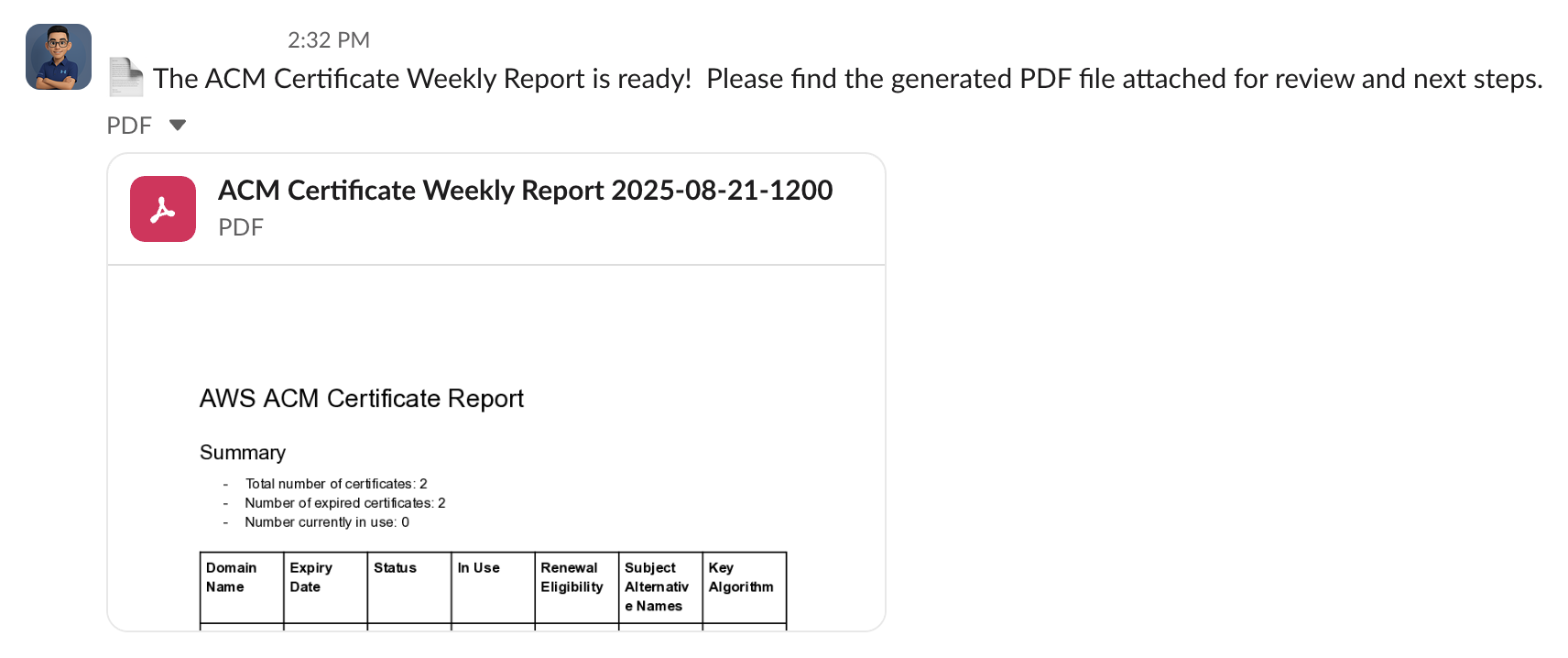"
},
"typeVersion": 1
},
{
"id": "e35484f2-223c-449a-9609-433a04a96109",
"name": "Notiz9",
"type": "n8n-nodes-base.stickyNote",
"position": [
1984,
-160
],
"parameters": {
"width": 336,
"height": 144,
"content": "### 6. 💬 Send PDF Report to Slack\nThe finalized PDF report is uploaded to a specific Slack channel (e.g., `#it-security` or `#cloud-ops`) so stakeholders are instantly notified of certificate status.\n"
},
"typeVersion": 1
},
{
"id": "5a303f6d-00f4-4668-9b7e-c6bce6187f99",
"name": "Workflow-Daten setzen",
"type": "n8n-nodes-base.set",
"disabled": true,
"position": [
1072,
248
],
"parameters": {
"options": {},
"assignments": {
"assignments": [
{
"id": "0869e141-3255-4268-ad3b-cb88173b6079",
"name": "SenderEmail",
"type": "string",
"value": "it@emesoft.net"
},
{
"id": "6c2047bb-ff37-45c2-a30c-6b00b6aed409",
"name": "SenderName",
"type": "string",
"value": "IT Support"
},
{
"id": "8b5c7afb-3ac0-4be9-ada8-4488d5acf402",
"name": "RecepientEmail",
"type": "string",
"value": "trung.tran@emesoft.net"
}
]
}
},
"typeVersion": 3.4
}
],
"active": false,
"pinData": {},
"settings": {
"executionOrder": "v1"
},
"versionId": "6985d393-0373-4095-b053-76348faa6904",
"connections": {
"44bc4988-b569-4eeb-bee6-af4897743939": {
"main": [
[
{
"node": "cf420f55-0b0e-44a7-84c9-d4ec1b5220d0",
"type": "main",
"index": 0
}
]
]
},
"bca5adc0-9afe-4a4f-ac72-30501fd2b0d8": {
"main": [
[
{
"node": "bb2cdcf1-8e34-4b01-9f79-ad2d8efaafae",
"type": "main",
"index": 0
},
{
"node": "cc91cae2-3dd0-4a16-ba4d-30034521582d",
"type": "main",
"index": 0
}
]
]
},
"a736e395-58bb-4263-b42d-aded26afc6b2": {
"ai_languageModel": [
[
{
"node": "bb2cdcf1-8e34-4b01-9f79-ad2d8efaafae",
"type": "ai_languageModel",
"index": 0
}
]
]
},
"5a303f6d-00f4-4668-9b7e-c6bce6187f99": {
"main": [
[
{
"node": "00e56531-89a5-447b-b99f-e1946c63eba5",
"type": "main",
"index": 0
}
]
]
},
"7d2d2fa6-2737-4577-bb13-5d776a9a0a5b": {
"ai_languageModel": [
[
{
"node": "cc91cae2-3dd0-4a16-ba4d-30034521582d",
"type": "ai_languageModel",
"index": 0
}
]
]
},
"1ee4f8f4-1e4b-4977-a090-b350e69e6fd8": {
"main": [
[
{
"node": "4f123f70-a491-4201-a2f7-6069cbd735c2",
"type": "main",
"index": 0
}
]
]
},
"4f123f70-a491-4201-a2f7-6069cbd735c2": {
"main": [
[
{
"node": "44bc4988-b569-4eeb-bee6-af4897743939",
"type": "main",
"index": 0
}
]
]
},
"72c7e0a7-e1bf-40da-b946-f7bc2261bbae": {
"main": [
[
{
"node": "bca5adc0-9afe-4a4f-ac72-30501fd2b0d8",
"type": "main",
"index": 0
}
]
]
},
"f4bdc2d2-bc98-4eca-9886-1dd303091150": {
"main": [
[
{
"node": "72c7e0a7-e1bf-40da-b946-f7bc2261bbae",
"type": "main",
"index": 0
}
]
]
},
"bb2cdcf1-8e34-4b01-9f79-ad2d8efaafae": {
"main": [
[
{
"node": "5a303f6d-00f4-4668-9b7e-c6bce6187f99",
"type": "main",
"index": 0
}
]
]
},
"cc91cae2-3dd0-4a16-ba4d-30034521582d": {
"main": [
[
{
"node": "1ee4f8f4-1e4b-4977-a090-b350e69e6fd8",
"type": "main",
"index": 0
}
]
]
}
}
}Wie verwende ich diesen Workflow?
Kopieren Sie den obigen JSON-Code, erstellen Sie einen neuen Workflow in Ihrer n8n-Instanz und wählen Sie "Aus JSON importieren". Fügen Sie die Konfiguration ein und passen Sie die Anmeldedaten nach Bedarf an.
Für welche Szenarien ist dieser Workflow geeignet?
Experte - KI-Zusammenfassung, Multimodales KI
Ist es kostenpflichtig?
Dieser Workflow ist völlig kostenlos. Beachten Sie jedoch, dass Drittanbieterdienste (wie OpenAI API), die im Workflow verwendet werden, möglicherweise kostenpflichtig sind.
Verwandte Workflows

Trung Tran
@trungtranEmpowering small and medium businesses with smart automation and practical AI, no big tech team required.
Diesen Workflow teilen