행동 강령 Q&A Slack 챗봇 (RAG 기반)
고급
이것은AI RAG, Multimodal AI분야의자동화 워크플로우로, 24개의 노드를 포함합니다.주로 If, Code, Slack, Webhook, FormTrigger 등의 노드를 사용하며. GPT-4 및 RAG 기술을 사용하여 Slack 내 행동 강령 질문에 답변
사전 요구사항
- •Slack Bot Token 또는 Webhook URL
- •HTTP Webhook 엔드포인트(n8n이 자동으로 생성)
- •Google Drive API 인증 정보
- •OpenAI API Key
사용된 노드 (24)
워크플로우 미리보기
노드 연결 관계를 시각적으로 표시하며, 확대/축소 및 이동을 지원합니다
워크플로우 내보내기
다음 JSON 구성을 복사하여 n8n에 가져오면 이 워크플로우를 사용할 수 있습니다
{
"id": "rFm9WyEEbE0Cbp4V",
"meta": {
"instanceId": "4a2e6764ba7a6bc9890d9225f4b21d570ce88fc9bd57549c89057fcee58fed0f",
"templateId": "1961",
"templateCredsSetupCompleted": true
},
"name": "Code of Conduct Q&A Slack Chatbot with RAG Powered ",
"tags": [
{
"id": "mrjg6I7yRRonHQkj",
"name": "slack",
"createdAt": "2025-08-22T05:19:22.985Z",
"updatedAt": "2025-08-22T05:19:22.985Z"
}
],
"nodes": [
{
"id": "d8182642-5598-4fae-8a72-13f63d9436a2",
"name": "사용자 메시지인가?",
"type": "n8n-nodes-base.if",
"position": [
-3224,
1192
],
"parameters": {
"options": {},
"conditions": {
"options": {
"version": 2,
"leftValue": "",
"caseSensitive": true,
"typeValidation": "strict"
},
"combinator": "and",
"conditions": [
{
"id": "1def7344-ce55-450d-a85a-468f746fe31f",
"operator": {
"type": "string",
"operation": "exists",
"singleValue": true
},
"leftValue": "={{ $json.body.event.type }}",
"rightValue": ""
}
]
}
},
"typeVersion": 2.2
},
{
"id": "d2ae5571-62c6-4ada-8807-0e53d90ae6c5",
"name": "No Operation, do nothing",
"type": "n8n-nodes-base.noOp",
"position": [
-2760,
1392
],
"parameters": {},
"typeVersion": 1
},
{
"id": "8794702d-9c02-40ba-8a62-acd6ccb8df08",
"name": "Webhook",
"type": "n8n-nodes-base.webhook",
"position": [
-3536,
1200
],
"webhookId": "4e9d4215-802a-4322-ad54-67ce21d5c1e3",
"parameters": {
"path": "4e9d4215-802a-4322-ad54-67ce21d5c1e3",
"options": {},
"httpMethod": "POST",
"responseMode": "lastNode"
},
"typeVersion": 2
},
{
"id": "b9c6502a-8232-4840-a252-0f2889d96d7d",
"name": "gpt4-1 model",
"type": "@n8n/n8n-nodes-langchain.lmChatOpenAi",
"position": [
-2912,
1008
],
"parameters": {
"model": {
"__rl": true,
"mode": "list",
"value": "gpt-4.1-mini"
},
"options": {}
},
"credentials": {
"openAiApi": {
"id": "PPSwAKeLQYgAPobT",
"name": "OpenAi account"
}
},
"typeVersion": 1.2
},
{
"id": "372bc24d-4510-4eb2-9ef5-fbaba46e18fc",
"name": "명시된 채널에 결과 전송",
"type": "n8n-nodes-base.slack",
"position": [
-2160,
992
],
"webhookId": "9e363320-9c63-4ed9-9438-31d5fdc030c9",
"parameters": {
"text": "=<@{{ $json.id }}> {{ $('Code Of Conduct Agent').item.json.output }}",
"select": "channel",
"channelId": {
"__rl": true,
"mode": "id",
"value": "={{ $('Webhook').item.json.body.event.channel }}"
},
"otherOptions": {
"mrkdwn": true
}
},
"credentials": {
"slackApi": {
"id": "3MfZsxrz9SluxmDt",
"name": "COC Bot"
}
},
"typeVersion": 2.3
},
{
"id": "a9a7c510-4b00-4fcb-988a-f6b126a9564a",
"name": "사용자 정보 조회",
"type": "n8n-nodes-base.slack",
"position": [
-2384,
992
],
"webhookId": "4b89e5a8-34cc-4d7b-a91b-465e7a864875",
"parameters": {
"user": {
"__rl": true,
"mode": "id",
"value": "={{ $('Webhook').item.json.body.event.user }}"
},
"resource": "user",
"authentication": "oAuth2"
},
"credentials": {
"slackOAuth2Api": {
"id": "4JSKt9sIRV1KGswQ",
"name": "Slack account"
}
},
"typeVersion": 2.3
},
{
"id": "5821abdb-fba3-47fd-986e-29e0282855ee",
"name": "Sticky Note",
"type": "n8n-nodes-base.stickyNote",
"position": [
-4928,
592
],
"parameters": {
"color": 4,
"width": 1056,
"height": 2144,
"content": "\n# 📘 Code of Conduct Q&A Chatbot (RAG-powered for Slack)\n[](https://www.youtube.com/watch?v=2EWgC5UKiBQ)\n> Empower employees to instantly access and understand the company’s Code of Conduct via a Slack chatbot, powered by Retrieval-Augmented Generation (RAG) and LLMs.\n\n## 🧑💼 Who’s it for\n\nThis workflow is designed for:\n- **HR and compliance teams** to automate policy-related inquiries\n- **Employees** who want quick answers to Code of Conduct questions directly inside Slack\n- **Startups or enterprises** that need internal compliance self-service tools powered by AI\n\n## ⚙️ How it works / What it does\n\nThis RAG-powered Slack chatbot answers user questions based on your uploaded **Code of Conduct PDF** using GPT-4 and embedded document chunks. Here's the flow:\n\n1. **Receive Message from Slack:** A webhook triggers when a message is posted in Slack.\n2. **Check if it’s a valid query:** Filters out non-user messages (e.g., bot mentions).\n3. **Run Agent with RAG:**\n - Uses GPT-4 with `Query Data Tool` to retrieve relevant document chunks.\n - Returns a well-formatted, context-aware answer.\n4. **Send Response to Slack:** Fetches user info and posts the answer back in the same channel.\n5. **Document Upload Flow:**\n - HR can upload the PDF Code of Conduct file.\n - It’s parsed, chunked, embedded using OpenAI, and stored for future query retrieval.\n - A backup copy is saved to Google Drive.\n\n## 🛠️ How to set up\n\n1. **Prepare your environment:**\n - Slack Bot token & webhook configured (Sample slack app manifest: https://wisestackai.s3.ap-southeast-1.amazonaws.com/slack_bot_manifest.json)\n - OpenAI API key (for GPT-4 & embedding)\n - Google Drive credentials (optional for backup)\n\n2. **Upload the Code of Conduct PDF:**\n - Use the designated node to upload your document (Sample file: https://wisestackai.s3.ap-southeast-1.amazonaws.com/20220419-ingrs-code-of-conduct-policy-en.pdf)\n - This triggers chunking → embedding → data store.\n\n3. **Deploy the chatbot:**\n - Host the webhook and connect it to your Slack app.\n - Share the command format with employees (e.g., `@CodeBot Can I accept gifts from partners?`)\n\n4. **Monitor and iterate:**\n - Improve chunk size or embed model if queries aren’t accurate.\n - Review unanswered queries to enhance coverage.\n\n## 📋 Requirements\n\n- n8n (Self-hosted or Cloud)\n- Slack App (with `chat:write`, `users:read`, `commands`)\n- OpenAI account (embedding + GPT-4 access)\n- Google Drive integration (for backups)\n- Uploaded Code of Conduct in PDF format\n\n## 🧩 How to customize the workflow\n\n| What to Customize | How to Do It |\n|-----------------------------|------------------------------------------------------------------------------|\n| 🔤 **Prompt style** | Edit the System & User prompts inside the `Code Of Conduct Agent` node |\n| 📄 **Document types** | Upload additional policy PDFs and tag them differently in metadata |\n| 🤖 **Agent behavior** | Tune GPT temperature or replace with different LLM |\n| 💬 **Slack interaction** | Customize message formats or trigger phrases |\n| 📁 **Data Store engine** | Swap to Pinecone, Weaviate, Supabase, etc. depending on use case |\n| 🌐 **Multilingual support** | Preprocess text and support locale detection via Slack metadata |"
},
"typeVersion": 1
},
{
"id": "e06f197d-f4e7-4e29-96c9-5c44dea773d5",
"name": "Default Data Loader",
"type": "@n8n/n8n-nodes-langchain.documentDefaultDataLoader",
"position": [
-3216,
1608
],
"parameters": {
"options": {},
"dataType": "binary"
},
"typeVersion": 1.1
},
{
"id": "24bb84e8-1ab4-42d9-9e8e-088590882f45",
"name": "Insert Data to Store",
"type": "@n8n/n8n-nodes-langchain.vectorStoreInMemory",
"position": [
-3312,
1384
],
"parameters": {
"mode": "insert",
"memoryKey": {
"__rl": true,
"mode": "list",
"value": "vector_store_key",
"cachedResultName": "vector_store_key"
}
},
"typeVersion": 1.2
},
{
"id": "de57e328-271a-42a5-914a-073ee5762a54",
"name": "Code",
"type": "n8n-nodes-base.code",
"position": [
-3224,
1784
],
"parameters": {
"jsCode": "const data = $input.item.json;\nconst binaryData = $input.item.binary;\n\nlet output = [];\n\nObject.keys(binaryData)\n .filter(label => label.startsWith(\"CV_\"))\n .forEach(label => {\n output.push({\n json: data,\n binary: { data: binaryData[label] }\n });\n });\n\nreturn output;"
},
"typeVersion": 2
},
{
"id": "264b1310-b80d-4e92-88da-218f261a9687",
"name": "PDF 문서 업로드",
"type": "n8n-nodes-base.formTrigger",
"position": [
-3536,
1636
],
"webhookId": "82848bc4-5ea2-4e5a-8bb6-3c09b94a8c5d",
"parameters": {
"options": {},
"formTitle": "Upload your data to test RAG",
"formFields": {
"values": [
{
"fieldType": "file",
"fieldLabel": "Upload your file(s)",
"requiredField": true,
"acceptFileTypes": ".pdf"
}
]
}
},
"typeVersion": 2.2
},
{
"id": "f1b4fece-cac6-49b7-ad47-a1a8ced08ba9",
"name": "Google Drive에 문서 백업",
"type": "n8n-nodes-base.googleDrive",
"position": [
-2760,
1784
],
"parameters": {
"name": "=document-{{ $now.toFormat(\"yyyyLLdd-HHmmss\") }}-{{$binary.data.fileName}}",
"driveId": {
"__rl": true,
"mode": "list",
"value": "My Drive",
"cachedResultUrl": "https://drive.google.com/drive/my-drive",
"cachedResultName": "My Drive"
},
"options": {},
"folderId": {
"__rl": true,
"mode": "list",
"value": "1ObNNVJFR2vcKqP8p-ZnX_eaZy4gBHgha",
"cachedResultUrl": "https://drive.google.com/drive/folders/1ObNNVJFR2vcKqP8p-ZnX_eaZy4gBHgha",
"cachedResultName": "SmartIT"
}
},
"credentials": {
"googleDriveOAuth2Api": {
"id": "fC471es5gk5Mm900",
"name": "Google Drive account"
}
},
"typeVersion": 3
},
{
"id": "73b5b601-f14a-44d7-9737-7efe05af9fa1",
"name": "Embeddings OpenAI",
"type": "@n8n/n8n-nodes-langchain.embeddingsOpenAi",
"position": [
-2688,
1216
],
"parameters": {
"options": {}
},
"credentials": {
"openAiApi": {
"id": "PPSwAKeLQYgAPobT",
"name": "OpenAi account"
}
},
"typeVersion": 1.2
},
{
"id": "f229958a-af79-4420-a218-0ed18e5562fc",
"name": "Query Data Tool",
"type": "@n8n/n8n-nodes-langchain.vectorStoreInMemory",
"position": [
-2784,
1008
],
"parameters": {
"mode": "retrieve-as-tool",
"toolName": "knowledge_base",
"memoryKey": {
"__rl": true,
"mode": "list",
"value": "vector_store_key"
},
"toolDescription": "Use this knowledge base to answer questions from the user"
},
"typeVersion": 1.2
},
{
"id": "a6310e4a-fcc0-4814-a203-ce38b8daeff6",
"name": "행동 강령 에이전트",
"type": "@n8n/n8n-nodes-langchain.agent",
"position": [
-2896,
784
],
"parameters": {
"text": "=You are an AI Slack chatbot for Code of Conduct Q&A.\n\nThe user has asked:\n{{ $json.body.event.text }}\n\nYour answer should be clear, professional, and easy for employees to understand.\nIf the information isn’t found in the retrieved content, say: “I couldn’t find an answer to that in the Code of Conduct. Please reach out to HR or the compliance team for clarification.”\n\nRespond in Slack-friendly format (Markdown supported).",
"options": {
"systemMessage": "You are an AI assistant trained to help employees understand and comply with the company's Code of Conduct. Your role is to provide clear, accurate, and friendly answers to questions based on the retrieved content from the official Code of Conduct documentation. Always reference the relevant section when possible, and avoid making assumptions beyond the retrieved data.\n\nIf the question cannot be answered from the provided data, politely respond that the information is not available and suggest contacting HR or compliance team for clarification.\n\nFormatting: \n- Use bullet points or numbered lists if helpful\n- Bold key terms or important statements\n- Keep the tone professional yet approachable\n\nNever fabricate information. Only use the content provided in the retrieved chunks."
},
"promptType": "define",
"hasOutputParser": true
},
"executeOnce": true,
"typeVersion": 2.1
},
{
"id": "3cee5a9d-bf5c-4f8e-bbc2-abfe3087a52a",
"name": "Sticky Note1",
"type": "n8n-nodes-base.stickyNote",
"position": [
-1920,
784
],
"parameters": {
"width": 1056,
"height": 560,
"content": "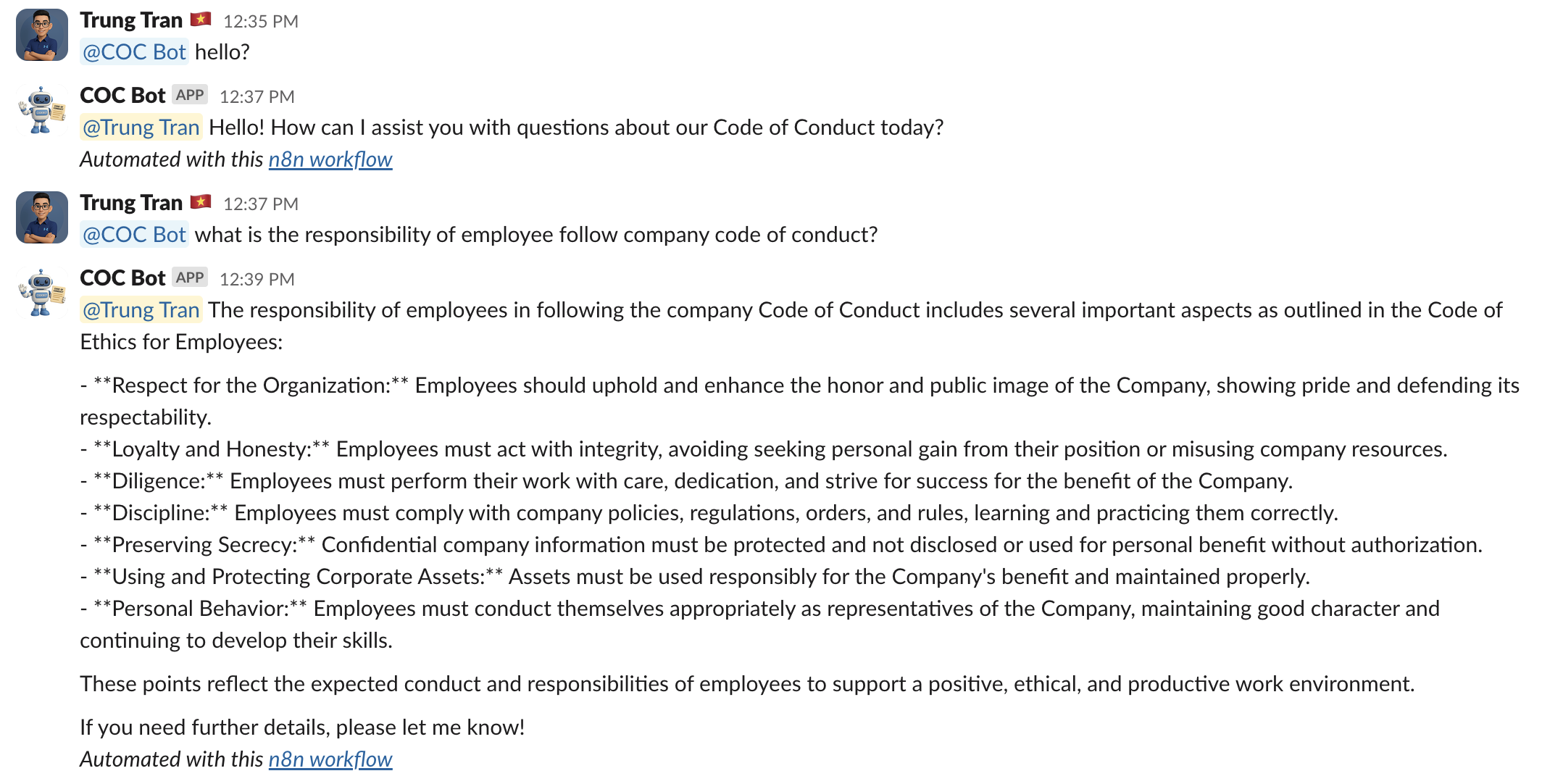"
},
"typeVersion": 1
},
{
"id": "1235b85c-8ef7-493e-a91b-84e09e09da12",
"name": "Sticky Note2",
"type": "n8n-nodes-base.stickyNote",
"position": [
-3616,
1824
],
"parameters": {
"height": 224,
"content": "#### 1. 🟢 Upload PDF Document\nAllows HR/admin users to upload the official **Code of Conduct PDF** via an input node.\nSample: https://wisestackai.s3.ap-southeast-1.amazonaws.com/20220419-ingrs-code-of-conduct-policy-en.pdf"
},
"typeVersion": 1
},
{
"id": "263a5ad7-9392-4d37-8a68-eeff78a73379",
"name": "Sticky Note3",
"type": "n8n-nodes-base.stickyNote",
"position": [
-3072,
1568
],
"parameters": {
"height": 128,
"content": "#### 2. 📑 Parse PDF Content\nUses the **Default Data Loader** to read and process the uploaded PDF content into structured format."
},
"typeVersion": 1
},
{
"id": "159e3edf-f845-49e6-9fdd-ddd7c45f3016",
"name": "Sticky Note4",
"type": "n8n-nodes-base.stickyNote",
"position": [
-2544,
1264
],
"parameters": {
"height": 256,
"content": "#### 3. 🧬 Generate Embeddings (OpenAI)\n- Splits the content into smaller chunks and sends each to **OpenAI's Embedding API** for vectorization.\n- Saves the resulting vector embeddings into the connected **vector database or internal store** for RAG querying."
},
"typeVersion": 1
},
{
"id": "559c1f98-3af4-46ef-9207-dbda744d8a48",
"name": "Sticky Note5",
"type": "n8n-nodes-base.stickyNote",
"position": [
-2544,
1760
],
"parameters": {
"content": "#### 4. ☁️ Backup to Google Drive\nSaves the uploaded PDF as a backup into a designated folder in Google Drive."
},
"typeVersion": 1
},
{
"id": "b5144bb8-087c-4563-8095-8b1aa7b8c15c",
"name": "Sticky Note6",
"type": "n8n-nodes-base.stickyNote",
"position": [
-3616,
992
],
"parameters": {
"color": 7,
"content": "#### 1. 🟢 Webhook Trigger (Slack Event)\nListens for incoming Slack events specifically user messages mentioning the bot via a POST webhook integration."
},
"typeVersion": 1
},
{
"id": "ccc08f58-a7c3-48b1-ab1b-774525644fc4",
"name": "Sticky Note7",
"type": "n8n-nodes-base.stickyNote",
"position": [
-3296,
1024
],
"parameters": {
"color": 7,
"height": 128,
"content": "#### 2. 🧠 Message Validation\nChecks whether the incoming event is a user message. If not, it routes to a \"No Operation\" node."
},
"typeVersion": 1
},
{
"id": "bd562f0a-fab6-4d3b-9712-1adc0af8d720",
"name": "Sticky Note8",
"type": "n8n-nodes-base.stickyNote",
"position": [
-3024,
560
],
"parameters": {
"color": 7,
"width": 512,
"content": "#### 3. 🤖 Code of Conduct Agent (GPT-4 + Query Tool)\nExecutes the AI assistant agent:\n- Uses **GPT-4** as the chat model\n- Calls **Query Data Tool** to retrieve relevant chunks from the embedded Code of Conduct content\n- Returns a Slack-friendly, Markdown-formatted response"
},
"typeVersion": 1
},
{
"id": "7e9c0b48-063b-48cf-8ed1-fa902e83cfc8",
"name": "Sticky Note9",
"type": "n8n-nodes-base.stickyNote",
"position": [
-2368,
784
],
"parameters": {
"color": 7,
"width": 288,
"height": 144,
"content": "#### 5. 💬 Post Response to Slack\n- Fetches user details to personalize the reply.\n- Delivers the final answer back to the mentioned Slack channel, replying to the original message or thread."
},
"typeVersion": 1
}
],
"active": false,
"pinData": {},
"settings": {},
"versionId": "e0003593-074e-4bad-9302-b7c166e9fd92",
"connections": {
"de57e328-271a-42a5-914a-073ee5762a54": {
"main": [
[
{
"node": "f1b4fece-cac6-49b7-ad47-a1a8ced08ba9",
"type": "main",
"index": 0
}
]
]
},
"8794702d-9c02-40ba-8a62-acd6ccb8df08": {
"main": [
[
{
"node": "d8182642-5598-4fae-8a72-13f63d9436a2",
"type": "main",
"index": 0
}
]
]
},
"b9c6502a-8232-4840-a252-0f2889d96d7d": {
"ai_languageModel": [
[
{
"node": "a6310e4a-fcc0-4814-a203-ce38b8daeff6",
"type": "ai_languageModel",
"index": 0
}
]
]
},
"f229958a-af79-4420-a218-0ed18e5562fc": {
"ai_tool": [
[
{
"node": "a6310e4a-fcc0-4814-a203-ce38b8daeff6",
"type": "ai_tool",
"index": 0
}
]
]
},
"d8182642-5598-4fae-8a72-13f63d9436a2": {
"main": [
[
{
"node": "a6310e4a-fcc0-4814-a203-ce38b8daeff6",
"type": "main",
"index": 0
}
],
[
{
"node": "d2ae5571-62c6-4ada-8807-0e53d90ae6c5",
"type": "main",
"index": 0
}
]
]
},
"73b5b601-f14a-44d7-9737-7efe05af9fa1": {
"ai_embedding": [
[
{
"node": "24bb84e8-1ab4-42d9-9e8e-088590882f45",
"type": "ai_embedding",
"index": 0
},
{
"node": "f229958a-af79-4420-a218-0ed18e5562fc",
"type": "ai_embedding",
"index": 0
}
]
]
},
"e06f197d-f4e7-4e29-96c9-5c44dea773d5": {
"ai_document": [
[
{
"node": "24bb84e8-1ab4-42d9-9e8e-088590882f45",
"type": "ai_document",
"index": 0
}
]
]
},
"a6310e4a-fcc0-4814-a203-ce38b8daeff6": {
"main": [
[
{
"node": "a9a7c510-4b00-4fcb-988a-f6b126a9564a",
"type": "main",
"index": 0
}
]
]
},
"a9a7c510-4b00-4fcb-988a-f6b126a9564a": {
"main": [
[
{
"node": "372bc24d-4510-4eb2-9ef5-fbaba46e18fc",
"type": "main",
"index": 0
}
]
]
},
"264b1310-b80d-4e92-88da-218f261a9687": {
"main": [
[
{
"node": "24bb84e8-1ab4-42d9-9e8e-088590882f45",
"type": "main",
"index": 0
},
{
"node": "de57e328-271a-42a5-914a-073ee5762a54",
"type": "main",
"index": 0
}
]
]
},
"372bc24d-4510-4eb2-9ef5-fbaba46e18fc": {
"main": [
[]
]
}
}
}자주 묻는 질문
이 워크플로우를 어떻게 사용하나요?
위의 JSON 구성 코드를 복사하여 n8n 인스턴스에서 새 워크플로우를 생성하고 "JSON에서 가져오기"를 선택한 후, 구성을 붙여넣고 필요에 따라 인증 설정을 수정하세요.
이 워크플로우는 어떤 시나리오에 적합한가요?
고급 - AI RAG, 멀티모달 AI
유료인가요?
이 워크플로우는 완전히 무료이며 직접 가져와 사용할 수 있습니다. 다만, 워크플로우에서 사용하는 타사 서비스(예: OpenAI API)는 사용자 직접 비용을 지불해야 할 수 있습니다.
관련 워크플로우 추천
더 지능적인 BRD(비즈니스 요구 사항 문서) 작성을 위한 다중 에이전트 RAG 시스템
다중 에이전트 GPT와 Google Workspace를 사용하여 비즈니스 요구 사항 문서 생성
Set
Code
Merge
+
Set
Code
Merge
37 노드Trung Tran
AI RAG
PDF 문서와 Google Drive 백업을 포함한 Telegram RAG 챗봇
Telegram, OpenAI, Google Drive PDF 백업을 사용하여 검색형 챗봇을 구축합니다.
If
Code
Telegram
+
If
Code
Telegram
24 노드Trung Tran
내부 위키
Slack 후보자 평가를 위한 AI 기반 챗봇 구축
AI 이력서 분석 및 후보자 평가: Slack과 Google 스프레드시트 통합
If
Code
Slack
+
If
Code
Slack
29 노드Trung Tran
AI 챗봇
dian-memo_03 내보내기
AI 음성 및 텍스트 메모 - LINE 메시지, Supabase 벡터 데이터베이스 및 Gmail 통합
If
Set
Code
+
If
Set
Code
30 노드kote2
AI RAG
문서 수집
Google Drive, Sheets 및 OpenAI를 사용한 문서 수집 및 RAG 시스템 자동화
If
Form
Crypto
+
If
Form
Crypto
28 노드Mohamed Abdelwahab
기타
시각화 참조 라이브러리에서 n8n 노드를 탐색
可视化 참조 라이브러리에서 n8n 노드를 탐색
If
Ftp
Set
+
If
Ftp
Set
113 노드I versus AI
기타
워크플로우 정보
난이도
고급
노드 수24
카테고리2
노드 유형13
저자

Trung Tran
@trungtranEmpowering small and medium businesses with smart automation and practical AI, no big tech team required.
외부 링크
n8n.io에서 보기 →
이 워크플로우 공유