귀하의 이메일에 시각화 요약 및 지식 그래프 통찰력 생성
고급
이것은Other, AI분야의자동화 워크플로우로, 38개의 노드를 포함합니다.주로 If, Set, Code, Wait, Gmail 등의 노드를 사용하며인공지능 기술을 결합하여 스마트 자동화를 구현합니다. 이메일에 시각화 요약과 지식 그래프 통찰력 생성
사전 요구사항
- •Google 계정 및 Gmail API 인증 정보
- •Telegram Bot Token
- •대상 API의 인증 정보가 필요할 수 있음
- •Google Gemini API Key
사용된 노드 (38)
워크플로우 미리보기
노드 연결 관계를 시각적으로 표시하며, 확대/축소 및 이동을 지원합니다
워크플로우 내보내기
다음 JSON 구성을 복사하여 n8n에 가져오면 이 워크플로우를 사용할 수 있습니다
{
"id": "ddCCP7XAKuUqNKbU",
"meta": {
"instanceId": "2a26454b0172ffcb8d70ba77c235b1209f92cd71bf06c79ba609c7173b416d68",
"templateCredsSetupCompleted": true
},
"name": "Generate Visual Summary & Knowledge Graph Insights for Your Email",
"tags": [
{
"id": "sJk9cUvmMU8FkJXv",
"name": "AI",
"createdAt": "2025-05-20T13:16:15.636Z",
"updatedAt": "2025-05-20T13:16:15.636Z"
}
],
"nodes": [
{
"id": "bb0edf9a-910c-41fc-bcc1-f09e162045c2",
"name": "Sticky Note",
"type": "n8n-nodes-base.stickyNote",
"position": [
-2040,
-240
],
"parameters": {
"width": 380,
"height": 1140,
"content": "## 1. How to Trigger?\n\n### a. via a password-protected private URL form where you can specify which emails you want to analyze\n\n### b. daily trigger (for regular automated updates)\n\n### c. manual trigger\n\n### d. webhook\n\nTo select a trigger, activate it while deactivating the others.\n\nTo learn more about the email search criteria, refer to this [Google page](https://support.google.com/mail/answer/7190?hl=en&co=GENIE.Platform%3DAndroid)\n\n\n\n"
},
"typeVersion": 1
},
{
"id": "3a974df3-2b2a-4ce2-aff4-74b3771d2e5d",
"name": "InfraNodus Question Generator",
"type": "n8n-nodes-base.httpRequest",
"position": [
2460,
200
],
"parameters": {
"url": "https://infranodus.com/api/v1/graphAndAdvice?doNotSave=true&optimize=gap&includeGraph=false&includeGraphSummary=true",
"method": "POST",
"options": {},
"sendBody": true,
"authentication": "genericCredentialType",
"bodyParameters": {
"parameters": [
{
"name": "aiTopics",
"value": "true"
},
{
"name": "requestMode",
"value": "question"
},
{
"name": "name",
"value": "={{ $('Assign Processing Settings').item.json[\"Graph Name\"] }}"
}
]
},
"genericAuthType": "httpBearerAuth"
},
"credentials": {
"httpBearerAuth": {
"id": "FPDx6PA5CtzGEIQc",
"name": "InfraNodus DeeMeeTree API Key"
}
},
"typeVersion": 4.2
},
{
"id": "81a91a82-e1c5-4ff6-873a-3d70d4635637",
"name": "텍스트 정리 및 문장으로 구성",
"type": "n8n-nodes-base.code",
"position": [
1200,
200
],
"parameters": {
"jsCode": "\nlet statements = []\nfor (const item of $input.all()) {\n\n item.json.from?.forEach((emailOrigin, index) => {\n const textContent = item.json.text[index]?.split('\\n').join(' ');\n const cleanTextContent = removeHtmlCssScript(textContent)\n const cleanDate = new Date().toDateString()\n statements.push('[[' + emailOrigin + ']] ' + '[' + cleanDate + '] ' + cleanTextContent)\n })\n}\n\nreturn { statements: statements }\n\nfunction removeHtmlCssScript(text) {\n if (!text || typeof text !== 'string') {\n return '';\n }\n \n let cleanText = text;\n \n // Remove script tags and their content (case insensitive)\n cleanText = cleanText.replace(/<script[^>]*>[\\s\\S]*?<\\/script>/gi, '');\n \n // Remove style tags and their content (case insensitive)\n cleanText = cleanText.replace(/<style[^>]*>[\\s\\S]*?<\\/style>/gi, '');\n \n // Remove HTML comments\n cleanText = cleanText.replace(/<!--[\\s\\S]*?-->/g, '');\n \n // Remove all remaining HTML tags\n cleanText = cleanText.replace(/<[^>]*>/g, '');\n \n // Decode common HTML entities\n const htmlEntities = {\n '&': '&',\n '<': '<',\n '>': '>',\n '"': '\"',\n ''': \"'\",\n ' ': ' ',\n '©': '©',\n '®': '®',\n '™': '™'\n };\n \n Object.keys(htmlEntities).forEach(entity => {\n const regex = new RegExp(entity, 'g');\n cleanText = cleanText.replace(regex, htmlEntities[entity]);\n });\n \n // Clean up extra whitespace\n cleanText = cleanText.replace(/\\s+/g, ' ').trim();\n \n return cleanText;\n}"
},
"typeVersion": 2
},
{
"id": "7a1946fe-5e84-402a-a728-71288cc4b160",
"name": "Sticky Note1",
"type": "n8n-nodes-base.stickyNote",
"position": [
-2040,
-880
],
"parameters": {
"color": 6,
"width": 1280,
"height": 600,
"content": "# Visual Summary & Knowledge Graph Insights for Your Gmail\n\n## Use this workflow to filter your emails by search terms, date, labels, or AI-defined criteria and to visualize the main topics and gaps using the [InfraNodus knowledge graph](https://infranodus.com). Generate topical summaries and insights based on the gaps, receive them via Telegram.\n\n### Some interesting use cases:\n- Analyze all your personal messages for the week to get an overview of the main topics \n- Analyze all your Sent messages to find recurrent topics and gaps and generate ideas based. on those gaps\n- Generate ideas based on specific message filter (Personal, Promos, from a specific person, AI-defined criteria, e.g. urgency)\n- Get an overview of an interaction with a specific person / company\n- Get an overview of your notes\n- Generate ideas based on your correspondence\n- Learn about various n8n nodes useful for email processing, filtering, and data conversion\n- Never miss important topics \n\n\n### To set up (takes 2 minutes):\n- Connect your Gmail account in steps 3 and 4 (best works if you have a Google cloud Oauth key, which you can use for other Google services)\n- Get your [InfraNodus API](https://infranodus.com/api-access) key and add it in steps 7 and 8\n- Connect to your Telegram bot (takes 30 secs to set up via [@botfather](https://t.me/botfather) in step 8\n- Use a Form trigger to experiment or specify your default parameters in the Step 2 node\n"
},
"typeVersion": 1
},
{
"id": "599264b8-bd89-4ed9-8645-725ebd005747",
"name": "Google Gemini Chat Model",
"type": "@n8n/n8n-nodes-langchain.lmChatGoogleGemini",
"position": [
120,
500
],
"parameters": {
"options": {},
"modelName": "models/gemini-2.5-flash-preview-04-17"
},
"credentials": {
"googlePalmApi": {
"id": "ivswOFTY8MYDbj5b",
"name": "Google Gemini(PaLM) Api account"
}
},
"typeVersion": 1
},
{
"id": "e7251d9c-e247-4b48-a7db-4b7bba057777",
"name": "라벨이 제공되었나요?",
"type": "n8n-nodes-base.if",
"position": [
-1080,
320
],
"parameters": {
"options": {},
"conditions": {
"options": {
"version": 2,
"leftValue": "",
"caseSensitive": true,
"typeValidation": "strict"
},
"combinator": "and",
"conditions": [
{
"id": "a8278945-a9a1-45c6-809f-b9282f6de0ed",
"operator": {
"type": "string",
"operation": "notEmpty",
"singleValue": true
},
"leftValue": "={{ $('Assign Processing Settings').item.json[\"Label Filter\"] }}",
"rightValue": ""
}
]
}
},
"typeVersion": 2.2
},
{
"id": "6a1fdf73-fa60-46d6-8980-e192735fbb54",
"name": "스니펫을 분석해야 하나요?",
"type": "n8n-nodes-base.if",
"position": [
-620,
380
],
"parameters": {
"options": {},
"conditions": {
"options": {
"version": 2,
"leftValue": "",
"caseSensitive": true,
"typeValidation": "strict"
},
"combinator": "and",
"conditions": [
{
"id": "802f2028-04bb-43ad-befa-416c0afc5515",
"operator": {
"type": "string",
"operation": "empty",
"singleValue": true
},
"leftValue": "={{ $('Assign Processing Settings').item.json['Analyze Full Email Text?'] }}",
"rightValue": "Snippets"
}
]
}
},
"typeVersion": 2.2
},
{
"id": "daa2cf5f-e8b5-45a4-ab73-feb5981d665d",
"name": "필터링된 이메일에서 스니펫을 분석해야 하나요?",
"type": "n8n-nodes-base.if",
"position": [
-600,
60
],
"parameters": {
"options": {},
"conditions": {
"options": {
"version": 2,
"leftValue": "",
"caseSensitive": true,
"typeValidation": "strict"
},
"combinator": "and",
"conditions": [
{
"id": "82abd9a8-375b-4c3f-8f19-be6b3c1b8e80",
"operator": {
"type": "string",
"operation": "empty",
"singleValue": true
},
"leftValue": "={{ $('Assign Processing Settings').item.json['Analyze Full Email Text?'] }}",
"rightValue": "Snippets"
}
]
}
},
"typeVersion": 2.2
},
{
"id": "9cae8722-13c0-4090-81c3-ec60ced40ec4",
"name": "라벨별 이메일 필터링",
"type": "n8n-nodes-base.filter",
"notes": "To only show personal mails, use CATEGORY_PERSONAL in the filters (or any other label you like)\nCATEGORY_PROMOTIONS - for promos\nSENT - for your sent messages",
"position": [
-880,
160
],
"parameters": {
"options": {},
"conditions": {
"options": {
"version": 2,
"leftValue": "",
"caseSensitive": true,
"typeValidation": "strict"
},
"combinator": "and",
"conditions": [
{
"id": "731d1986-b8e1-480f-b956-0e9e7d2b9df8",
"operator": {
"type": "array",
"operation": "contains",
"rightType": "any"
},
"leftValue": "={{ $json.labels.map(label => label.name) }}",
"rightValue": "={{ $('Assign Processing Settings').item.json['Label Filter'] }}"
}
]
}
},
"notesInFlow": true,
"typeVersion": 2.2
},
{
"id": "204e3171-f4bf-4c6f-a0a9-3ba9ae9f869d",
"name": "전체 메시지 내용 가져오기",
"type": "n8n-nodes-base.gmail",
"position": [
-280,
380
],
"webhookId": "e79f9021-02a7-4506-8aa8-b21a6b823815",
"parameters": {
"simple": false,
"options": {},
"messageId": "={{ $json.id }}",
"operation": "get"
},
"credentials": {
"gmailOAuth2": {
"id": "pL8OjzEMWakSY1Nk",
"name": "Gmail paranyushkin"
}
},
"typeVersion": 2.1
},
{
"id": "825e11fe-5f2c-41ef-ade0-1136607decbd",
"name": "AI를 사용해 이메일을 추가로 필터링해야 하나요?",
"type": "n8n-nodes-base.if",
"position": [
-20,
220
],
"parameters": {
"options": {},
"conditions": {
"options": {
"version": 2,
"leftValue": "",
"caseSensitive": true,
"typeValidation": "strict"
},
"combinator": "and",
"conditions": [
{
"id": "6ccf71c6-0f1b-4560-82c7-0185946af0a2",
"operator": {
"type": "string",
"operation": "notEmpty",
"singleValue": true
},
"leftValue": "={{ $('Assign Processing Settings').item.json['Email Type Description'] }}",
"rightValue": ""
}
]
}
},
"typeVersion": 2.2
},
{
"id": "f504bc20-2385-42f1-80da-f7129a4dcb6e",
"name": "메시지 텍스트 또는 스니펫이 있나요?",
"type": "n8n-nodes-base.filter",
"position": [
160,
120
],
"parameters": {
"options": {},
"conditions": {
"options": {
"version": 2,
"leftValue": "",
"caseSensitive": true,
"typeValidation": "loose"
},
"combinator": "and",
"conditions": [
{
"id": "eaffd686-c04b-4327-b2c5-3b0da2eee00e",
"operator": {
"type": "string",
"operation": "exists",
"singleValue": true
},
"leftValue": "={{ $json.text || $json.snippet }}",
"rightValue": ""
}
]
},
"looseTypeValidation": true
},
"typeVersion": 2.2
},
{
"id": "52802d59-e9a0-44ec-9ffc-0ecd1ad60354",
"name": "이메일 분류",
"type": "@n8n/n8n-nodes-langchain.textClassifier",
"position": [
300,
280
],
"parameters": {
"options": {},
"inputText": "={{ $json.text || $json.snippet }}",
"categories": {
"categories": [
{
"category": "Matched User's Condition",
"description": "={{ $('Assign Processing Settings').item.json['Email Type Description'] }}"
},
{
"category": "Spam and Notifications",
"description": "Spam, automatic notifications, generic, non-personalized emails, non-personalized commercial offers, promotions, discounts"
}
]
}
},
"typeVersion": 1
},
{
"id": "0fe84425-5e0b-4eb7-b8fa-f6e8cc0bfee2",
"name": "텍스트 필드가 있나요?",
"type": "n8n-nodes-base.if",
"position": [
760,
200
],
"parameters": {
"options": {},
"conditions": {
"options": {
"version": 2,
"leftValue": "",
"caseSensitive": true,
"typeValidation": "strict"
},
"combinator": "and",
"conditions": [
{
"id": "9448b606-0961-4852-8917-408e5fef7df9",
"operator": {
"type": "string",
"operation": "exists",
"singleValue": true
},
"leftValue": "={{ $json.text }}",
"rightValue": ""
}
]
}
},
"typeVersion": 2.2
},
{
"id": "5759e919-6f02-49c3-9012-c3bdfa29f5a3",
"name": "전체 이메일 텍스트에서 집계",
"type": "n8n-nodes-base.aggregate",
"position": [
980,
80
],
"parameters": {
"options": {},
"fieldsToAggregate": {
"fieldToAggregate": [
{
"renameField": true,
"outputFieldName": "from",
"fieldToAggregate": "from.text"
},
{
"renameField": true,
"outputFieldName": "text",
"fieldToAggregate": "text"
},
{
"renameField": true,
"outputFieldName": "date",
"fieldToAggregate": "date"
}
]
}
},
"typeVersion": 1
},
{
"id": "d38a14d2-118b-45cd-b6fa-f7ef3811e9ea",
"name": "이메일 스니펫에서 집계",
"type": "n8n-nodes-base.aggregate",
"position": [
980,
360
],
"parameters": {
"options": {},
"fieldsToAggregate": {
"fieldToAggregate": [
{
"renameField": true,
"outputFieldName": "from",
"fieldToAggregate": "From"
},
{
"renameField": true,
"outputFieldName": "text",
"fieldToAggregate": "snippet"
},
{
"renameField": true,
"outputFieldName": "date",
"fieldToAggregate": "internalDate"
}
]
}
},
"typeVersion": 1
},
{
"id": "bb3ff757-5cfc-4d1e-9544-0ae411978c9f",
"name": "질문 생성 전 대기",
"type": "n8n-nodes-base.wait",
"position": [
1980,
160
],
"webhookId": "c6d4fa4d-223a-47c3-b026-a002daa05b3b",
"parameters": {
"amount": 60
},
"typeVersion": 1.1
},
{
"id": "3c912db2-015b-4284-9c12-7fd0891bf2a6",
"name": "그래프 링크와 요약을 Telegram로 전송",
"type": "n8n-nodes-base.telegram",
"onError": "continueRegularOutput",
"maxTries": 2,
"position": [
2800,
420
],
"webhookId": "51b1be86-6889-420c-b0c6-e95f9b464b97",
"parameters": {
"text": "=🧬 The knowledge graph is ready at [https://infranodus.com/your_user_name/{{ $('Assign Processing Settings').item.json[\"Graph Name\"] }}/edit](https://infranodus.com/your_user_name/{{ $('Assign Processing Settings').item.json[\"Graph Name\"] }}/edit)\n\nTopical Summary: \n{{ $('InfraNodus AI Summary & Graph Link').item.json.aiAdvice[0].text }}",
"chatId": "use_get_id_bot_to_get_it",
"additionalFields": {
"appendAttribution": false
}
},
"credentials": {
"telegramApi": {
"id": "UXVSOiGwy2SPh7Du",
"name": "Gmail Talker Bot"
}
},
"retryOnFail": true,
"typeVersion": 1.2
},
{
"id": "3d9ac1ee-cf79-4f2d-930b-76f6b4eb80f5",
"name": "인사이트 질문을 Telegram로 전송",
"type": "n8n-nodes-base.telegram",
"onError": "continueRegularOutput",
"maxTries": 2,
"position": [
2800,
680
],
"webhookId": "690e527e-3085-4b32-b1d1-ea2f70aa403f",
"parameters": {
"text": "=💎 Insight Question: \n{{ $json.aiAdvice[0].text }}\n \nMore at [https://infranodus.com/your_user_name/{{ $('Assign Processing Settings').item.json[\"Graph Name\"] }}/edit](https://infranodus.com/your_user_name/{{ $('Assign Processing Settings').item.json[\"Graph Name\"] }}/edit)",
"chatId": "use_get_id_bot_to_get_it",
"additionalFields": {
"appendAttribution": false
}
},
"credentials": {
"telegramApi": {
"id": "UXVSOiGwy2SPh7Du",
"name": "Gmail Talker Bot"
}
},
"retryOnFail": true,
"typeVersion": 1.2
},
{
"id": "85e994c5-8762-4e07-89e0-a91742e1c4aa",
"name": "검색 기준으로 메시지 가져오기",
"type": "n8n-nodes-base.gmail",
"notes": "// use this is a filter to retrieve yesterday's date\n// change the number 1 below to the number of days to go behind\n{{ \n (() => {\n const yesterday = new Date();\n yesterday.setDate(yesterday.getDate() - 1);\n return `after:${yesterday.getFullYear()}/${(yesterday.getMonth() + 1).toString().padStart(2, '0')}/${yesterday.getDate().toString().padStart(2, '0')}`;\n })()\n}}",
"position": [
-1280,
320
],
"webhookId": "083fdee4-dcae-4366-8550-8df8dbe29fa2",
"parameters": {
"filters": {
"q": "={{ $json[\"Search Criteria\"] }}"
},
"operation": "getAll",
"returnAll": true
},
"credentials": {
"gmailOAuth2": {
"id": "pL8OjzEMWakSY1Nk",
"name": "Gmail paranyushkin"
}
},
"typeVersion": 2.1
},
{
"id": "229bf0ac-7371-443b-9d4c-c2774d184116",
"name": "사용자 양식 제출",
"type": "n8n-nodes-base.formTrigger",
"disabled": true,
"position": [
-1940,
300
],
"webhookId": "84c4d21b-e825-42f0-a73b-c9a837ec8da3",
"parameters": {
"options": {
"appendAttribution": false,
"respondWithOptions": {
"values": {
"formSubmittedText": "Thank you, you will receive a summary via Telegram in a moment, once the analysis is ready."
}
}
},
"formTitle": "Generate a Visual Summary of Your Mailbox",
"formFields": {
"values": [
{
"fieldLabel": "Search Criteria",
"placeholder": "e.g. from:email@gmail.com after:2025/06/01 label:personal"
},
{
"fieldLabel": "Label Filter",
"placeholder": "SENT, CATEGORY_PERSONAL - for additional filtering"
},
{
"fieldLabel": "Email Type Description",
"placeholder": "Anything that relates to my work on various projects"
},
{
"fieldType": "dropdown",
"fieldLabel": "Analyze Full Email Text?",
"fieldOptions": {
"values": [
{
"option": "Yes"
}
]
}
},
{
"fieldType": "dropdown",
"fieldLabel": "Build a Social Graph?",
"fieldOptions": {
"values": [
{
"option": "Yes"
}
]
}
},
{
"fieldLabel": "Graph Name",
"placeholder": "e.g. n8n_gmail_search"
}
]
},
"authentication": "basicAuth",
"formDescription": "Build a knowledge graph from your Gmail mails based on search criteria, label, date, and email type. Generate topical summary and insight questions."
},
"credentials": {
"httpBasicAuth": {
"id": "dnRnDRFSRoubvTh8",
"name": "Basic n8n Form Auth"
}
},
"typeVersion": 2.2
},
{
"id": "423739ac-e4a8-4890-b1ef-851fb7b56e86",
"name": "InfraNodus AI 요약 및 그래프 링크",
"type": "n8n-nodes-base.httpRequest",
"position": [
2240,
200
],
"parameters": {
"url": "https://infranodus.com/api/v1/graphAndAdvice?doNotSave=true&optimize=summary&includeGraph=false&includeGraphSummary=true",
"method": "POST",
"options": {},
"sendBody": true,
"authentication": "genericCredentialType",
"bodyParameters": {
"parameters": [
{
"name": "aiTopics",
"value": "true"
},
{
"name": "requestMode",
"value": "graph summary"
},
{
"name": "name",
"value": "={{ $('Assign Processing Settings').item.json[\"Graph Name\"] }}"
}
]
},
"genericAuthType": "httpBearerAuth"
},
"credentials": {
"httpBearerAuth": {
"id": "FPDx6PA5CtzGEIQc",
"name": "InfraNodus DeeMeeTree API Key"
}
},
"typeVersion": 4.2
},
{
"id": "177e9479-176c-434b-8082-b7cebd315c4b",
"name": "생성할 그래프 유형",
"type": "n8n-nodes-base.switch",
"position": [
1460,
260
],
"parameters": {
"rules": {
"values": [
{
"outputKey": "social knowledge graph",
"conditions": {
"options": {
"version": 2,
"leftValue": "",
"caseSensitive": true,
"typeValidation": "strict"
},
"combinator": "and",
"conditions": [
{
"id": "76bf82df-009a-4714-819c-ec9159f39f72",
"operator": {
"type": "string",
"operation": "notEmpty",
"singleValue": true
},
"leftValue": "={{ $('Assign Processing Settings').item.json['Build a Social Graph?'] }}",
"rightValue": ""
}
]
},
"renameOutput": true
},
{
"outputKey": "text knowledge graph",
"conditions": {
"options": {
"version": 2,
"leftValue": "",
"caseSensitive": true,
"typeValidation": "strict"
},
"combinator": "and",
"conditions": [
{
"id": "49ca2845-be5b-40ad-b6b4-c2a4e45f4f77",
"operator": {
"type": "string",
"operation": "empty",
"singleValue": true
},
"leftValue": "={{ $('Assign Processing Settings').item.json['Build a Social Graph?'] }}",
"rightValue": ""
}
]
},
"renameOutput": true
}
]
},
"options": {}
},
"typeVersion": 3.2
},
{
"id": "2b2b0d12-296d-4d11-9a5e-13c9b411f1bb",
"name": "InfraNodus 소셜 지식 그래프 구축",
"type": "n8n-nodes-base.httpRequest",
"position": [
1720,
160
],
"parameters": {
"url": "https://infranodus.com/api/v1/graphAndStatements?doNotSave=false&includeGraph=false&includeGraphSummary=true&includeStatements=false",
"method": "POST",
"options": {},
"sendBody": true,
"authentication": "genericCredentialType",
"bodyParameters": {
"parameters": [
{
"name": "name",
"value": "={{ $('Assign Processing Settings').item.json[\"Graph Name\"] }}"
},
{
"name": "statements",
"value": "={{ $json.statements }}"
},
{
"name": "contextSettings",
"value": "={{{ \"partOfSpeechToProcess\":\"HASHTAGS_AND_WORDS\", \"doubleSquarebracketsProcessing\":\"PROCESS_AS_MENTIONS\"} }}"
}
]
},
"genericAuthType": "httpBearerAuth"
},
"credentials": {
"httpBearerAuth": {
"id": "FPDx6PA5CtzGEIQc",
"name": "InfraNodus DeeMeeTree API Key"
}
},
"typeVersion": 4.2
},
{
"id": "8fec6156-93e0-410b-b91a-6d378b70d369",
"name": "InfraNodus 텍스트 지식 그래프 구축",
"type": "n8n-nodes-base.httpRequest",
"position": [
1720,
460
],
"parameters": {
"url": "https://infranodus.com/api/v1/graphAndStatements?doNotSave=false&includeGraph=false&includeGraphSummary=true&includeStatements=false",
"method": "POST",
"options": {},
"sendBody": true,
"authentication": "genericCredentialType",
"bodyParameters": {
"parameters": [
{
"name": "name",
"value": "={{ $('Assign Processing Settings').item.json[\"Graph Name\"] }}"
},
{
"name": "statements",
"value": "={{ $json.statements }}"
},
{
"name": "contextSettings",
"value": "={{{ \"partOfSpeechToProcess\":\"HASHTAGS_AND_WORDS\", \"doubleSquarebracketsProcessing\":\"EXCLUDE\", \"mentionsProcessing\":\"EXCLUDE\"} }}"
}
]
},
"genericAuthType": "httpBearerAuth"
},
"credentials": {
"httpBearerAuth": {
"id": "FPDx6PA5CtzGEIQc",
"name": "InfraNodus DeeMeeTree API Key"
}
},
"typeVersion": 4.2
},
{
"id": "23d3c594-1416-486c-961e-55dbf0714b4d",
"name": "'워크플로 테스트' 클릭 시",
"type": "n8n-nodes-base.manualTrigger",
"position": [
-1940,
720
],
"parameters": {},
"typeVersion": 1
},
{
"id": "be89719e-e217-4c28-9d71-ddcda1b4606d",
"name": "처리 설정 할당",
"type": "n8n-nodes-base.set",
"notes": "// script to generate a date \n// minus -1 is the days before\n\n(() => {\n const yesterday = new Date();\n yesterday.setDate(yesterday.getDate() - 7);\n return `after:${yesterday.getFullYear()}/${(yesterday.getMonth() + 1).toString().padStart(2, '0')}/${yesterday.getDate().toString().padStart(2, '0')}`;\n })()",
"position": [
-1560,
540
],
"parameters": {
"mode": "raw",
"options": {},
"jsonOutput": "={\n \"Label Filter\": \"{{ $json[\"Label Filter\"] !== undefined ? $json[\"Label Filter\"] : `CATEGORY_PERSONAL`}}\",\n \"Email Type Description\": \"{{ $json[\"Email Type Description\"] !== undefined ? $json[\"Email Type Description\"] : `Important personalized emails, exclude mailouts and non-urgent notifications` }}\",\n \"Analyze Full Email Text?\": \"{{ $json[\"Analyze Full Email Text?\"] !== undefined ? $json[\"Analyze Full Email Text?\"] : ``}}\",\n \"Build a Social Graph?\": \"{{ $json[\"Build a Social Graph?\"] !== undefined ? $json[\"Build a Social Graph?\"] : `Yes`}}\",\n \"Search Criteria\": \"{{ $json[\"Search Criteria\"] !== undefined ? $json[\"Search Criteria\"] :\n (() => {\n const yesterday = new Date();\n yesterday.setDate(yesterday.getDate() - 1);\n return `after:${yesterday.getFullYear()}/${(yesterday.getMonth() + 1).toString().padStart(2, '0')}/${yesterday.getDate().toString().padStart(2, '0')}`;\n })()\n}}\",\n \"Graph Name\": \"{{ $json[\"Graph Name\"] !== undefined ? $json[\"Graph Name\"] : `n8n_gmail_search_` + $now.toString().split('T')[0] }}\"\n}"
},
"typeVersion": 3.4
},
{
"id": "a1b0c1c6-efd1-4d77-91d3-6f29565ea3ed",
"name": "스케줄 트리거",
"type": "n8n-nodes-base.scheduleTrigger",
"disabled": true,
"position": [
-1940,
500
],
"parameters": {
"rule": {
"interval": [
{
"triggerAtHour": 10
}
]
}
},
"typeVersion": 1.2
},
{
"id": "f2401504-38c5-4368-84bb-738082abd50c",
"name": "Sticky Note2",
"type": "n8n-nodes-base.stickyNote",
"position": [
-1620,
-240
],
"parameters": {
"width": 220,
"height": 960,
"content": "## 2. Filter Settings\n\n### 🚨 Specify which emails should be extracted. Default values are provided in the node. \n\nTo increase the speed, we recommend to use the Gmail search operators like \"after:2025/06/01\" or \"keyword\" or \"label:notes\".\n\nDefault values are provided in the node, which are filled in automatically if no details are specified. \n\n[Options](https://support.google.com/mail/answer/7190?hl=en&co=GENIE.Platform%3DAndroid) you can use for filtering:\n\n- search string or date (e.g. \"after:2025/06/01\" or \"business\")\n\n- email labels and categories (e.g. SENT, CATEGORY_PERSONAL, etc)\n\n- use AI query for advanced filtering\n\n- build a social text graph (with sender's emails)\n\n\n"
},
"typeVersion": 1
},
{
"id": "893fa8d1-935e-4671-83f5-a0fc5a5d2e7f",
"name": "Sticky Note3",
"type": "n8n-nodes-base.stickyNote",
"position": [
-1360,
-240
],
"parameters": {
"width": 600,
"height": 960,
"content": "## 3. Get Gmail Messages\n\n### Get the emails that satisfy the filter criteria. \n#### 🚨 Specify your Gmail account credentials here\n\nWe recommend using the filters to make the search faster. You can then use the labels to filter the search results. However, you can also use the labels in the search query, like \"label:notes\" to increase the speed in this step. Alternatively, you can set a limit to 50 to 100 and then this node will retrieve the most recent messages. \n\nSome useful labels:\n- SENT (or label:sent in the search query)\n- CATEGORY_PERSONAL (or label:personal in the search query)\n- CATEGORY_PROMOTION (or label:promotion in the search query)\n- ... and your own labels (e.g. \"Business\", \"Urgent\", etc.)\n\nSee our [other workflows](https://n8n.io/creators/infranodus/) to automate email labeling"
},
"typeVersion": 1
},
{
"id": "a016b287-db0c-4ef7-ba73-381890c7a6a7",
"name": "Sticky Note4",
"type": "n8n-nodes-base.stickyNote",
"position": [
-660,
-240
],
"parameters": {
"width": 540,
"height": 960,
"content": "## 4. Analyze Snippets or Full Text?\n\n### Which parts of emails to analyze?\n\nBy default, we're analyzing the snippets provided by Google. However, for detailed and more precise analysis you can also analyze the full text of emails. \n\nIn this case, we need to retrieve the email text using a separate Gmail node.\n"
},
"typeVersion": 1
},
{
"id": "298cf343-afb4-4c8f-b164-a0bb827c7d7c",
"name": "Sticky Note5",
"type": "n8n-nodes-base.stickyNote",
"position": [
-60,
-240
],
"parameters": {
"width": 660,
"height": 960,
"content": "## 5. Use AI Classifier to Filter Mails?\n\n### You can use the AI to add additional filters. Check the Classify Node for specifics.\n\nIf the Google search parameters or your existing emails are not sufficient, you can use the AI to classify the type of emails you want to analyze. \n\nYou can describe it in the User Submits Form in the Step 1 or in the Assign Processing Settings in the Step 2. \n\nWe prefer to use the Google's Gemini model as it's faster, and we also have to be less concerned about sending the email content to an external model as it's the same company. \n\n🚨 Specify your Gemini API key here (takes 30 seconds to get in the Google's AI studio)"
},
"typeVersion": 1
},
{
"id": "4306e643-4055-4f69-8393-322f70e5e035",
"name": "Sticky Note6",
"type": "n8n-nodes-base.stickyNote",
"position": [
680,
-240
],
"parameters": {
"width": 660,
"height": 960,
"content": "## 6. Formatting Text or Snippets\n\n### We convert the html to text and also format the data to be converted to the [InfraNodus](https://infranodus.com) format, so we can build a nice graph from it.\n\n"
},
"typeVersion": 1
},
{
"id": "ba5a3dbc-2502-46fd-8b66-c975b696bb15",
"name": "Sticky Note7",
"type": "n8n-nodes-base.stickyNote",
"position": [
1380,
-240
],
"parameters": {
"width": 540,
"height": 1340,
"content": "## 7. Building a Knowledge Graph\n\n### We submit the data to build a knowledge graph using [InfraNodus](https://infranodus.com). \n\n### 🚨 Specify the graph name you want to save the data to in the `name` field of the HTTP InfraNodus node (or in the Step 2) and your [InfraNodus API key](https://infranodus.com/api-access) credentials.\n\nWe have two types of graphs:\n\n- Text Knowledge Graph will visualize the content and the main topics and gaps within\n\n- Social Knowledge Graph will visualize the content as well as the senders so you can see not only the main topics and gaps, but also who actually sent the messages.\n\n\n\n\n\n\n\n\n\n\n\n\n\n\n\n\n\n\n\n\n\n\n\n\n\n\n\n\n\n\n\n\n\n\n\n\n\n\n\n\n\n\n\n\n\n\n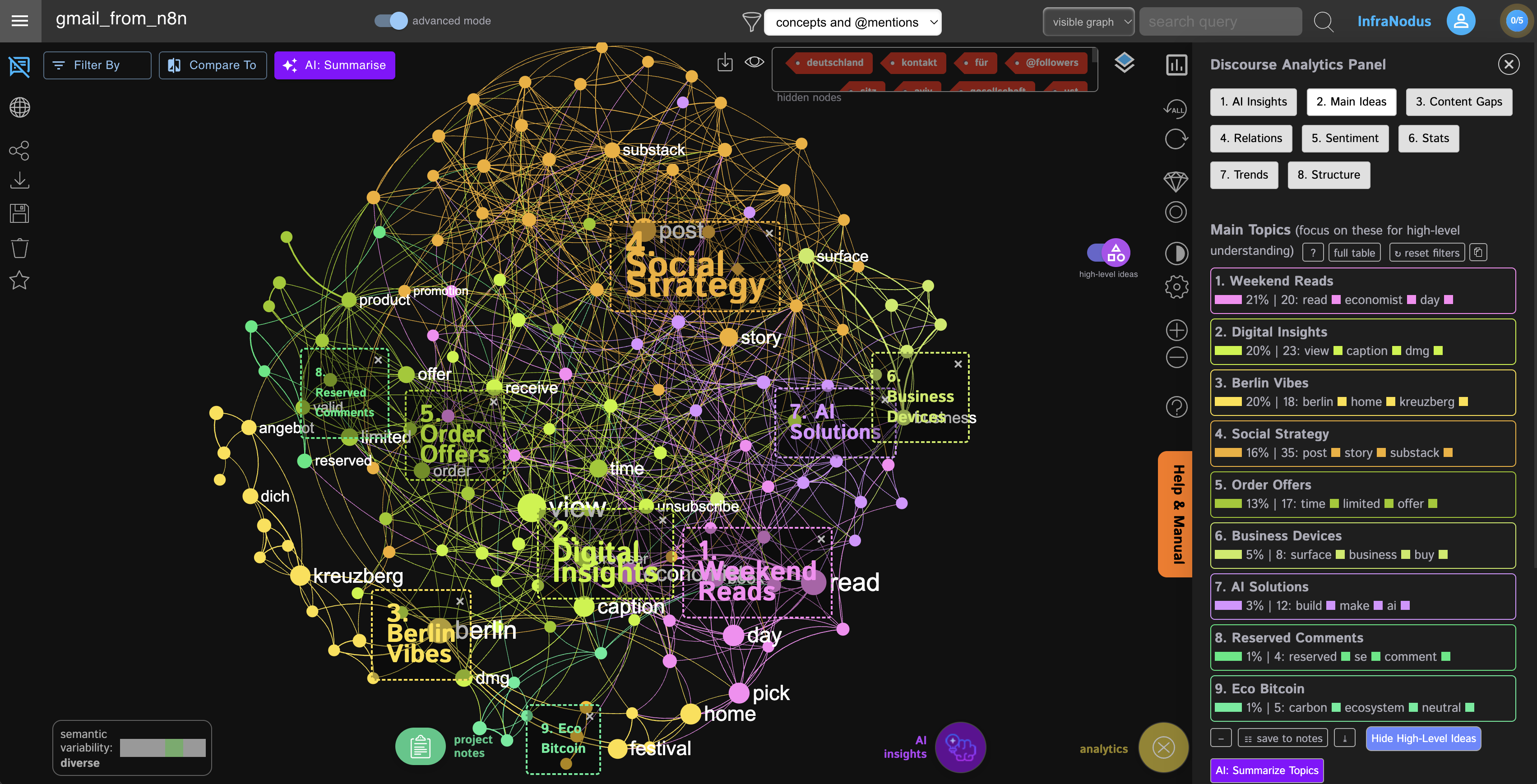"
},
"typeVersion": 1
},
{
"id": "42e1981f-2d8f-4260-b6df-8d625f7cab0a",
"name": "Sticky Note8",
"type": "n8n-nodes-base.stickyNote",
"position": [
2140,
-240
],
"parameters": {
"width": 480,
"height": 1340,
"content": "## 8. Use InfraNodus to generate topical summary and insight questions \n\n### We use the [InfraNodus GraphRAG API](https://infranodus.com/use-case/ai-knowledge-graphs) to generate the topical summary and AI questions\n\n\n### The insight is based on the structural gap identified in the graph — the topics that could be connected but are not yet.\n\n\n### 🚨 Specify the graph name you want to save the data to in the `name` field of the HTTP InfraNodus node or in the Step 2.\n\n\n\n\n\n\n\n\n\n\n\n\n\n\n\n\n\n\n\n\n\n\n\n\n\n\n\n\n\n\n\n\n\n\n\n\n\n\n\n\n\n\n\n\n\n\n\n\n\n\n\n\n"
},
"typeVersion": 1
},
{
"id": "06c11eea-d17a-4342-990a-f3ecf978a594",
"name": "Sticky Note9",
"type": "n8n-nodes-base.stickyNote",
"position": [
2720,
-240
],
"parameters": {
"width": 300,
"height": 1340,
"content": "## 9. Send the insight and the graph link via Telegram and Email\n\n### Get informed via Telegram when the graph is created along with the topical summary and insight question\n\n### 🚨 Creating a bot in Telegram takes 30 seconds: just to to [@botfather](https://t.me/botfather) and type in `newbot` — then use the API key it generates in the credentials\n\n\n"
},
"typeVersion": 1
},
{
"id": "c5072e2a-0848-43b9-bbc5-88c99947fece",
"name": "Sticky Note10",
"type": "n8n-nodes-base.stickyNote",
"position": [
-660,
-880
],
"parameters": {
"color": 7,
"width": 1260,
"height": 600,
"content": "## Types of knowledge graphs\n\n### Knowledge graphs can show you recurrent patterns and gaps in your data. This can be very useful for understanding complex relations and discovering what you would otherwise have missed.\n\n#### You can build two types of graphs with this template: a text graph that shows the topics only and the social graph that adds the email senders to the graph, so you can see the associations of individuals / companies with the topics you're talking about.\n\n\n| Text Graph | | Social Graph |\n|------------|--|-------------|\n|  | | 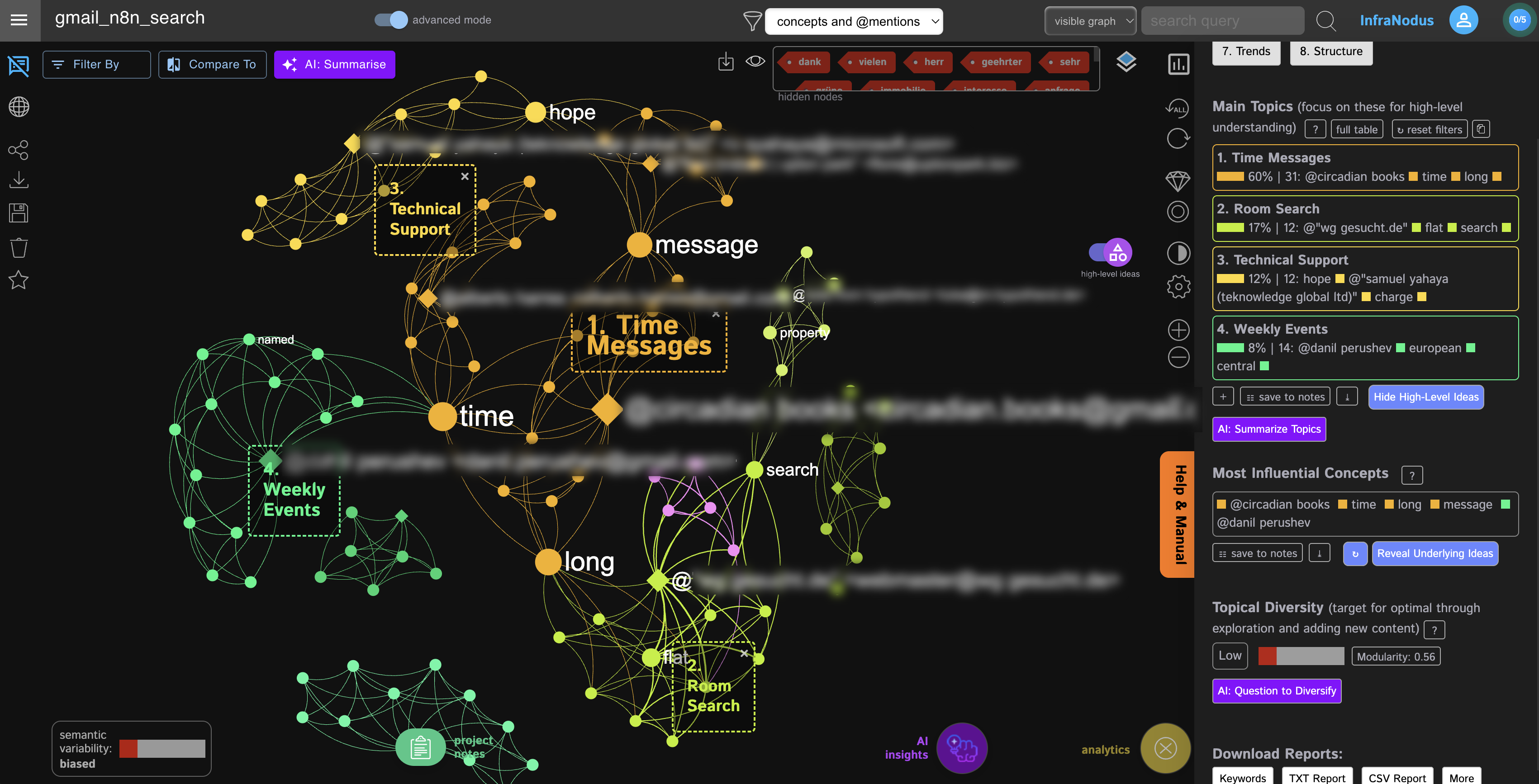 |"
},
"typeVersion": 1
},
{
"id": "c2f7946d-a08d-4c63-93fc-0296adad0e86",
"name": "Gmail",
"type": "n8n-nodes-base.gmail",
"onError": "continueRegularOutput",
"position": [
2800,
200
],
"webhookId": "9ecdabd6-c4bc-4bff-81c9-14ba07a2b947",
"parameters": {
"sendTo": "your_own_email_2912319@email.com",
"message": "=Hello\n\nHere is a visual knowledge graph summary of your emails as of {{$now.toString().split('T')[0]}}: \nhttps://infranodus.com/your_user_name/{{ $('Assign Processing Settings').item.json[\"Graph Name\"] }}/edit\n\nTopical summary:\n{{ $('InfraNodus AI Summary & Graph Link').item.json.aiAdvice[0].text }}\n\nResearch questions:\n{{ $json.aiAdvice[0].text }}\n\n",
"options": {},
"subject": "=Email Summary as of {{$now.toString().split('T')[0]}}",
"emailType": "text"
},
"credentials": {
"gmailOAuth2": {
"id": "w7b4H8WpgY9Oit56",
"name": "Gmail supadelicious"
}
},
"typeVersion": 2.1
}
],
"active": false,
"pinData": {},
"settings": {
"executionOrder": "v1"
},
"versionId": "d35db610-8926-4980-834f-662656aa7f75",
"connections": {
"52802d59-e9a0-44ec-9ffc-0ecd1ad60354": {
"main": [
[
{
"node": "0fe84425-5e0b-4eb7-b8fa-f6e8cc0bfee2",
"type": "main",
"index": 0
}
]
]
},
"a1b0c1c6-efd1-4d77-91d3-6f29565ea3ed": {
"main": [
[
{
"node": "be89719e-e217-4c28-9d71-ddcda1b4606d",
"type": "main",
"index": 0
}
]
]
},
"229bf0ac-7371-443b-9d4c-c2774d184116": {
"main": [
[
{
"node": "be89719e-e217-4c28-9d71-ddcda1b4606d",
"type": "main",
"index": 0
}
]
]
},
"0fe84425-5e0b-4eb7-b8fa-f6e8cc0bfee2": {
"main": [
[
{
"node": "5759e919-6f02-49c3-9012-c3bdfa29f5a3",
"type": "main",
"index": 0
}
],
[
{
"node": "d38a14d2-118b-45cd-b6fa-f7ef3811e9ea",
"type": "main",
"index": 0
}
]
]
},
"e7251d9c-e247-4b48-a7db-4b7bba057777": {
"main": [
[
{
"node": "9cae8722-13c0-4090-81c3-ec60ced40ec4",
"type": "main",
"index": 0
}
],
[
{
"node": "6a1fdf73-fa60-46d6-8980-e192735fbb54",
"type": "main",
"index": 0
}
]
]
},
"9cae8722-13c0-4090-81c3-ec60ced40ec4": {
"main": [
[
{
"node": "daa2cf5f-e8b5-45a4-ab73-feb5981d665d",
"type": "main",
"index": 0
}
]
]
},
"177e9479-176c-434b-8082-b7cebd315c4b": {
"main": [
[
{
"node": "2b2b0d12-296d-4d11-9a5e-13c9b411f1bb",
"type": "main",
"index": 0
}
],
[
{
"node": "8fec6156-93e0-410b-b91a-6d378b70d369",
"type": "main",
"index": 0
}
]
]
},
"204e3171-f4bf-4c6f-a0a9-3ba9ae9f869d": {
"main": [
[
{
"node": "825e11fe-5f2c-41ef-ade0-1136607decbd",
"type": "main",
"index": 0
}
]
]
},
"599264b8-bd89-4ed9-8645-725ebd005747": {
"ai_languageModel": [
[
{
"node": "52802d59-e9a0-44ec-9ffc-0ecd1ad60354",
"type": "ai_languageModel",
"index": 0
}
]
]
},
"6a1fdf73-fa60-46d6-8980-e192735fbb54": {
"main": [
[
{
"node": "825e11fe-5f2c-41ef-ade0-1136607decbd",
"type": "main",
"index": 0
}
],
[
{
"node": "204e3171-f4bf-4c6f-a0a9-3ba9ae9f869d",
"type": "main",
"index": 0
}
]
]
},
"be89719e-e217-4c28-9d71-ddcda1b4606d": {
"main": [
[
{
"node": "85e994c5-8762-4e07-89e0-a91742e1c4aa",
"type": "main",
"index": 0
}
]
]
},
"d38a14d2-118b-45cd-b6fa-f7ef3811e9ea": {
"main": [
[
{
"node": "81a91a82-e1c5-4ff6-873a-3d70d4635637",
"type": "main",
"index": 0
}
]
]
},
"3a974df3-2b2a-4ce2-aff4-74b3771d2e5d": {
"main": [
[
{
"node": "3d9ac1ee-cf79-4f2d-930b-76f6b4eb80f5",
"type": "main",
"index": 0
},
{
"node": "3c912db2-015b-4284-9c12-7fd0891bf2a6",
"type": "main",
"index": 0
},
{
"node": "c2f7946d-a08d-4c63-93fc-0296adad0e86",
"type": "main",
"index": 0
}
]
]
},
"5759e919-6f02-49c3-9012-c3bdfa29f5a3": {
"main": [
[
{
"node": "81a91a82-e1c5-4ff6-873a-3d70d4635637",
"type": "main",
"index": 0
}
]
]
},
"85e994c5-8762-4e07-89e0-a91742e1c4aa": {
"main": [
[
{
"node": "e7251d9c-e247-4b48-a7db-4b7bba057777",
"type": "main",
"index": 0
}
]
]
},
"f504bc20-2385-42f1-80da-f7129a4dcb6e": {
"main": [
[
{
"node": "52802d59-e9a0-44ec-9ffc-0ecd1ad60354",
"type": "main",
"index": 0
}
]
]
},
"bb3ff757-5cfc-4d1e-9544-0ae411978c9f": {
"main": [
[
{
"node": "423739ac-e4a8-4890-b1ef-851fb7b56e86",
"type": "main",
"index": 0
}
]
]
},
"23d3c594-1416-486c-961e-55dbf0714b4d": {
"main": [
[
{
"node": "be89719e-e217-4c28-9d71-ddcda1b4606d",
"type": "main",
"index": 0
}
]
]
},
"423739ac-e4a8-4890-b1ef-851fb7b56e86": {
"main": [
[
{
"node": "3a974df3-2b2a-4ce2-aff4-74b3771d2e5d",
"type": "main",
"index": 0
}
]
]
},
"3d9ac1ee-cf79-4f2d-930b-76f6b4eb80f5": {
"main": [
[]
]
},
"81a91a82-e1c5-4ff6-873a-3d70d4635637": {
"main": [
[
{
"node": "177e9479-176c-434b-8082-b7cebd315c4b",
"type": "main",
"index": 0
}
]
]
},
"8fec6156-93e0-410b-b91a-6d378b70d369": {
"main": [
[
{
"node": "bb3ff757-5cfc-4d1e-9544-0ae411978c9f",
"type": "main",
"index": 0
}
]
]
},
"825e11fe-5f2c-41ef-ade0-1136607decbd": {
"main": [
[
{
"node": "f504bc20-2385-42f1-80da-f7129a4dcb6e",
"type": "main",
"index": 0
}
],
[
{
"node": "0fe84425-5e0b-4eb7-b8fa-f6e8cc0bfee2",
"type": "main",
"index": 0
}
]
]
},
"2b2b0d12-296d-4d11-9a5e-13c9b411f1bb": {
"main": [
[
{
"node": "bb3ff757-5cfc-4d1e-9544-0ae411978c9f",
"type": "main",
"index": 0
}
]
]
},
"3c912db2-015b-4284-9c12-7fd0891bf2a6": {
"main": [
[]
]
},
"daa2cf5f-e8b5-45a4-ab73-feb5981d665d": {
"main": [
[
{
"node": "825e11fe-5f2c-41ef-ade0-1136607decbd",
"type": "main",
"index": 0
}
],
[
{
"node": "204e3171-f4bf-4c6f-a0a9-3ba9ae9f869d",
"type": "main",
"index": 0
}
]
]
}
}
}자주 묻는 질문
이 워크플로우를 어떻게 사용하나요?
위의 JSON 구성 코드를 복사하여 n8n 인스턴스에서 새 워크플로우를 생성하고 "JSON에서 가져오기"를 선택한 후, 구성을 붙여넣고 필요에 따라 인증 설정을 수정하세요.
이 워크플로우는 어떤 시나리오에 적합한가요?
고급 - 기타, 인공지능
유료인가요?
이 워크플로우는 완전히 무료이며 직접 가져와 사용할 수 있습니다. 다만, 워크플로우에서 사용하는 타사 서비스(예: OpenAI API)는 사용자 직접 비용을 지불해야 할 수 있습니다.
관련 워크플로우 추천
시각화 참조 라이브러리에서 n8n 노드를 탐색
可视化 참조 라이브러리에서 n8n 노드를 탐색
If
Ftp
Set
+
If
Ftp
Set
113 노드I versus AI
기타
수신 이메일 태깅, 지식 그래프 구축, Telegram 알림
Gemini AI를 사용한 Gmail 라벨 지정 및 InfraNodus 지식 그래프 구축, Telegram 알림 전송
Code
Wait
Gmail
+
Code
Wait
Gmail
28 노드InfraNodus
기타
API 아키텍처 추출기
API 아키텍처 추출기
If
Set
Code
+
If
Set
Code
88 노드Polina Medvedieva
엔지니어링
리드 생성 및 이메일 워크플로
Google 지도, SendGrid 및 AI를 사용한 B2B 잠재 고객 개발 및 이메일 마케팅 자동화
If
Set
Code
+
If
Set
Code
141 노드Ezema Kingsley Chibuzo
리드 생성
LinkedIn 및 X 바이럴 콘텐츠 자동 엔진
사용AI생성및게시자동생성LinkedIn및X의病毒콘텐츠
If
Set
Wait
+
If
Set
Wait
156 노드Diptamoy Barman
콘텐츠 제작
AI 대리인 레스토랑 [템플릿]
🤖 WhatsApp, 인스타그램, 메신저의 AI 레스토랑 도우미
If
N8n
Set
+
If
N8n
Set
239 노드Amanda Benks
기타
워크플로우 정보
난이도
고급
노드 수38
카테고리2
노드 유형16
저자

InfraNodus
@infranodusI'm Dmitry, the founder of InfraNodus — an AI text network analysis tool. I'm passionate about networks and data visualization and its ability to reveal what everyone else is missing and to highlight different perspectives. I'm sharing the n8n templates that make use of this unique capability of InfraNodus for multiple scenarios.
외부 링크
n8n.io에서 보기 →
이 워크플로우 공유