ブループリントと Baserow を使用した自動タスク生成と週末対応スケジュール
中級
これはProject Management分野の自動化ワークフローで、12個のノードを含みます。主にSet, Code, Baserow, Webhook, Aggregateなどのノードを使用。 ブループリントとBaserowに基づく自動タスク生成と週末考慮スケジューリング
前提条件
- •HTTP Webhookエンドポイント(n8nが自動生成)
- •ターゲットAPIの認証情報が必要な場合あり
カテゴリー
ワークフロープレビュー
ノード接続関係を可視化、ズームとパンをサポート
ワークフローをエクスポート
以下のJSON設定をn8nにインポートして、このワークフローを使用できます
{
"nodes": [
{
"id": "0a933c3b-9f6b-4f45-97ec-e3cc4d343a97",
"name": "タスクの一括生成",
"type": "n8n-nodes-base.httpRequest",
"onError": "continueErrorOutput",
"position": [
1312,
544
],
"parameters": {
"url": "={{ $('Configure settings and ids').item.json['API host'] }}/api/database/rows/table/{{ $('Configure settings and ids').item.json['Tasks table ID'] }}/batch/?user_field_names=true",
"method": "POST",
"options": {},
"jsonBody": "={\"items\": {{ JSON.stringify($json.items) }}}",
"sendBody": true,
"sendHeaders": true,
"specifyBody": "json",
"headerParameters": {
"parameters": [
{
"name": "Authorization",
"value": "=Token {{ $('Configure settings and ids').item.json.Token }}"
}
]
}
},
"typeVersion": 4.2
},
{
"id": "95e2115f-702f-42dc-8320-605727f05017",
"name": "挿入用タスクの集約",
"type": "n8n-nodes-base.aggregate",
"position": [
1088,
544
],
"parameters": {
"options": {},
"aggregate": "aggregateAllItemData",
"destinationFieldName": "items"
},
"typeVersion": 1
},
{
"id": "ada410ae-504e-418b-9a5c-cdeec042e68c",
"name": "エラーレスポンス",
"type": "n8n-nodes-base.respondToWebhook",
"position": [
1536,
640
],
"parameters": {
"options": {},
"respondWith": "text",
"responseBody": "❌ Something went wrong, please check the log files"
},
"typeVersion": 1.4
},
{
"id": "d980e86e-b261-4ddf-b73d-45dd3b9fbf56",
"name": "全テンプレートステップの取得",
"type": "n8n-nodes-base.baserow",
"position": [
416,
544
],
"parameters": {
"tableId": "={{ $json[\"Detail template table ID\"] }}",
"returnAll": true,
"databaseId": "={{ $json[\"Database ID\"] }}",
"additionalOptions": {
"filters": {
"fields": [
{
"field": "={{ $json[\"Link to master template field ID\"] }}",
"value": "={{ $('Trigger task creation').item.json.body.template_id }}",
"operator": "link_row_has"
}
]
}
}
},
"credentials": {
"baserowApi": {
"id": "HgVHAoZFovwlleMD",
"name": "Baserow SaaS account"
}
},
"typeVersion": 1
},
{
"id": "12f6eb7e-1dd5-4d67-995f-493d58197d46",
"name": "タスク作成のトリガー",
"type": "n8n-nodes-base.webhook",
"position": [
-32,
544
],
"webhookId": "5d4788bb-3dae-4f4d-9f4f-31fc23721840",
"parameters": {
"path": "create-tasks-for-template",
"options": {},
"httpMethod": "POST",
"responseMode": "responseNode"
},
"typeVersion": 2
},
{
"id": "e188e6da-2de1-4dfb-a203-0319ff720a80",
"name": "週末スケジューリングの回避",
"type": "n8n-nodes-base.code",
"position": [
864,
544
],
"parameters": {
"jsCode": "function adjustDateForWeekend(original_date){\n const new_date = new Date(original_date)\n const day = new_date.getDay();\n // check for Saturday: add 2 days if necessary\n if(day == 6){\n new_date.setDate(new_date.getDate() + 2)\n }\n // check for Sunday: add 1 day if necessary\n if(day == 0){\n new_date.setDate(new_date.getDate() + 1)\n }\n //return the new day in format YYYY-mm-dd\n return new_date.toISOString().slice(0,10)\n}\n\n// Loop over all the deadlines and adjust to the next monday if the original date is during the weekend\nfor (const item of $input.all()) {\n item.json.Deadline = adjustDateForWeekend(item.json.Deadline);\n}\n\nreturn $input.all();"
},
"typeVersion": 2
},
{
"id": "907e6348-ec6f-434b-b7b2-4568d2a27e7d",
"name": "各ステップの期限計算",
"type": "n8n-nodes-base.set",
"position": [
640,
544
],
"parameters": {
"options": {},
"assignments": {
"assignments": [
{
"id": "fbdee67a-9eb1-4970-9f51-103002e69253",
"name": "Procedure step",
"type": "array",
"value": "=[{{ $json.id }}]"
},
{
"id": "abd084cc-b13f-48d2-a0ff-31398bce757a",
"name": "Deadline",
"type": "string",
"value": "={{new Date($('Configure settings and ids').item.json['Schedule date']).plus($json['Days to complete'],'days').format('yyyy-MM-dd')}}"
},
{
"id": "cf93c092-6126-4b36-a9ce-3725e1a7e47b",
"name": "Assignee",
"type": "array",
"value": "=[{{ $('Configure settings and ids').item.json['Assignee ID'] }}]"
},
{
"id": "6127e270-7305-4a61-b22a-8273544487b3",
"name": "Note",
"type": "string",
"value": "={{ $('Configure settings and ids').item.json.Note }}"
}
]
}
},
"typeVersion": 3.4
},
{
"id": "2514909f-2cba-41b2-9a7f-0a7c4b41a61a",
"name": "設定とIDの構成",
"type": "n8n-nodes-base.set",
"position": [
192,
544
],
"parameters": {
"options": {},
"assignments": {
"assignments": [
{
"id": "644a34f8-a7dc-4812-a5b6-4efa5b47efa1",
"name": "API host",
"type": "string",
"value": "https://api.baserow.io"
},
{
"id": "daba6cf7-c391-4a08-89c7-6164ce5b594e",
"name": "Token",
"type": "string",
"value": "<your_token>"
},
{
"id": "ba45eee9-7823-4e83-bbc0-e1754c04709d",
"name": "Database ID",
"type": "number",
"value": 1111
},
{
"id": "c8a493c3-2ff4-4f63-9a99-b586c14cf4a1",
"name": "Detail template table ID",
"type": "number",
"value": 1111
},
{
"id": "9a4c326a-1581-47bf-b5da-35084656e5f3",
"name": "Link to master template field ID",
"type": "string",
"value": "1111"
},
{
"id": "a420b11a-e75f-45ef-b4ab-373d5754edc2",
"name": "Tasks table ID",
"type": "number",
"value": 1111
},
{
"id": "507da617-8380-437e-ad09-2355e1473544",
"name": "Assignee ID",
"type": "number",
"value": "={{ $json.body.assignee_id }}"
},
{
"id": "59cb1495-86e3-4795-b05b-65e61c9907fb",
"name": "Schedule date",
"type": "string",
"value": "={{ $if(typeof $json.body.schedule_date == 'undefined',$now.format('yyyy-MM-dd'), $json.body.schedule_date)}}"
},
{
"id": "2bf36248-a5a9-49b2-bf5f-8387034159bb",
"name": "Note",
"type": "string",
"value": "={{ $json.body.note }}"
}
]
}
},
"typeVersion": 3.4
},
{
"id": "8f2b7922-2f35-427e-8b65-5c1220122000",
"name": "付箋",
"type": "n8n-nodes-base.stickyNote",
"position": [
-1088,
-112
],
"parameters": {
"width": 928,
"height": 1920,
"content": "This n8n template demonstrates how to automatically **create** **tasks** (or in general, records) in Baserow based on template or blueprint tables. The first blueprint table is the **master table** that holds the general information about the template. For example: a standard procedure to handle incidents. The second table is the **details table** that holds multiple records for the template. Each record in that table is a specific task that needs to be assigned to someone with a certain deadline. \n\nThis makes it easy to streamline task creation for recurring processes. Use cases are many:\n- Project management (generate tasks for employees based on a project template)\n- HR & onboarding (generate tasks for employee onboarding based on a template)\n- Operations (create checklists for maintenance, audits, or recurring procedures)\n\n## Good to know\n- The Baserow template for handling [Standard Operating Procedures](https://baserow.io/templates/standard-operating-procedures) works perfect as a base schema to try out this workflow.\n- Authentication is done through a database token. Check the [documentation](https://baserow.io/user-docs/personal-api-tokens) on how to create such a token.\n- Tasks are inserted using the HTTP request node instead of a dedicated Baserow node. This is to support batch import instead of importing records one by one.\n\n## Requirements\n- Baserow account (cloud or self-hosted)\n- A Baserow database with at least the following tables:\n - `Assignee` / employee table. This is required to be able to assign someone to a task.\n - `Master` table with procedure or template information. This is required to be able to select a certain template\n - `Details` table with all the steps associated with a procedure or template. This is required to convert each step into a specific task.\n - A step must have a field `Days to complete` with the number of days to complete the step. This field will be used to calculate the deadline.\n - `Tasks` table that contains the actual tasks with an assignee and deadline.\n\n## How it works\n- **Trigger task creation (webhook)**\n - The automation starts when the webhook is triggered through a POST request.\n - It should contain an assignee, template, date and note in the body of the request.\n - It will send a succes or failure response once all steps are completed.\n- **Configure settings and ids**\n - Stores the ids of the involved Baserow database and tables, together with the API credentials and the data from the webhook.\n- **Get all template steps**\n - Gets all the steps from the template `Details` table that are associated with the id of the `Master` template table.\n - For example: the master template can have a record about handling customer complaints. The details table contains all the steps to handle this procedure.\n- **Calculate deadlines for each step**\n - Prepares the input of the tasks by using the same property names as the field of the `Tasks` table. Adjust this names, add or remove fields if this is required for your database structure.\n - The deadline of each step is calculated by adding the number of days a step can take based on the deadline of the first step. This is done through a field `Days to complete` in the template `Details` table.\n - For example. If the `schedule_date` property in the webhook is set to 2025-10-01 and the `Days to complete` for the step is 3, then the deadline will be 2025-10-04\n- **Avoid scheduling during the weekend**\n - It might happen that the calculated deadline is on a Saturday or Sunday. This Code node moves those dates to the first Monday to avoid scheduling during the weekend.\n- **Aggregate tasks for insert**\n - Aggregates the data from the previous nodes as an array in a property named `items`. This matches perfect with the Baserow API to insert new records in batch.\n- **Generate tasks in batch**\n - Calls the API endpoint `/api/database/rows/table/{table_id}/batch/` to insert multiple records at once in the tasks table. Check the [Baserow API documentation](https://api.baserow.io/api/redoc/#tag/Database-table-rows/operation/batch_create_database_table_rows) for further details.\n- **Success / Error response**\n - Sends a simple text response to indicate the success or failure of the record creation. This is to offer feedback when triggering the automation from a Baserow application, but can be replaced with a JSON response.\n\n## How to use\n- Call the `Trigger task creation` node with the required parameters through a POST request. This can be done from any web application. For example: the application builder in Baserow supports an action to send an HTTP request. The Procedure details page in the [Standard Operating Procedures](https://baserow.io/templates/standard-operating-procedures) template demonstrates this action.\n - The following information is required in the body of the request. This information is required to create the actual tasks.\n \n ```json\n {\n \"assignee_id\": integer refering to the id of the assignee in the database,\n \"template_id\": integer refering to the id of the template or procedure in the master table,\n \"schedule_date\": the date the tasks need to start scheduling,\n \"note\": text with an optional note about the tasks\n }\n ```\n \n- Set the corresponding ids in the `Configure settings and ids` node.\n- Check the names of the properties in the `Calculate deadlines for each step` node. Make sure the names of those properties match the field names of your `Tasks` table.\n- You can replace the text message in the `Success response` and `Failure response` with a more structured format if this is necessary in your application.\n\n## Customising this workflow\n- Add support for public holidays (e.g., using an external calendar API).\n- Modify the task assignment logic (e.g., pre-assign tasks in the details table).\n- Combine with notifications (email, Slack, etc.) to alert employees when new tasks are generated."
},
"typeVersion": 1
},
{
"id": "df72abe3-8919-4854-ace5-0a35ed2a25c9",
"name": "成功レスポンス",
"type": "n8n-nodes-base.respondToWebhook",
"position": [
1536,
448
],
"parameters": {
"options": {},
"respondWith": "text",
"responseBody": "✅ The tasks were created"
},
"typeVersion": 1.4
},
{
"id": "3ec01ca3-cbb1-4932-8a26-63609021fb43",
"name": "付箋1",
"type": "n8n-nodes-base.stickyNote",
"position": [
-80,
736
],
"parameters": {
"color": 7,
"width": 688,
"height": 944,
"content": "## Trigger task creation\n\nThe following information must be passed in the body of the request\n```json\n {\n \"assignee_id\": integer,\n \"template_id\": integer,\n \"schedule_date\": date,\n \"note\":\n }\n```\n\nYou can trigger the webhook for example through the Baserow application builder by adding an Send an HTTP request action to a button click and passing the required parameters.\n\n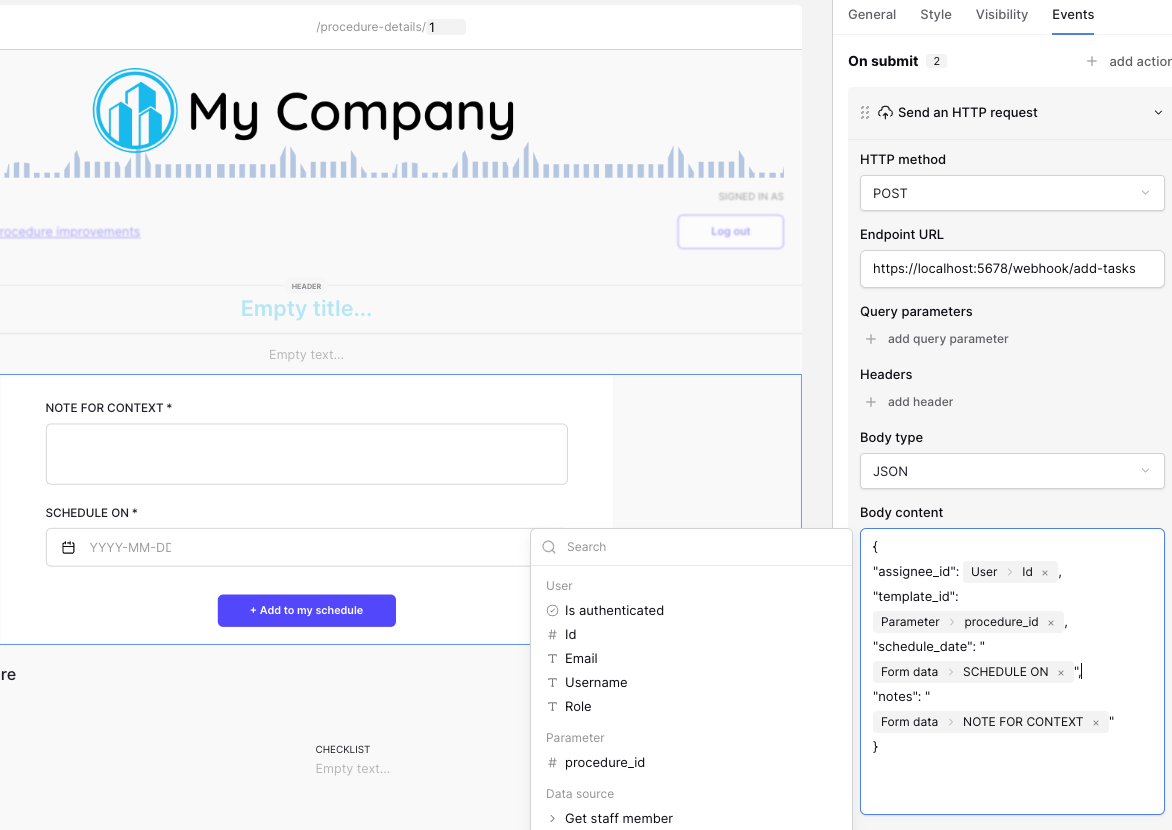"
},
"typeVersion": 1
},
{
"id": "4e516ff5-099a-4c9f-a881-846b6d1d25b6",
"name": "付箋2",
"type": "n8n-nodes-base.stickyNote",
"position": [
144,
160
],
"parameters": {
"color": 7,
"width": 512,
"height": 352,
"content": "## Configure settings and ids\n\n* API host: the path to the API of your instance. This is https://api.baserow.io when using the cloud instance.\n* Token: a token you need to generate for the database. Check the [documentation](https://baserow.io/user-docs/personal-api-tokens) on how to create such a token.\n* Database ID: the unique id of the database you want to use\n* Detail template table ID: the unique id of the table containing the steps that need to be converted to tasks\n* Link to master template field ID: the unique ID of the field that references the Masters table\n* Task table ID: the unique id of the table holding the tasks\n\nThe other fields are filled in with the data from the webhook body"
},
"typeVersion": 1
}
],
"connections": {
"12f6eb7e-1dd5-4d67-995f-493d58197d46": {
"main": [
[
{
"node": "2514909f-2cba-41b2-9a7f-0a7c4b41a61a",
"type": "main",
"index": 0
}
]
]
},
"d980e86e-b261-4ddf-b73d-45dd3b9fbf56": {
"main": [
[
{
"node": "907e6348-ec6f-434b-b7b2-4568d2a27e7d",
"type": "main",
"index": 0
}
]
]
},
"0a933c3b-9f6b-4f45-97ec-e3cc4d343a97": {
"main": [
[
{
"node": "df72abe3-8919-4854-ace5-0a35ed2a25c9",
"type": "main",
"index": 0
}
],
[
{
"node": "ada410ae-504e-418b-9a5c-cdeec042e68c",
"type": "main",
"index": 0
}
]
]
},
"95e2115f-702f-42dc-8320-605727f05017": {
"main": [
[
{
"node": "0a933c3b-9f6b-4f45-97ec-e3cc4d343a97",
"type": "main",
"index": 0
}
]
]
},
"2514909f-2cba-41b2-9a7f-0a7c4b41a61a": {
"main": [
[
{
"node": "d980e86e-b261-4ddf-b73d-45dd3b9fbf56",
"type": "main",
"index": 0
}
]
]
},
"907e6348-ec6f-434b-b7b2-4568d2a27e7d": {
"main": [
[
{
"node": "e188e6da-2de1-4dfb-a203-0319ff720a80",
"type": "main",
"index": 0
}
]
]
},
"e188e6da-2de1-4dfb-a203-0319ff720a80": {
"main": [
[
{
"node": "95e2115f-702f-42dc-8320-605727f05017",
"type": "main",
"index": 0
}
]
]
}
}
}よくある質問
このワークフローの使い方は?
上記のJSON設定コードをコピーし、n8nインスタンスで新しいワークフローを作成して「JSONからインポート」を選択、設定を貼り付けて認証情報を必要に応じて変更してください。
このワークフローはどんな場面に適していますか?
中級 - プロジェクト管理
有料ですか?
このワークフローは完全無料です。ただし、ワークフローで使用するサードパーティサービス(OpenAI APIなど)は別途料金が発生する場合があります。
関連ワークフロー
Bright Data、OpenAI、Redisを基盤とした高度なマルチソースAIリサーチ
高度なマルチソースAIリサーチの実装(Bright Data、OpenAI、Redis使用)
If
Set
Code
+
If
Set
Code
43 ノードDaniel Shashko
市場調査
Gmailのメールヘッダーを解析してIP信頼性とスプーフィングを検出
Gmailのメールヘッダーを解析し、IP評判とスプーフィングを検出する
If
Set
Code
+
If
Set
Code
40 ノードAngel Menendez
セキュリティ運用
Outlookのメールヘッダーを解析してIP信頼性とスプーフィングを検出
Outlookのメールヘッダーを解析し、IP評判とスプーフィングを検出する
If
Set
Code
+
If
Set
Code
41 ノードAngel Menendez
セキュリティ運用
VEXA、OpenAI、Mem0を使った会議のAI分析の自動化
VEXA、OpenAI、Mem0を使った会議対話洞察の自動分析
Set
Code
Merge
+
Set
Code
Merge
26 ノードStephan Koning
文書抽出
CSVからJSON変換器(エラーハンドリングとSlack通知)
CSVからJSONへの変換ツール(エラーハンドリングとSlack通知機能付き)
If
Set
Code
+
If
Set
Code
18 ノードn8n Team
エンジニアリング
Groq AIとGhostGeniusを使ってLinkedInプロフィールと求人情報を比較
Groq AI と GhostGenius を使って LinkedIn プロフィールと職位説明のマッチ度を比較する
If
Set
Code
+
If
Set
Code
17 ノードStephan Koning
その他
ワークフロー情報
難易度
中級
ノード数12
カテゴリー1
ノードタイプ8
作成者

Frederik Duchi
@frederikdcI have a background in software engineering and work as a product specialist at Baserow and already did a lot of implementations for customers where I combine Baserow with n8n.
外部リンク
n8n.ioで表示 →
このワークフローを共有