🛻 物流注文処理 AI エージェント(GPT-4o、Gmail と Google Sheet)
中級
これはSales, IT Ops分野の自動化ワークフローで、11個のノードを含みます。主にIf, Code, GmailTrigger, GoogleSheets, Agentなどのノードを使用。 🛻 物流注文処理 AI エージェント(GPT-4o、Gmail、Google Sheet)
前提条件
- •Googleアカウント + Gmail API認証情報
- •Google Sheets API認証情報
- •OpenAI API Key
ワークフロープレビュー
ノード接続関係を可視化、ズームとパンをサポート
ワークフローをエクスポート
以下のJSON設定をn8nにインポートして、このワークフローを使用できます
{
"meta": {
"instanceId": "6a5e68bcca67c4cdb3e0b698d01739aea084e1ec06e551db64aeff43d174cb23",
"templateCredsSetupCompleted": true
},
"nodes": [
{
"id": "bc49829b-45f2-4910-9c37-907271982f14",
"name": "付箋3",
"type": "n8n-nodes-base.stickyNote",
"position": [
-140,
320
],
"parameters": {
"width": 780,
"height": 540,
"content": "### 4. Do you need more details?\nFind a step-by-step guide in this tutorial\n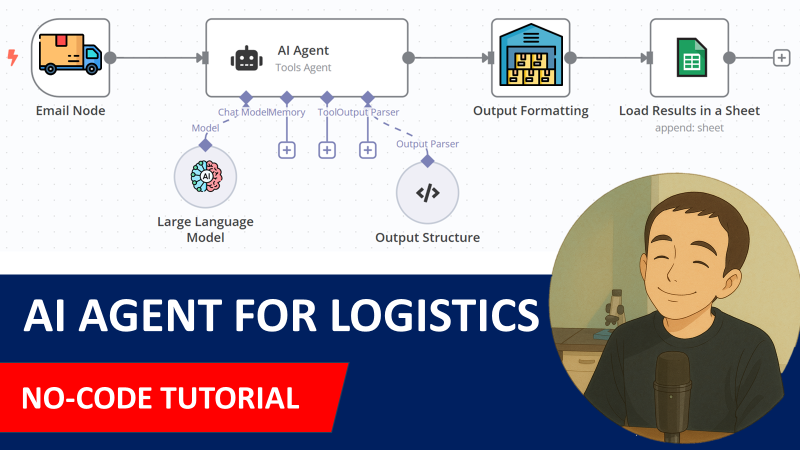\n[🎥 Watch My Tutorial](https://www.youtube.com/watch?v=kQ8dO_30SB0)"
},
"typeVersion": 1
},
{
"id": "40c6e16a-3b4f-4e28-b0a1-7066e0efab5d",
"name": "AIエージェント",
"type": "@n8n/n8n-nodes-langchain.agent",
"position": [
-460,
-80
],
"parameters": {
"text": "=Email Subject: {{ $json.subject }}\nEmail Body: \n{{ $json.text }}",
"options": {
"systemMessage": "=You are an assistant that processes emails related to inbound orders from Hermas.\n\nEach email has the subject line containing a purchase order reference (e.g., \"PO45231\").\nIn the email body, you will find:\n\nAn expected delivery date, typically in formats like 27/03/2025 or 2025-03-27.\n\nOne or more order lines, where each line contains:\n\nAn SKU (e.g., HERM-SHOE-001)\n\nA quantity (e.g., 120)\n\nYour goal is to extract the following fields:\n\npurchase_order: The PO number from the subject line (e.g., PO45231)\n\nexpected_delivery_date: In ISO format (e.g., 2025-03-27)\n\nlines: A list of objects with sku and quantity for each order line\n\nReturn your output strictly as a valid JSON object using the format below."
},
"promptType": "define",
"hasOutputParser": true
},
"typeVersion": 1.8
},
{
"id": "e9cb7bb1-40e7-463e-8b3f-417602338e5c",
"name": "OpenAI チャットモデル",
"type": "@n8n/n8n-nodes-langchain.lmChatOpenAi",
"position": [
-520,
120
],
"parameters": {
"model": {
"__rl": true,
"mode": "list",
"value": "gpt-4o-mini"
},
"options": {}
},
"typeVersion": 1.2
},
{
"id": "468bdb39-223f-4bae-8bdb-a72272ab57c3",
"name": "構造化出力パーサー",
"type": "@n8n/n8n-nodes-langchain.outputParserStructured",
"position": [
-180,
120
],
"parameters": {
"jsonSchemaExample": "{\n \"purchase_order\": \"PO45231\",\n \"expected_delivery_date\": \"2025-03-27\",\n \"lines\": [\n { \"sku\": \"HERM-SHOE-001\", \"quantity\": 120 },\n { \"sku\": \"HERM-BAG-032\", \"quantity\": 45 },\n { \"sku\": \"HERM-WATCH-105\", \"quantity\": 30 },\n { \"sku\": \"HERM-SCARF-018\", \"quantity\": 80 }\n ]\n}\n"
},
"typeVersion": 1.2
},
{
"id": "667a8d43-1ce5-4ec8-871a-26007356a89e",
"name": "付箋1",
"type": "n8n-nodes-base.stickyNote",
"position": [
-1000,
-460
],
"parameters": {
"color": 7,
"width": 380,
"height": 720,
"content": "### 1. Workflow Trigger with Gmail Trigger\nThe workflow is triggered by a new email received in your Gmail mailbox. \nIf the subject includes the string \"Inbound Order\" we proceed, if not we do nothing.\n\n#### How to setup?\n- **Gmail Trigger Node:** set up your Gmail API credentials\n[Learn more about the Gmail Trigger Node](https://docs.n8n.io/integrations/builtin/trigger-nodes/n8n-nodes-base.gmailtrigger)\n"
},
"typeVersion": 1
},
{
"id": "e1e2d95a-9bbd-4bd5-92ec-7a4835db21a2",
"name": "付箋2",
"type": "n8n-nodes-base.stickyNote",
"position": [
-600,
-460
],
"parameters": {
"color": 7,
"width": 660,
"height": 720,
"content": "### 2. AI Agent equipped with the query tool\nThe email body and subject are sent to the AI agent for parsing. The results include the **PO Number**, **expected delivery date** and all the order lines with **SKU ID** and **order quantity**. Outputs are formatted by the code node to fit in a Google Sheet.\n\n#### How to setup?\n- **AI Agent with the Chat Model**:\n 1. Add a **chat model** with the required credentials *(Example: Open AI 4o-mini)*\n 2. Adapt the system prompt to the format of your emails\n [Learn more about the AI Agent Node](https://docs.n8n.io/integrations/builtin/cluster-nodes/root-nodes/n8n-nodes-langchain.agent)"
},
"typeVersion": 1
},
{
"id": "53375c17-a36c-431e-9ba6-07a9a84fc4c9",
"name": "付箋4",
"type": "n8n-nodes-base.stickyNote",
"position": [
80,
-460
],
"parameters": {
"color": 7,
"width": 460,
"height": 540,
"content": "### 3. Store the orderlines in a Google Sheet\nThe table generated by the **code node** includes all the order lines with the **PO Number** and the **expected delivery date**. This **Google Sheet Node** loads the content in a Google Sheet.\n\n#### How to setup?\n- **Add Results in Google Sheets**:\n 1. Add your Google Sheet API credentials to access the Google Sheet file\n 2. Select the file using the list, an URL or an ID\n 3. Select the sheet in which the vocabulary list is stored\n 4. Create the columns: **PO_NUMBER, EXPECTED_DELIVERY DATE, SKU_ID, QUANTITY**\n [Learn more about the Google Sheet Node](https://docs.n8n.io/integrations/builtin/app-nodes/n8n-nodes-base.googlesheets)"
},
"typeVersion": 1
},
{
"id": "776cfc0e-264b-44cc-b534-dc387b0c9fce",
"name": "購買オーダー明細を保存",
"type": "n8n-nodes-base.googleSheets",
"position": [
180,
-80
],
"parameters": {
"columns": {
"value": {
"SKU_ID": "={{ $json.sku }}",
"QUANTITY": "={{ $json.quantity }}",
"PO_NUMBER": "={{ $json.purchase_order }}",
"EXPECTED_DELIVERY DATE": "={{ $json.expected_delivery_date }}"
},
"schema": [
{
"id": "PO_NUMBER",
"type": "string",
"display": true,
"required": false,
"displayName": "PO_NUMBER",
"defaultMatch": false,
"canBeUsedToMatch": true
},
{
"id": "EXPECTED_DELIVERY DATE",
"type": "string",
"display": true,
"required": false,
"displayName": "EXPECTED_DELIVERY DATE",
"defaultMatch": false,
"canBeUsedToMatch": true
},
{
"id": "SKU_ID",
"type": "string",
"display": true,
"required": false,
"displayName": "SKU_ID",
"defaultMatch": false,
"canBeUsedToMatch": true
},
{
"id": "QUANTITY",
"type": "string",
"display": true,
"required": false,
"displayName": "QUANTITY",
"defaultMatch": false,
"canBeUsedToMatch": true
}
],
"mappingMode": "defineBelow",
"matchingColumns": [],
"attemptToConvertTypes": false,
"convertFieldsToString": false
},
"options": {},
"operation": "append",
"sheetName": {
"__rl": true,
"mode": "list",
"value": "gid=0",
"cachedResultUrl": "=",
"cachedResultName": "="
},
"documentId": {
"__rl": true,
"mode": "list",
"value": "1HnaJJ-DqzqgWJo2YwQDcgB6BgWiU6eMlnGvv4kapubg",
"cachedResultUrl": "=",
"cachedResultName": "="
}
},
"notesInFlow": true,
"typeVersion": 4.5
},
{
"id": "d5c52625-fef2-47a9-b2a4-bf005d8b9e05",
"name": "メール受信",
"type": "n8n-nodes-base.gmailTrigger",
"position": [
-980,
-80
],
"parameters": {
"simple": false,
"filters": {},
"options": {},
"pollTimes": {
"item": [
{
"mode": "everyMinute"
}
]
}
},
"typeVersion": 1.2
},
{
"id": "6dc9e5cc-9ab3-469c-ad93-e0e7817ccbf7",
"name": "POか?",
"type": "n8n-nodes-base.if",
"position": [
-760,
-80
],
"parameters": {
"options": {},
"conditions": {
"options": {
"version": 2,
"leftValue": "",
"caseSensitive": true,
"typeValidation": "strict"
},
"combinator": "and",
"conditions": [
{
"id": "f300ae2b-5de4-4efc-88ae-130a957588cb",
"operator": {
"type": "string",
"operation": "contains"
},
"leftValue": "={{ $json.subject }}",
"rightValue": "Inbound Order"
}
]
}
},
"typeVersion": 2.2
},
{
"id": "385db736-0867-46b9-9274-380e7c255fc4",
"name": "購買オーダー明細を整形",
"type": "n8n-nodes-base.code",
"position": [
-120,
-80
],
"parameters": {
"jsCode": "const {purchase_order, expected_delivery_date, lines} = $input.first().json.output;\n\nreturn lines.map( line => ({\n json: {\n purchase_order,\n expected_delivery_date,\n sku: line.sku,\n quantity: line.quantity\n }\n}))\n"
},
"typeVersion": 2
},
{
"id": "b2e39591-70be-4d7f-a5d4-1505741d6310",
"name": "付箋",
"type": "n8n-nodes-base.stickyNote",
"position": [
-1000,
320
],
"parameters": {
"width": 780,
"height": 720,
"content": "### Test the workflow with this email!\n\n#### How?\n1. Send this email to the Gmail box you set up in your credentials.\n2. Click on Test workflow\n\n### Email\n**Email Subject:** Inbound Order PO45231 – Expected Delivery on 2025-03-27\n\n**Email Body:** \nDear LogiGreen Team,\n\nPlease find below the details of the upcoming inbound order.\n\nPurchase Order: PO45231\nExpected Delivery Date: 27/03/2025\n\nOrder Lines:\n\nSKU: HERM-SHOE-001 — Qty: 120\n\nSKU: HERM-BAG-032 — Qty: 45\n\nSKU: HERM-WATCH-105 — Qty: 30\n\nSKU: HERM-SCARF-018 — Qty: 80\n\nLet us know if you need any additional details.\n\nBest regards,\nSophie Lambert\nAdmin Assistant – Hermas Logistics\n📞 +33 1 23 45 67 89 78 84\n✉️ sophie.lambert@hermas.com\n"
},
"typeVersion": 1
}
],
"pinData": {},
"connections": {
"6dc9e5cc-9ab3-469c-ad93-e0e7817ccbf7": {
"main": [
[
{
"node": "40c6e16a-3b4f-4e28-b0a1-7066e0efab5d",
"type": "main",
"index": 0
}
]
]
},
"40c6e16a-3b4f-4e28-b0a1-7066e0efab5d": {
"main": [
[
{
"node": "385db736-0867-46b9-9274-380e7c255fc4",
"type": "main",
"index": 0
}
]
]
},
"d5c52625-fef2-47a9-b2a4-bf005d8b9e05": {
"main": [
[
{
"node": "6dc9e5cc-9ab3-469c-ad93-e0e7817ccbf7",
"type": "main",
"index": 0
}
]
]
},
"e9cb7bb1-40e7-463e-8b3f-417602338e5c": {
"ai_languageModel": [
[
{
"node": "40c6e16a-3b4f-4e28-b0a1-7066e0efab5d",
"type": "ai_languageModel",
"index": 0
}
]
]
},
"468bdb39-223f-4bae-8bdb-a72272ab57c3": {
"ai_outputParser": [
[
{
"node": "40c6e16a-3b4f-4e28-b0a1-7066e0efab5d",
"type": "ai_outputParser",
"index": 0
}
]
]
},
"385db736-0867-46b9-9274-380e7c255fc4": {
"main": [
[
{
"node": "776cfc0e-264b-44cc-b534-dc387b0c9fce",
"type": "main",
"index": 0
}
]
]
}
}
}よくある質問
このワークフローの使い方は?
上記のJSON設定コードをコピーし、n8nインスタンスで新しいワークフローを作成して「JSONからインポート」を選択、設定を貼り付けて認証情報を必要に応じて変更してください。
このワークフローはどんな場面に適していますか?
中級 - 営業, IT運用
有料ですか?
このワークフローは完全無料です。ただし、ワークフローで使用するサードパーティサービス(OpenAI APIなど)は別途料金が発生する場合があります。
関連ワークフロー
✈️CarbonInterface APIとGPT-4oを使用してビジネス旅行の二酸化炭素排出量を計算
✈️ Carbon Interface APIとGPT-4oを使用してビジネス旅行の二酸化炭素排出量を計算
Split Out
Http Request
Gmail Trigger
+
Split Out
Http Request
Gmail Trigger
12 ノードSamir Saci
その他
🚚 Carbon Interface APIとGPT-4oを使用して貨物のCO2排出量を計算
🚚 Carbon Interface APIとGPT-4oを使用して貨物輸送のCO2排出量を計算
Http Request
Gmail Trigger
Google Sheets
+
Http Request
Gmail Trigger
Google Sheets
10 ノードSamir Saci
人工知能
🤖🚚 GPT-4o と Open Route API ベースの配送注文管理 AI エージェント
🤖🚚 GPT-4oとOpen Route APIに基づく配送注文管理AIエージェント
Set
Wait
Gmail
+
Set
Wait
Gmail
26 ノードSamir Saci
人工知能
🌲GmailとGPT-40を使用してサステナビリティレポート監査を行うAIエージェント
🌲 GmailとGPT-40を使用して持続可能性レポート監査を行うAIエージェント
If
Code
Gmail
+
If
Code
Gmail
14 ノードSamir Saci
その他
🗞️ AIドライブの持続可能性マーケティングブリーフィング(Gmail、GPT-4o使用)
🗞️ AI駆動型持続可能性マーケティングブリーフィング(Gmail、GPT-4oを使用)
If
Set
Code
+
If
Set
Code
21 ノードSamir Saci
人工知能
📦 GmailとGoogleスプレッドシートを使用してEDIメッセージを解析する
📦 GmailとGoogleスプレッドシートを使用して電子データ交換(EDI)メッセージを解析
If
Set
Code
+
If
Set
Code
17 ノードSamir Saci
その他
ワークフロー情報
難易度
中級
ノード数11
カテゴリー2
ノードタイプ8
作成者

Samir Saci
@samirsaciAutomation, AI and Analytics for Supply Chain & Business Optimization Helping businesses streamline operations using n8n, AI agents, and data science to enhance efficiency and sustainability. Linkedin: www.linkedin.com/in/samir-saci
外部リンク
n8n.ioで表示 →
このワークフローを共有