Analyser, interpréter et visualiser les données multi-sources avec Ada AI
Avancé
Ceci est uncontenant 25 nœuds.Utilise principalement des nœuds comme Set, Code, Gmail, MySql, Markdown. Utiliser Ada AI pour analyser, interpréter et visualiser les données multi-sources
Prérequis
- •Compte Google et informations d'identification Gmail API
- •Informations de connexion à la base de données MySQL
- •Peut nécessiter les informations d'identification d'authentification de l'API cible
- •Informations d'identification Google Sheets API
Nœuds utilisés (25)
Catégorie
-
Aperçu du workflow
Visualisation des connexions entre les nœuds, avec support du zoom et du déplacement
Exporter le workflow
Copiez la configuration JSON suivante dans n8n pour importer et utiliser ce workflow
{
"meta": {
"instanceId": "806e76bc68769277cc91003cf60c5af8793416e570a07db359be1a94e4c0b217"
},
"nodes": [
{
"id": "78b49282-5384-4a85-aadf-f05fc08cfe7f",
"name": "Note adhésive",
"type": "n8n-nodes-base.stickyNote",
"position": [
-144,
-112
],
"parameters": {
"color": 4,
"width": 448,
"height": 1536,
"content": "## Data Source\nThese nodes extract structured data directly from your data source (e.g., MySQL, Google Sheets, Excel/CSV).\n\nSimply connect the data source nodes you need and disconnect any unused nodes.\n\n**You must select one - and only one - data source node. Disconnect any additional data source nodes. You can also replace these nodes with any other data sources**\n\nAs long as the generated data matches the structured format required by the subsequent steps.\n\n## Sample Data\nA node is provided here that randomly generates one thousand data entries each time.\n\nThis dataset is a collection of simulated sales order records. Each record contains the following fields:\n\norder_date: The date when the order was placed.\nproduct_category: The category of the product sold, such as \"Electronics,\" \"Clothing & Fashion,\" \"Home & Furniture,\" \"Food & Beverages,\" \"Sports & Outdoors,\" or \"Beauty & Personal Care.\"\nregion: The sales region, which can include \"North America,\" \"South America,\" \"Europe,\" \"Asia,\" \"Africa,\" \"Oceania,\" \"Middle East,\" or \"Central Asia.\"\nsales_amount: The total sales amount for the order.\nThis type of data is typically used for analyzing sales performance across different time periods, product categories, and regions. In n8n, such data is usually structured as an array of objects, making it suitable for further processing, analysis, and automation workflows."
},
"typeVersion": 1
},
{
"id": "bf8a1e18-4fcf-4ba5-ba20-ec534dbb3499",
"name": "Note adhésive 1",
"type": "n8n-nodes-base.stickyNote",
"position": [
496,
240
],
"parameters": {
"color": 4,
"width": 656,
"height": 976,
"content": "## Select the skills you need\nConnect the skill nodes you require\n\nYou need to apply for an API key according to the instructions, configure credentials, and set up Authentication in the DataAnalysis, DataInterpretation, and DataVisualization nodes.\n\n### Input parameters\ninput_json: Data from previous nodes\nquery: Query statement, you can set a fixed query according to your needs or use LLM to generate the query\n\n### Output\nThe output of DataAnalysis and DataInterpretation nodes will include markdown text, while the output of DataVisualization nodes will include HTML code."
},
"typeVersion": 1
},
{
"id": "dd510d46-fb9d-4020-b675-cddb76dfbfc5",
"name": "Note adhésive 2",
"type": "n8n-nodes-base.stickyNote",
"position": [
1328,
368
],
"parameters": {
"color": 4,
"width": 336,
"height": 848,
"content": "## Output\n\nHere we use sending email as an example; you can choose the method that suits your needs."
},
"typeVersion": 1
},
{
"id": "64975f75-6153-43a0-ad61-4bc8c69c0e33",
"name": "Note adhésive 3",
"type": "n8n-nodes-base.stickyNote",
"position": [
-3584,
240
],
"parameters": {
"color": 7,
"width": 3088,
"height": 4672,
"content": "## Overview\nThis template empowers low-code data analysis using natural language. Simply connect to your data sources (e.g., MySQL, Google Sheets),\nand it automates the entire workflow—from data querying and processing to interpretation and visualization. For instance,\nit can professionally analyze, interpret, and visualize weekly sales data and have the report delivered directly to your inbox.\n\nThis template is supported by [ada.im](https://ada.im/home?ada_data_=&utm_source=n8n&utm_medium=landingpage&utm_infeluncer=landingpage&utm_campain=landingpage&utm_content=landingpage)\n## Here are some example results:\n\n### DataVisualization\nquery: Use a pie chart to display the sales of each product in 2024, and a line chart to represent the total monthly sales of each product in 2024. Additionally, you can add some extra charts based on the data.\nresult: \n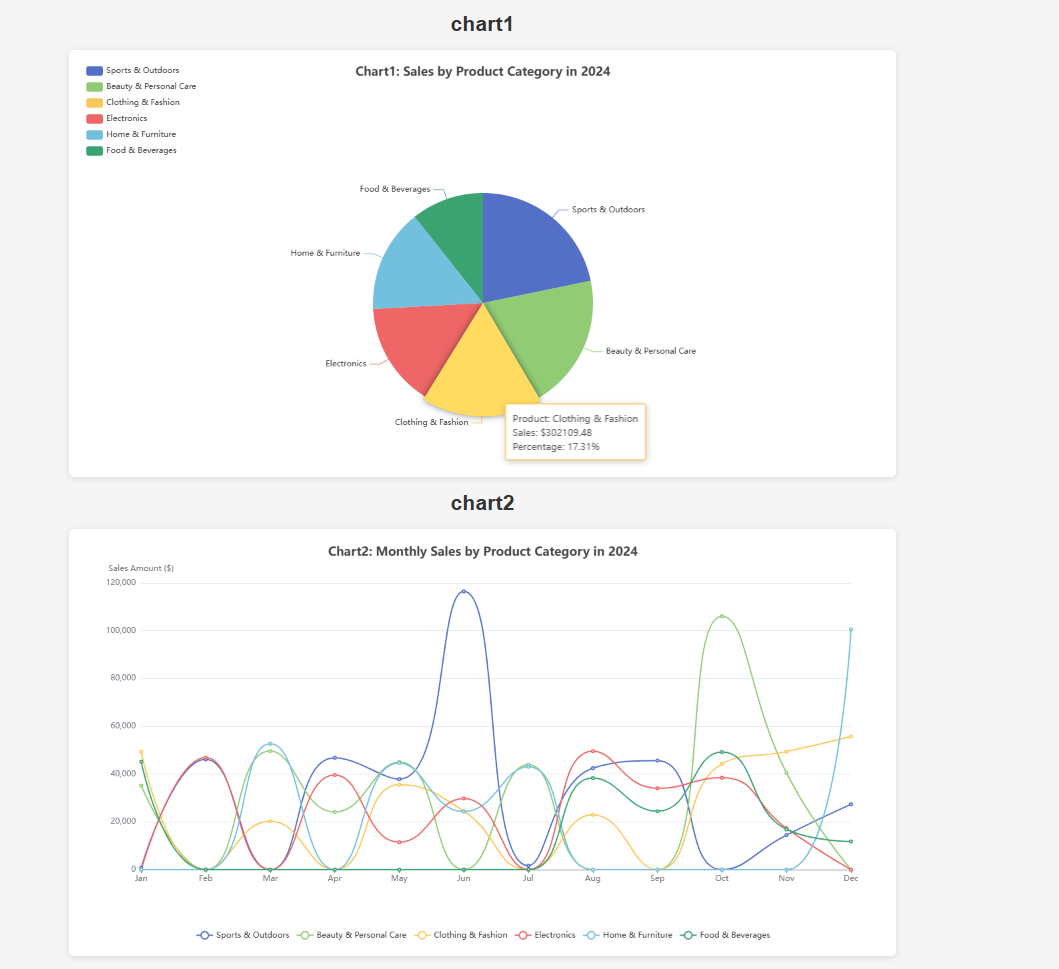\n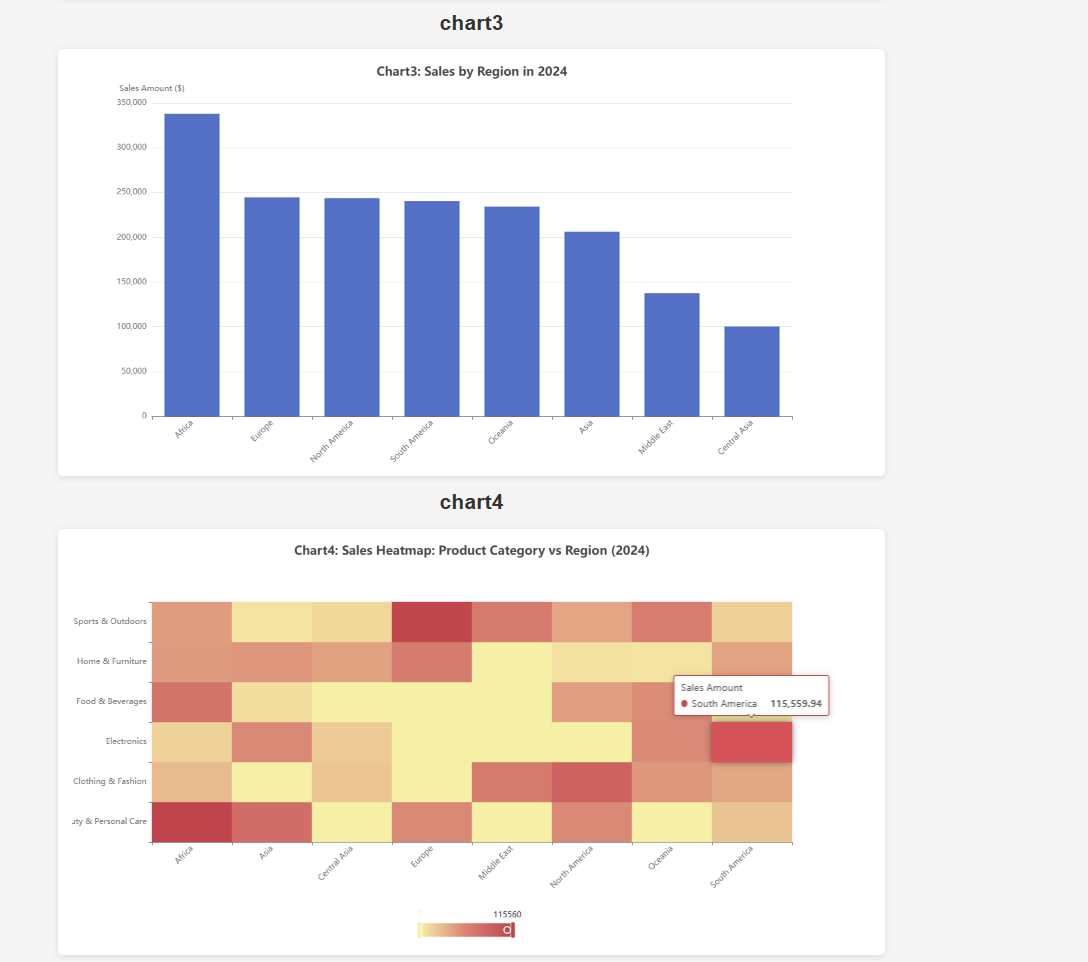\n\n### DataInterpretation\nquery: Sales volume of each product in 2024\nresult: \n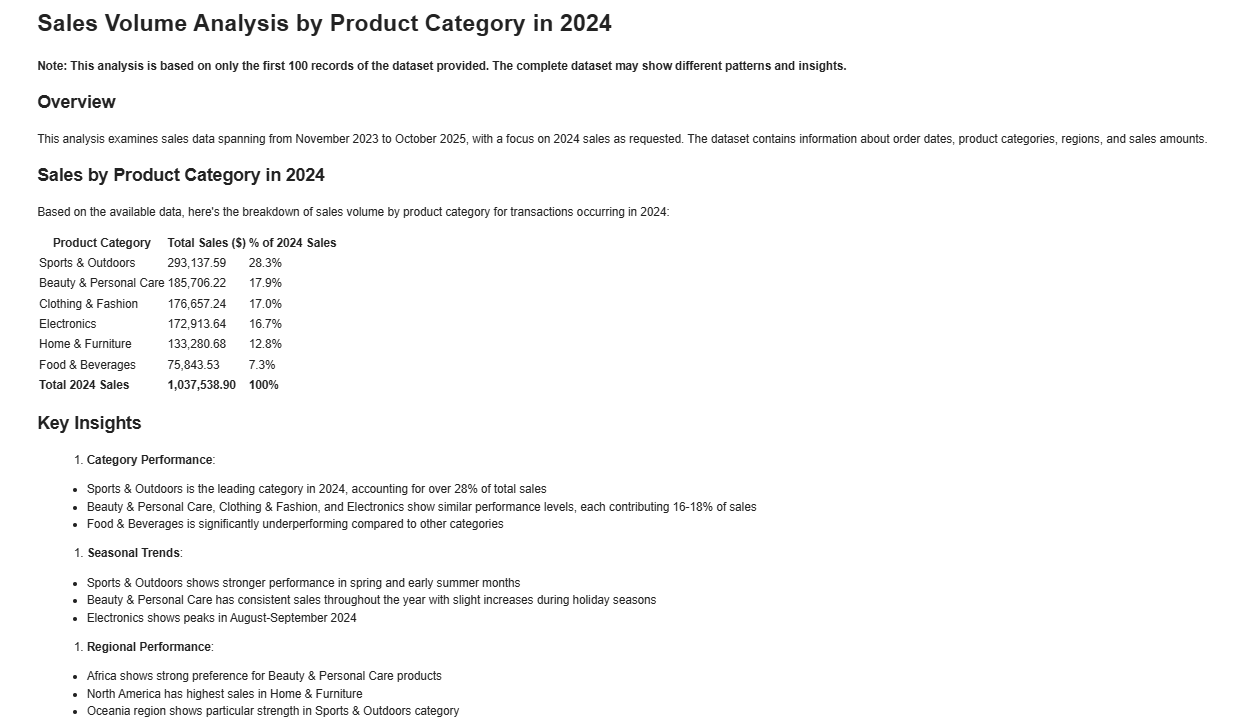\n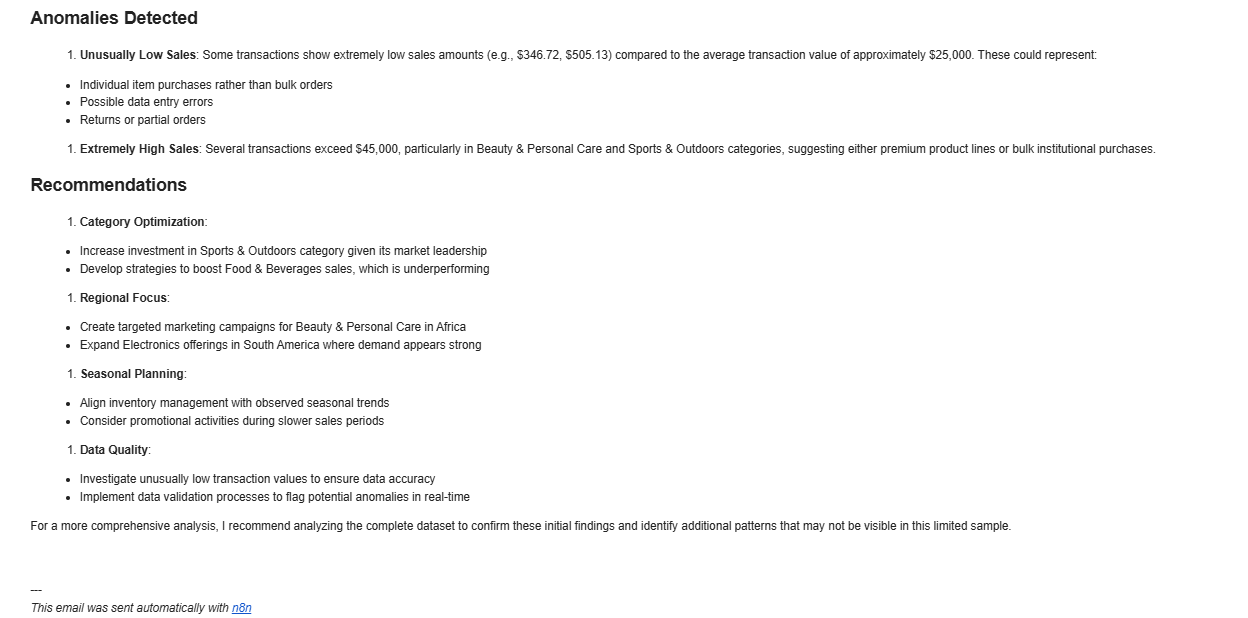\n\n### DataAnalysis\nquery: What are the top three products in terms of sales in 2024? Analyze the gap between the top three products and the others from a statistical perspective.\nresult: \n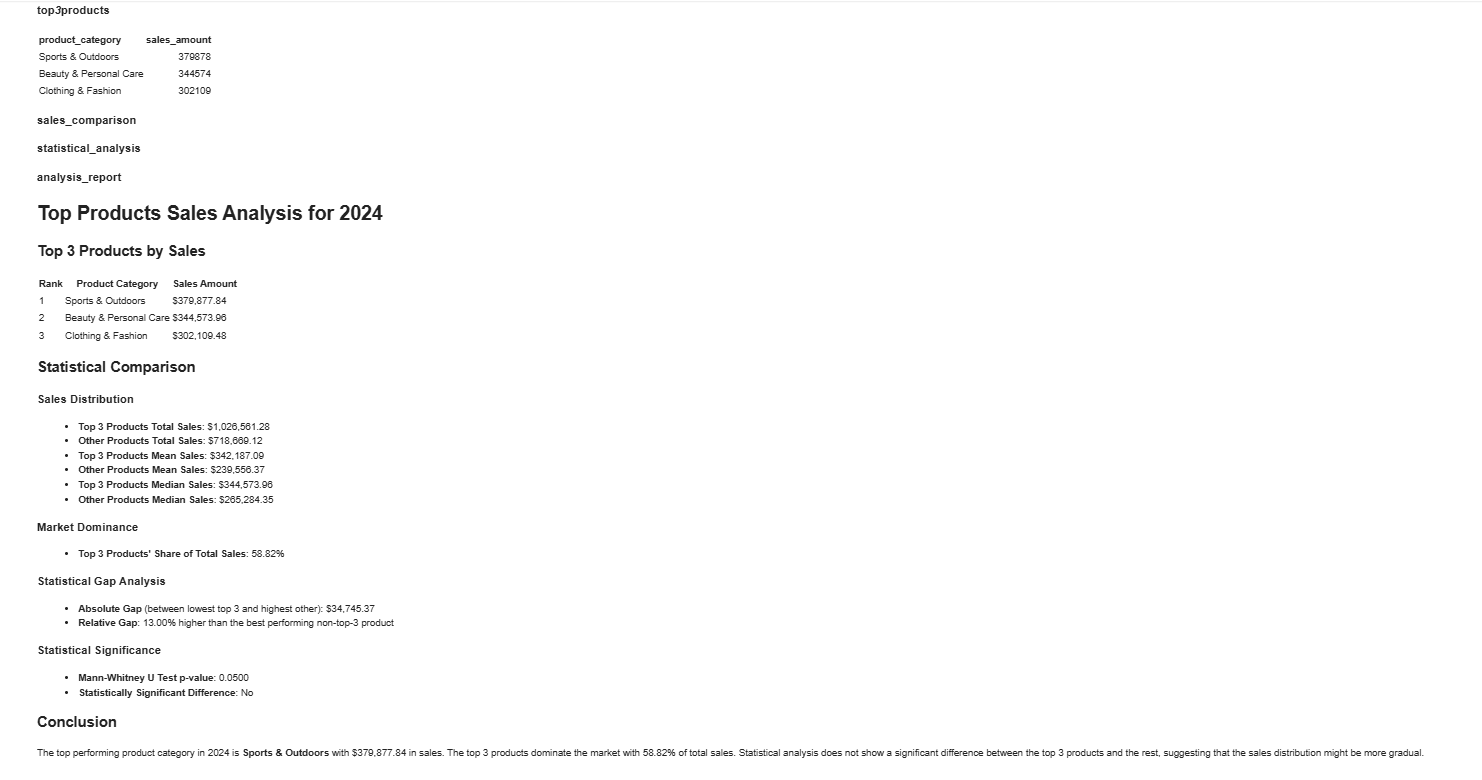"
},
"typeVersion": 1
},
{
"id": "8f6a76db-8a9b-482f-91d6-919056845326",
"name": "Note adhésive 4",
"type": "n8n-nodes-base.stickyNote",
"position": [
-1152,
512
],
"parameters": {
"width": 512,
"height": 1536,
"content": "## 2️⃣ Set credentials\n\nIn HTTP nodes(DataAnalysis, DataInterpretation, and DataVisualization) select Authentication → Generic Credential Type\n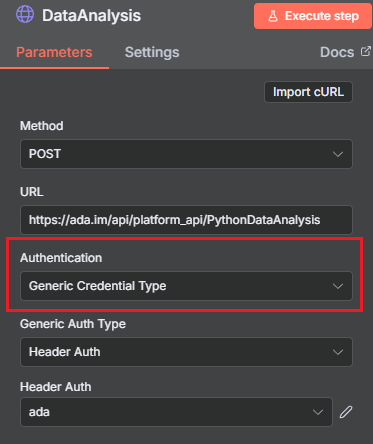\n\nChoose Header Auth → Create new credential\n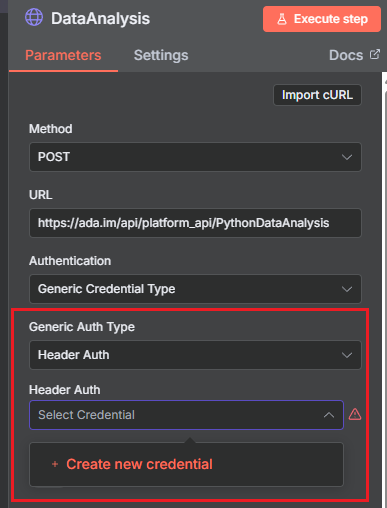\n\nName the header Authorization, which must be exactly 'Authorization', and fill in the previously applied API key\n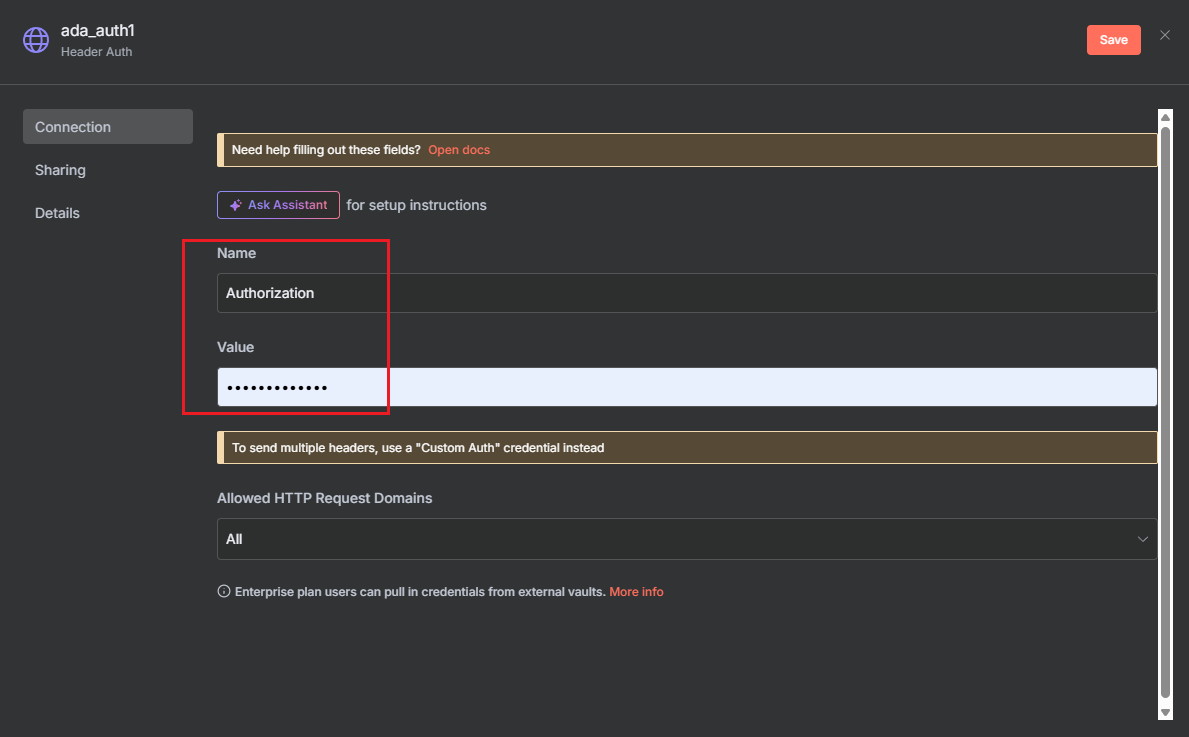"
},
"typeVersion": 1
},
{
"id": "a207fbeb-3186-4116-920d-7c835c819af7",
"name": "Note adhésive 5",
"type": "n8n-nodes-base.stickyNote",
"position": [
-2272,
2880
],
"parameters": {
"width": 1088,
"height": 224,
"content": "## Consult\nContact us for inquiries or feedback.\n\nemail: n8n-plugin@ada.im\n\n[Discord](https://discord.com/invite/Bwd6zGYThS)\n\nExplore [Ada](https://ada.im/home?ada_data_=&utm_source=n8n&utm_medium=landingpage&utm_infeluncer=landingpage&utm_campain=landingpage&utm_content=landingpage) : Your own AI Data Analyst."
},
"typeVersion": 1
},
{
"id": "ab5c1992-7fc4-497b-8fd1-af121a4cd31b",
"name": "Note adhésive 6",
"type": "n8n-nodes-base.stickyNote",
"position": [
-2288,
512
],
"parameters": {
"width": 1056,
"height": 2336,
"content": "## 1️⃣ Apply for an API Key\nYou can easily create and manage your API Key in the [ADA official website](https://ada.im/home?ada_data_=&utm_source=n8n&utm_medium=landingpage&utm_infeluncer=landingpage&utm_campain=landingpage&utm_content=landingpage) - API. To begin with, You need to register for an ADA account.\n\nOnce on the homepage, click the bottom left corner to access the API management dashboard.\n\n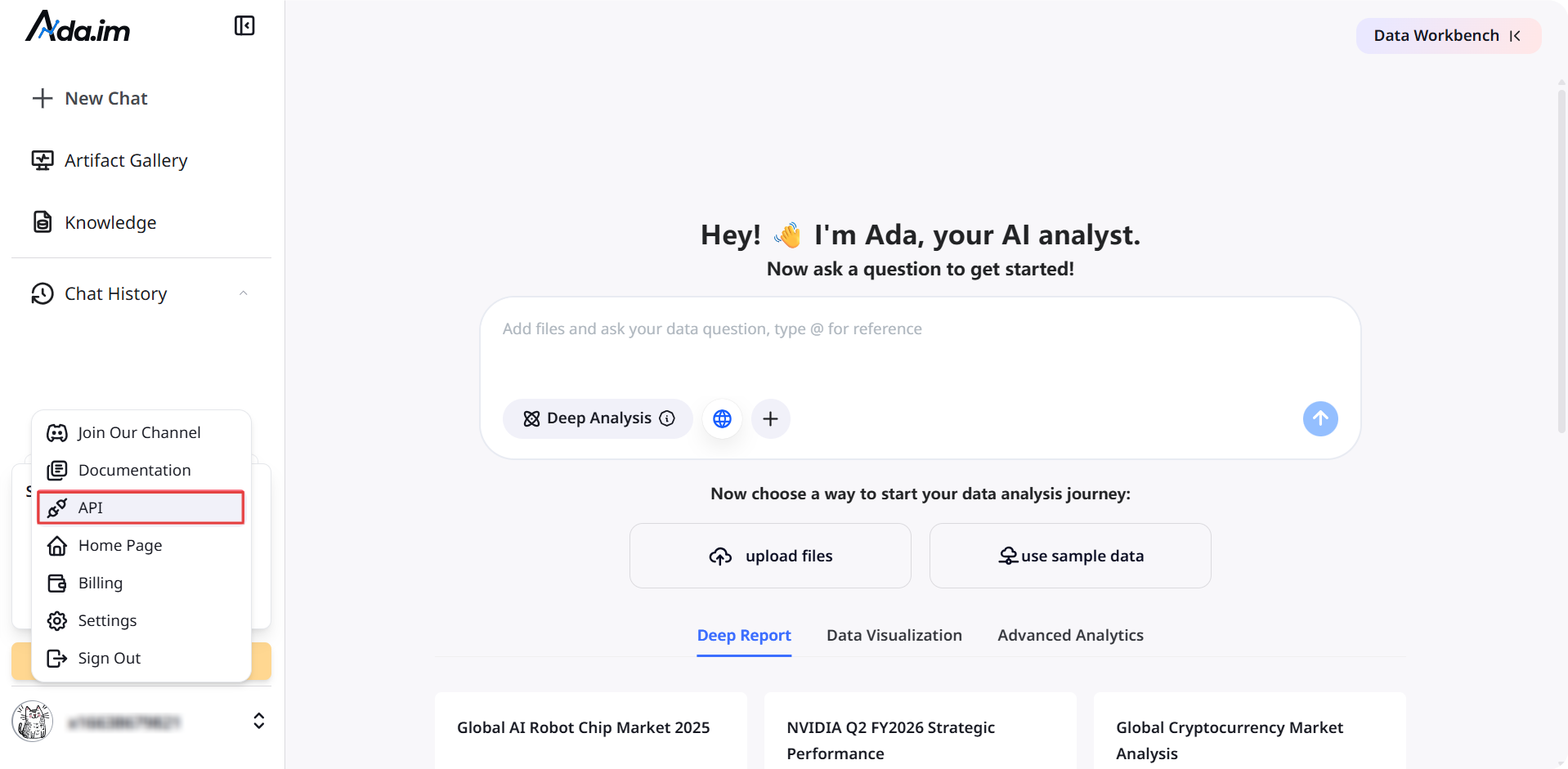\n\nHere, you can create new APIs and set the credit consumption limit for each API. A single account can create up to 10 APIs.\n\n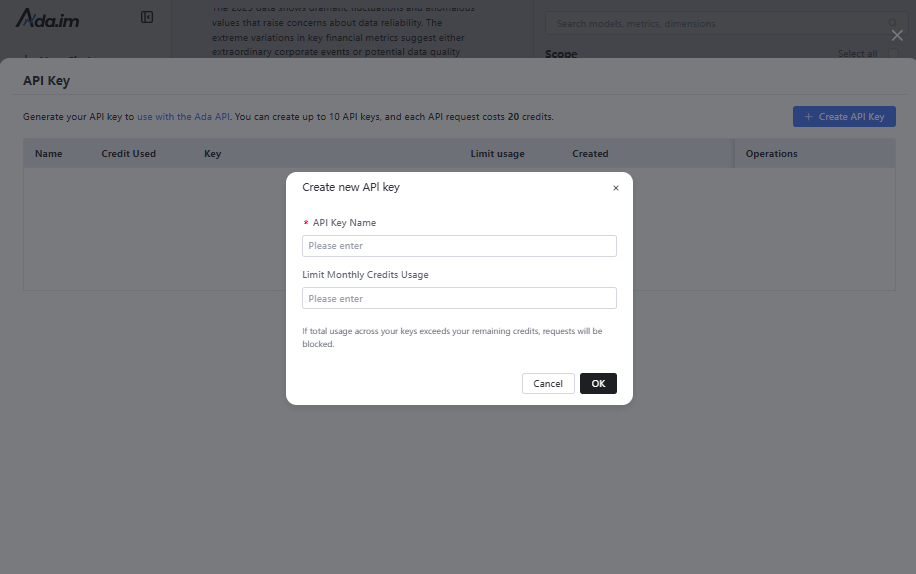\n\nAfter successful creation, you can copy the API Key to set credentials. You can also view the credit consumption of each API and manage your APIs.\n\n\n### **Credit Rules:**\n\n- Calling a single tool consumes 20 credits.\n- You will get 500 free credits per month for ADA Free account, with each batch of credits valid for three months.\n- When credits run out, you can purchase more or upgrade your account on the ADA Billing page. Each batch of purchased credits is valid for three months. Expiration dates and billing details are available on the [ADA website-Billing](https://ada.im/udsl/#/system/billing).\n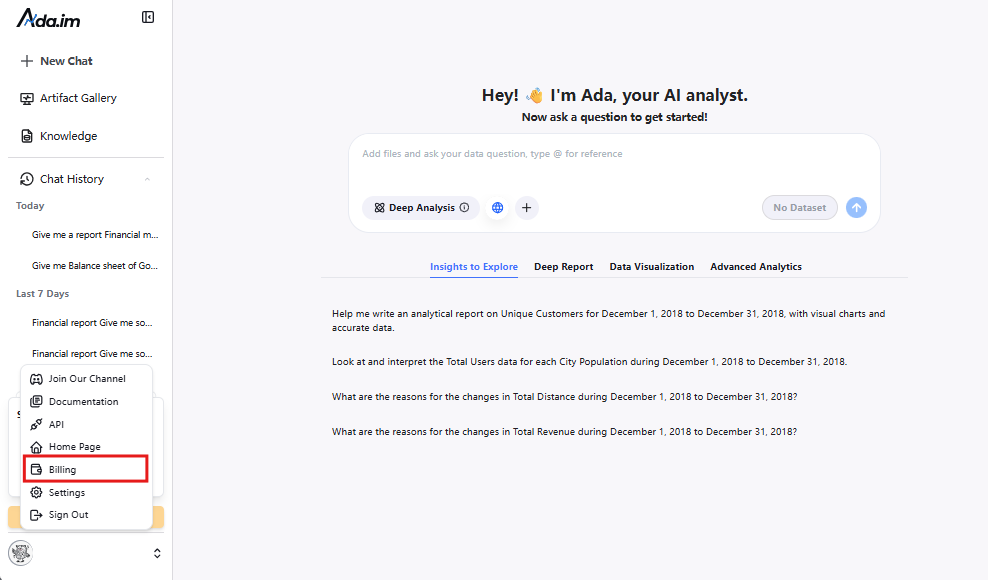"
},
"typeVersion": 1
},
{
"id": "c29c4606-ab1b-42b8-bbf3-8c79d68a2a98",
"name": "Début",
"type": "n8n-nodes-base.manualTrigger",
"position": [
-432,
608
],
"parameters": {},
"typeVersion": 1
},
{
"id": "a4d275ff-e4ff-4066-a4e0-f4d857f5e4c4",
"name": "Obtenir les données de la base de données",
"type": "n8n-nodes-base.mySql",
"position": [
0,
800
],
"parameters": {
"query": "select * from orders limit 100",
"options": {},
"operation": "executeQuery"
},
"typeVersion": 2.5
},
{
"id": "75fc8170-eec6-47c7-bd66-384d2f1a53a8",
"name": "Traiter les données",
"type": "n8n-nodes-base.aggregate",
"position": [
336,
608
],
"parameters": {
"options": {},
"aggregate": "aggregateAllItemData"
},
"typeVersion": 1
},
{
"id": "809b1798-dcf6-42cc-8d8d-d258fa6d67fd",
"name": "Obtenir les données de Google Sheets",
"type": "n8n-nodes-base.googleSheets",
"position": [
0,
992
],
"parameters": {
"options": {},
"sheetName": {
"__rl": true,
"mode": "list",
"value": 332281959,
"cachedResultUrl": "https://docs.google.com/spreadsheets/d/1IhUFreWCZFLAUaCP9ELBnvakg1xSs4CgqnSnMvgkGmM/edit#gid=332281959",
"cachedResultName": "Sheet1"
},
"documentId": {
"__rl": true,
"mode": "list",
"value": "1IhUFreWCZFLAUaCP9ELBnvakg1xSs4CgqnSnMvgkGmM",
"cachedResultUrl": "https://docs.google.com/spreadsheets/d/1IhUFreWCZFLAUaCP9ELBnvakg1xSs4CgqnSnMvgkGmM/edit?usp=drivesdk",
"cachedResultName": "example_data"
}
},
"credentials": {
"googleSheetsOAuth2Api": {
"id": "TYgnI9PXhFzSLNSk",
"name": "Google Sheets account"
}
},
"typeVersion": 4.7
},
{
"id": "0cf1ecaf-77a5-4c42-a8a4-c1ed05d1b044",
"name": "Obtenir les données du fichier local",
"type": "n8n-nodes-base.readWriteFile",
"position": [
-80,
1184
],
"parameters": {
"options": {
"dataPropertyName": "input_file"
}
},
"typeVersion": 1
},
{
"id": "53f02952-806b-4023-9723-f30a35024b3f",
"name": "Extraire JSON du fichier xlsx",
"type": "n8n-nodes-base.extractFromFile",
"position": [
112,
1184
],
"parameters": {
"options": {},
"operation": "xlsx",
"binaryPropertyName": "input_file"
},
"typeVersion": 1
},
{
"id": "02987176-ebb7-4fda-b5e3-fb99f023f381",
"name": "DataAnalysis",
"type": "n8n-nodes-base.httpRequest",
"position": [
560,
608
],
"parameters": {
"url": "https://ada.im/api/platform_api/PythonDataAnalysis",
"method": "POST",
"options": {},
"sendBody": true,
"authentication": "genericCredentialType",
"bodyParameters": {
"parameters": [
{
"name": "input_json",
"value": "={{$json.data}}"
},
{
"name": "query",
"value": "What are the top three products in terms of sales in 2024? Analyze the gap between the top three products and the others from a statistical perspective."
},
{
"name": "platform",
"value": "n8n"
}
]
},
"genericAuthType": "httpHeaderAuth"
},
"typeVersion": 4.2
},
{
"id": "34c0b0d3-197d-4966-936b-b7601530e325",
"name": "DataInterpretation",
"type": "n8n-nodes-base.httpRequest",
"position": [
560,
784
],
"parameters": {
"url": "https://ada.im/api/platform_api/DataInterpretation",
"method": "POST",
"options": {},
"sendBody": true,
"authentication": "genericCredentialType",
"bodyParameters": {
"parameters": [
{
"name": "input_json",
"value": "={{$json.data}}"
},
{
"name": "query",
"value": "Sales volume of each product in 2024"
},
{
"name": "platform",
"value": "n8n"
}
]
},
"genericAuthType": "httpHeaderAuth"
},
"typeVersion": 4.2
},
{
"id": "50a3424f-7147-4d38-9cb3-2b90fed8a572",
"name": "DataVisualization",
"type": "n8n-nodes-base.httpRequest",
"position": [
560,
960
],
"parameters": {
"url": "https://ada.im/api/platform_api/EchartsVisualization",
"method": "POST",
"options": {},
"sendBody": true,
"authentication": "genericCredentialType",
"bodyParameters": {
"parameters": [
{
"name": "input_json",
"value": "={{$json.data}}"
},
{
"name": "query",
"value": "Use a pie chart to display the sales of each product in 2024, and a line chart to represent the total monthly sales of each product in 2024. Additionally, you can add some extra charts based on the data."
},
{
"name": "platform",
"value": "n8n"
}
]
},
"genericAuthType": "httpHeaderAuth"
},
"credentials": {
"httpHeaderAuth": {
"id": "A1ydMlIrxdo5rBa4",
"name": "Header Auth account"
}
},
"typeVersion": 4.2
},
{
"id": "0d7f6c15-aef5-4b3a-81bc-b21a0a9f4c1d",
"name": "Convertir en fichier HTML",
"type": "n8n-nodes-base.convertToFile",
"position": [
976,
960
],
"parameters": {
"options": {
"fileName": "chart.html"
},
"operation": "toText",
"sourceProperty": "html",
"binaryPropertyName": "chart"
},
"typeVersion": 1.1
},
{
"id": "0454bd77-f7fc-4798-afa1-3f93a0e006d5",
"name": "Convertir markdown en HTML",
"type": "n8n-nodes-base.markdown",
"position": [
976,
608
],
"parameters": {
"mode": "markdownToHtml",
"options": {
"tables": true,
"simpleLineBreaks": true,
"completeHTMLDocument": false
},
"markdown": "={{ $json.data.parseJson().data }}",
"destinationKey": "html"
},
"typeVersion": 1
},
{
"id": "6ffbdfb1-f72a-480b-82ae-c0fcdc881feb",
"name": "Convertir markdown en HTML 2",
"type": "n8n-nodes-base.markdown",
"position": [
976,
784
],
"parameters": {
"mode": "markdownToHtml",
"options": {
"tables": true,
"simpleLineBreaks": true,
"completeHTMLDocument": false
},
"markdown": "={{ $json.data.parseJson().data }}",
"destinationKey": "html"
},
"typeVersion": 1
},
{
"id": "f765788b-4efb-4daa-908c-84e653784156",
"name": "Note adhésive 7",
"type": "n8n-nodes-base.stickyNote",
"position": [
-1152,
2096
],
"parameters": {
"width": 512,
"height": 1168,
"content": "## 3️⃣ Try out the skills\nSelect the data source and fill in the query parameters for the DataAnalysis, DataInterpretation, and DataVisualization nodes.\n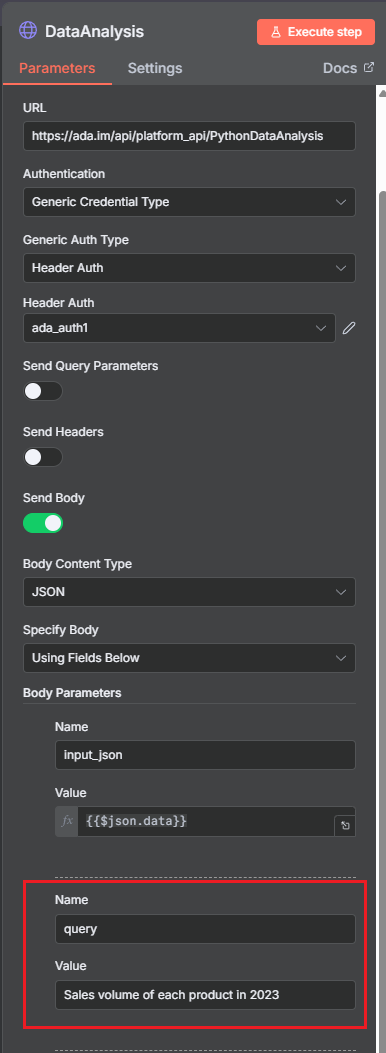"
},
"typeVersion": 1
},
{
"id": "30aaf9f5-e935-4ddb-adcc-baff0ab5b101",
"name": "Envoyer le message DataAnalysis",
"type": "n8n-nodes-base.gmail",
"position": [
1456,
608
],
"webhookId": "6634ed2d-552c-4bf6-a7f2-bbdee8d61df4",
"parameters": {
"message": "={{ $json.html }}",
"options": {},
"subject": "n8n-email"
},
"typeVersion": 2.1
},
{
"id": "a10921fc-2258-48d5-8f40-99bf495a082c",
"name": "Envoyer le message DataInterpretation",
"type": "n8n-nodes-base.gmail",
"position": [
1456,
784
],
"webhookId": "6634ed2d-552c-4bf6-a7f2-bbdee8d61df4",
"parameters": {
"sendTo": "cuifangxu1999@gmail.com",
"message": "={{ $json.html }}",
"options": {},
"subject": "n8ntest"
},
"typeVersion": 2.1
},
{
"id": "8fb14896-41b4-4eb1-8d4e-b70f3b97ad49",
"name": "Envoyer DataVisualization",
"type": "n8n-nodes-base.gmail",
"position": [
1456,
960
],
"webhookId": "6634ed2d-552c-4bf6-a7f2-bbdee8d61df4",
"parameters": {
"sendTo": "cuifangxu1999@gmail.com",
"message": "From n8n, please use a browser to open the HTML file in the attachment",
"options": {
"attachmentsUi": {
"attachmentsBinary": [
{
"property": "=chart"
}
]
}
},
"subject": "n8ntest",
"emailType": "text"
},
"typeVersion": 2.1
},
{
"id": "b29b555a-bd5d-4a6f-8873-9027c13ae3ef",
"name": "Données d'exemple",
"type": "n8n-nodes-base.code",
"position": [
0,
608
],
"parameters": {
"jsCode": "const categories = [\n 'Electronics',\n 'Clothing & Fashion',\n 'Home & Furniture',\n 'Food & Beverages',\n 'Sports & Outdoors',\n 'Beauty & Personal Care'\n];\nconst regions = [\n 'North America',\n 'South America',\n 'Europe',\n 'Asia',\n 'Africa',\n 'Oceania',\n 'Middle East',\n 'Central Asia'\n];\n\nfunction randomDateWithin730Days() {\n const now = new Date();\n const daysAgo = Math.floor(Math.random() * 730);\n now.setDate(now.getDate() - daysAgo);\n return now.toISOString().slice(0, 10);\n}\n\nlet items = [];\nfor (let i = 0; i < 1000; i++) {\n items.push({\n json: {\n order_date: randomDateWithin730Days(),\n product_category: categories[Math.floor(Math.random() * categories.length)],\n region: regions[Math.floor(Math.random() * regions.length)],\n sales_amount: (50 + Math.random() * 49950).toFixed(2)\n }\n });\n}\nreturn items;"
},
"typeVersion": 2
},
{
"id": "7213ec38-425d-4020-9776-5750c286aa65",
"name": "Traiter les données de visualisation",
"type": "n8n-nodes-base.set",
"position": [
768,
960
],
"parameters": {
"options": {},
"assignments": {
"assignments": [
{
"id": "ab328d59-6af7-4084-9c75-a7b5c5673168",
"name": "html",
"type": "string",
"value": "={{ JSON.parse($json.data).data }}"
}
]
}
},
"typeVersion": 3.4
}
],
"pinData": {},
"connections": {
"c29c4606-ab1b-42b8-bbf3-8c79d68a2a98": {
"main": [
[
{
"node": "b29b555a-bd5d-4a6f-8873-9027c13ae3ef",
"type": "main",
"index": 0
}
]
]
},
"b29b555a-bd5d-4a6f-8873-9027c13ae3ef": {
"main": [
[
{
"node": "75fc8170-eec6-47c7-bd66-384d2f1a53a8",
"type": "main",
"index": 0
}
]
]
},
"02987176-ebb7-4fda-b5e3-fb99f023f381": {
"main": [
[
{
"node": "0454bd77-f7fc-4798-afa1-3f93a0e006d5",
"type": "main",
"index": 0
}
]
]
},
"75fc8170-eec6-47c7-bd66-384d2f1a53a8": {
"main": [
[
{
"node": "50a3424f-7147-4d38-9cb3-2b90fed8a572",
"type": "main",
"index": 0
},
{
"node": "02987176-ebb7-4fda-b5e3-fb99f023f381",
"type": "main",
"index": 0
},
{
"node": "34c0b0d3-197d-4966-936b-b7601530e325",
"type": "main",
"index": 0
}
]
]
},
"50a3424f-7147-4d38-9cb3-2b90fed8a572": {
"main": [
[
{
"node": "7213ec38-425d-4020-9776-5750c286aa65",
"type": "main",
"index": 0
}
]
]
},
"34c0b0d3-197d-4966-936b-b7601530e325": {
"main": [
[
{
"node": "6ffbdfb1-f72a-480b-82ae-c0fcdc881feb",
"type": "main",
"index": 0
}
]
]
},
"0d7f6c15-aef5-4b3a-81bc-b21a0a9f4c1d": {
"main": [
[
{
"node": "8fb14896-41b4-4eb1-8d4e-b70f3b97ad49",
"type": "main",
"index": 0
}
]
]
},
"a4d275ff-e4ff-4066-a4e0-f4d857f5e4c4": {
"main": [
[
{
"node": "75fc8170-eec6-47c7-bd66-384d2f1a53a8",
"type": "main",
"index": 0
}
]
]
},
"8fb14896-41b4-4eb1-8d4e-b70f3b97ad49": {
"main": [
[]
]
},
"0454bd77-f7fc-4798-afa1-3f93a0e006d5": {
"main": [
[
{
"node": "30aaf9f5-e935-4ddb-adcc-baff0ab5b101",
"type": "main",
"index": 0
}
]
]
},
"0cf1ecaf-77a5-4c42-a8a4-c1ed05d1b044": {
"main": [
[
{
"node": "53f02952-806b-4023-9723-f30a35024b3f",
"type": "main",
"index": 0
}
]
]
},
"30aaf9f5-e935-4ddb-adcc-baff0ab5b101": {
"main": [
[]
]
},
"6ffbdfb1-f72a-480b-82ae-c0fcdc881feb": {
"main": [
[
{
"node": "a10921fc-2258-48d5-8f40-99bf495a082c",
"type": "main",
"index": 0
}
]
]
},
"7213ec38-425d-4020-9776-5750c286aa65": {
"main": [
[
{
"node": "0d7f6c15-aef5-4b3a-81bc-b21a0a9f4c1d",
"type": "main",
"index": 0
}
]
]
},
"53f02952-806b-4023-9723-f30a35024b3f": {
"main": [
[
{
"node": "75fc8170-eec6-47c7-bd66-384d2f1a53a8",
"type": "main",
"index": 0
}
]
]
},
"809b1798-dcf6-42cc-8d8d-d258fa6d67fd": {
"main": [
[
{
"node": "75fc8170-eec6-47c7-bd66-384d2f1a53a8",
"type": "main",
"index": 0
}
]
]
},
"a10921fc-2258-48d5-8f40-99bf495a082c": {
"main": [
[]
]
}
}
}Foire aux questions
Comment utiliser ce workflow ?
Copiez le code de configuration JSON ci-dessus, créez un nouveau workflow dans votre instance n8n et sélectionnez "Importer depuis le JSON", collez la configuration et modifiez les paramètres d'authentification selon vos besoins.
Dans quelles scénarios ce workflow est-il adapté ?
Avancé
Est-ce payant ?
Ce workflow est entièrement gratuit et peut être utilisé directement. Veuillez noter que les services tiers utilisés dans le workflow (comme l'API OpenAI) peuvent nécessiter un paiement de votre part.
Workflows recommandés
Explorer les nœuds n8n dans la bibliothèque de références visuelles
Explorer les nœuds n8n dans la base de références visuelles
If
Ftp
Set
+
If
Ftp
Set
113 NœudsI versus AI
Autres
Automatisation de l'envoi de demandes de contact LinkedIn et de messages d'ouverture avec Unipile et Google Sheets
Utiliser Unipile et Google Sheets pour envoyer automatiquement des demandes de contact LinkedIn et des messages d'ouverture
If
Set
Code
+
If
Set
Code
44 NœudsPollupAI
Autres
Agent automatisé pour la rédaction de blogs et la promotion sur les réseaux sociaux
Automatisation de la création de blog SEO + médias sociaux avec GPT-4, Perplexity et WordPress
Set
Code
Gmail
+
Set
Code
Gmail
79 NœudsLukaszB
Design
Générer des médias IA avec ComfyUI : images, vidéos, 3D et pont audio
Générer des médias IA (images, vidéos, 3D et audio de pont) avec ComfyUI
If
Set
Code
+
If
Set
Code
51 NœudsNielo
Design
Évaluateur de transcription
Analyse et visualisation de conversations audio avec DeepGram et GPT-4o
Set
Code
Html
+
Set
Code
Html
54 NœudsRealSimple Solutions
Intelligence Artificielle
Prospection et workflow d'e-mails
Utiliser Google Maps, SendGrid et l'IA pour automatiser le développement de prospects B2B et le marketing par e-mail
If
Set
Code
+
If
Set
Code
141 NœudsEzema Kingsley Chibuzo
Génération de leads
Informations sur le workflow
Niveau de difficulté
Avancé
Nombre de nœuds25
Catégorie-
Types de nœuds13
Description de la difficulté
Auteur

Ada
@adaLiens externes
Voir sur n8n.io →
Partager ce workflow