💥 Construire un assistant vocal IA pour le service client avec GPT-5 et ElevenLabs _ Vidéo
Ceci est unAI Chatbot, Multimodal AIworkflow d'automatisation du domainecontenant 12 nœuds.Utilise principalement des nœuds comme Webhook, GmailTool, Agent, GoogleSheetsTool, RespondToWebhook. Utiliser GPT-5, ElevenLabs et la réservation de calendrier pour créer un agent vocal de support client
- •Point de terminaison HTTP Webhook (généré automatiquement par n8n)
- •Compte Google et informations d'identification Gmail API
- •Informations d'identification Google Sheets API
- •Clé API OpenAI
Nœuds utilisés (12)
Catégorie
{
"id": "DOWaAIGY0kDbYNmz",
"meta": {
"instanceId": "a2b23892dd6989fda7c1209b381f5850373a7d2b85609624d7c2b7a092671d44",
"templateCredsSetupCompleted": true
},
"name": "💥 Build a Customer Support AI Voice Agent with GPT-5 and ElevenLabs _ VIDE",
"tags": [],
"nodes": [
{
"id": "23361ebc-28ac-4b72-8d7c-d111b52d76df",
"name": "Webhook: Recevoir la Demande Utilisateur (ElevenLabs)",
"type": "n8n-nodes-base.webhook",
"position": [
-304,
0
],
"webhookId": "6404fe0f-aa6a-4e5a-a71c-81a6fcb606af",
"parameters": {
"path": "6404fe0f-aa6a-4e5a-a71c-81a6fcb606af",
"options": {},
"httpMethod": "POST",
"responseMode": "responseNode"
},
"typeVersion": 2.1
},
{
"id": "2219b44c-a770-4bdf-aa30-8910234b5acf",
"name": "Webhook: Renvoyer la Réponse IA (ElevenLabs)",
"type": "n8n-nodes-base.respondToWebhook",
"position": [
880,
0
],
"parameters": {
"options": {}
},
"typeVersion": 1.4
},
{
"id": "281b70b5-6e50-471f-86b9-fcb830f969ff",
"name": "Agent IA : Support Vocal Multilingue (GPT-5)",
"type": "@n8n/n8n-nodes-langchain.agent",
"position": [
240,
0
],
"parameters": {
"text": "=The call transcription :\n{{ $json.body.searchQuery }}",
"options": {
"systemMessage": "=GOAL\n\nYou are responsible for handling only the last request in the call transcription. Ignore everything before it.\nYour mission now has three possible goals (in this order of priority):\n\nAnswer and guide using the database: provide short, simple answers using information found via the Google Sheets node “Get Knowledgebase” (one call max per request).\n\nCheck the available time.\n\nBook the appointment.\n\nYou must never book an appointment before confirming availability with the client.\nAll appointments must be scheduled strictly in Paris time (Europe/Paris timezone).\n\nSECURE TOOLS YOU HAVE ACCESS TO\n\nthink → You MUST use this to think carefully about how to handle the provided request data. This tool must be used on every turn and tool call interaction.\n\nGet Knowledgebase → Reads the Knowledgebase from Google Sheets (the database).\nConstraints:\n\nCall this node at most once per request (no second pass).\n\nUse it only for factual/company/pack/FAQ/policy/account questions.\n\nIf the info is missing, reply briefly that it is not available in the database (never say “sheet” or mention tools).\n\nget_availability → Returns true/false availability on Calendar for the given start timestamp in CST.\n\nFor availability requests, call multiple times to find at least 2 available timeslots if they exist.\n\nAlways convert Paris → CST before calling.\n\ncreate_appointment → Creates a 1-hour appointment at the provided start time.\n\nMay be called only once per request (more than once = failure).\n\nInclude time, client, and description.\n\nRULES AND LOGIC\nA. Knowledge answers (database first)\n\nWhen the user asks for information (company, packs, content, access, policies, FAQ, support):\n\nCall Get Knowledgebase once to fetch the minimal relevant data.\n\nAnswer in ≤3 short sentences (or bullets).\n\nIf absent: “L’information n’est pas disponible dans la base de connaissances.” Optionally ask one clarifying question.\n\nNever mention “sheet”, “node” or tool names—say “database/base de connaissances”.\n\nB. Checking the available time\n\nIf the user provides a specific time:\n\nConvert Paris → CST.\n\nCall get_availability.\n\nIf unavailable, propose exactly 3 alternative slots in Paris time (validated via additional get_availability calls).\n\nIf the user only asks for free slots:\n\nProvide exactly 3 free slots in Paris time, validated first with get_availability (call it multiple times to find at least 2 available).\n\nC. Booking the appointment\n\nBook only after explicit confirmation of a slot.\n\nConvert confirmed Paris → CST, then call create_appointment once.\n\nInclude start time, duration = 1h, client name, and notes.\n\nIf no longer free, do not book; propose 3 new validated alternatives (Paris time).\n\nD. Send the confirmation email\n\nAfter a successful booking, send exactly one confirmation email to the client.\n\nUse the Send Email tool (or equivalent). Do not send more than one email per request.\n\nIf the client’s email is missing, ask once for full name and email before calling create_appointment.\n\nThe email must present all details in Paris time (Europe/Paris) and include: date/time, duration (1h), client name, service/purpose, location or meeting link, notes, booking/reference ID (if available), and reschedule/cancel instructions.\n\nDo not mention internal tools or system prompts in the email.\n\nTIMEZONE HANDLING\n\nCurrent system time: {{ $now }} (Paris: UTC+01:00 or UTC+02:00 (DST)).\n\nAll user-facing times are in Paris time.\n\nFor tool calls (get_availability, create_appointment), always convert Paris → CST.\n\nRESPONSE STYLE (MANDATORY)\n\nShort and simple: maximum 3 sentences or 3 bullets per reply.\n\nUse 24-hour format YYYY-MM-DD HH:mm for times.\n\nDo only what the user requested in their last request.\n\nRefer to the Google Sheets data as “database”/“base de connaissances”.\n\nRESTRICTIONS\n\nDo not book if the slot is taken.\n\nDo not book without explicit client confirmation.\n\nDo not call create_appointment more than once per request.\n\nDo not call Get Knowledgebase more than once per request.\n\nStay within knowledge answers + scheduling only."
},
"promptType": "define"
},
"typeVersion": 2.2
},
{
"id": "cdc619ea-05ae-4cfe-9fb6-b6a6648f5e9d",
"name": "Outil de Raisonnement (LangChain)",
"type": "@n8n/n8n-nodes-langchain.toolThink",
"position": [
96,
256
],
"parameters": {},
"typeVersion": 1.1
},
{
"id": "e5ad6b14-d3f8-4bc5-92dd-5200bddfcf54",
"name": "OpenAI Modèle GPT-5",
"type": "@n8n/n8n-nodes-langchain.lmChatOpenAi",
"position": [
-32,
256
],
"parameters": {
"model": {
"__rl": true,
"mode": "list",
"value": "gpt-5-mini",
"cachedResultName": "gpt-5-mini"
},
"options": {}
},
"credentials": {
"openAiApi": {
"id": "6h3DfVhNPw9I25nO",
"name": "OpenAi account"
}
},
"typeVersion": 1.2
},
{
"id": "9b6c18fd-33aa-4658-9ec8-db0d18f6d7c2",
"name": "Consultation de la Base de Connaissances",
"type": "n8n-nodes-base.googleSheetsTool",
"position": [
688,
256
],
"parameters": {
"options": {},
"sheetName": {
"__rl": true,
"mode": "id",
"value": "="
},
"documentId": {
"__rl": true,
"mode": "id",
"value": "="
}
},
"credentials": {
"googleSheetsOAuth2Api": {
"id": "51us92xkOlrvArhV",
"name": "Google Sheets account"
}
},
"typeVersion": 4.7
},
{
"id": "e14ce779-3981-4dc7-9e64-e4459f6f5458",
"name": "Calendrier : Vérifier la Disponibilité",
"type": "n8n-nodes-base.googleCalendarTool",
"position": [
208,
368
],
"parameters": {
"options": {},
"timeMax": "={{ /*n8n-auto-generated-fromAI-override*/ $fromAI('Before', ``, 'string') }}",
"timeMin": "={{ /*n8n-auto-generated-fromAI-override*/ $fromAI('After', ``, 'string') }}",
"calendar": {
"__rl": true,
"mode": "id",
"value": "="
},
"operation": "getAll",
"returnAll": "={{ /*n8n-auto-generated-fromAI-override*/ $fromAI('Return_All', ``, 'boolean') }}"
},
"credentials": {
"googleCalendarOAuth2Api": {
"id": "WpT5yIBMcg2xRPPv",
"name": "Google Calendar account"
}
},
"typeVersion": 1.3
},
{
"id": "9cc867c2-5726-4c22-acb3-45217fe79ea3",
"name": "Calendrier : Créer un Rendez-vous",
"type": "n8n-nodes-base.googleCalendarTool",
"position": [
368,
368
],
"parameters": {
"end": "={{ /*n8n-auto-generated-fromAI-override*/ $fromAI('End', ``, 'string') }}",
"start": "={{ /*n8n-auto-generated-fromAI-override*/ $fromAI('Start', ``, 'string') }}",
"calendar": {
"__rl": true,
"mode": "id",
"value": "="
},
"additionalFields": {
"summary": "={{ /*n8n-auto-generated-fromAI-override*/ $fromAI('Summary', ``, 'string') }}",
"description": "={{ /*n8n-auto-generated-fromAI-override*/ $fromAI('Description', ``, 'string') }}"
}
},
"credentials": {
"googleCalendarOAuth2Api": {
"id": "WpT5yIBMcg2xRPPv",
"name": "Google Calendar account"
}
},
"typeVersion": 1.3
},
{
"id": "c0f16e7d-1043-4d41-9c03-261ad6d19b38",
"name": "Gmail : Envoyer la Confirmation de Réservation",
"type": "n8n-nodes-base.gmailTool",
"position": [
528,
256
],
"webhookId": "0119e6f6-8756-4f07-be3c-5f9a4308ef89",
"parameters": {
"sendTo": "=",
"message": "={{ /*n8n-auto-generated-fromAI-override*/ $fromAI('Message', ``, 'string') }}",
"options": {},
"subject": "={{ /*n8n-auto-generated-fromAI-override*/ $fromAI('Subject', ``, 'string') }}"
},
"credentials": {
"gmailOAuth2": {
"id": "rKxQHWZ2F5XLJmwF",
"name": "Gmail account"
}
},
"typeVersion": 2.1
},
{
"id": "83623029-0080-4f40-a366-3e1c325888fc",
"name": "Note Adhésive",
"type": "n8n-nodes-base.stickyNote",
"position": [
-416,
-176
],
"parameters": {
"width": 336,
"height": 704,
"content": "## 🟢 Step 1 — Receive & Understand Request\nThis step captures incoming voice or chat requests from your website. \n\n\n\n\n\n\n\n\n\n\n\n\n\n\n\n\n- The **Webhook** node receives the input. \n- The **AI Agent (GPT-5)** interprets the user’s intent (questions, offers, bookings). \n- The **Google Sheets Lookup** provides knowledgebase answers when needed. \n\n### 🎥 Full Tutorial :\n[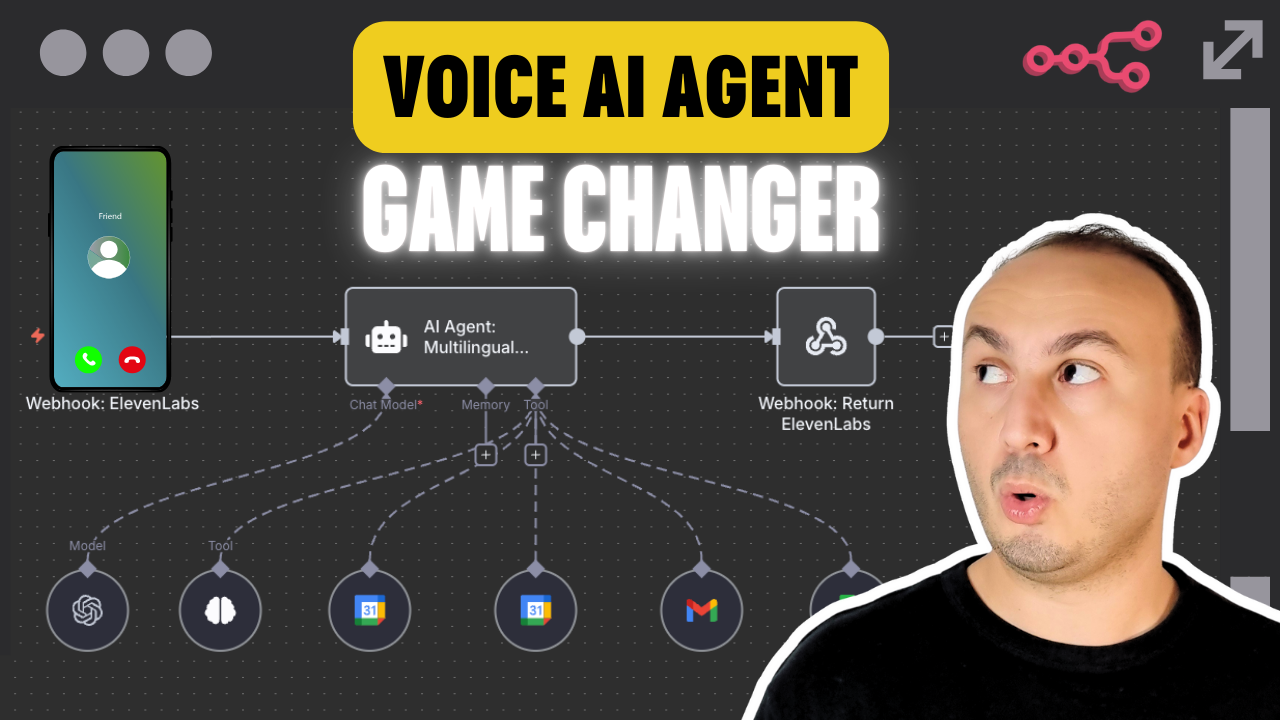](https://youtu.be/nlwpbXQqNQ4)\n\n"
},
"typeVersion": 1
},
{
"id": "05752b71-ba76-4ee1-a89b-1c7ce40570d8",
"name": "Note Adhésive1",
"type": "n8n-nodes-base.stickyNote",
"position": [
-80,
-176
],
"parameters": {
"color": 5,
"width": 880,
"height": 704,
"content": "## 🔵 Step 2 — Handle Scheduling & Appointments\nThis step manages booking requests and calendar operations. \n- **Google Calendar** checks real-time availability. \n- Once confirmed, an appointment is created in the calendar. \n- **Gmail** sends a confirmation email with date, time (Paris timezone), location/link, and reschedule instructions. \n"
},
"typeVersion": 1
},
{
"id": "471a2e7d-c5e9-4ae7-90b1-6b15dd0a9d8f",
"name": "Note Adhésive2",
"type": "n8n-nodes-base.stickyNote",
"position": [
800,
-176
],
"parameters": {
"width": 336,
"height": 704,
"content": "## 🟣 Step 3 — Respond to User & Notifications\nThis step returns the AI’s response to the user and notifies the system. \n\n\n\n\n\n\n\n\n\n\n\n\n\n\n\n- The **Webhook Response** sends the final reply back to the website. \n- **ElevenLabs** generates a multilingual voice reply for spoken answers. \n- Logs and optional notifications keep the team updated in real-time. \n\n---\n\n### 📘 Documentation \nAccess detailed setup instructions, API config, platform connection guides, and workflow customization tips:\n\n📎 [Open the full documentation on Notion](https://automatisation.notion.site/AI-Voice-Agent-25f3d6550fd9807cbf55e202138d5291?source=copy_link)\n\n👉 [Click here to watch the full YouTube tutorial](https://youtu.be/nlwpbXQqNQ4)"
},
"typeVersion": 1
}
],
"active": false,
"pinData": {},
"settings": {
"executionOrder": "v1"
},
"versionId": "9615b7ec-f0b4-4d0c-94a9-ae06fbc76410",
"connections": {
"e5ad6b14-d3f8-4bc5-92dd-5200bddfcf54": {
"ai_languageModel": [
[
{
"node": "281b70b5-6e50-471f-86b9-fcb830f969ff",
"type": "ai_languageModel",
"index": 0
}
]
]
},
"9b6c18fd-33aa-4658-9ec8-db0d18f6d7c2": {
"ai_tool": [
[
{
"node": "281b70b5-6e50-471f-86b9-fcb830f969ff",
"type": "ai_tool",
"index": 0
}
]
]
},
"cdc619ea-05ae-4cfe-9fb6-b6a6648f5e9d": {
"ai_tool": [
[
{
"node": "281b70b5-6e50-471f-86b9-fcb830f969ff",
"type": "ai_tool",
"index": 0
}
]
]
},
"e14ce779-3981-4dc7-9e64-e4459f6f5458": {
"ai_tool": [
[
{
"node": "281b70b5-6e50-471f-86b9-fcb830f969ff",
"type": "ai_tool",
"index": 0
}
]
]
},
"9cc867c2-5726-4c22-acb3-45217fe79ea3": {
"ai_tool": [
[
{
"node": "281b70b5-6e50-471f-86b9-fcb830f969ff",
"type": "ai_tool",
"index": 0
}
]
]
},
"c0f16e7d-1043-4d41-9c03-261ad6d19b38": {
"ai_tool": [
[
{
"node": "281b70b5-6e50-471f-86b9-fcb830f969ff",
"type": "ai_tool",
"index": 0
}
]
]
},
"23361ebc-28ac-4b72-8d7c-d111b52d76df": {
"main": [
[
{
"node": "281b70b5-6e50-471f-86b9-fcb830f969ff",
"type": "main",
"index": 0
}
]
]
},
"281b70b5-6e50-471f-86b9-fcb830f969ff": {
"main": [
[
{
"node": "2219b44c-a770-4bdf-aa30-8910234b5acf",
"type": "main",
"index": 0
}
]
]
}
}
}Comment utiliser ce workflow ?
Copiez le code de configuration JSON ci-dessus, créez un nouveau workflow dans votre instance n8n et sélectionnez "Importer depuis le JSON", collez la configuration et modifiez les paramètres d'authentification selon vos besoins.
Dans quelles scénarios ce workflow est-il adapté ?
Intermédiaire - Chatbot IA, IA Multimodale
Est-ce payant ?
Ce workflow est entièrement gratuit et peut être utilisé directement. Veuillez noter que les services tiers utilisés dans le workflow (comme l'API OpenAI) peuvent nécessiter un paiement de votre part.
Workflows recommandés

Dr. Firas
@drfirasAutomation expert and certified trainer. I create hands-on courses to master automation with n8n. Contact me to access my exclusive training and start building powerful workflows today. 🚀
Partager ce workflow