Workflow de balisage YouTube automatisé par IA (automatisation SEO)
Ceci est unAI Summarization, Multimodal AIworkflow d'automatisation du domainecontenant 19 nœuds.Utilise principalement des nœuds comme Set, Slack, YouTube, Telegram, Agent. Automatisation des étiquettes SEO de vidéos YouTube avec GPT et notifications Slack
- •Token Bot Slack ou URL Webhook
- •Token Bot Telegram
- •Clé API OpenAI
Nœuds utilisés (19)
Catégorie
{
"id": "iR5Qxsd2rQKs553F",
"meta": {
"instanceId": "4a2e6764ba7a6bc9890d9225f4b21d570ce88fc9bd57549c89057fcee58fed0f",
"templateCredsSetupCompleted": true
},
"name": "AI-Powered YouTube Auto-Tagging Workflow (SEO Automation)",
"tags": [
{
"id": "yZoudEzYFVwawRWb",
"name": "youtube",
"createdAt": "2025-08-26T06:37:09.894Z",
"updatedAt": "2025-08-26T06:37:09.894Z"
}
],
"nodes": [
{
"id": "eeb9e588-5a0c-4f88-9816-73c7e1e084b2",
"name": "OpenAI Chat Model",
"type": "@n8n/n8n-nodes-langchain.lmChatOpenAi",
"position": [
480,
192
],
"parameters": {
"model": {
"__rl": true,
"mode": "list",
"value": "gpt-4.1-mini"
},
"options": {}
},
"credentials": {
"openAiApi": {
"id": "PPSwAKeLQYgAPobT",
"name": "OpenAi account"
}
},
"typeVersion": 1.2
},
{
"id": "a18a582a-ba79-4e23-b39a-7e3d4f37f610",
"name": "Youtube Video Auto Tagging Agent",
"type": "@n8n/n8n-nodes-langchain.agent",
"position": [
384,
-32
],
"parameters": {
"text": "=Here is my YouTube video information:\n\nTitle: {{ $json.snippet.title }}\nDescription: {{ $json.snippet.description }}\nChannel Name: {{ $json.snippet.channelTitle }}\n\nPlease analyze this information and provide me with the most relevant and SEO-friendly tags (15–20, comma-separated). \nFocus on tags that increase reach, match viewer search intent, and balance between trending keywords and niche keywords. ",
"options": {
"systemMessage": "You are an expert YouTube SEO strategist. \nYour goal is to generate a list of highly relevant, diverse, and SEO-friendly tags for a YouTube video based on its title, description, and channel name. \nThe tags should:\n- Improve discoverability and ranking on YouTube search and recommendations\n- Cover both specific keywords (directly related to the video) and broader categories (general niche)\n- Include variations (short-tail and long-tail keywords)\n- Avoid duplicates, irrelevant terms, or hashtags (#)\n- Be limited to 15–20 tags, formatted as a clean comma-separated list\n- Prioritize high-search-intent keywords that align with the channel’s theme"
},
"promptType": "define"
},
"typeVersion": 2.1
},
{
"id": "a568f816-976c-476d-90ce-2e3833d5a53b",
"name": "Déclencheur hebdomadaire",
"type": "n8n-nodes-base.scheduleTrigger",
"position": [
-496,
-32
],
"parameters": {
"rule": {
"interval": [
{
"field": "weeks"
}
]
}
},
"typeVersion": 1.2
},
{
"id": "12932cab-a1c4-4703-8f3b-8acf297a50bf",
"name": "Obtenir toutes les vidéos téléchargées la semaine dernière",
"type": "n8n-nodes-base.youTube",
"position": [
-64,
-32
],
"parameters": {
"filters": {
"channelId": "={{ $json.Channel_Id }}",
"publishedAfter": "={{ $today.minus(1,'days') }}"
},
"options": {
"order": "date"
},
"resource": "video",
"returnAll": true
},
"credentials": {
"youTubeOAuth2Api": {
"id": "QCcCcX4vK4jmKpJz",
"name": "YouTube account"
}
},
"typeVersion": 1
},
{
"id": "d6cabd43-deb2-40ba-bd57-fea53b848f0a",
"name": "Obtenir les détails de la vidéo",
"type": "n8n-nodes-base.youTube",
"position": [
160,
-32
],
"parameters": {
"options": {},
"videoId": "={{ $json.id.videoId }}",
"resource": "video",
"operation": "get"
},
"credentials": {
"youTubeOAuth2Api": {
"id": "QCcCcX4vK4jmKpJz",
"name": "YouTube account"
}
},
"typeVersion": 1
},
{
"id": "5603be02-d036-4c04-91dc-a7f4bde972af",
"name": "Mettre à jour la vidéo avec les étiquettes générées par IA",
"type": "n8n-nodes-base.youTube",
"position": [
784,
-32
],
"parameters": {
"title": "={{ $('Get video detail').item.json.snippet.title }}",
"videoId": "={{ $('Get video detail').item.json.id }}",
"resource": "video",
"operation": "update",
"categoryId": "28",
"regionCode": "VN",
"updateFields": {
"tags": "={{ $json.output }}",
"description": "={{ $('Get video detail').item.json.snippet.description }}"
}
},
"credentials": {
"youTubeOAuth2Api": {
"id": "QCcCcX4vK4jmKpJz",
"name": "YouTube account"
}
},
"typeVersion": 1
},
{
"id": "0d30ce62-5c94-40ac-83cd-e3120c941c6a",
"name": "Informer via message slack",
"type": "n8n-nodes-base.slack",
"position": [
1216,
-144
],
"webhookId": "a9989356-6284-4bea-b16b-23ee6eb2c091",
"parameters": {
"text": "=The video ”{{ $json.snippet.title }} - {{ $json.id }}” has been auto-tagged successfully with the following tags: {{ $('Youtube Video Auto Tagging Agent').item.json.output }}",
"user": {
"__rl": true,
"mode": "username",
"value": "@trung.tran"
},
"select": "user",
"otherOptions": {},
"authentication": "oAuth2"
},
"credentials": {
"slackOAuth2Api": {
"id": "4JSKt9sIRV1KGswQ",
"name": "Slack account"
}
},
"typeVersion": 2.3
},
{
"id": "b443412b-03a0-4663-a6e8-72575fdafb50",
"name": "Note adhésive",
"type": "n8n-nodes-base.stickyNote",
"position": [
1424,
-176
],
"parameters": {
"width": 688,
"height": 128,
"content": ""
},
"typeVersion": 1
},
{
"id": "9229f95f-88f4-45e0-b5aa-5365777a68d2",
"name": "Note adhésive1",
"type": "n8n-nodes-base.stickyNote",
"position": [
320,
-784
],
"parameters": {
"width": 608,
"height": 528,
"content": "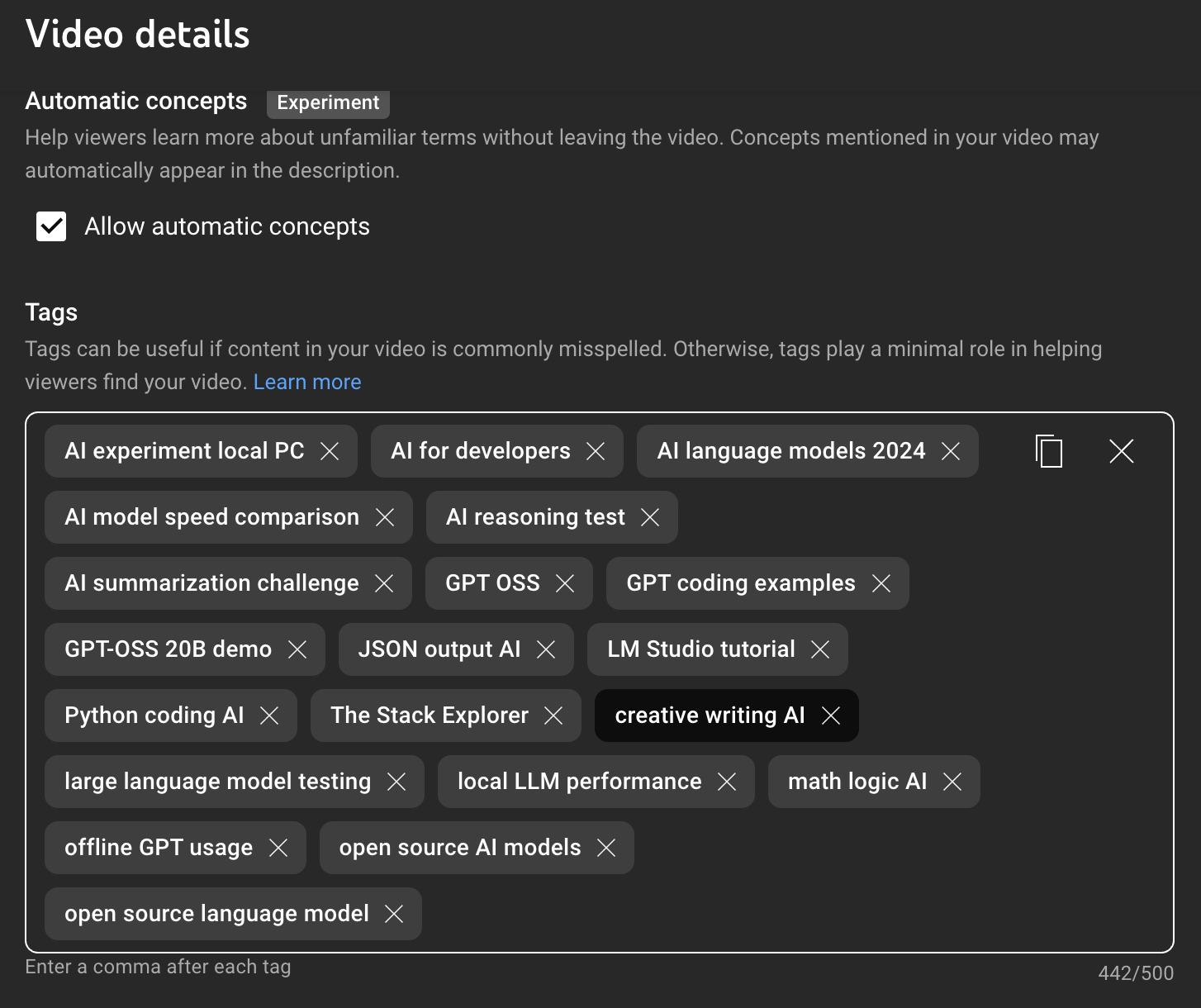"
},
"typeVersion": 1
},
{
"id": "baa0e76d-7a75-45df-a4c4-c7600a5b6617",
"name": "Note adhésive2",
"type": "n8n-nodes-base.stickyNote",
"position": [
-1760,
-1136
],
"parameters": {
"width": 1072,
"height": 2208,
"content": "# AI-Powered YouTube Auto-Tagging Workflow (SEO Automation)\n> Supercharge your YouTube SEO with this AI-powered workflow that automatically generates and applies smart, SEO friendly tags to your new videos every week. No more manual tagging, just better discoverability, improved reach, and consistent optimization. Plus, get instant Slack notifications so your team stays updated on every video’s SEO boost.\n## Who’s it for\n- YouTube creators, channel admins, and marketing teams who publish regularly and want consistent, SEO-friendly tags without manual effort. \n- Agencies managing multiple channels who need an auditable, automated tagging process with Slack notifications.\n\n## How it works / What it does\n1. **Weekly Schedule Trigger** \n Runs the workflow once per week.\n\n2. **Get all videos uploaded last week** \n Queries YouTube for videos uploaded by the channel in the past 7 days.\n\n3. **Get video detail** \n Retrieves each video’s title, description, and ID.\n\n4. **YouTube Video Auto Tagging Agent** (LLM) \n - Inputs: `video.title`, `video.description`, `channelName`. \n - Uses a SEO-specialist system prompt to generate 15–20 relevant, comma-separated tags.\n\n5. **Update video with AI-generated tags** \n Writes the tags back to the video via YouTube Data API.\n\n6. **Inform via Slack message** \n Posts a confirmation message (video title + ID + tags) to a chosen Slack channel for visibility.\n\n## How to set up\n1. **YouTube connection**\n - Create a Google Cloud project and enable **YouTube Data API v3**.\n - Configure OAuth client (Web app / Desktop as required).\n - Authorize with the Google account that manages the channel.\n - In your automation platform, add the YouTube credential and grant scopes (see *Requirements*).\n\n2. **Slack connection**\n - Create or use an existing Slack app/bot.\n - Install to your workspace and capture the Bot Token.\n - Add the Slack credential in your automation platform.\n\n3. **LLM / Chat Model**\n - Select your model (e.g., OpenAI GPT). \n - Paste the **System Prompt** (SEO expert) and the **User Prompt** template:\n - Inputs: `{{video_title}}`, `{{video_description}}`, `{{channel_name}}`.\n - Output: **comma-separated list** of 15–20 tags (no #, no duplicates).\n\n4. **Node configuration**\n - **Weekly Schedule Trigger:** choose day/time (e.g., Mondays 09:00 local).\n - **Get all videos uploaded last week:** date filter = now() - 7 days.\n - **Get video detail:** map each video ID from previous node.\n - **Agent node:** map fields to the prompt variables.\n - **Update video:** map the agent’s tag string to the YouTube `tags` field.\n - **Slack message:** \n ```\n The video \"*{{video_title}} - {{video_id}}*\" has been auto-tagged successfully.\n Tags: {{tags}}\n ```\n\n5. **Test run**\n - Manually run the workflow with one recent video.\n - Verify the tags appear in YouTube Studio and the Slack message posts.\n\n## Requirements\n**APIs & Scopes**\n- **YouTube Data API v3**\n - `youtube.readonly` (to list videos / details)\n - `youtube` or `youtube.force-ssl` (to update video metadata incl. tags)\n- **Slack Bot Token Scopes**\n - `chat:write` (post messages)\n - `channels:read` or `groups:read` if selecting channels dynamically (optional)\n\n**Platform**\n- Access to a chat/LLM provider (e.g., OpenAI).\n- Outbound HTTPS allowed.\n\n**Rate limits & quotas**\n- YouTube updates consume quota; tag updates are write operations—avoid re-writing unchanged tags.\n- Add basic throttling (e.g., 1–2 updates/sec) if you process many videos.\n\n## How to customize the workflow\n- **Schedule:** switch to daily, or run on publish events instead of weekly.\n- **Filtering:** process only videos matching rules (e.g., title contains “tutorial”, or missing tags).\n- **Prompt tuning:** \n - Add brand keywords to always include (e.g., “WiseStack AI”). \n - Constrain to language (e.g., “Vietnamese tags only”). \n - Enforce max 500 chars total for tags if you want a stricter cap.\n- **Safety guardrails:** \n - Validate model output: split by comma, trim whitespace, dedupe, drop empty/over-long tags. \n - If the agent fails, fall back to a heuristic generator (title/keywords extraction).\n- **Change log:** write a row per update to a sheet/DB (videoId, oldTags, newTags, timestamp, runId).\n- **Human-in-the-loop:** send tags to Slack as buttons (“Apply / Edit / Skip”) before updating YouTube.\n- **Multi-channel support:** loop through a list of channel credentials and repeat the pipeline.\n- **Notifications:** add error Slack messages for failed API calls; summarize weekly results.\n\n**Tip:** Keep a small allow/deny list (e.g., banned terms, mandatory brand terms) and run a quick sanitizer right after the agent node to maintain consistency across your channel."
},
"typeVersion": 1
},
{
"id": "d8d08371-f68e-4de2-b6f3-85c7ff34257b",
"name": "Note adhésive3",
"type": "n8n-nodes-base.stickyNote",
"position": [
-576,
-192
],
"parameters": {
"height": 128,
"content": "### 1. Weekly Schedule Trigger\nThe workflow starts automatically once per week, ensuring newly uploaded videos are processed on schedule.\n"
},
"typeVersion": 1
},
{
"id": "ac946b30-3d0a-4e47-a925-ebe4957ce05d",
"name": "Note adhésive4",
"type": "n8n-nodes-base.stickyNote",
"position": [
-336,
160
],
"parameters": {
"height": 128,
"content": "### 2. Get All Videos Uploaded Last Week\nFetches a list of all videos uploaded to the channel in the past 7 days."
},
"typeVersion": 1
},
{
"id": "eb5de2fc-5469-44d1-b539-9d252f2ff08a",
"name": "Note adhésive5",
"type": "n8n-nodes-base.stickyNote",
"position": [
-128,
-176
],
"parameters": {
"height": 112,
"content": "### 3. Get Video Detail\nRetrieves each video’s title, description, and ID to prepare for SEO tag generation.\n"
},
"typeVersion": 1
},
{
"id": "6a37b4aa-6f5a-4038-ba78-a0a34fbd14ef",
"name": "Note adhésive6",
"type": "n8n-nodes-base.stickyNote",
"position": [
192,
-224
],
"parameters": {
"content": "### 4. YouTube Video Auto Tagging Agent\nUses an AI SEO expert prompt to generate 15–20 relevant, comma-separated tags based on the video title, description, and channel name."
},
"typeVersion": 1
},
{
"id": "5e5d6e85-c775-4922-ae93-aacbe6df8953",
"name": "Note adhésive7",
"type": "n8n-nodes-base.stickyNote",
"position": [
512,
160
],
"parameters": {
"height": 128,
"content": "### 5. Update Video with AI-Generated Tags\nUpdates each video in YouTube with the newly generated SEO-friendly tags.\n"
},
"typeVersion": 1
},
{
"id": "dc46942f-1a90-479a-8101-878490739aa1",
"name": "Note adhésive8",
"type": "n8n-nodes-base.stickyNote",
"position": [
960,
-336
],
"parameters": {
"content": "### 6. Inform via Slack Message\nSends a confirmation message to Slack with the video title, ID, and the tags applied, keeping the team informed."
},
"typeVersion": 1
},
{
"id": "29b62c5e-1ec2-4dde-a484-8c96d9a65116",
"name": "Canal alternatif pour notification",
"type": "n8n-nodes-base.telegram",
"disabled": true,
"position": [
1216,
176
],
"webhookId": "f98476d9-64e4-48b1-893f-b7d837aeceb1",
"parameters": {
"text": "=The video ”{{ $json.snippet.title }} - {{ $json.id }}” has been auto-tagged successfully with the following tags: {{ $('Youtube Video Auto Tagging Agent').item.json.output }}",
"chatId": "chat_id",
"additionalFields": {}
},
"credentials": {
"telegramApi": {
"id": "paNoPvnV5Wzt4Lhv",
"name": "Telegram account"
}
},
"typeVersion": 1.2
},
{
"id": "6bde2db5-e5c0-487f-b2fd-150369bc1236",
"name": "Note adhésive9",
"type": "n8n-nodes-base.stickyNote",
"position": [
992,
384
],
"parameters": {
"height": 80,
"content": "(Optional) Customize this node to send message via Telegram, in case you're not using Slack"
},
"typeVersion": 1
},
{
"id": "8cc6eb91-0f1c-4b92-bf75-e47889c4fa2c",
"name": "Définir les informations du canal",
"type": "n8n-nodes-base.set",
"position": [
-272,
-32
],
"parameters": {
"options": {},
"assignments": {
"assignments": [
{
"id": "4c3894aa-c248-4eac-a97c-9d44a9496964",
"name": "Channel_Id",
"type": "string",
"value": "UCOdDjEyCCUQECkzWHxTF5iw"
}
]
}
},
"typeVersion": 3.4
}
],
"active": false,
"pinData": {},
"settings": {
"executionOrder": "v1"
},
"versionId": "845e49ef-ae93-4b9a-9f52-087d5263821b",
"connections": {
"d6cabd43-deb2-40ba-bd57-fea53b848f0a": {
"main": [
[
{
"node": "a18a582a-ba79-4e23-b39a-7e3d4f37f610",
"type": "main",
"index": 0
}
]
]
},
"eeb9e588-5a0c-4f88-9816-73c7e1e084b2": {
"ai_languageModel": [
[
{
"node": "a18a582a-ba79-4e23-b39a-7e3d4f37f610",
"type": "ai_languageModel",
"index": 0
}
]
]
},
"8cc6eb91-0f1c-4b92-bf75-e47889c4fa2c": {
"main": [
[
{
"node": "12932cab-a1c4-4703-8f3b-8acf297a50bf",
"type": "main",
"index": 0
}
]
]
},
"a568f816-976c-476d-90ce-2e3833d5a53b": {
"main": [
[
{
"node": "8cc6eb91-0f1c-4b92-bf75-e47889c4fa2c",
"type": "main",
"index": 0
}
]
]
},
"29b62c5e-1ec2-4dde-a484-8c96d9a65116": {
"main": [
[]
]
},
"a18a582a-ba79-4e23-b39a-7e3d4f37f610": {
"main": [
[
{
"node": "5603be02-d036-4c04-91dc-a7f4bde972af",
"type": "main",
"index": 0
}
]
]
},
"12932cab-a1c4-4703-8f3b-8acf297a50bf": {
"main": [
[
{
"node": "d6cabd43-deb2-40ba-bd57-fea53b848f0a",
"type": "main",
"index": 0
}
]
]
},
"5603be02-d036-4c04-91dc-a7f4bde972af": {
"main": [
[
{
"node": "0d30ce62-5c94-40ac-83cd-e3120c941c6a",
"type": "main",
"index": 0
},
{
"node": "29b62c5e-1ec2-4dde-a484-8c96d9a65116",
"type": "main",
"index": 0
}
]
]
}
}
}Comment utiliser ce workflow ?
Copiez le code de configuration JSON ci-dessus, créez un nouveau workflow dans votre instance n8n et sélectionnez "Importer depuis le JSON", collez la configuration et modifiez les paramètres d'authentification selon vos besoins.
Dans quelles scénarios ce workflow est-il adapté ?
Avancé - Résumé IA, IA Multimodale
Est-ce payant ?
Ce workflow est entièrement gratuit et peut être utilisé directement. Veuillez noter que les services tiers utilisés dans le workflow (comme l'API OpenAI) peuvent nécessiter un paiement de votre part.
Workflows recommandés

Trung Tran
@trungtranEmpowering small and medium businesses with smart automation and practical AI, no big tech team required.
Partager ce workflow