Enrichissement automatique des informations nouvelles entreprises CRM avec des recherches web ChatGPT via Tavily
Ceci est unLead Generation, AI RAGworkflow d'automatisation du domainecontenant 16 nœuds.Utilise principalement des nœuds comme Webhook, HttpRequest, Agent, ToolThink, TavilyTool. Utiliser ChatGPT avec Tavily pour la recherche web et enrichir automatiquement les informations de nouvelles entreprises CRM
- •Point de terminaison HTTP Webhook (généré automatiquement par n8n)
- •Peut nécessiter les informations d'identification d'authentification de l'API cible
- •Clé API OpenAI
Nœuds utilisés (16)
Catégorie
{
"id": "Wm8l2EqUfFXbZefy",
"meta": {
"instanceId": "68ab8a7bd891eafb85f915471f38591da0135936f93fdf7e27d0ebea24fea950"
},
"name": "Auto-Enrich New CRM Companies with ChatGPT Web Research via Tavily",
"tags": [],
"nodes": [
{
"id": "8a9fac46-d7ca-4b5f-a809-ba9c4be4bb48",
"name": "OpenAI Chat Model",
"type": "@n8n/n8n-nodes-langchain.lmChatOpenAi",
"position": [
2320,
980
],
"parameters": {
"model": {
"__rl": true,
"mode": "list",
"value": "gpt-4.1",
"cachedResultName": "gpt-4.1"
},
"options": {}
},
"credentials": {
"openAiApi": {
"id": "bo9yE6c6LIEm8seD",
"name": "OpenAi account 3"
}
},
"typeVersion": 1.2
},
{
"id": "a9b15186-9dd1-4b2a-be23-277d6507c6b6",
"name": "Note adhésive2",
"type": "n8n-nodes-base.stickyNote",
"position": [
1880,
0
],
"parameters": {
"color": 7,
"width": 340,
"height": 980,
"content": "## 5. set up webhook trigger\n* double-click node\n* HTTP Method: POST\n* Authentication none\n\n### For testing: \nCreate a company in CentralStationCRM and click on \"Listen for Test Event\" on the node shortly beforehand. The webhook should be triggered and the node should transfer the data.\n\n### For operation:\n* switch from \"Test URL\" to \"Production URL\"\n* copy new webhook URL (click on it)\n* enter new URL under \"Endpoint URL\" in the CentralStationCRM webhook"
},
"typeVersion": 1
},
{
"id": "04f6c697-7838-438e-95bd-db3f226d8238",
"name": "Note adhésive3",
"type": "n8n-nodes-base.stickyNote",
"position": [
1420,
0
],
"parameters": {
"color": 7,
"width": 420,
"height": 980,
"content": "## 4. set up CentralStationCRM Webhook\n* log in to CentralStationCRM\n* click on the gear wheel in the top right corner\n\n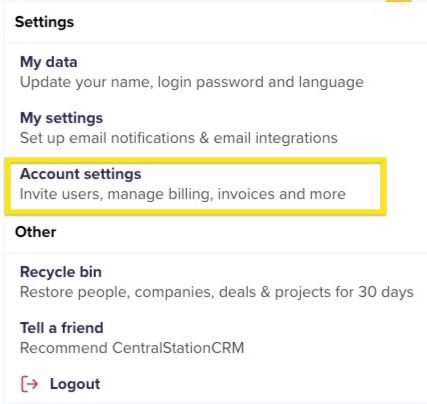\n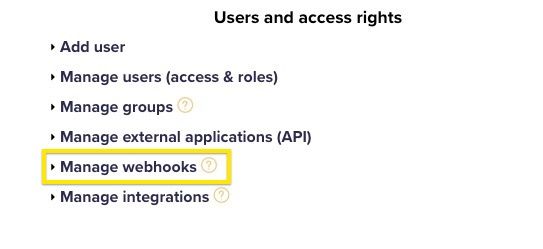\n* click \"Create webhook\"\n* enter password\n* \"Monitored object type\": company\n* \"Monitored event\": create\n* for \"Endpoint URL\" enter Webhook URL\n* for \"Nested objects\" enter:\ntags, addrs, companies\n* Enter name and description (e.g. n8n Test)\n* Set status to active and save"
},
"typeVersion": 1
},
{
"id": "2f0f0aa7-ae85-4ff1-aec2-6e78b5b4bdab",
"name": "Note adhésive5",
"type": "n8n-nodes-base.stickyNote",
"position": [
960,
840
],
"parameters": {
"color": 7,
"width": 420,
"height": 140,
"content": "## 3. get webhook URL from n8n\n* Double-click the first node in the workflow\n* Click once on the url next to POST"
},
"typeVersion": 1
},
{
"id": "03bbfa92-95b1-4beb-a1b0-fc1a2958093b",
"name": "Note adhésive",
"type": "n8n-nodes-base.stickyNote",
"position": [
2260,
0
],
"parameters": {
"color": 7,
"width": 500,
"height": 1160,
"content": "## 6. set up Research AI Agent\n### Set up Open AI Node\n* Register with Open AI\n* Surf to [https://platform.openai.com/api-keys](https://platform.openai.com/api-keys)\n* Click on \"Create New Secret Key\"\n* Enter name and project for the key, if applicable\n* Copy API key\n\n* Switch to n8n\n* Double-click \"OpenAI Chat Model\" node\n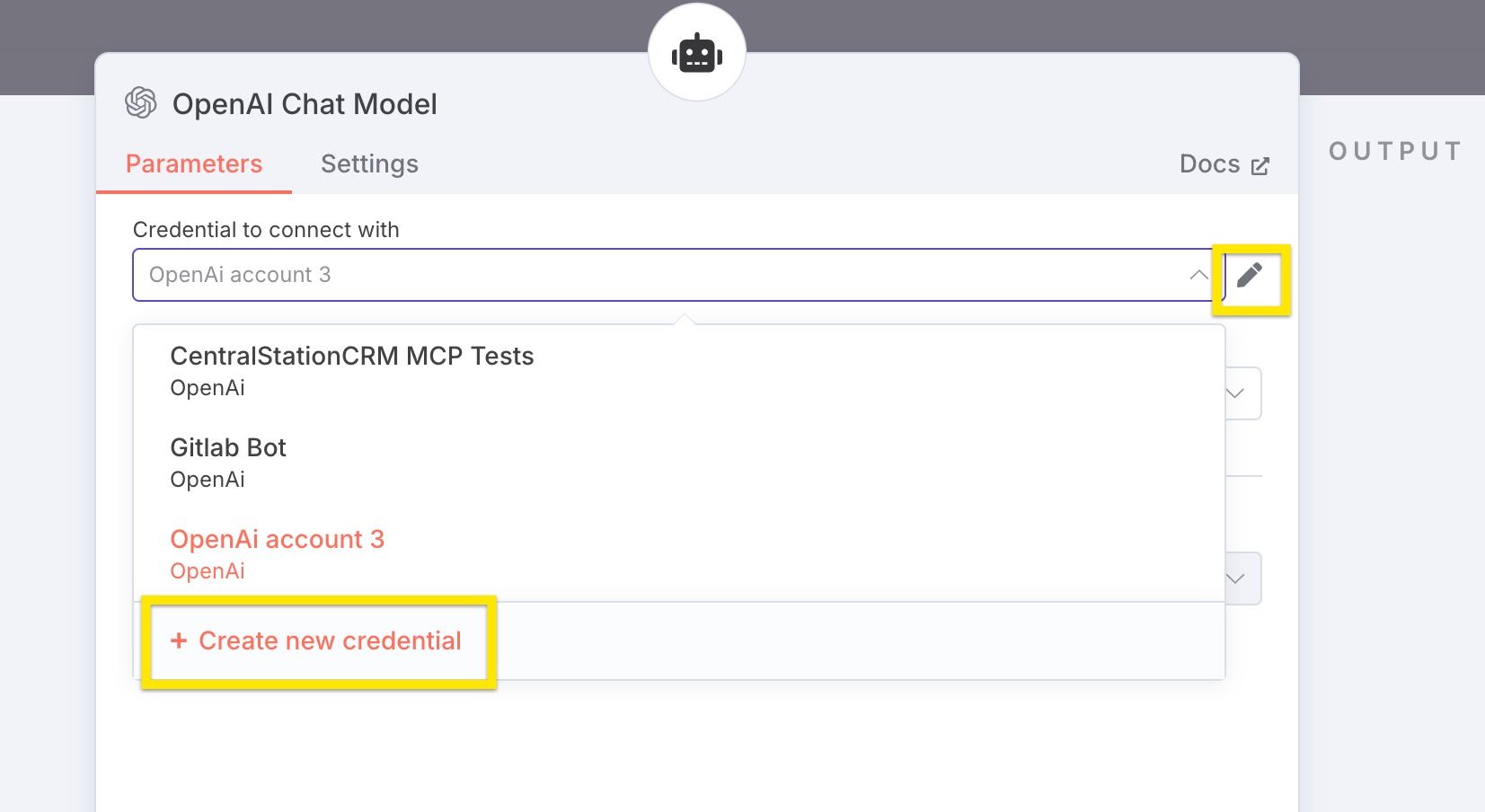\n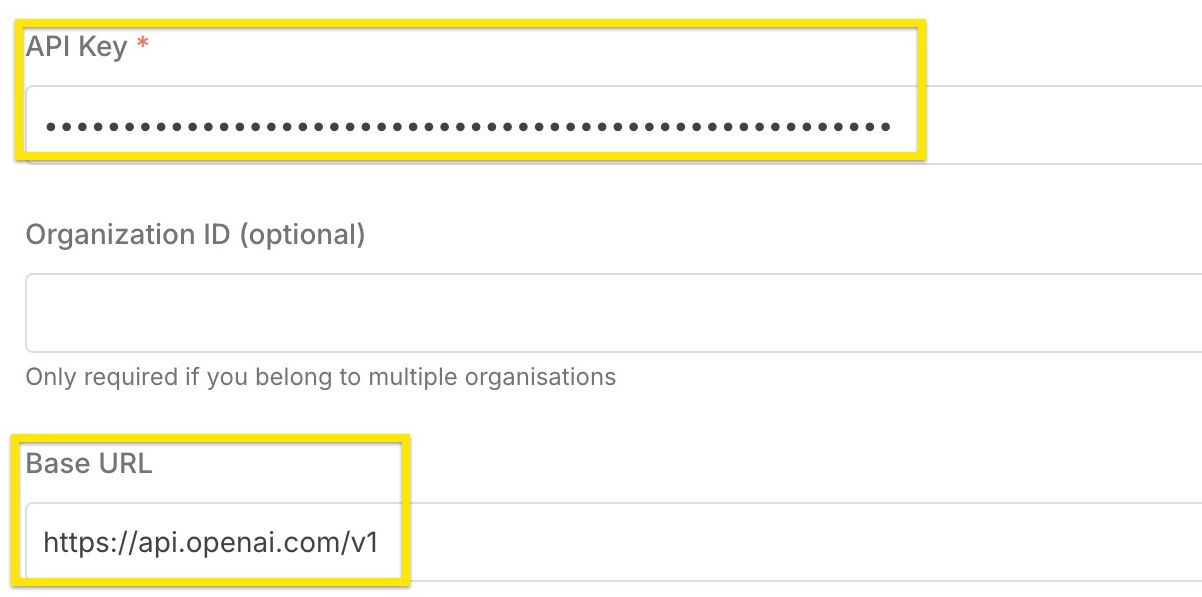\n"
},
"typeVersion": 1
},
{
"id": "f3b11fd7-2fcf-4fe0-b272-e6326b1c6b53",
"name": "Note adhésive1",
"type": "n8n-nodes-base.stickyNote",
"position": [
2780,
0
],
"parameters": {
"color": 7,
"width": 380,
"height": 980,
"content": "## 7. set up CentralStationCRM protocol\n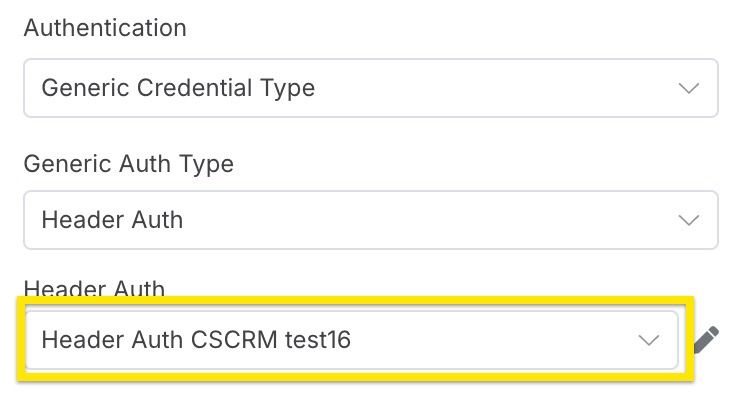\n* Select credentials created in step 1"
},
"typeVersion": 1
},
{
"id": "9ffff75c-ae83-4f5a-b656-3fea3da62e70",
"name": "Note adhésive8",
"type": "n8n-nodes-base.stickyNote",
"position": [
960,
0
],
"parameters": {
"color": 7,
"width": 420,
"height": 820,
"content": "## 2. set up CentralStationCRM n8n credentials\n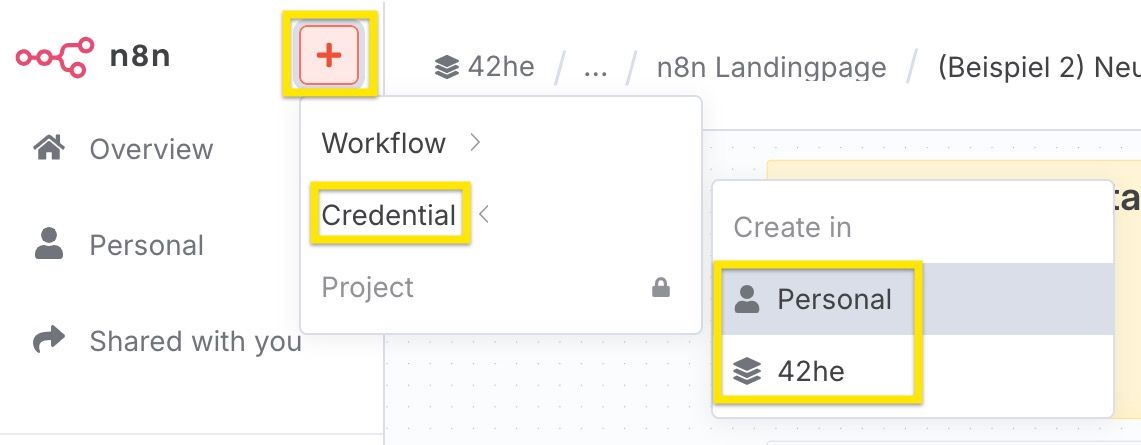\n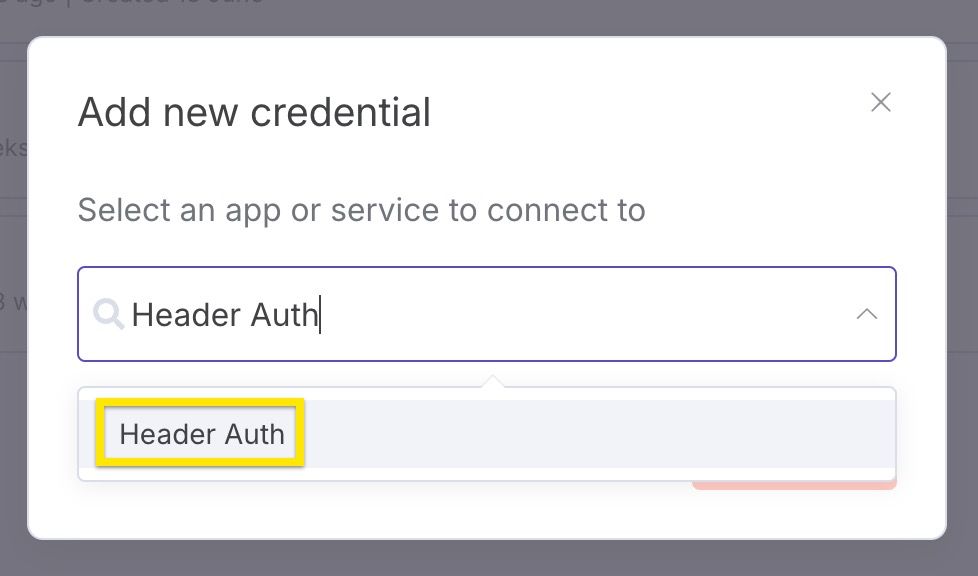\n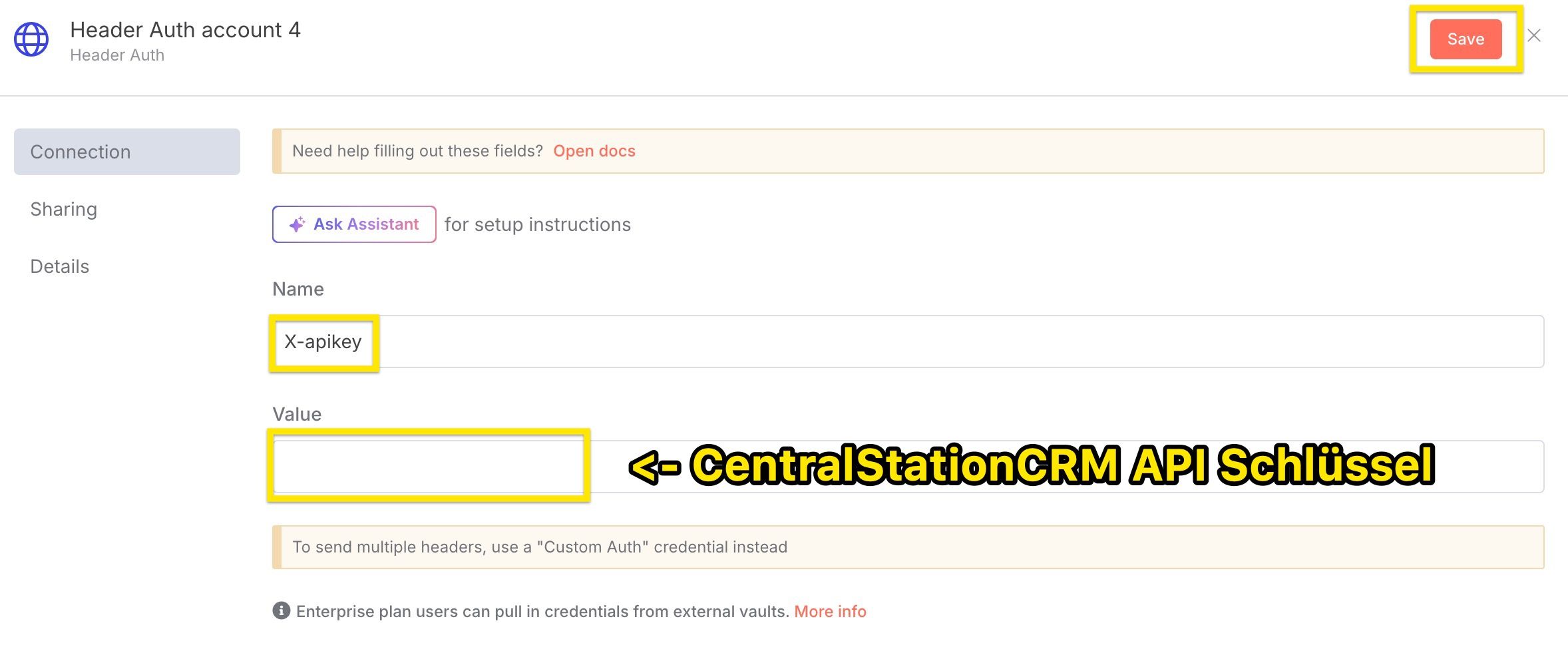\nImportant:\n* select Header Auth as credential type\n* assign X-apikey as name\n* enter the CentralStationCRM API key under \"Value"
},
"typeVersion": 1
},
{
"id": "9c9d77d8-159c-4e52-aad0-d2ccfcb84ac5",
"name": "Note adhésive9",
"type": "n8n-nodes-base.stickyNote",
"position": [
0,
780
],
"parameters": {
"width": 460,
"height": 200,
"content": "## Tools in this workflow\n* [CentralStationCRM](https://centralstationcrm.de), the easy and intuitive CRM Software for small teams. [Here is our API Documentation](https://api.centralstationcrm.net/api-docs/index.html) if you want to customize the workflow.\n* [ChatGPT](https://openai.com), the well-known ai chatbot\n* [Tavily](https://www.tavily.com/), a web search service for large language models"
},
"typeVersion": 1
},
{
"id": "f387821a-8be9-46b9-9435-212c704a558c",
"name": "Note adhésive4",
"type": "n8n-nodes-base.stickyNote",
"position": [
0,
0
],
"parameters": {
"width": 460,
"height": 740,
"content": "\n# Auto-Enrich New CRM Companies with ChatGPT Web Research via Tavily\n\nIn this workflow, you use **ChatGPT** in conjunction with the **web search tool Tavily**.\n\n* the webhook is triggered when a new company is created in the CRM\n* the company data is transferred to ChatGPT\n* the AI agent searches the web with Tavily and converts the information into Markdown format\n* A note with the resulting information is added to your CRM\n\n\n\n*To edit the nodes: Simply double-click!\n\n*At the very end: Set the workflow switch to “Active”."
},
"typeVersion": 1
},
{
"id": "4a3a7718-ff96-4ef5-90fe-6d03f0d81c25",
"name": "Note adhésive6",
"type": "n8n-nodes-base.stickyNote",
"position": [
500,
0
],
"parameters": {
"color": 7,
"width": 420,
"height": 980,
"content": "## 1. set up CentralStationCRM API Key\n* log in to CentralStationCRM\n* click on the gear wheel in the top right corner\n\n\n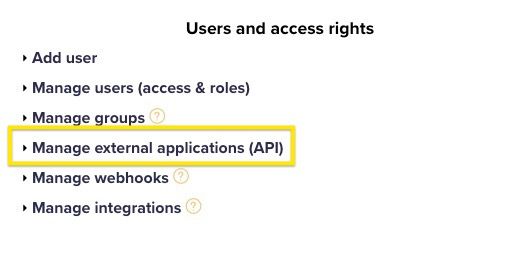\n* click \"Create API key\" on the right-hand side\n* enter \"Description\" (e.g. n8n Test)\n* save\n* save the API key! The key cannot be called up again in CRM and is required for step 2."
},
"typeVersion": 1
},
{
"id": "0cd3cfc1-74f4-400a-a5b7-0811d600ec4e",
"name": "Agent IA de recherche",
"type": "@n8n/n8n-nodes-langchain.agent",
"position": [
2380,
800
],
"parameters": {
"text": "=We are a small consulting firm specialised on sales and marketing consulting. \n\nDo a deep research in German about the company \"{{ $json.body.record.name }}\". The research shall help sales people get a good overview about the company and allow to identify potential opportunities.\n\nUse the following structure:\n\n```markdown\n- **Name:** Firmenname\n- **Webseite:** http://foobar.com\n- **Zentrale:** San Francisco ([1](http://foobar))\n- **Gründungsjahr:** 2018 ([1](http://...), [2](http://...))\n- **Anzahl der Mitarbeiter:** 123 ([1](...))\n\nAllgemeine Beschreibung der Firma, inklusive Quellen. ([1](http://source))\n\n## Social media\n\n- **Linked In:** http://...\n- **Facebook:** http://...\n```\n\nThis structure is not complete, you can add more facts, social media sites or sections. You can use multiple searches, use more specific search queries if there are important facts missing. Add sources to every fact you mention.\n\nRespond only with the markdown itself, do not start with ```markdown.",
"options": {},
"promptType": "define"
},
"typeVersion": 2
},
{
"id": "e61f2c0b-defd-4e91-8e01-e9dc6c71e0ce",
"name": "une amorce d'espace mental pour l'IA",
"type": "@n8n/n8n-nodes-langchain.toolThink",
"position": [
2660,
980
],
"parameters": {},
"typeVersion": 1
},
{
"id": "c4d18a52-57d1-4c9e-b8f8-f29440d12d38",
"name": "Tavily Websearch Extraire les URL",
"type": "@tavily/n8n-nodes-tavily.tavilyTool",
"position": [
2560,
1120
],
"parameters": {
"urls": [
"={{ /*n8n-auto-generated-fromAI-override*/ $fromAI('urls0_URLs', ``, 'string') }}"
],
"options": {},
"resource": "extract"
},
"credentials": {
"tavilyApi": {
"id": "ORAd9u0WAvNAofCP",
"name": "Tavily account"
}
},
"typeVersion": 1
},
{
"id": "f8af5e5a-d411-4888-904a-d8f3df1be67e",
"name": "Tavily Websearch Rechercher sur le web",
"type": "@tavily/n8n-nodes-tavily.tavilyTool",
"position": [
2400,
1120
],
"parameters": {
"query": "={{ /*n8n-auto-generated-fromAI-override*/ $fromAI('Query', ``, 'string') }}",
"options": {
"max_results": 15,
"search_depth": "advanced"
}
},
"credentials": {
"tavilyApi": {
"id": "ORAd9u0WAvNAofCP",
"name": "Tavily account"
}
},
"typeVersion": 1
},
{
"id": "589de93d-74f3-4bde-a5da-8f92b572c59b",
"name": "Ajouter une note à l'entreprise dans CentralStationCRM",
"type": "n8n-nodes-base.httpRequest",
"position": [
2920,
800
],
"parameters": {
"url": "https://api.centralstationcrm.net/api/protocols.json",
"method": "POST",
"options": {},
"jsonBody": "={\n \"protocol\": {\n \"company_ids\": [{{ $('Company created in CentralStationCRM').item.json.body.record.id }}],\n \"type\": \"ProtocolObjectNote\",\n \"badge\": \"note\",\n \"content\": {{ $json.output.toJsonString() }},\n \"format\": \"markdown\"\n }\n} \n",
"sendBody": true,
"sendHeaders": true,
"specifyBody": "json",
"authentication": "genericCredentialType",
"genericAuthType": "httpHeaderAuth",
"headerParameters": {
"parameters": [
{
"name": "accept",
"value": "application/json"
},
{
"name": "Content-Type",
"value": "application/json"
}
]
}
},
"credentials": {
"httpHeaderAuth": {
"id": "pqUNcvQBnqpxmMAD",
"name": "Header Auth CSCRM test16"
}
},
"typeVersion": 4.2
},
{
"id": "922a8cd5-ef4a-45a2-97fb-932c98ee7d8d",
"name": "Entreprise créée dans CentralStationCRM",
"type": "n8n-nodes-base.webhook",
"position": [
2000,
800
],
"webhookId": "c8682af5-17b7-48f5-9be3-49ef787b40e5",
"parameters": {
"path": "c8682af5-17b7-48f5-9be3-49ef787b40e5",
"options": {},
"httpMethod": "POST"
},
"typeVersion": 2
}
],
"active": false,
"pinData": {},
"settings": {
"executionOrder": "v1"
},
"versionId": "16f5b624-473c-424a-be92-f62e08907ce2",
"connections": {
"8a9fac46-d7ca-4b5f-a809-ba9c4be4bb48": {
"ai_languageModel": [
[
{
"node": "0cd3cfc1-74f4-400a-a5b7-0811d600ec4e",
"type": "ai_languageModel",
"index": 0
}
]
]
},
"0cd3cfc1-74f4-400a-a5b7-0811d600ec4e": {
"main": [
[
{
"node": "589de93d-74f3-4bde-a5da-8f92b572c59b",
"type": "main",
"index": 0
}
]
]
},
"c4d18a52-57d1-4c9e-b8f8-f29440d12d38": {
"ai_tool": [
[
{
"node": "0cd3cfc1-74f4-400a-a5b7-0811d600ec4e",
"type": "ai_tool",
"index": 0
}
]
]
},
"e61f2c0b-defd-4e91-8e01-e9dc6c71e0ce": {
"ai_tool": [
[
{
"node": "0cd3cfc1-74f4-400a-a5b7-0811d600ec4e",
"type": "ai_tool",
"index": 0
}
]
]
},
"f8af5e5a-d411-4888-904a-d8f3df1be67e": {
"ai_tool": [
[
{
"node": "0cd3cfc1-74f4-400a-a5b7-0811d600ec4e",
"type": "ai_tool",
"index": 0
}
]
]
},
"922a8cd5-ef4a-45a2-97fb-932c98ee7d8d": {
"main": [
[
{
"node": "0cd3cfc1-74f4-400a-a5b7-0811d600ec4e",
"type": "main",
"index": 0
}
]
]
}
}
}Comment utiliser ce workflow ?
Copiez le code de configuration JSON ci-dessus, créez un nouveau workflow dans votre instance n8n et sélectionnez "Importer depuis le JSON", collez la configuration et modifiez les paramètres d'authentification selon vos besoins.
Dans quelles scénarios ce workflow est-il adapté ?
Avancé - Génération de leads, RAG IA
Est-ce payant ?
Ce workflow est entièrement gratuit et peut être utilisé directement. Veuillez noter que les services tiers utilisés dans le workflow (comme l'API OpenAI) peuvent nécessiter un paiement de votre part.
Workflows recommandés

CentralStationCRM
@centralstationcrmCentralStationCRM ist das einfache und intuitive CRM für kleine Teams. Auf n8n teilen wir unsere Workflow-Ideen: für schnellere Abläufe und einen besseren Arbeitsalltag. CentralStationCRM is the simple and intuitive CRM for small businesses. On n8, we share CRM-workflow ideas to speed up your working life!
Partager ce workflow