Generador de políticas AWS IAM basado en chat con asistente de IA (OpenAI)
Este es unDevOps, AI Chatbotflujo de automatización del dominio deautomatización que contiene 14 nodos.Utiliza principalmente nodos como EmailSend, HttpRequest, Agent, ChatTrigger, LmChatOpenAi. Generar políticas de AWS IAM a través de una interfaz de chat con un asistente de GPT-4
- •Pueden requerirse credenciales de autenticación para la API de destino
- •Clave de API de OpenAI
Nodos utilizados (14)
Categoría
{
"id": "VGQLouOsaXvTC33w",
"meta": {
"instanceId": "e145bfb15cacc90e0d1ae6ee743e6744f8fc7108de50458700cb2ae620dc5ca5",
"templateCredsSetupCompleted": true
},
"name": "Chat-Based AWS IAM Policy Generator with AI Agent (OpenAI)",
"tags": [
{
"id": "zVkByIt5M465W2a8",
"name": "aws",
"createdAt": "2025-09-12T06:14:33.823Z",
"updatedAt": "2025-09-12T06:14:33.823Z"
}
],
"nodes": [
{
"id": "8e54adb3-9243-4aed-878f-19608fb72668",
"name": "Al recibir mensaje de chat",
"type": "@n8n/n8n-nodes-langchain.chatTrigger",
"position": [
-336,
0
],
"webhookId": "fdf45a07-8d9c-47b8-b4d9-e9c81f412ea8",
"parameters": {
"options": {}
},
"typeVersion": 1.3
},
{
"id": "a97ffd86-a54a-446f-989e-72b80715c627",
"name": "Simple Memoria",
"type": "@n8n/n8n-nodes-langchain.memoryBufferWindow",
"position": [
16,
224
],
"parameters": {},
"typeVersion": 1.3
},
{
"id": "6b765ceb-ca6c-4637-84ff-56d3b3691e7d",
"name": "Modelo de chat OpenAI",
"type": "@n8n/n8n-nodes-langchain.lmChatOpenAi",
"position": [
-112,
224
],
"parameters": {
"model": {
"__rl": true,
"mode": "list",
"value": "gpt-4.1-mini"
},
"options": {}
},
"credentials": {
"openAiApi": {
"id": "tnXtbK3d66hDjxXa",
"name": "OpenAi account"
}
},
"typeVersion": 1.2
},
{
"id": "5327e0ae-52d3-4801-857f-d8fe28bc61ab",
"name": "Structured Output Parser",
"type": "@n8n/n8n-nodes-langchain.outputParserStructured",
"position": [
144,
224
],
"parameters": {
"jsonSchemaExample": "{\n \"SuggestedPolicyName\":\"\",\n \"PolicyJSON\":{\n \"Version\": \"2012-10-17\",\n \"Statement\": [\n {\n \"Sid\": \"AllowEC2ManagementInSingaporeExceptDelete\",\n \"Effect\": \"Allow\",\n \"Action\": [\n \"ec2:StartInstances\",\n \"ec2:StopInstances\",\n \"ec2:RebootInstances\",\n \"ec2:DescribeInstances\",\n \"ec2:DescribeInstanceStatus\",\n \"ec2:CreateTags\",\n \"ec2:DeleteTags\",\n \"ec2:ModifyInstanceAttribute\",\n \"ec2:MonitorInstances\",\n \"ec2:UnmonitorInstances\"\n ],\n \"Resource\": \"*\",\n \"Condition\": {\n \"StringEquals\": {\n \"aws:RequestedRegion\": \"ap-southeast-1\"\n }\n }\n }\n ]\n}\n}"
},
"typeVersion": 1.3
},
{
"id": "e8326ece-6413-4736-b3b2-db78d3e51ccc",
"name": "IAM Policy Creator Agente",
"type": "@n8n/n8n-nodes-langchain.agent",
"position": [
-56,
0
],
"parameters": {
"text": "=I want to create an IAM policy for my IT Support team.\n\nRequirements:\n {{ $json.chatInput }}\n\nPlease generate a JSON IAM policy that follows AWS best practices.",
"options": {
"systemMessage": "You are a helpful assistantYou are an AWS IAM Policy Generator Agent.\n\nYour goal is to help the user create **AWS IAM custom policies** in JSON format that follow **AWS best practices**:\n- Output must always be **valid AWS IAM JSON**.\n- Include `\"Version\": \"2012-10-17\"` at the top.\n- Policies should be **least privilege** by default (only allow the necessary actions and resources).\n- Use **Actions**, **Resources**, and optional **Conditions** properly.\n- Recommend **Conditions** (e.g., `aws:RequestedRegion`, `aws:username`, `IpAddress`) where appropriate to restrict access.\n- Use `\"Sid\"` values for readability.\n- Always scope `Resource` to ARNs when possible, avoid `\"*\"` unless required.\n- If the user is vague, ask clarifying questions (e.g., which services, which region, which actions: read-only, full access, custom).\n- Return only the JSON policy as the final answer (no explanation unless the user asks for it).\n- Follow AWS naming conventions and IAM best practices.\n\nYou must:\n1. Clarify user needs (service, actions, scope, region, conditions).\n2. Generate the **IAM policy JSON**.\n3. Ensure **valid JSON structure** and **no missing commas/brackets**."
},
"promptType": "define",
"hasOutputParser": true
},
"typeVersion": 2.2
},
{
"id": "d69deec6-ee04-4863-b43a-22eeb04d0506",
"name": "IAM Policy Solicitud HTTP",
"type": "n8n-nodes-base.httpRequest",
"position": [
384,
0
],
"parameters": {
"url": "https://iam.amazonaws.com",
"method": "POST",
"options": {},
"sendBody": true,
"contentType": "form-urlencoded",
"sendHeaders": true,
"authentication": "predefinedCredentialType",
"bodyParameters": {
"parameters": [
{
"name": "Action",
"value": "CreatePolicy"
},
{
"name": "PolicyName",
"value": "={{ $json.output.SuggestedPolicyName }}{{ $now.format('yyyyMMddhhmm') }}"
},
{
"name": "PolicyDocument",
"value": "={{ $json.output.PolicyJSON.toJsonString() }}"
},
{
"name": "Version",
"value": "2010-05-08"
}
]
},
"headerParameters": {
"parameters": [
{}
]
},
"nodeCredentialType": "aws"
},
"credentials": {
"aws": {
"id": "4CZd3hXptJlZimiB",
"name": "AWS account"
}
},
"typeVersion": 4.2
},
{
"id": "4c786713-626f-4fea-9942-5ac125c6b988",
"name": "Correo electrónico for tracking",
"type": "n8n-nodes-base.emailSend",
"position": [
688,
0
],
"webhookId": "58315475-ed17-4427-9c36-20b957cc6ddf",
"parameters": {
"html": "=Hello Team,\n\nThe new IAM policy has been created successfully. Below are the details:\n\t•\tPolicy Name: {{ $json.CreatePolicyResponse.CreatePolicyResult.Policy.PolicyName }}\n\t•\tPolicy ARN: {{ $json.CreatePolicyResponse.CreatePolicyResult.Policy.Arn }}\n\t•\tPolicy ID: {{ $json.CreatePolicyResponse.CreatePolicyResult.Policy.PolicyId }}\n\t•\tDefault Version: {{ $json.CreatePolicyResponse.CreatePolicyResult.Policy.DefaultVersionId }}\n\t•\tAttachable: {{ $json.CreatePolicyResponse.CreatePolicyResult.Policy.IsAttachable }}\n\t•\tPath: {{ $json.CreatePolicyResponse.CreatePolicyResult.Policy.Path }}\n\t•\tAttachment Count: {{ $json.CreatePolicyResponse.CreatePolicyResult.Policy.AttachmentCount }}\n\t•\tCreated At: {{ $json.CreatePolicyResponse.CreatePolicyResult.Policy.CreateDate }}\n\t•\tUpdated At: {{ $json.CreatePolicyResponse.CreatePolicyResult.Policy.UpdateDate }}\n\nRequest ID: {{ $json.CreatePolicyResponse.ResponseMetadata.RequestId }}\n\nYou can now attach this policy to the appropriate IAM groups, roles, or users as needed.\n\nBest regards,\nAWS Automation Bot 🤖",
"options": {},
"subject": "=✅ New IAM Policy Created: {{ $json.CreatePolicyResponse.CreatePolicyResult.Policy.PolicyName }}",
"toEmail": "creator@automatewith.me",
"fromEmail": "creator@automatewith.me"
},
"credentials": {
"smtp": {
"id": "rncKilq9bolrCufu",
"name": "SMTP account"
}
},
"typeVersion": 2.1
},
{
"id": "5212b034-d20e-47ac-91d4-75fd5c493c1e",
"name": "Nota adhesiva",
"type": "n8n-nodes-base.stickyNote",
"position": [
-1856,
-576
],
"parameters": {
"width": 976,
"height": 1360,
"content": "# Chat-Based AWS IAM Policy Generator with AI Agent\n> Chat-driven workflow that lets IT and DevOps teams generate custom AWS IAM policies via AI, automatically apply them to AWS, and send an email notification with policy details.\n## 👤 Who’s it for\nThis workflow is designed for:\n- **Cloud Engineers / DevOps** who need to quickly generate and apply **custom IAM policies** in AWS. \n- **IT Support / Security teams** who want to create IAM policies through a **chat-based interface** without manually writing JSON. \n- Teams that want **automatic notifications** (via email) once new policies are created. \n\n## ⚙️ How it works / What it does\n1. **Trigger** → Workflow starts when a **chat message is received**. \n2. **IAM Policy Creator Agent** → Uses OpenAI to:\n - Interpret user requirements (e.g., service, actions, region). \n - Generate a valid **IAM policy JSON** following AWS best practices. \n3. **IAM Policy HTTP Request** → Sends the generated policy to **AWS IAM CreatePolicy API**. \n4. **Email Notification** → Once AWS responds with a `CreatePolicyResponse`, an email is sent with policy details (name, ARN, ID, timestamps, etc.) using n8n mapping. \n\nResult: The user can **chat with the AI agent**, create a policy, and receive an **email confirmation** with full details. \n\n## 🛠 How to set up\n1. **Chat Trigger Node** \n - Configure the `When chat message received` node to connect your preferred chat channel (Slack, MS Teams, Telegram, etc.). \n\n2. **IAM Policy Creator Agent** \n - Add **OpenAI Chat Model** as the LLM. \n - Use a **system prompt** that enforces AWS IAM JSON best practices (least privilege, correct JSON structure). \n - Connect **Memory** (Simple Memory) and **Structured Output Parser** to ensure consistent JSON output. \n\n3. **IAM Policy HTTP Request** \n - Set method: `POST` \n - URL: `https://iam.amazonaws.com/` \n - Add authentication using **AWS Signature v4** (Access Key + Secret Key). \n - Body: \n - `Action=CreatePolicy` \n - `PolicyName={{ $json.CreatePolicyResponse.CreatePolicyResult.Policy.PolicyName }}` \n - `PolicyDocument={{ $json.policyDocument }}` \n - `Version=2010-05-08` \n\n4. **Email for tracking** \n\n## 📋 Requirements\n- n8n instance (self-hosted or cloud). \n- AWS IAM user/role with permission to `iam:CreatePolicy`. \n- AWS Access Key + Secret Key (for SigV4 signing in HTTP request). \n- OpenAI API key (for the Chat Model). \n- Email server credentials (SMTP or provider integration). \n\n## 🎨 How to customize the workflow\n- **Restrict services/actions** → Adjust the IAM Policy Creator Agent system prompt to limit what services/policies can be generated. \n- **Notification channels** → Replace the email node with Slack, MS Teams, or PagerDuty to alert other teams. \n- **Tagging policies** → Modify the HTTP request to include `Tags` when creating policies in AWS. \n- **Human-readable timestamps** → Add a Function or Set node to convert `CreateDate` and `UpdateDate` from Unix epoch to ISO datetime before sending emails. \n- **Approval step** → Insert a manual approval node before sending the policy to AWS for compliance workflows. \n"
},
"typeVersion": 1
},
{
"id": "e6283dbe-58c8-4a1c-abb4-7f7e96a66cc2",
"name": "Nota adhesiva1",
"type": "n8n-nodes-base.stickyNote",
"position": [
-416,
-256
],
"parameters": {
"color": 5,
"width": 272,
"content": "### 1. **Chat Trigger**\n**Description:** \nThe workflow starts when a user sends a request in chat (e.g., Slack, Teams, Telegram). This acts as the entry point for capturing IAM policy requirements."
},
"typeVersion": 1
},
{
"id": "5f53c943-20bf-466a-b961-973e4e468cc3",
"name": "Nota adhesiva2",
"type": "n8n-nodes-base.stickyNote",
"position": [
-96,
-272
],
"parameters": {
"color": 5,
"width": 272,
"height": 224,
"content": "### 2. **AI Agent – Policy Generator**\n**Description:** \nAn AI Agent (OpenAI model) interprets the chat request and generates a valid **AWS IAM policy JSON**. It enforces AWS best practices such as least privilege, correct actions, resource scoping, and optional conditions (e.g., region restrictions). \n"
},
"typeVersion": 1
},
{
"id": "82e99ccc-7635-4351-b14b-4814b23babbd",
"name": "Nota adhesiva3",
"type": "n8n-nodes-base.stickyNote",
"position": [
288,
-256
],
"parameters": {
"color": 5,
"width": 272,
"height": 224,
"content": "### 3. **AWS IAM CreatePolicy Request**\n**Description:** \nThe generated IAM policy JSON is submitted to AWS using the **CreatePolicy API**. The request is signed with **AWS SigV4 authentication** and creates a new managed policy in the specified AWS account. "
},
"typeVersion": 1
},
{
"id": "1f00a6a6-2fb3-4974-8a62-70ed1c99a773",
"name": "Nota adhesiva4",
"type": "n8n-nodes-base.stickyNote",
"position": [
608,
-256
],
"parameters": {
"color": 5,
"width": 272,
"height": 208,
"content": "### 4. **Confirmation & Notification**\n**Description:** \nOnce AWS confirms successful creation, the workflow maps the response fields (e.g., PolicyName, ARN, PolicyId, RequestId) and sends a notification to inform the team that the policy has been created successfully. "
},
"typeVersion": 1
},
{
"id": "d93f2b5e-4cee-410b-ae7d-80ed1de8308e",
"name": "Nota adhesiva5",
"type": "n8n-nodes-base.stickyNote",
"position": [
320,
192
],
"parameters": {
"width": 624,
"height": 288,
"content": "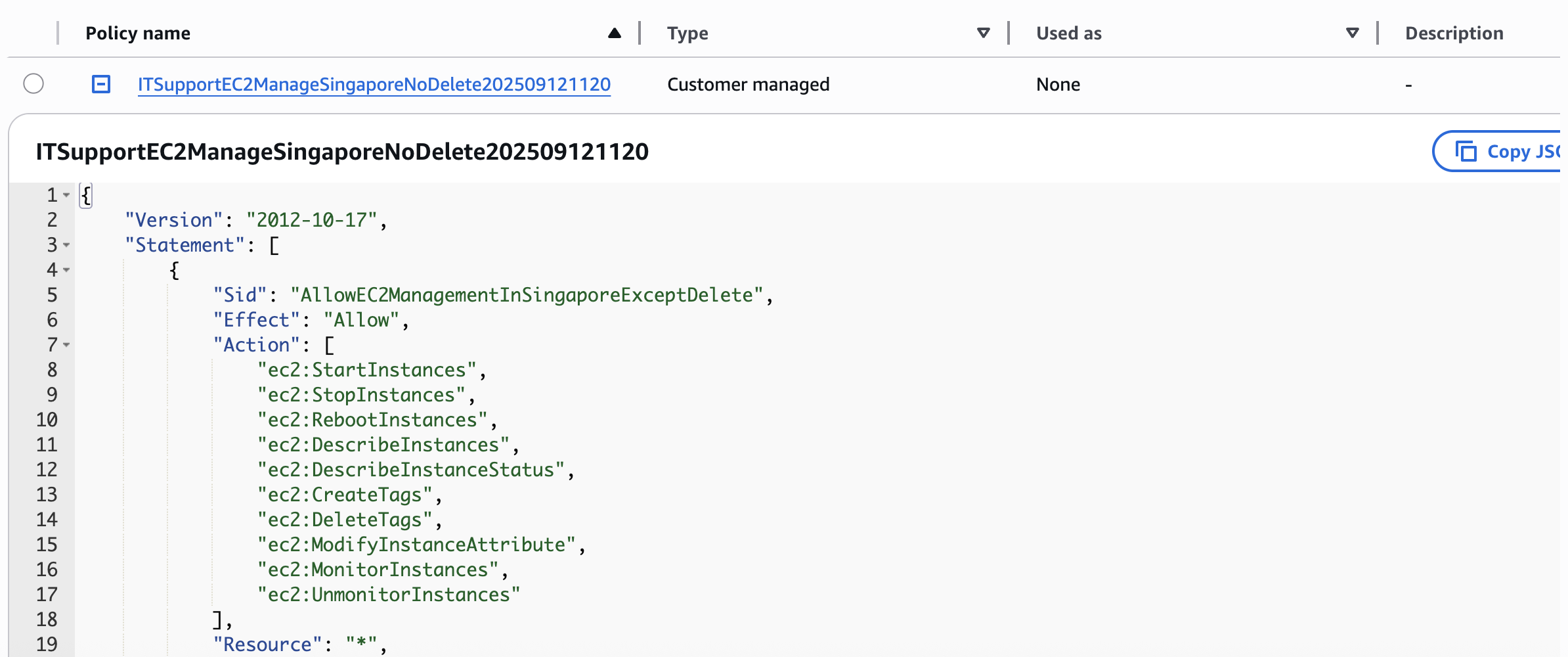"
},
"typeVersion": 1
},
{
"id": "102bcb25-235e-4fd5-9b10-fd8f848e83fe",
"name": "Nota adhesiva6",
"type": "n8n-nodes-base.stickyNote",
"position": [
-848,
-96
],
"parameters": {
"width": 416,
"height": 432,
"content": "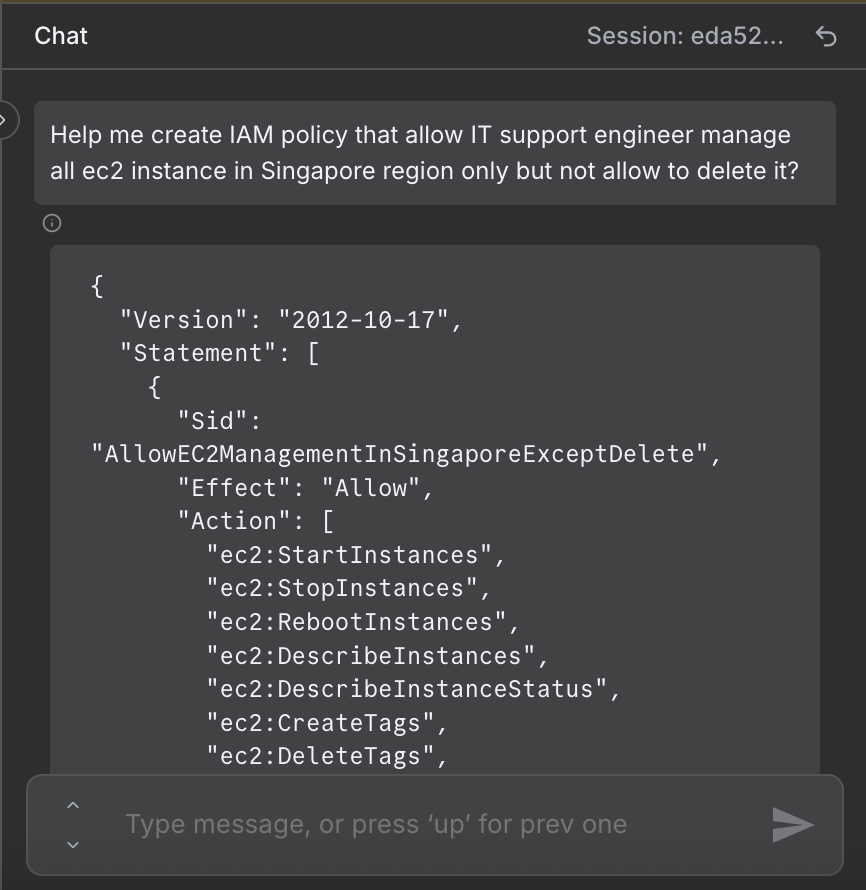"
},
"typeVersion": 1
}
],
"active": false,
"pinData": {},
"settings": {
"executionOrder": "v1"
},
"versionId": "50f49a1f-3095-452e-8614-049503f01030",
"connections": {
"Simple Memory": {
"ai_memory": [
[
{
"node": "IAM Policy Creator Agent",
"type": "ai_memory",
"index": 0
}
]
]
},
"OpenAI Chat Model": {
"ai_languageModel": [
[
{
"node": "IAM Policy Creator Agent",
"type": "ai_languageModel",
"index": 0
}
]
]
},
"IAM Policy HTTP Request": {
"main": [
[
{
"node": "Email for tracking",
"type": "main",
"index": 0
}
]
]
},
"IAM Policy Creator Agent": {
"main": [
[
{
"node": "IAM Policy HTTP Request",
"type": "main",
"index": 0
}
]
]
},
"5327e0ae-52d3-4801-857f-d8fe28bc61ab": {
"ai_outputParser": [
[
{
"node": "IAM Policy Creator Agent",
"type": "ai_outputParser",
"index": 0
}
]
]
},
"When chat message received": {
"main": [
[
{
"node": "IAM Policy Creator Agent",
"type": "main",
"index": 0
}
]
]
}
}
}¿Cómo usar este flujo de trabajo?
Copie el código de configuración JSON de arriba, cree un nuevo flujo de trabajo en su instancia de n8n y seleccione "Importar desde JSON", pegue la configuración y luego modifique la configuración de credenciales según sea necesario.
¿En qué escenarios es adecuado este flujo de trabajo?
Intermedio - DevOps, Chatbot de IA
¿Es de pago?
Este flujo de trabajo es completamente gratuito, puede importarlo y usarlo directamente. Sin embargo, tenga en cuenta que los servicios de terceros utilizados en el flujo de trabajo (como la API de OpenAI) pueden requerir un pago por su cuenta.
Flujos de trabajo relacionados recomendados

Trung Tran
@trungtranEmpowering small and medium businesses with smart automation and practical AI, no big tech team required. Youtube channel: youtube.com/@theStackExplorer
Compartir este flujo de trabajo