Usar ontología de expertos en grafos de conocimiento para potenciar sus indicaciones
Este es unInternal Wiki, AI RAGflujo de automatización del dominio deautomatización que contiene 7 nodos.Utiliza principalmente nodos como HttpRequest, ChatTrigger. a través deInfraNodus知识图谱推理yGraphRAG增强AIchatbot响应
- •Pueden requerirse credenciales de autenticación para la API de destino
Nodos utilizados (7)
Categoría
{
"id": "MqHZXsobgwvx8B1f",
"meta": {
"instanceId": "334f4f928505fa56392672dcbddf0c1a39709717127e8d60d133a12f8f82b3b4",
"templateCredsSetupCompleted": true
},
"name": "Augment Your Prompt with a Knowledge Graph Ontology Expert",
"tags": [
{
"id": "2Q64isOPYcTslspA",
"name": "AI",
"createdAt": "2025-08-02T13:39:06.091Z",
"updatedAt": "2025-08-02T13:39:06.091Z"
},
{
"id": "pZUWchtD7Jo42VrS",
"name": "AI Chatbot",
"createdAt": "2025-08-02T13:39:11.275Z",
"updatedAt": "2025-08-02T13:39:11.275Z"
},
{
"id": "MNbFLjKxPdVAYXIC",
"name": "AI Rag",
"createdAt": "2025-08-02T13:39:08.349Z",
"updatedAt": "2025-08-02T13:39:08.349Z"
}
],
"nodes": [
{
"id": "2568cca8-643d-48cd-969a-eccf267dd000",
"name": "Cuando se recibe un mensaje en el chat",
"type": "@n8n/n8n-nodes-langchain.chatTrigger",
"position": [
-512,
0
],
"webhookId": "26592391-6f28-4740-8caa-79ce80b582d0",
"parameters": {
"public": true,
"options": {}
},
"typeVersion": 1.1
},
{
"id": "92d3bec1-b54d-43c8-8ac2-1e11d92135cb",
"name": "Prompt aumentado con ontología de razonamiento",
"type": "n8n-nodes-base.httpRequest",
"position": [
-16,
0
],
"parameters": {
"url": "https://infranodus.com/api/v1/graphAndAdvice?doNotSave=true&addStats=true&optimize=develop&includeStatements=true&includeGraphSummary=true&includeGraph=false",
"method": "POST",
"options": {},
"sendBody": true,
"authentication": "genericCredentialType",
"bodyParameters": {
"parameters": [
{
"name": "name",
"value": "eightos_system"
},
{
"name": "requestMode",
"value": "reprompt"
},
{
"name": "aiTopics",
"value": "true"
},
{
"name": "prompt",
"value": "={{ $json.chatInput }}"
},
{
"name": "systemPrompt",
"value": "Your task is to reformulate the original query of a user using the context provided"
}
]
},
"genericAuthType": "httpBearerAuth"
},
"credentials": {
"httpBearerAuth": {
"id": "C3Li2OwYebUs6Dmg",
"name": "InfraNodus Expert"
}
},
"typeVersion": 4.2
},
{
"id": "cb908d48-e575-4844-a026-aa95d0655935",
"name": "Consultar la base de conocimiento",
"type": "n8n-nodes-base.httpRequest",
"position": [
608,
0
],
"parameters": {
"url": "https://infranodus.com/api/v1/graphAndAdvice?doNotSave=true&addStats=true&optimize=develop&includeStatements=true&includeGraphSummary=true&includeGraph=false",
"method": "POST",
"options": {},
"sendBody": true,
"authentication": "genericCredentialType",
"bodyParameters": {
"parameters": [
{
"name": "name",
"value": "eightos_system"
},
{
"name": "requestMode",
"value": "response"
},
{
"name": "aiTopics",
"value": "true"
},
{
"name": "prompt",
"value": "={{ $json.aiAdvice[0].text }}"
},
{
"name": "systemPrompt",
"value": "Use the context you are provided as a logic to use when providing a response to the user query, not as the content you should be providing. IT IS IMPERATIVE THAT YOU DO NOT EXTRACT THE CONTENT FROM THE CONTEXT PROVIDED FOR YOUR ANSWER BUT USE IT AS A REASONING LOGIC TO PROVIDE YOUR ANSWER."
}
]
},
"genericAuthType": "httpBearerAuth"
},
"credentials": {
"httpBearerAuth": {
"id": "C3Li2OwYebUs6Dmg",
"name": "InfraNodus Expert"
}
},
"typeVersion": 4.2
},
{
"id": "401b9dc0-c51e-4fe9-87cd-be393c5bd66e",
"name": "Nota adhesiva",
"type": "n8n-nodes-base.stickyNote",
"position": [
-2592,
-976
],
"parameters": {
"color": 6,
"width": 540,
"height": 760,
"content": "## AI Chatbot Agent with Experts\n\n### Uses the InfraNodus knowledge graphs and its Graph RAG to retrieve relevant information.\n\nUse your [InfraNodus graph](https://infranodus.com) as the knowledge base for your AI chatbot. \n\nUpload any data to InfraNodus, generate separate knowledge graphs, then connect them as tools to the agent, so it can decide which \"expert\" to use. InfraNodus' Graph RAG will provide high-quality responses that will augment the chatbot's answers.\n\nVideo demo: [https://www.youtube.com/watch?v=kS0QTUvcH6E](https://www.youtube.com/watch?v=kS0QTUvcH6E)\n\nDetailed description: [Nodus Labs support portal](https://support.noduslabs.com/hc/en-us/articles/20174217658396-Using-InfraNodus-Knowledge-Graphs-as-Experts-for-AI-Chatbot-Agents-in-n8n)\n\nInfraNodus API key can be obtained at [InfraNodus.Com](https://infranodus.com/use-case/ai-knowledge-graphs)\n\n\n[](https://www.youtube.com/watch?v=kS0QTUvcH6E)"
},
"typeVersion": 1
},
{
"id": "8f70c71d-84bc-43cd-a13c-550ca6da336a",
"name": "Nota adhesiva1",
"type": "n8n-nodes-base.stickyNote",
"position": [
-224,
-32
],
"parameters": {
"width": 520,
"height": 1220,
"content": "\n\n\n\n\n\n\n\n\n\n\n\n\n\n\n\n\n## 2. Reasoning Expert Reformulates the User's Query\n\n### Create an InfraNodus graph with a reasoning ontology. This node will then provide the reasoning logic to your LLM to reformulate the original query. Learn more about this approach in our [article on reasoning agents](https://support.noduslabs.com/hc/en-us/articles/21429518472988-Using-Knowledge-Graphs-as-Reasoning-Experts) \n\nTO CREATE THE REASONING CHAIN GRAPH:\n\n• use the [InfraNodus AI Ontologies Generator](https://infranodus.com/import/ai-ontologies) — learn more how it works on our [support portal](https://support.noduslabs.com/hc/en-us/articles/18301655686172-Generate-Knowledge-Graphs-and-Ontologies-in-Plain-Text)\n\n• choose a reasoning graph from our [multiple freely available graphs online](https://infranodus.com/knowledge-graphs)\n\n• download the existing graph on [EightOS cognitive variability framework](https://infranodus.com/expert/eightos_system?background=dark&show_analytics=1&most_influential=bc2&maxnodes=150&threshold=8&labelsize=proportional&edgestype=curve&drawedges=true&drawnodes=true&labelsizeratio=2&dynamic=highlight&cutgraph=1&selected=highlight) or use one \n\n### Once ready, add your InfraNodus graph here via the HTTP node using its name in the `body.name` field.\n\n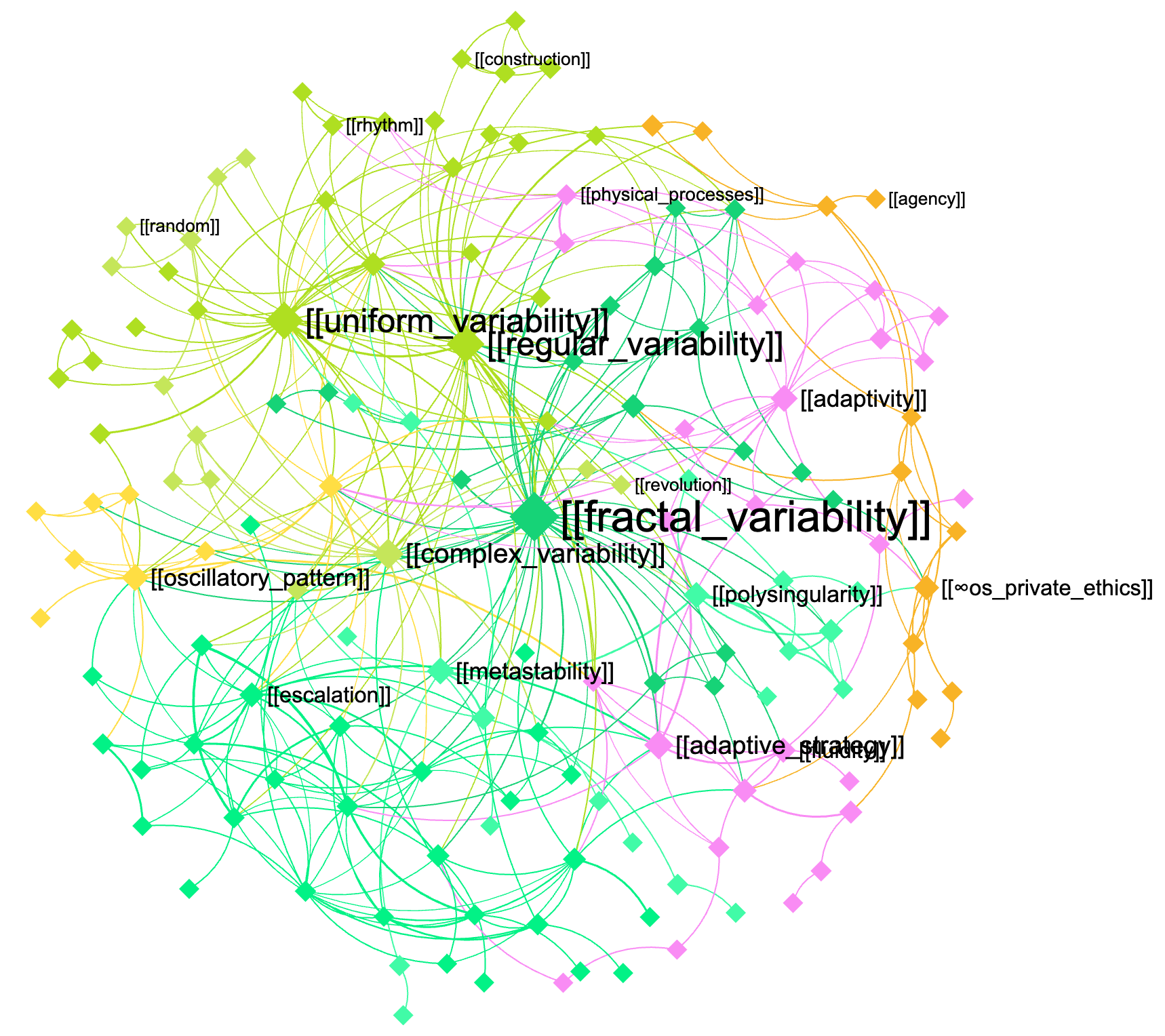"
},
"typeVersion": 1
},
{
"id": "c6d16d77-1aed-4fa8-a7aa-fb7fc6974469",
"name": "Nota adhesiva9",
"type": "n8n-nodes-base.stickyNote",
"position": [
400,
-32
],
"parameters": {
"width": 520,
"height": 1216,
"content": "\n\n\n\n\n\n\n\n\n\n\n\n\n\n\n\n\n## 3. The augmented query is sent to the knowledge base and the response is retrieved using GraphRAG\n\nNow that the query is augmented with domain-specific knowledge, you can send it back to this same graph or to another graph (for cross-disciplinary requests — e.g. to use the machine learning expertise in biology, etc)\n\n[InfraNodus](https://infranodus.com) will use [GraphRAG](https://infranodus.com/docs/graph-rag-knowledge-graph) to traverse the graph for answers and extract a response for your user query.\n\nProvide the name of the graph you'll be using as a knowledge base in the `name` field of the node.\n\nYou can also replace this node with any external AI model (e.g. Open AI chat message node).\n"
},
"typeVersion": 1
},
{
"id": "3d1fe3e7-dbd5-4b13-a62c-97ee5fa42046",
"name": "Nota adhesiva2",
"type": "n8n-nodes-base.stickyNote",
"position": [
-576,
-48
],
"parameters": {
"height": 768,
"content": "\n\n\n\n\n\n\n\n\n\n\n\n\n\n\n\n\n## 1. Trigger the chat and send a message\n\nYou can also make this node publicly available via a URL and embed it on a website or make it available via a Telegram node that is activated upon receiving a message (check [this workflow](https://n8n.io/workflows/4485-telegram-ai-chatbot-agent-with-infranodus-graphrag-knowledge-base/) to learn how to set it up). "
},
"typeVersion": 1
}
],
"active": false,
"pinData": {},
"settings": {
"executionOrder": "v1"
},
"versionId": "2bb0a437-1815-4bff-bdd4-600faa19b456",
"connections": {
"2568cca8-643d-48cd-969a-eccf267dd000": {
"main": [
[
{
"node": "92d3bec1-b54d-43c8-8ac2-1e11d92135cb",
"type": "main",
"index": 0
}
]
]
},
"92d3bec1-b54d-43c8-8ac2-1e11d92135cb": {
"main": [
[
{
"node": "cb908d48-e575-4844-a026-aa95d0655935",
"type": "main",
"index": 0
}
]
]
}
}
}¿Cómo usar este flujo de trabajo?
Copie el código de configuración JSON de arriba, cree un nuevo flujo de trabajo en su instancia de n8n y seleccione "Importar desde JSON", pegue la configuración y luego modifique la configuración de credenciales según sea necesario.
¿En qué escenarios es adecuado este flujo de trabajo?
Intermedio - Wiki interno, RAG de IA
¿Es de pago?
Este flujo de trabajo es completamente gratuito, puede importarlo y usarlo directamente. Sin embargo, tenga en cuenta que los servicios de terceros utilizados en el flujo de trabajo (como la API de OpenAI) pueden requerir un pago por su cuenta.
Flujos de trabajo relacionados recomendados

InfraNodus
@infranodusI'm Dmitry, the founder of InfraNodus — an AI text network analysis tool. I'm passionate about networks and data visualization and its ability to reveal what everyone else is missing and to highlight different perspectives. I'm sharing the n8n templates that make use of this unique capability of InfraNodus for multiple scenarios.
Compartir este flujo de trabajo