Construir un servicio de reparación de imágenes integrando n8n y la edición de imágenes con Gemini AI
Este es unDesign, AIflujo de automatización del dominio deautomatización que contiene 17 nodos.Utiliza principalmente nodos como Set, SplitOut, GoogleDrive, HttpRequest, ConvertToFile, combinando tecnología de inteligencia artificial para lograr automatización inteligente. Construir un servicio de reparación de imágenes integrando n8n y la edición de imágenes Gemini AI
- •Credenciales de API de Google Drive
- •Pueden requerirse credenciales de autenticación para la API de destino
Nodos utilizados (17)
Categoría
{
"meta": {
"instanceId": "408f9fb9940c3cb18ffdef0e0150fe342d6e655c3a9fac21f0f644e8bedabcd9",
"templateCredsSetupCompleted": true
},
"nodes": [
{
"id": "b6a5c37d-b845-4fd2-8ea3-db23aed99286",
"name": "Al hacer clic en 'Ejecutar flujo de trabajo'",
"type": "n8n-nodes-base.manualTrigger",
"position": [
-80,
320
],
"parameters": {},
"typeVersion": 1
},
{
"id": "1f363fc5-42cf-4e9c-ae74-496030362ed9",
"name": "Imágenes de ejemplo",
"type": "n8n-nodes-base.set",
"position": [
120,
320
],
"parameters": {
"options": {},
"assignments": {
"assignments": [
{
"id": "7196d08d-dff6-48e4-a06d-0ec863a4dff3",
"name": "url",
"type": "array",
"value": "={{\n[\n \"https://res.cloudinary.com/daglih2g8/image/upload/f_auto,q_auto/v1/n8n-workflows/l8b3j1sf6ejx73z0awsh\",\n \"https://res.cloudinary.com/daglih2g8/image/upload/f_auto,q_auto/v1/n8n-workflows/htrjbmiozdrvxwdsreyt\",\n \"https://res.cloudinary.com/daglih2g8/image/upload/f_auto,q_auto/v1/n8n-workflows/ykftgxpozp2pr4sxpuoy\"\n]\n}}"
}
]
}
},
"typeVersion": 3.4
},
{
"id": "e078aba0-2f2b-47b5-90b2-c457184e6237",
"name": "Dividir salida",
"type": "n8n-nodes-base.splitOut",
"position": [
320,
320
],
"parameters": {
"options": {},
"fieldToSplitOut": "url"
},
"typeVersion": 1
},
{
"id": "a0fbf72b-d079-4777-be06-531e0e131857",
"name": "Descargar imagen",
"type": "n8n-nodes-base.httpRequest",
"position": [
520,
320
],
"parameters": {
"url": "={{ $json.url }}",
"options": {}
},
"typeVersion": 4.2
},
{
"id": "77f0d0c7-e6bd-4f15-beff-9cb53446fcb0",
"name": "Gemini Restauración de imagen",
"type": "n8n-nodes-base.httpRequest",
"position": [
1100,
320
],
"parameters": {
"url": "https://generativelanguage.googleapis.com/v1beta/models/gemini-2.0-flash-preview-image-generation:generateContent",
"method": "POST",
"options": {},
"jsonBody": "={\n \"contents\": [\n {\n \"parts\": [\n {\n \"text\": \"You are an vintage image restoration agent. Restore the given image by removing cracks and tears and fill in missing sections of the image. Retain the dimensions, colors and camera film type of the original image.\"\n },\n {\n \"inline_data\": {\n \"mime_type\": \"{{ $('Download Image').item.binary.data.mimeType }}\",\n \"data\": \"{{ $json.data }}\"\n }\n }\n ]\n }\n ],\n \"generationConfig\": {\n \"responseModalities\": [\n \"TEXT\",\n \"IMAGE\"\n ]\n }\n}",
"sendBody": true,
"specifyBody": "json",
"authentication": "predefinedCredentialType",
"nodeCredentialType": "googlePalmApi"
},
"credentials": {
"googlePalmApi": {
"id": "dSxo6ns5wn658r8N",
"name": "Google Gemini(PaLM) Api account"
}
},
"typeVersion": 4.2
},
{
"id": "6aebcc29-a65d-4cb9-8d6a-56f24b58c7f5",
"name": "Extraer de archivo",
"type": "n8n-nodes-base.extractFromFile",
"position": [
720,
320
],
"parameters": {
"options": {},
"operation": "binaryToPropery"
},
"typeVersion": 1
},
{
"id": "1c50d319-1771-408f-9015-f04bb6a3d305",
"name": "Obtener contenidos de imagen",
"type": "n8n-nodes-base.set",
"position": [
1340,
320
],
"parameters": {
"options": {},
"assignments": {
"assignments": [
{
"id": "021aad70-de11-4387-844e-7e7dfd3b1044",
"name": "image",
"type": "string",
"value": "={{ $json.candidates[0].content.parts.find(part => part.inlineData).inlineData.data }}"
},
{
"id": "62877ef7-2057-4d35-a44b-1d58fa1f1769",
"name": "mimeType",
"type": "string",
"value": "={{ $json.candidates[0].content.parts.find(part => part.inlineData).inlineData.mimeType }}"
}
]
}
},
"typeVersion": 3.4
},
{
"id": "c19074f0-45a1-42bd-b25f-966f26ef5ef5",
"name": "Nota adhesiva",
"type": "n8n-nodes-base.stickyNote",
"position": [
2220,
-200
],
"parameters": {
"width": 700,
"height": 320,
"content": "|Original|Restored|\n|-|-|\n|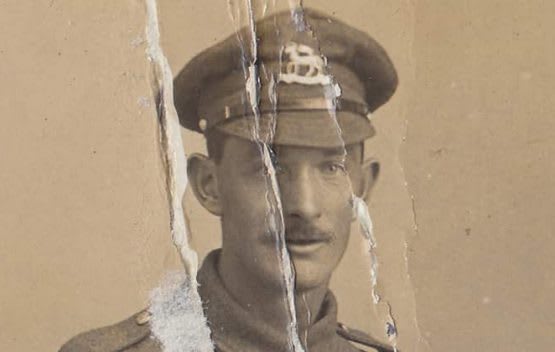|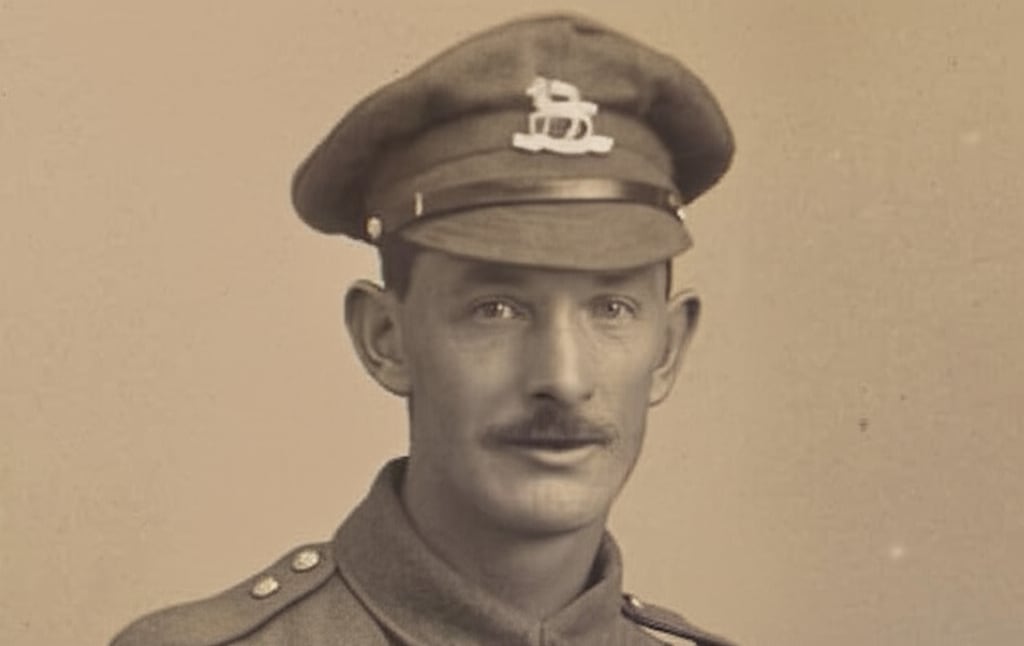|"
},
"typeVersion": 1
},
{
"id": "82e82d53-e5ff-44a2-96ca-1867058fbb65",
"name": "Nota adhesiva1",
"type": "n8n-nodes-base.stickyNote",
"position": [
-140,
80
],
"parameters": {
"color": 7,
"width": 1060,
"height": 460,
"content": "## 1. Download Sample Images\n[Read more about the HTTP Request node](https://docs.n8n.io/integrations/builtin/core-nodes/n8n-nodes-base.httprequest/)\n\nFor this demonstration, we'll download 3 sample vintage photographs. These images show a variety of damage such as cracks, tears and missing or obscured sections and it will be the goal of this workflow to automate the restoration.\n\nInstead of a manual trigger, use a webhook trigger instead to integrate it into apps!"
},
"typeVersion": 1
},
{
"id": "eb1f70d5-2d3f-4f22-badb-d49569f565c2",
"name": "Subir a Drive",
"type": "n8n-nodes-base.googleDrive",
"position": [
1960,
320
],
"parameters": {
"name": "=file_restored_{{ $itemIndex }}.{{ $binary.data.fileExtension }}",
"driveId": {
"__rl": true,
"mode": "list",
"value": "My Drive"
},
"options": {},
"folderId": {
"__rl": true,
"mode": "list",
"value": "root",
"cachedResultName": "/ (Root folder)"
}
},
"credentials": {
"googleDriveOAuth2Api": {
"id": "yOwz41gMQclOadgu",
"name": "Google Drive account"
}
},
"typeVersion": 3
},
{
"id": "4f980d9d-a993-4ec6-80fd-1a323e40822d",
"name": "Nota adhesiva2",
"type": "n8n-nodes-base.stickyNote",
"position": [
960,
80
],
"parameters": {
"color": 7,
"width": 620,
"height": 460,
"content": "## 2. Use Gemini LLM to Restore Damaged Images\n[Read more about Gemini's Text and Image to Image Editing](https://ai.google.dev/gemini-api/docs/image-generation#gemini-image-editing)\n\nText-and-image-to-image capability enables LLMs to become instant replacements for a lot of image and photo editing applications. Here, we can use Gemini's new Image Generation model to restore vintage photos by removing damage and filling in missing sections."
},
"typeVersion": 1
},
{
"id": "69f7f355-5443-4265-b2a1-901711fa93dd",
"name": "Convertir a archivo",
"type": "n8n-nodes-base.convertToFile",
"onError": "continueRegularOutput",
"position": [
1720,
320
],
"parameters": {
"options": {
"mimeType": "={{ $json.mimeType }}"
},
"operation": "toBinary",
"sourceProperty": "image"
},
"typeVersion": 1.1
},
{
"id": "beae9111-8186-4afd-9fa6-c732f0229854",
"name": "Nota adhesiva3",
"type": "n8n-nodes-base.stickyNote",
"position": [
1620,
80
],
"parameters": {
"color": 7,
"width": 560,
"height": 460,
"content": "## 3. Upload to Google Drive\n[Read more about Google Drive node](https://docs.n8n.io/integrations/builtin/app-nodes/n8n-nodes-base.googledrive)\n\nGemini outputs the image data as a base64 string so conversion to binary is sometimes necessary such as when uploading to Google Drive. We're using Google drive here but you can upload to any destination of your choosing."
},
"typeVersion": 1
},
{
"id": "00aaa458-1c49-4adf-87d6-ea70309107f9",
"name": "Nota adhesiva4",
"type": "n8n-nodes-base.stickyNote",
"position": [
-640,
-380
],
"parameters": {
"width": 460,
"height": 920,
"content": "## Try It Out!\n### This n8n template demonstrates how to build a simple but effective vintage image restoration service using an AI model with image editing capabilities.\n\nWith Gemini now capable of multimodal output, it's a great time to explore this capability for image or graphics automation. Let's see how well it does for a task such as image restoration.\n\n**Please note, at time of writing each image generated will cost $0.039 USD**. See Gemini Pricing for updated info.\n\n### How it works\n* Images are imported into our workflow via the HTTP node and converted to base64 strings using the Extract from file node.\n* The image data is then pipelined to Gemini's Image Generation model. A prompt is provided to instruct Gemini to \"restore\" the image to near new condition - of course, feel free to experiment with this prompt to improve the results!\n* Gemini's responds with the image as a base64 string and hence, a convert to file node is used to transform the data to binary.\n* With the restored image as a binary, we can then use this with our Google Drive node to upload it to our desired folder.\n\n### How to use\n* This demonstration uses 3 random images sourced from the internet but any typical image file will work.\n* Use a webhook node to allow integration from other applications.\n* Use a telegram trigger for instant mobile service!\n\n### Requirements\n* Google Gemini for LLM/Image generation\n* Google Drive for Upload Storage\n\n### Need Help?\nJoin the [Discord](https://discord.com/invite/XPKeKXeB7d) or ask in the [Forum](https://community.n8n.io/)!\n\nHappy Hacking!"
},
"typeVersion": 1
},
{
"id": "4e4b822b-983b-48d2-a319-68242b7af171",
"name": "Nota adhesiva8",
"type": "n8n-nodes-base.stickyNote",
"position": [
-640,
580
],
"parameters": {
"color": 5,
"width": 460,
"height": 140,
"content": "### Geo Restrictions!\nPlease note at time of writing, the Gemini Image Generation model is restricted to certain countries and regions. If you're getting model not found errors, it's possible the model may not be available in your country!"
},
"typeVersion": 1
},
{
"id": "24d74843-d9b5-4302-8136-159e0a7dd492",
"name": "Nota adhesiva5",
"type": "n8n-nodes-base.stickyNote",
"position": [
2220,
140
],
"parameters": {
"width": 400,
"height": 440,
"content": "|Original|Restored|\n|-|-|\n||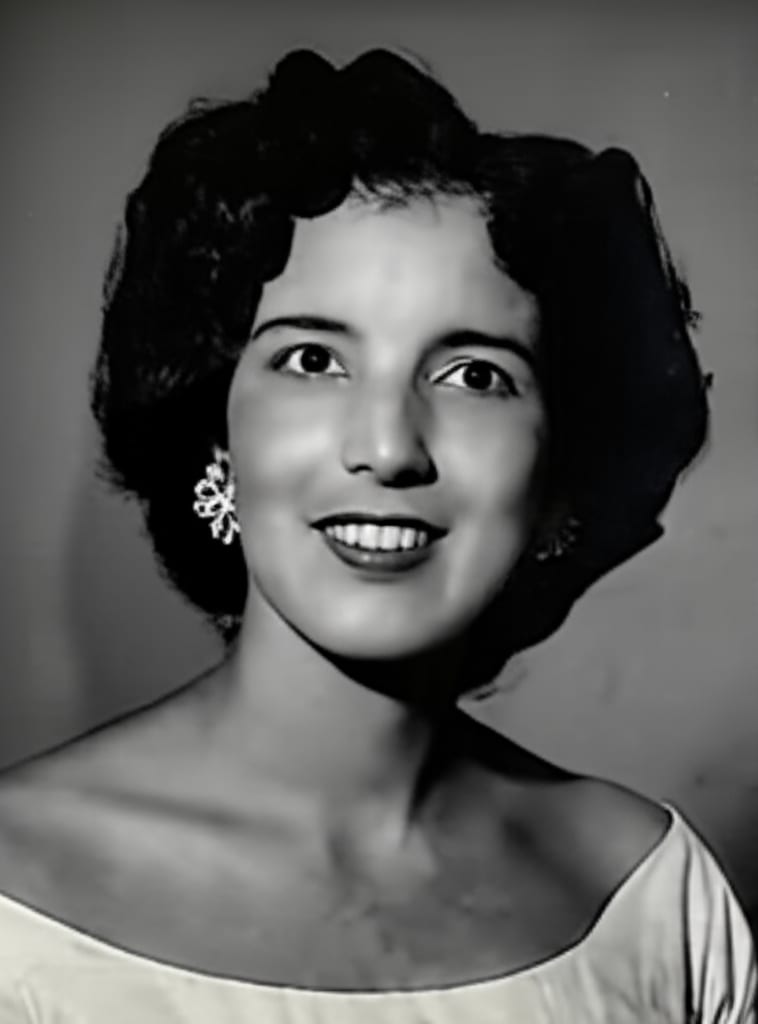|"
},
"typeVersion": 1
},
{
"id": "f77ed90e-70ca-4268-9c77-17e49f94a4bb",
"name": "Nota adhesiva6",
"type": "n8n-nodes-base.stickyNote",
"position": [
2640,
140
],
"parameters": {
"width": 580,
"height": 300,
"content": "|Original|Restored|\n|-|-|\n|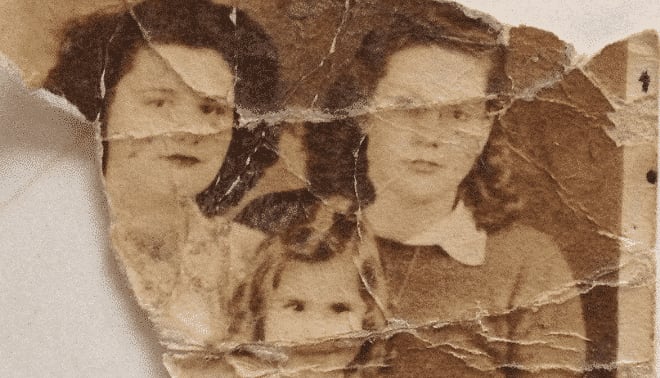|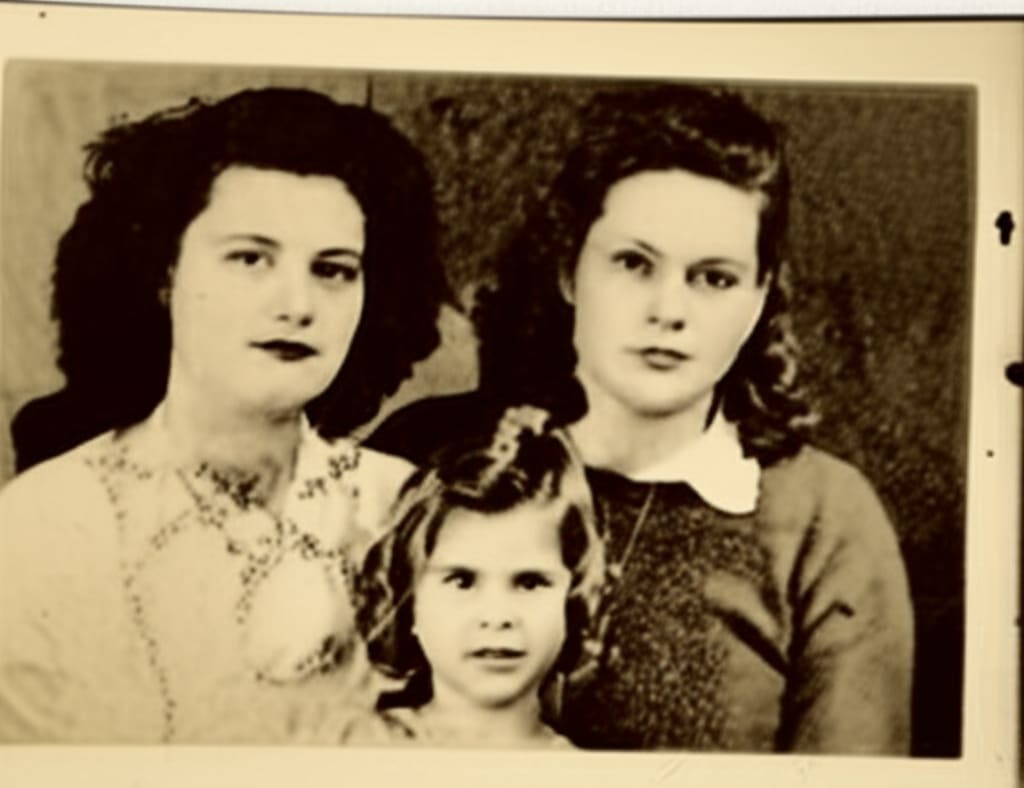|"
},
"typeVersion": 1
}
],
"pinData": {},
"connections": {
"e078aba0-2f2b-47b5-90b2-c457184e6237": {
"main": [
[
{
"node": "a0fbf72b-d079-4777-be06-531e0e131857",
"type": "main",
"index": 0
}
]
]
},
"1f363fc5-42cf-4e9c-ae74-496030362ed9": {
"main": [
[
{
"node": "e078aba0-2f2b-47b5-90b2-c457184e6237",
"type": "main",
"index": 0
}
]
]
},
"a0fbf72b-d079-4777-be06-531e0e131857": {
"main": [
[
{
"node": "6aebcc29-a65d-4cb9-8d6a-56f24b58c7f5",
"type": "main",
"index": 0
}
]
]
},
"69f7f355-5443-4265-b2a1-901711fa93dd": {
"main": [
[
{
"node": "eb1f70d5-2d3f-4f22-badb-d49569f565c2",
"type": "main",
"index": 0
}
]
]
},
"6aebcc29-a65d-4cb9-8d6a-56f24b58c7f5": {
"main": [
[
{
"node": "77f0d0c7-e6bd-4f15-beff-9cb53446fcb0",
"type": "main",
"index": 0
}
]
]
},
"1c50d319-1771-408f-9015-f04bb6a3d305": {
"main": [
[
{
"node": "69f7f355-5443-4265-b2a1-901711fa93dd",
"type": "main",
"index": 0
}
]
]
},
"77f0d0c7-e6bd-4f15-beff-9cb53446fcb0": {
"main": [
[
{
"node": "1c50d319-1771-408f-9015-f04bb6a3d305",
"type": "main",
"index": 0
}
]
]
},
"b6a5c37d-b845-4fd2-8ea3-db23aed99286": {
"main": [
[
{
"node": "1f363fc5-42cf-4e9c-ae74-496030362ed9",
"type": "main",
"index": 0
}
]
]
}
}
}¿Cómo usar este flujo de trabajo?
Copie el código de configuración JSON de arriba, cree un nuevo flujo de trabajo en su instancia de n8n y seleccione "Importar desde JSON", pegue la configuración y luego modifique la configuración de credenciales según sea necesario.
¿En qué escenarios es adecuado este flujo de trabajo?
Avanzado - Diseño, Inteligencia Artificial
¿Es de pago?
Este flujo de trabajo es completamente gratuito, puede importarlo y usarlo directamente. Sin embargo, tenga en cuenta que los servicios de terceros utilizados en el flujo de trabajo (como la API de OpenAI) pueden requerir un pago por su cuenta.
Flujos de trabajo relacionados recomendados

Jimleuk
@jimleukFreelance consultant based in the UK specialising in AI-powered automations. I work with select clients tackling their most challenging projects. For business enquiries, send me an email at hello@jimle.uk LinkedIn: https://www.linkedin.com/in/jimleuk/ X/Twitter: https://x.com/jimle_uk
Compartir este flujo de trabajo