KI-gesteuertes Feedback-Triage-System: Jotform zu Trello, Airtable und Slack, integriert mit Gemini
Dies ist ein Market Research, AI Summarization-Bereich Automatisierungsworkflow mit 21 Nodes. Hauptsächlich werden If, Set, Gmail, Slack, Trello und andere Nodes verwendet. KI-gesteuertes Feedback-Triage-System: Jotform zu Trello, Airtable und Slack, integriert mit Gemini
- •Google-Konto + Gmail API-Anmeldedaten
- •Slack Bot Token oder Webhook URL
- •Airtable API Key
- •Google Gemini API Key
Verwendete Nodes (21)
Kategorie
{
"meta": {
"instanceId": "51295e4a2441063c8b3c5b0c823451e48c57f5baaf713c6f2f9d792402274528",
"templateCredsSetupCompleted": true
},
"nodes": [
{
"id": "f29975d2-a156-411b-a647-168cbb517d94",
"name": "JotForm-Trigger",
"type": "n8n-nodes-base.jotFormTrigger",
"position": [
-288,
0
],
"webhookId": "323a975b-6b2e-4b03-aeef-169e8e8e7075",
"parameters": {
"form": "252934846764067"
},
"credentials": {
"jotFormApi": {
"id": "0rXRUH1s8t1hYA56",
"name": "JotForm account"
}
},
"typeVersion": 1
},
{
"id": "693d8fe9-0b13-455e-9719-229e9758edea",
"name": "KI-Feedback-Triage",
"type": "@n8n/n8n-nodes-langchain.agent",
"position": [
1056,
0
],
"parameters": {
"text": "=You are an expert product manager's assistant, responsible for triaging all incoming feedback.\n\nA user has submitted the following feedback:\n\"{{ $('JotForm Trigger').item.json['Feedback Details'] }}\"\n\nPlease analyze this feedback and follow these steps:\n1. First, create a short, clear `task_title` for it.\n2. Second, determine the `category`. Is this a 'Bug' (something is broken), a 'Feature Request' (a new idea), or 'General Feedback' (an opinion or comment)?\n3. Third, assess the `suggested_priority` based on the user's tone and the potential impact described.\n4. Fourth, extract an array of relevant `tags` (keywords).\n\nProvide your final analysis ONLY in the requested JSON format.",
"options": {},
"promptType": "define",
"hasOutputParser": true
},
"typeVersion": 2.2
},
{
"id": "212689e8-f1ab-4fbc-bdcd-ca9a69041c7e",
"name": "Strukturierter Ausgabe-Parser",
"type": "@n8n/n8n-nodes-langchain.outputParserStructured",
"position": [
1248,
208
],
"parameters": {
"jsonSchemaExample": "{\n \"task_title\": \"A short, 5-10 word title for this feedback\",\n \"category\": \"Must be one of: 'Bug', 'Feature Request', or 'General Feedback'\",\n \"suggested_priority\": \"Must be one of: 'High', 'Medium', or 'Low'\",\n \"tags\": [\n \"keyword1\",\n \"keyword2\"\n ]\n}"
},
"typeVersion": 1.3
},
{
"id": "61f942ca-9996-4802-9303-c31dd5731ac7",
"name": "Google Gemini Chat Model",
"type": "@n8n/n8n-nodes-langchain.lmChatGoogleGemini",
"position": [
1056,
208
],
"parameters": {
"options": {}
},
"credentials": {
"googlePalmApi": {
"id": "mzeuL0IEjP3FgRof",
"name": "Google Gemini(PaLM) Api account"
}
},
"typeVersion": 1
},
{
"id": "70ce77fe-3fe2-4de0-a172-45dd42410dde",
"name": "Ist es ein Bug oder Feature?",
"type": "n8n-nodes-base.if",
"position": [
1568,
0
],
"parameters": {
"options": {},
"conditions": {
"options": {
"version": 2,
"leftValue": "",
"caseSensitive": true,
"typeValidation": "strict"
},
"combinator": "or",
"conditions": [
{
"id": "9001cb9f-6160-40df-9fc9-a94c8852b4ea",
"operator": {
"name": "filter.operator.equals",
"type": "string",
"operation": "equals"
},
"leftValue": "={{ $json.output.category.trim().toLowerCase() }}",
"rightValue": "bug"
},
{
"id": "6acdcfdc-70be-4f7d-be5b-5103b9a38067",
"operator": {
"name": "filter.operator.equals",
"type": "string",
"operation": "equals"
},
"leftValue": "={{ $json.output.category.trim().toLowerCase() }}",
"rightValue": "feature request"
}
]
}
},
"typeVersion": 2.2
},
{
"id": "2dd9abbb-3333-43a0-b595-1fba66b4b7ed",
"name": "Erstelle Trello Card",
"type": "n8n-nodes-base.trello",
"position": [
2016,
-352
],
"parameters": {
"name": "={{ $('AI Feedback Triage').item.json.output.task_title }}",
"listId": "={{ $json.output.category.trim().toLowerCase() === 'bug' ? '68f7a8a8d35b96b34942f6f4' : '68f7a8a8d35b96b34942f6f3' }}",
"description": "=**Feedback from:**\n{{ $('JotForm Trigger').item.json['I am a...'] }} {{ $('JotForm Trigger').item.json['Your Email (Optional)'] ? '(Email: ' + $('JotForm Trigger').item.json['Your Email (Optional)'] + ')' : '' }}\n\n---\n\n**Full Feedback:**\n{{ $('JotForm Trigger').item.json['Feedback Details'] }}\n\n---\n\n**AI Tags:**\n{{ $('AI Feedback Triage').item.json.output.tags.join(', ') }}\n",
"additionalFields": {
"pos": "top",
"idLabels": "={{ (['Customer', 'Staff', 'Other'].includes($('JotForm Trigger').item.json['I am a...']) ? ($('JotForm Trigger').item.json['I am a...'] === 'Customer' ? $('Config').item.json.customer_label_id : ($('JotForm Trigger').item.json['I am a...'] === 'Staff' ? $('Config').item.json.staff_label_id : $('Config').item.json.other_label_id)) : '') + ($('AI Feedback Triage').item.json.output.suggested_priority.trim().toLowerCase() === 'high' ? ','+$('Config').item.json.urgent_label_id : '') }}"
}
},
"credentials": {
"trelloApi": {
"id": "PT1lBr6mfSo72DbH",
"name": "Trello account"
}
},
"typeVersion": 1
},
{
"id": "fae71b7e-5c81-4dca-a092-cf5a9ba66842",
"name": "Konfiguration",
"type": "n8n-nodes-base.set",
"position": [
416,
0
],
"parameters": {
"options": {},
"assignments": {
"assignments": [
{
"id": "c320b912-9afe-4bfd-83b9-350b424ab39e",
"name": "feature_backlog_list_id",
"type": "string",
"value": "68f7a8a8d35b96b34942f6f3"
},
{
"id": "34354023-c982-4c78-9ca8-bf190453d2d0",
"name": "bugs_list_id",
"type": "string",
"value": "68f7a8a8d35b96b34942f6f4"
},
{
"id": "875f9be5-98fb-4ec3-8c4a-354444cc55fe",
"name": "customer_label_id",
"type": "string",
"value": "68f7a8a8d35b96b34942f6f1"
},
{
"id": "bbec900c-74a9-4160-8610-ce28d19bb21b",
"name": "staff_label_id",
"type": "string",
"value": "68f7a8a8d35b96b34942f6ec"
},
{
"id": "2b94d809-8ef3-4fca-8a2d-1a3e6f928a64",
"name": "other_label_id",
"type": "string",
"value": "68f7ae69d2c2a4e0e83d8f75"
},
{
"id": "ac6ca56e-d753-43ec-a589-dd14ec828f27",
"name": "urgent_label_id",
"type": "string",
"value": "68f7a8a8d35b96b34942f6ef"
}
]
}
},
"typeVersion": 3.4
},
{
"id": "3c4059e5-4321-4f1c-9f78-54ba336ce9ee",
"name": "Allgemeines Feedback in Airtable protokollieren",
"type": "n8n-nodes-base.airtable",
"position": [
2016,
128
],
"parameters": {
"base": {
"__rl": true,
"mode": "list",
"value": "appKqfaCnM6Ea50x6",
"cachedResultUrl": "https://airtable.com/appKqfaCnM6Ea50x6",
"cachedResultName": "Product Feedback Log"
},
"table": {
"__rl": true,
"mode": "list",
"value": "tblfQMf9cDi9LSds4",
"cachedResultUrl": "https://airtable.com/appKqfaCnM6Ea50x6/tblfQMf9cDi9LSds4",
"cachedResultName": "Feedback Submissions"
},
"columns": {
"value": {
"Email": "={{ $('JotForm Trigger').item.json['Your Email (Optional)'] ? $('JotForm Trigger').item.json['Your Email (Optional)'] : '' }}",
"Source": "={{ $('JotForm Trigger').item.json['I am a...'] }}",
"AI Tags": "={{ $('AI Feedback Triage').item.json.output.tags }}",
"Full Feedback": "={{ $('JotForm Trigger').item.json['Feedback Details'] }}",
"Feedback Summary": "={{ $('AI Feedback Triage').item.json.output.task_title }}"
},
"schema": [
{
"id": "Feedback Summary",
"type": "string",
"display": true,
"removed": false,
"readOnly": false,
"required": false,
"displayName": "Feedback Summary",
"defaultMatch": false,
"canBeUsedToMatch": true
},
{
"id": "Full Feedback",
"type": "string",
"display": true,
"removed": false,
"readOnly": false,
"required": false,
"displayName": "Full Feedback",
"defaultMatch": false,
"canBeUsedToMatch": true
},
{
"id": "Source",
"type": "options",
"display": true,
"options": [
{
"name": "Customer",
"value": "Customer"
},
{
"name": "Staff",
"value": "Staff"
},
{
"name": "Other",
"value": "Other"
}
],
"removed": false,
"readOnly": false,
"required": false,
"displayName": "Source",
"defaultMatch": false,
"canBeUsedToMatch": true
},
{
"id": "Email",
"type": "string",
"display": true,
"removed": false,
"readOnly": false,
"required": false,
"displayName": "Email",
"defaultMatch": false,
"canBeUsedToMatch": true
},
{
"id": "AI Tags",
"type": "array",
"display": true,
"options": [],
"removed": false,
"readOnly": false,
"required": false,
"displayName": "AI Tags",
"defaultMatch": false,
"canBeUsedToMatch": true
},
{
"id": "Submitted At",
"type": "string",
"display": true,
"removed": true,
"readOnly": true,
"required": false,
"displayName": "Submitted At",
"defaultMatch": false,
"canBeUsedToMatch": true
}
],
"mappingMode": "defineBelow",
"matchingColumns": [],
"attemptToConvertTypes": false,
"convertFieldsToString": false
},
"options": {
"typecast": true
},
"operation": "create"
},
"credentials": {
"airtableTokenApi": {
"id": "jOvZXtRgEMuq8MFN",
"name": "Airtable Personal Access Token account"
}
},
"typeVersion": 2.1
},
{
"id": "655b2db1-987c-49a8-885c-2edb58c5cdd2",
"name": "Ist es ein dringender Bug?",
"type": "n8n-nodes-base.if",
"position": [
2464,
-352
],
"parameters": {
"options": {},
"conditions": {
"options": {
"version": 2,
"leftValue": "",
"caseSensitive": true,
"typeValidation": "strict"
},
"combinator": "and",
"conditions": [
{
"id": "e7be6c85-a279-4c6a-b23d-a4aa8128d11e",
"operator": {
"name": "filter.operator.equals",
"type": "string",
"operation": "equals"
},
"leftValue": "={{ $('AI Feedback Triage').item.json.output.category.trim().toLowerCase() }}",
"rightValue": "bug"
},
{
"id": "7a704de2-e3b4-438a-bc65-c9eb9966ef0e",
"operator": {
"name": "filter.operator.equals",
"type": "string",
"operation": "equals"
},
"leftValue": "={{ $('AI Feedback Triage').item.json.output.suggested_priority.trim().toLowerCase() }}",
"rightValue": "high"
}
]
}
},
"typeVersion": 2.2
},
{
"id": "979cb2ef-f5d1-4a2e-80a8-3043faf89427",
"name": "Entwicklungsteam alarmieren",
"type": "n8n-nodes-base.slack",
"position": [
2848,
-544
],
"webhookId": "85577b91-fe0e-44a9-bd7a-983f561e548b",
"parameters": {
"text": "=🚨 *High Priority Bug Reported!* 🚨\n\n*Title:* {{ $('AI Feedback Triage').item.json.output.task_title }}\n*Source:* {{ $('JotForm Trigger').item.json['I am a...'] }}\n*Feedback:* {{ $('JotForm Trigger').item.json['Feedback Details'] }}\n\n*Trello Card:*\n{{ $('Create Trello Card').item.json.shortUrl }}",
"select": "channel",
"channelId": {
"__rl": true,
"mode": "list",
"value": "C09MQB3PWUE",
"cachedResultName": "dev-alerts"
},
"otherOptions": {
"includeLinkToWorkflow": false
}
},
"credentials": {
"slackApi": {
"id": "yP6Hr4wJ20zxMNey",
"name": "Slack account"
}
},
"typeVersion": 2.3
},
{
"id": "fd3fd616-10fb-4f26-b79e-22b0529ad6ca",
"name": "Keine Alarmierung nötig",
"type": "n8n-nodes-base.noOp",
"position": [
2864,
-224
],
"parameters": {},
"typeVersion": 1
},
{
"id": "05b38448-f651-4c56-9340-0a40a9ed851a",
"name": "E-Mail angegeben?",
"type": "n8n-nodes-base.if",
"position": [
224,
432
],
"parameters": {
"options": {},
"conditions": {
"options": {
"version": 2,
"leftValue": "",
"caseSensitive": true,
"typeValidation": "strict"
},
"combinator": "and",
"conditions": [
{
"id": "21dc6a68-9229-48e5-a568-ea317dc94223",
"operator": {
"type": "string",
"operation": "notEmpty",
"singleValue": true
},
"leftValue": "={{ $json['Your Email (Optional)'] }}",
"rightValue": ""
}
]
}
},
"typeVersion": 2.2
},
{
"id": "e003b999-4797-47e9-8e92-6ac237e74da8",
"name": "Bestätigungs-E-Mail senden",
"type": "n8n-nodes-base.gmail",
"position": [
496,
288
],
"webhookId": "39c13fca-decb-4938-8207-e3153b2ed2c4",
"parameters": {
"sendTo": "={{ $json['Your Email (Optional)'] }}",
"message": "=Hi there,\n\nThanks for taking the time to share your feedback about IdeaToBiz.\n\nThis email confirms we've received your submission. Our product team reviews all feedback as we work to improve the platform.\n\nBest regards,\nThe IdeaToBiz Team",
"options": {
"appendAttribution": false
},
"subject": "Thanks for your feedback on IdeaToBiz!",
"emailType": "text"
},
"credentials": {
"gmailOAuth2": {
"id": "8kdHW2rLvRIwn673",
"name": "Gmail account"
}
},
"typeVersion": 2.1
},
{
"id": "36232076-daa5-453b-9e00-d3d4c5c5db26",
"name": "Bestätigungs-E-Mail überspringen",
"type": "n8n-nodes-base.noOp",
"position": [
496,
528
],
"parameters": {},
"typeVersion": 1
},
{
"id": "30c0174d-d658-458f-b5d0-f473a639479e",
"name": "Notiz",
"type": "n8n-nodes-base.stickyNote",
"position": [
-576,
-944
],
"parameters": {
"color": 5,
"width": 672,
"height": 1104,
"content": "## 🚪 Set Up Your Feedback Form\n\nThis workflow starts when someone submits your feedback form. You'll need a specific form structure for this automation.\n\n### 1. Get Your Jotform Account:\nIf you don't have one, sign up here:\n[**Click here to get started with Jotform**](https://www.jotform.com/?partner=atakhalighi)\n\n### 2. Create Your Form:\nCreate a new form in Jotform with the following title and fields:\n* **Title:** `Help us improve IdeaToBiz` (or similar)\n* **Subtitle:** `We're listening. All feedback is reviewed by our product team.` (or similar)\n\n### 3. Add Required Fields:\nYour form **must** include these fields:\n* **Radio Button:**\n * **Label:** `I am a...`\n * **Options:** `Customer`, `Staff`, `Other`\n * **Required:** ON\n* **Email:**\n * **Label:** `Your Email (Optional)`\n * **Required:** OFF (This allows anonymous feedback)\n* **Long Text:**\n * **Label:** `Feedback Details`\n * **Placeholder:** `Please describe your idea, bug, or feedback...`\n * **Required:** ON\n\n### 4. Set Submit Button:\n* **Label:** `Submit Feedback`\n\n### 5. Configure the n8n Node:\n* **Credentials:** Connect your Jotform account.\n* **Form:** Select the form you just created.\n* **Resolve Data:** Ensure the **\"Resolve Data\"** toggle in the node's parameters is turned **ON**. This setting provides cleaner field names (like \"Feedback Details\") instead of Question IDs.\n\nOnce configured, run a test submission to ensure n8n receives the data correctly."
},
"typeVersion": 1
},
{
"id": "fc29f80e-47b3-4683-a218-f0f41bf73fc8",
"name": "Notiz3",
"type": "n8n-nodes-base.stickyNote",
"position": [
-1392,
-944
],
"parameters": {
"color": 5,
"width": 800,
"height": 1104,
"content": "## Form Preview\n\n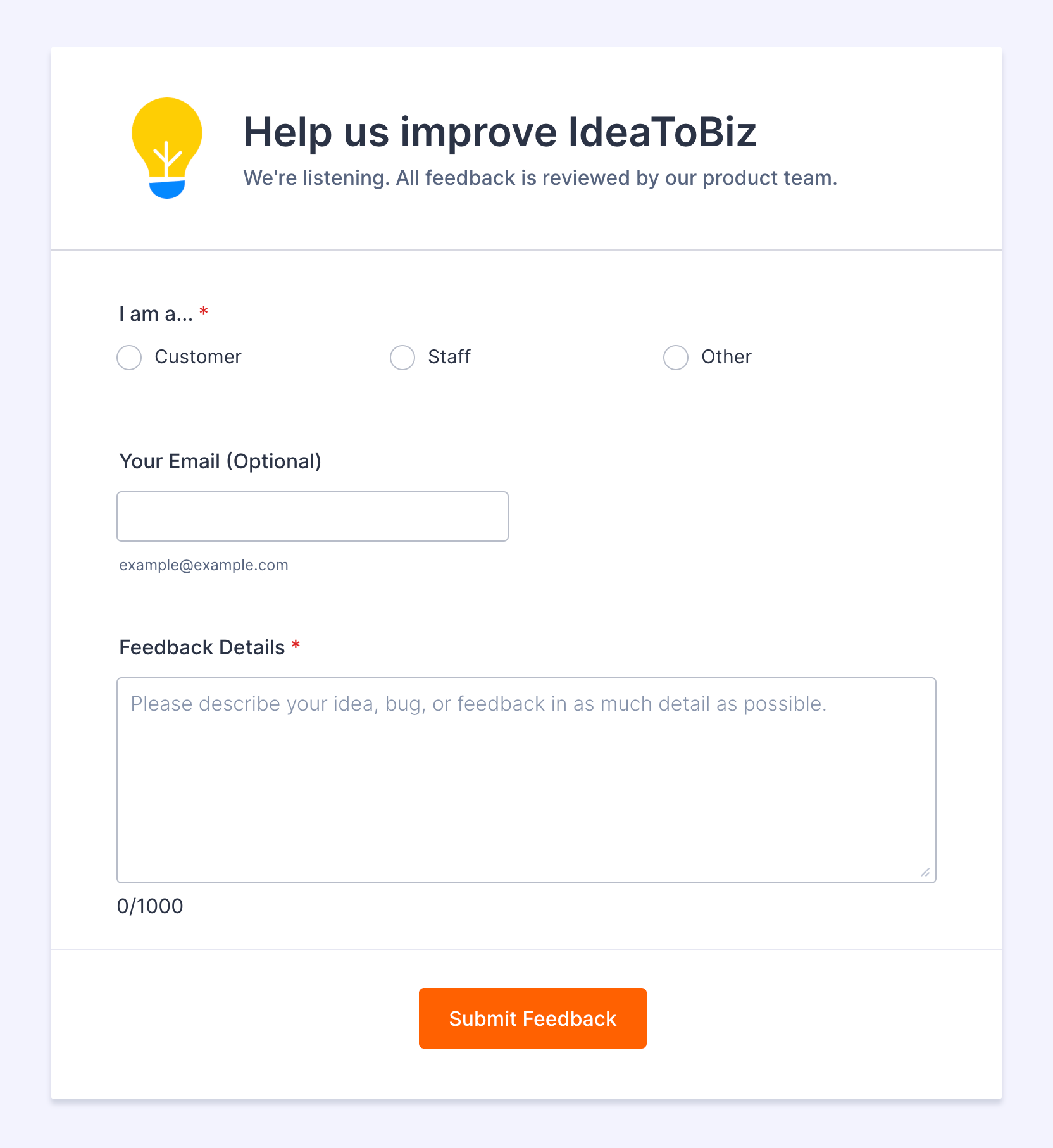\n"
},
"typeVersion": 1
},
{
"id": "68baa9dc-d231-49c1-99c2-c346f5f440f8",
"name": "Notiz1",
"type": "n8n-nodes-base.stickyNote",
"position": [
144,
-416
],
"parameters": {
"color": 6,
"width": 624,
"height": 576,
"content": "## 🔑 Enter Your Trello IDs \n\nThis node stores the unique IDs for your Trello board, lists, and labels. You **must** get these IDs from Trello and paste them here.\n\n### How to Find Your IDs:\n1. Open your **`Product Feedback`** Trello board in your web browser.\n2. Add **`.json`** to the end of the URL (e.g., `.../board-name.json`) and press Enter.\n3. Use your browser's Find (Ctrl+F / Cmd+F) on the JSON page:\n * **List IDs:** Search for the *name* of your lists (e.g., `\"Feature Backlog\"`, `\"Bugs\"`). The `\"id\"` field just *before* the name is the List ID.\n * **Label IDs:** Search for `\"labels\"`. Find the `name` for each label (`\"Customer\"`, `\"Staff\"`, `\"Other\"`, `\"Urgent\"`) and copy its corresponding `\"id\"`.\n\n### Your To-Do:\n* Replace the placeholder values in this node with **your** actual IDs."
},
"typeVersion": 1
},
{
"id": "c0dd48ad-7b79-40d9-ba7a-877f0cb7bbb8",
"name": "Notiz2",
"type": "n8n-nodes-base.stickyNote",
"position": [
816,
-480
],
"parameters": {
"color": 3,
"width": 688,
"height": 848,
"content": "## 🧠 AI Analysis\n\n### What this step does:\nThis is the \"brain\" of the workflow. It takes the raw **`Feedback Details`** from the form and uses Google Gemini to:\n1. Write a short **title** for the feedback.\n2. Categorize it as a **`Bug`**, **`Feature Request`**, or **`General Feedback`**.\n3. Suggest a **priority** (`High`, `Medium`, `Low`).\n4. Extract relevant keyword **tags**.\n\nThe output is a structured JSON object used by later steps to filter and route the feedback correctly.\n\n### Your To-Do:\n1. Connect your **Google AI credentials**.\n2. Make sure the **Prompt** correctly references your feedback field (e.g., `{{ $('Jotform Trigger').item.json['Feedback Details'] }}`).\n3. Ensure the **Structured Output** schema matches the required fields (`task_title`, `category`, `suggested_priority`, `tags`)."
},
"typeVersion": 1
},
{
"id": "a23cd654-0bb0-4ee0-bb44-c441f4fa63e2",
"name": "Notiz4",
"type": "n8n-nodes-base.stickyNote",
"position": [
1760,
-848
],
"parameters": {
"width": 608,
"height": 672,
"content": "## Create Actionable Task\n\n### What this step does:\nIf the feedback was identified by the AI as a **`Bug`** or **`Feature Request`**, this node creates a new card on your Trello board. It uses expressions to:\n* Place the card in the correct list (\"Bugs\" or \"Feature Backlog\").\n* Set the card title based on the AI's summary.\n* Add the full feedback details and source to the description.\n* Add relevant labels (\"Customer\"/\"Staff\"/\"Other\" and \"Urgent\" if needed) using the IDs from the `Config` node.\n* Places the new card at the top of the list.\n\n### Your To-Do:\n1. Connect your **Trello credentials**.\n2. In the **`Board ID`** field, select your **`Product Feedback`** board.\n3. **Check Expressions:** Ensure the expressions for `List ID`, `Name`, `Description`, and `Labels` correctly reference the previous nodes (`AI Feedback Triage`, `Jotform Trigger`, `Config`). The template should be pre-filled correctly, but double-check if you renamed any nodes."
},
"typeVersion": 1
},
{
"id": "3adf6775-dec1-4009-89a2-8a1c1bf82b82",
"name": "Notiz5",
"type": "n8n-nodes-base.stickyNote",
"position": [
1760,
96
],
"parameters": {
"color": 4,
"width": 608,
"height": 752,
"content": "\n\n\n\n\n\n\n\n\n\n\n\n\n\n\n\n\n## Log Non-Actionable Feedback\n\n### What this step does:\nThis node activates if the AI categorized the feedback as **`General Feedback`** (meaning it's not a specific bug or feature request). It creates a new record in your **`Product Feedback Log`** Airtable base, saving the feedback details, source, email (if provided), and AI tags for later review.\n\n### Why it's important:\nThis ensures that *all* feedback is captured, even if it doesn't immediately become a task. Your team can review this log periodically to understand general sentiment or spot emerging trends.\n\n### Your To-Do:\n1. Connect your **Airtable credentials**.\n2. Select your **`Product Feedback Log`** Base and **`Feedback Submissions`** Table.\n3. **Enable Typecast:** In the node's **Options**, make sure the **`Typecast`** toggle is **ON**. This allows n8n to automatically create new tag options in your Airtable \"AI Tags\" field if needed.\n4. **Check Field Mappings:** Ensure the fields (`Feedback Summary`, `Full Feedback`, `Source`, `Email`, `AI Tags`) correctly reference the `AI Feedback Triage` and `Jotform Trigger` nodes."
},
"typeVersion": 1
},
{
"id": "8da4c83f-8654-4404-9dd4-868d5e07d1cf",
"name": "Notiz6",
"type": "n8n-nodes-base.stickyNote",
"position": [
2608,
-944
],
"parameters": {
"color": 2,
"width": 592,
"height": 560,
"content": "## Alert Team About Urgent Bugs\n\n### What this step does:\nThis node runs **only if** the feedback was categorized as a **`Bug`** AND the AI suggested **`High`** priority. It sends an immediate alert to a designated Slack channel, letting your development team know about a potentially critical issue. The message includes key details and a direct link to the Trello card.\n\n### Your To-Do:\n1. Connect your **Slack credentials**.\n2. In the **`Channel`** field, select the specific channel your team uses for urgent alerts (e.g., `#dev-alerts`, `#bug-reports`).\n3. **Customize Message (Optional):** You can modify the message text to include different information or add mentions (`@here`, `@channel`). Ensure the expression for the Trello card URL (`{{ $('Create Trello Card').item.json.shortUrl }}`) is correct."
},
"typeVersion": 1
}
],
"pinData": {},
"connections": {
"fae71b7e-5c81-4dca-a092-cf5a9ba66842": {
"main": [
[
{
"node": "693d8fe9-0b13-455e-9719-229e9758edea",
"type": "main",
"index": 0
}
]
]
},
"05b38448-f651-4c56-9340-0a40a9ed851a": {
"main": [
[
{
"node": "e003b999-4797-47e9-8e92-6ac237e74da8",
"type": "main",
"index": 0
}
],
[
{
"node": "36232076-daa5-453b-9e00-d3d4c5c5db26",
"type": "main",
"index": 0
}
]
]
},
"f29975d2-a156-411b-a647-168cbb517d94": {
"main": [
[
{
"node": "fae71b7e-5c81-4dca-a092-cf5a9ba66842",
"type": "main",
"index": 0
},
{
"node": "05b38448-f651-4c56-9340-0a40a9ed851a",
"type": "main",
"index": 0
}
]
]
},
"693d8fe9-0b13-455e-9719-229e9758edea": {
"main": [
[
{
"node": "70ce77fe-3fe2-4de0-a172-45dd42410dde",
"type": "main",
"index": 0
}
]
]
},
"2dd9abbb-3333-43a0-b595-1fba66b4b7ed": {
"main": [
[
{
"node": "655b2db1-987c-49a8-885c-2edb58c5cdd2",
"type": "main",
"index": 0
}
]
]
},
"655b2db1-987c-49a8-885c-2edb58c5cdd2": {
"main": [
[
{
"node": "979cb2ef-f5d1-4a2e-80a8-3043faf89427",
"type": "main",
"index": 0
}
],
[
{
"node": "fd3fd616-10fb-4f26-b79e-22b0529ad6ca",
"type": "main",
"index": 0
}
]
]
},
"70ce77fe-3fe2-4de0-a172-45dd42410dde": {
"main": [
[
{
"node": "2dd9abbb-3333-43a0-b595-1fba66b4b7ed",
"type": "main",
"index": 0
}
],
[
{
"node": "3c4059e5-4321-4f1c-9f78-54ba336ce9ee",
"type": "main",
"index": 0
}
]
]
},
"61f942ca-9996-4802-9303-c31dd5731ac7": {
"ai_languageModel": [
[
{
"node": "693d8fe9-0b13-455e-9719-229e9758edea",
"type": "ai_languageModel",
"index": 0
}
]
]
},
"212689e8-f1ab-4fbc-bdcd-ca9a69041c7e": {
"ai_outputParser": [
[
{
"node": "693d8fe9-0b13-455e-9719-229e9758edea",
"type": "ai_outputParser",
"index": 0
}
]
]
}
}
}Wie verwende ich diesen Workflow?
Kopieren Sie den obigen JSON-Code, erstellen Sie einen neuen Workflow in Ihrer n8n-Instanz und wählen Sie "Aus JSON importieren". Fügen Sie die Konfiguration ein und passen Sie die Anmeldedaten nach Bedarf an.
Für welche Szenarien ist dieser Workflow geeignet?
Experte - Marktforschung, KI-Zusammenfassung
Ist es kostenpflichtig?
Dieser Workflow ist völlig kostenlos. Beachten Sie jedoch, dass Drittanbieterdienste (wie OpenAI API), die im Workflow verwendet werden, möglicherweise kostenpflichtig sind.
Verwandte Workflows

Atta
@attakhalighiHi 👋 I design automation workflows with n8n, AI, and custom APIs. My focus is on building reliable systems that save time and boost productivity. Always happy to answer questions about my templates.
Diesen Workflow teilen