Eigene Bildersuche mit KI-Objekterkennung, CDN und ElasticSearch erstellen
Dies ist ein AI-Bereich Automatisierungsworkflow mit 17 Nodes. Hauptsächlich werden Set, Filter, SplitOut, EditImage, HttpRequest und andere Nodes verwendet, kombiniert mit KI-Technologie für intelligente Automatisierung. Ihre eigene Bildsuche mit KI-Objekterkennung, CDN und ElasticSearch erstellen
- •Möglicherweise sind Ziel-API-Anmeldedaten erforderlich
Verwendete Nodes (17)
Kategorie
{
"meta": {
"instanceId": "26ba763460b97c249b82942b23b6384876dfeb9327513332e743c5f6219c2b8e"
},
"nodes": [
{
"id": "6359f725-1ede-4b05-bc19-05a7e85c0865",
"name": "Bei Klick auf \"Workflow testen\"",
"type": "n8n-nodes-base.manualTrigger",
"position": [
680,
292
],
"parameters": {},
"typeVersion": 1
},
{
"id": "9e1e61c7-f5fd-4e8a-99a6-ccc5a24f5528",
"name": "Quellbild abrufen",
"type": "n8n-nodes-base.httpRequest",
"position": [
1000,
292
],
"parameters": {
"url": "={{ $json.source_image }}",
"options": {}
},
"typeVersion": 4.2
},
{
"id": "9b1b94cf-3a7d-4c43-ab6c-8df9824b5667",
"name": "Nur Ergebnisse ausgeben",
"type": "n8n-nodes-base.splitOut",
"position": [
1428,
323
],
"parameters": {
"options": {},
"fieldToSplitOut": "result"
},
"typeVersion": 1
},
{
"id": "fcbaf6c3-2aee-4ea1-9c5e-2833dd7a9f50",
"name": "Filter: Score >= 0.9",
"type": "n8n-nodes-base.filter",
"position": [
1608,
323
],
"parameters": {
"options": {},
"conditions": {
"options": {
"leftValue": "",
"caseSensitive": true,
"typeValidation": "strict"
},
"combinator": "and",
"conditions": [
{
"id": "367d83ef-8ecf-41fe-858c-9bfd78b0ae9f",
"operator": {
"type": "number",
"operation": "gte"
},
"leftValue": "={{ $json.score }}",
"rightValue": 0.9
}
]
}
},
"typeVersion": 2
},
{
"id": "954ce7b0-ef82-4203-8706-17cfa5e5e3ff",
"name": "Objekt aus Bild zuschneiden",
"type": "n8n-nodes-base.editImage",
"position": [
2080,
432
],
"parameters": {
"width": "={{ $json.box.xmax - $json.box.xmin }}",
"height": "={{ $json.box.ymax - $json.box.ymin }}",
"options": {
"format": "jpeg",
"fileName": "={{ $binary.data.fileName.split('.')[0].urlEncode()+'-'+$json.label.urlEncode() + '-' + $itemIndex }}.jpg"
},
"operation": "crop",
"positionX": "={{ $json.box.xmin }}",
"positionY": "={{ $json.box.ymin }}"
},
"typeVersion": 1
},
{
"id": "40027456-4bf9-4eea-8d71-aa28e69b29e5",
"name": "Variablen setzen",
"type": "n8n-nodes-base.set",
"position": [
840,
292
],
"parameters": {
"options": {},
"assignments": {
"assignments": [
{
"id": "9e95d951-8530-4a80-bd00-6bb55623a71f",
"name": "CLOUDFLARE_ACCOUNT_ID",
"type": "string",
"value": ""
},
{
"id": "66807a90-63a1-4d4e-886e-e8abf3019a34",
"name": "model",
"type": "string",
"value": "@cf/facebook/detr-resnet-50"
},
{
"id": "a13ccde6-e6e3-46f4-afa3-2134af7bc765",
"name": "source_image",
"type": "string",
"value": "https://images.pexels.com/photos/2293367/pexels-photo-2293367.jpeg?auto=compress&cs=tinysrgb&w=600"
},
{
"id": "0734fc55-b414-47f7-8b3e-5c880243f3ed",
"name": "elasticsearch_index",
"type": "string",
"value": "n8n-image-search"
}
]
}
},
"typeVersion": 3.3
},
{
"id": "c3d8c5e3-546e-472c-9e6e-091cf5cee3c3",
"name": "Detr-Resnet-50 Objektklassifizierung verwenden",
"type": "n8n-nodes-base.httpRequest",
"position": [
1248,
324
],
"parameters": {
"url": "=https://api.cloudflare.com/client/v4/accounts/{{ $('Set Variables').item.json.CLOUDFLARE_ACCOUNT_ID }}/ai/run/{{ $('Set Variables').item.json.model }}",
"method": "POST",
"options": {},
"sendBody": true,
"contentType": "binaryData",
"authentication": "predefinedCredentialType",
"inputDataFieldName": "data",
"nodeCredentialType": "cloudflareApi"
},
"credentials": {
"cloudflareApi": {
"id": "qOynkQdBH48ofOSS",
"name": "Cloudflare account"
}
},
"typeVersion": 4.2
},
{
"id": "3c7aa2fc-9ca1-41ba-a10d-aa5930d45f18",
"name": "Zu Cloudinary hochladen",
"type": "n8n-nodes-base.httpRequest",
"position": [
2380,
380
],
"parameters": {
"url": "https://api.cloudinary.com/v1_1/daglih2g8/image/upload",
"method": "POST",
"options": {},
"sendBody": true,
"sendQuery": true,
"contentType": "multipart-form-data",
"authentication": "genericCredentialType",
"bodyParameters": {
"parameters": [
{
"name": "file",
"parameterType": "formBinaryData",
"inputDataFieldName": "data"
}
]
},
"genericAuthType": "httpQueryAuth",
"queryParameters": {
"parameters": [
{
"name": "upload_preset",
"value": "n8n-workflows-preset"
}
]
}
},
"credentials": {
"httpQueryAuth": {
"id": "sT9jeKzZiLJ3bVPz",
"name": "Cloudinary API"
}
},
"typeVersion": 4.2
},
{
"id": "3c4e1f04-a0ba-4cce-b82a-aa3eadc4e7e1",
"name": "Dokumente in Elasticsearch erstellen",
"type": "n8n-nodes-base.elasticsearch",
"position": [
2580,
380
],
"parameters": {
"indexId": "={{ $('Set Variables').item.json.elasticsearch_index }}",
"options": {},
"fieldsUi": {
"fieldValues": [
{
"fieldId": "image_url",
"fieldValue": "={{ $json.secure_url.replace('upload','upload/f_auto,q_auto') }}"
},
{
"fieldId": "source_image_url",
"fieldValue": "={{ $('Set Variables').item.json.source_image }}"
},
{
"fieldId": "label",
"fieldValue": "={{ $('Crop Object From Image').item.json.label }}"
},
{
"fieldId": "metadata",
"fieldValue": "={{ JSON.stringify(Object.assign($('Crop Object From Image').item.json, { filename: $json.original_filename })) }}"
}
]
},
"operation": "create",
"additionalFields": {}
},
"credentials": {
"elasticsearchApi": {
"id": "dRuuhAgS7AF0mw0S",
"name": "Elasticsearch account"
}
},
"typeVersion": 1
},
{
"id": "292c9821-c123-44fa-9ba1-c37bf84079bc",
"name": "Notiz",
"type": "n8n-nodes-base.stickyNote",
"position": [
620,
120
],
"parameters": {
"color": 7,
"width": 541.1455500767354,
"height": 381.6388867600897,
"content": "## 1. Get Source Image\n[Read more about setting variables for your workflow](https://docs.n8n.io/integrations/builtin/core-nodes/n8n-nodes-base.set)\n\nFor this demo, we'll manually define an image to process. In production however, this image can come from a variety of sources such as drives, webhooks and more."
},
"typeVersion": 1
},
{
"id": "863271dc-fb9d-4211-972d-6b57336073b4",
"name": "Notiz1",
"type": "n8n-nodes-base.stickyNote",
"position": [
1180,
80
],
"parameters": {
"color": 7,
"width": 579.7748008857744,
"height": 437.4680103498263,
"content": "## 2. Use Detr-Resnet-50 Object Classification\n[Learn more about Cloudflare Workers AI](https://developers.cloudflare.com/workers-ai/)\n\nNot all AI workflows need an LLM! As in this example, we're using a non-LLM vision model to parse the source image and return what objects are contained within. The image search feature we're building will be based on the objects in the image making for a much more granular search via object association.\n\nWe'll use the Cloudflare Workers AI service which conveniently provides this model via API use."
},
"typeVersion": 1
},
{
"id": "b73b45da-0436-4099-b538-c6b3b84822f2",
"name": "Notiz2",
"type": "n8n-nodes-base.stickyNote",
"position": [
1800,
260
],
"parameters": {
"color": 7,
"width": 466.35460775498495,
"height": 371.9272151757119,
"content": "## 3. Crop Objects Out of Source Image\n[Read more about Editing Images in n8n](https://docs.n8n.io/integrations/builtin/core-nodes/n8n-nodes-base.editimage)\n\nWith our objects identified by their bounding boxes, we can \"cut\" them out of the source image as separate images."
},
"typeVersion": 1
},
{
"id": "465bd842-8a35-49d8-a9ff-c30d164620db",
"name": "Notiz3",
"type": "n8n-nodes-base.stickyNote",
"position": [
2300,
180
],
"parameters": {
"color": 7,
"width": 478.20345439832454,
"height": 386.06196032653685,
"content": "## 4. Index Object Images In ElasticSearch\n[Read more about using ElasticSearch](https://docs.n8n.io/integrations/builtin/app-nodes/n8n-nodes-base.elasticsearch)\n\nBy storing the newly created object images externally and indexing them in Elasticsearch, we now have a foundation for our Image Search service which queries by object association."
},
"typeVersion": 1
},
{
"id": "6a04b4b5-7830-410d-9b5b-79acb0b1c78b",
"name": "Notiz4",
"type": "n8n-nodes-base.stickyNote",
"position": [
1800,
-220
],
"parameters": {
"color": 7,
"width": 328.419768654291,
"height": 462.65463700396174,
"content": "Fig 1. Result of Classification\n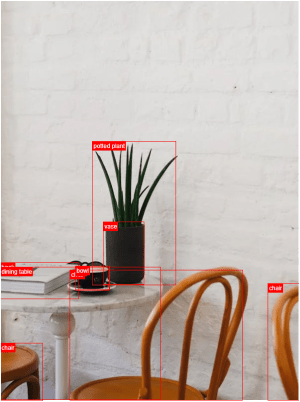"
},
"typeVersion": 1
},
{
"id": "8f607951-ba41-4362-8323-e8b4b96ad122",
"name": "Quellbild erneut abrufen",
"type": "n8n-nodes-base.httpRequest",
"position": [
1880,
432
],
"parameters": {
"url": "={{ $('Set Variables').item.json.source_image }}",
"options": {}
},
"typeVersion": 4.2
},
{
"id": "6933f67d-276b-4908-8602-654aa352a68b",
"name": "Notiz8",
"type": "n8n-nodes-base.stickyNote",
"position": [
220,
120
],
"parameters": {
"width": 359.6648027457353,
"height": 352.41026669883723,
"content": "## Try It Out!\n### This workflow does the following:\n* Downloads an image\n* Uses an object classification AI model to identify objects in the image.\n* Crops the objects out from the original image into new image files.\n* Indexes the image's object in an Elasticsearch Database to enable image search.\n\n### Need Help?\nJoin the [Discord](https://discord.com/invite/XPKeKXeB7d) or ask in the [Forum](https://community.n8n.io/)!\n\nHappy Hacking!"
},
"typeVersion": 1
},
{
"id": "35615ed5-43e8-43f0-95fe-1f95a1177d69",
"name": "Notiz5",
"type": "n8n-nodes-base.stickyNote",
"position": [
800,
280
],
"parameters": {
"width": 172.9365918827757,
"height": 291.6881468483679,
"content": "\n\n\n\n\n\n\n\n\n\n\n\n\n\n\n\n🚨**Required**\n* Set your variables here first!"
},
"typeVersion": 1
}
],
"pinData": {},
"connections": {
"40027456-4bf9-4eea-8d71-aa28e69b29e5": {
"main": [
[
{
"node": "9e1e61c7-f5fd-4e8a-99a6-ccc5a24f5528",
"type": "main",
"index": 0
}
]
]
},
"9e1e61c7-f5fd-4e8a-99a6-ccc5a24f5528": {
"main": [
[
{
"node": "c3d8c5e3-546e-472c-9e6e-091cf5cee3c3",
"type": "main",
"index": 0
}
]
]
},
"fcbaf6c3-2aee-4ea1-9c5e-2833dd7a9f50": {
"main": [
[
{
"node": "8f607951-ba41-4362-8323-e8b4b96ad122",
"type": "main",
"index": 0
}
]
]
},
"3c7aa2fc-9ca1-41ba-a10d-aa5930d45f18": {
"main": [
[
{
"node": "3c4e1f04-a0ba-4cce-b82a-aa3eadc4e7e1",
"type": "main",
"index": 0
}
]
]
},
"954ce7b0-ef82-4203-8706-17cfa5e5e3ff": {
"main": [
[
{
"node": "3c7aa2fc-9ca1-41ba-a10d-aa5930d45f18",
"type": "main",
"index": 0
}
]
]
},
"9b1b94cf-3a7d-4c43-ab6c-8df9824b5667": {
"main": [
[
{
"node": "fcbaf6c3-2aee-4ea1-9c5e-2833dd7a9f50",
"type": "main",
"index": 0
}
]
]
},
"8f607951-ba41-4362-8323-e8b4b96ad122": {
"main": [
[
{
"node": "954ce7b0-ef82-4203-8706-17cfa5e5e3ff",
"type": "main",
"index": 0
}
]
]
},
"6359f725-1ede-4b05-bc19-05a7e85c0865": {
"main": [
[
{
"node": "40027456-4bf9-4eea-8d71-aa28e69b29e5",
"type": "main",
"index": 0
}
]
]
},
"c3d8c5e3-546e-472c-9e6e-091cf5cee3c3": {
"main": [
[
{
"node": "9b1b94cf-3a7d-4c43-ab6c-8df9824b5667",
"type": "main",
"index": 0
}
]
]
}
}
}Wie verwende ich diesen Workflow?
Kopieren Sie den obigen JSON-Code, erstellen Sie einen neuen Workflow in Ihrer n8n-Instanz und wählen Sie "Aus JSON importieren". Fügen Sie die Konfiguration ein und passen Sie die Anmeldedaten nach Bedarf an.
Für welche Szenarien ist dieser Workflow geeignet?
Experte - Künstliche Intelligenz
Ist es kostenpflichtig?
Dieser Workflow ist völlig kostenlos. Beachten Sie jedoch, dass Drittanbieterdienste (wie OpenAI API), die im Workflow verwendet werden, möglicherweise kostenpflichtig sind.
Verwandte Workflows

Jimleuk
@jimleukFreelance consultant based in the UK specialising in AI-powered automations. I work with select clients tackling their most challenging projects. For business enquiries, send me an email at hello@jimle.uk LinkedIn: https://www.linkedin.com/in/jimleuk/ X/Twitter: https://x.com/jimle_uk
Diesen Workflow teilen